MOTHER 3 Recomp
MOTHER 3 Recomp is a native port of MOTHER 3 for Windows, Linux, and Android with high-quality 16-bit sound and clean fullscreen mode.
- Type: PC port
- Game: MOTHER 3
- Runs on Windows, Linux and Android
- By josiahg2502-glitch
- Latest release v1.0.6, 2026-10-16
- Source: https://github.com/josiahg2502-glitch/Mother3Recomp
README
MOTHER 3 Native Port (Recompilation) v1.0.3
A native multi-platform port of MOTHER 3 featuring the official MOTHER 3 Fan Translation v1.3 (English) with native support for the High-Quality 16-Bit Sound Mixing Mod, clean fullscreen mode, in-game controller layout switching, and dedicated packages for Windows, Linux, and Android.
Unlike conventional emulation, this project statically recompiles the original Game Boy Advance ARM/Thumb machine code into native C++ instructions. The resulting binary executes natively on modern hardware with ultra-low latency, full analog movement, optional decorative bezel framing, integer scaling, and instant save state controls.
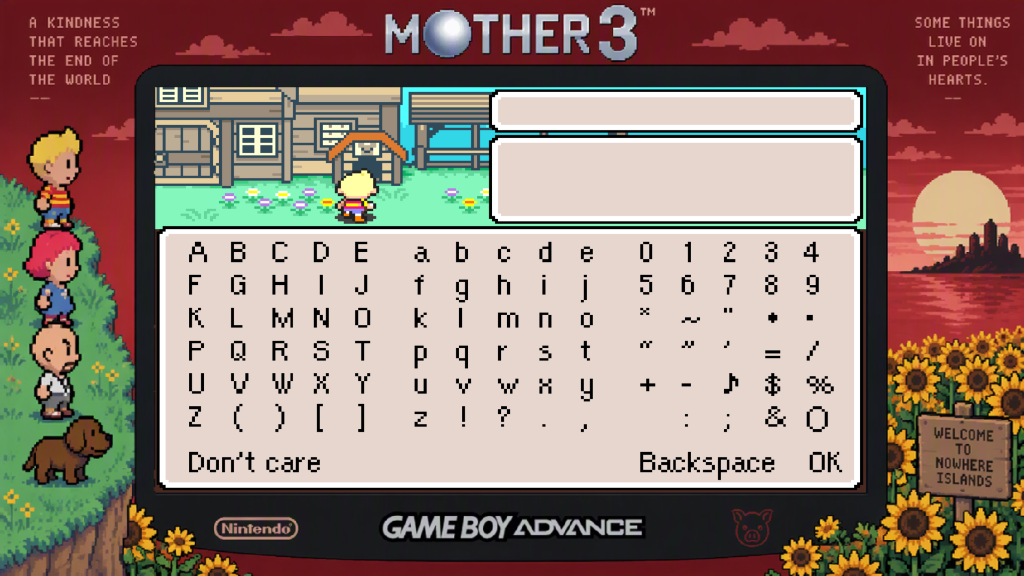
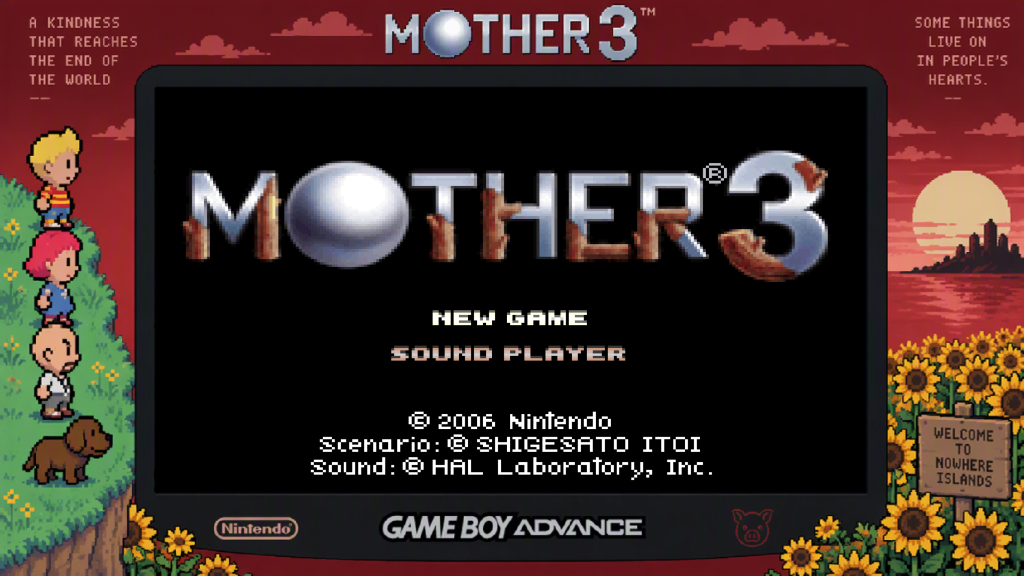
[!IMPORTANT] ENGLISH-PATCHED ROM REQUIRED: This software does NOT contain, distribute, or bundle any copyrighted Nintendo game data, ROM files, or BIOS dumps. On first launch, the program boots into the built-in launcher where you must provide your legally dumped MOTHER 3 ROM (patched with the v1.3 English translation) and your GBA BIOS dump.
1. What's New in v1.0.3
- Controller Remapping & In-Game Layout Switcher:
- Cycle mid-game between 4 controller layouts (Xbox Standard, Nintendo Switch, Trigger Dash, Classic 1:1) via F9, Xbox Guide, or Back + Start with an on-screen notification banner.
- One-click configuration via
Remap Controller.batwith dynamic live hot-reloading (persisted tokeybinds.ini). - (Note: Upstream
recomp-uionly supports keyboard mapping inside the launcher GUI for GBA targets; gamepad layouts are managed via the in-game switcher andkeybinds.ini).
- Native 16-Bit High-Quality Audio Engine (
run_hq_mixer_native):- Replaced GBA self-modifying IWRAM assembly (
0x03001C00) with a native C++ HLE 16-bit mixing pipeline, eliminating frame drops and audio crackling on hot audio routines. - Native recognition for the High-Quality Sound Mixing Mod ROM SHA-1 (
4ffe71ce...) directly in the launcher and runtime without patch steps or bypasses.
- Replaced GBA self-modifying IWRAM assembly (
- 100% Native Linux & Steam Deck Build Overhaul:
- Resolved ROM verification errors on Linux by bundling recompiled sources and applying translation/UPS patches during the native build.
- Added
Mother3Recomp.desktoplauncher for 1-click launch on SteamOS Desktop.
- 64-Bit Interposer Stability:
- Fixed pattern scanner prologue in
mother3_bezel.dllforSDL_DYNAPI_entry, ensuring crash-free hook attachment across modern 64-bit systems.
- Fixed pattern scanner prologue in
- Clean Fullscreen / No Borders Mode (F10 Toggle):
- Toggle between the 1080p Sunset & Party Bezel and Clean Fullscreen Mode (No Borders) at any time during gameplay with
F10!
- Toggle between the 1080p Sunset & Party Bezel and Clean Fullscreen Mode (No Borders) at any time during gameplay with
- Separate Multi-Platform Packages & Forks:
- Dedicated releases are now downloadable individually:
Platform Package Archive Release Asset Windows (x64) Mother3Recomp-v1.0.3-windows-x64.zipDownload v1.0.3 Linux (x86_64 / Steam Deck) Mother3Recomp-v1.0.3-linux-x86_64.tar.gzDownload v1.0.3 Android (ARM64) Mother3Recomp-v1.0.3-android-arm64.apkDownload v1.0.3 - Dedicated repository forks:
- Android Port Repository: josiahg2502-glitch/Mother3Recomp-Android
- Linux Port Repository: josiahg2502-glitch/Mother3Recomp-Linux
- Dedicated releases are now downloadable individually:
2. Requirements
Game & Asset Requirements
To play, you must provide your own legitimate dumps of:
- MOTHER 3 ROM (English Patched v1.3):
- Standard English v1.3: SHA-1:
306fb8874533b0fd0796208faa8bed2db4ae77fb - English v1.3 + High-Quality Sound Mixing: SHA-1:
4ffe71ce5c5e1e8d9be5fbd09968b60787169b21 - OR Clean Japanese ROM (
A3UJ/ SHA-1:4f0f493e12c2a8c61b2d809af03f7abf87a85776) + the officialmother3.upspatch file from the MOTHER 3 Fan Translation website. The built-in launcher includes an automatic UPS patcher that verifies and applies the patch on the fly without modifying your original file.
- Standard English v1.3: SHA-1:
- Game Boy Advance BIOS Dump:
gba_bios.bin(16 KB retail dump / SHA-1:300c20df6731a33952ded8c436f7f186d25d3492).
System Requirements
| Component | Minimum | Recommended |
|---|---|---|
| Operating System | Windows 10/11 (64-bit), Linux (glibc 2.35+ / SteamOS), Android 8.0+ | Windows 11 (64-bit) / SteamOS |
| Processor | x86-64 Dual-Core CPU with SSE2 / ARM64 v8a | x86-64 Quad-Core CPU with AVX2 |
| Memory (RAM) | 512 MB RAM | 2 GB RAM |
| Graphics | Direct3D 11, OpenGL 3.2+, or Vulkan compatible GPU | Direct3D 11 / Vulkan |
| Storage | 100 MB available space | 500 MB available space |
| Input Devices | Keyboard / Touchscreen | Xbox, PlayStation, Switch Pro, or XInput/DirectInput gamepad |
3. First-Time Setup & Quick Start
Windows (PC)
- Download
Mother3Recomp-v1.0.3-windows-x64.zipand extract it anywhere on your PC. - Run
Play Mother 3.cmdorMother3Recomp.exe. - In the Launcher:
- Click Select GBA BIOS dump and choose your
gba_bios.bin. - Click Select game ROM (.gba) and choose your English-patched
MOTHER 3 (English v1.3).gba. - (Optional) If using a clean Japanese ROM, tick ROM patch and select
mother3.ups.
- Click Select GBA BIOS dump and choose your
- Configure display and controller settings if desired, then click Play.
Linux (x86_64) & Steam Deck (Native)
Mother 3 Recomp runs as a 100% native Linux application (native x86_64 ELF binary with native SDL2, OpenGL/Vulkan, and ALSA/PulseAudio/PipeWire audio).
- Native Release Archive:
Download
Mother3Recomp-v1.0.3-linux-x86_64.tar.gzand extract it:tar -xzf Mother3Recomp-v1.0.3-linux-x86_64.tar.gz cd Mother3Recomp-Linux - Place
gba_bios.bininbios/and your ROM inroms/.- English Fan Translation v1.3: SHA-1
306fb8874533b0fd0796208faa8bed2db4ae77fb(recognized natively) - High-Quality 16-Bit Audio Mod: SHA-1
4ffe71ce5c5e1e8d9be5fbd09968b60787169b21(recognized natively) - Clean Japanese ROM: SHA-1
4f0f493e12c2a8c61b2d809af03f7abf87a85776(enable ROM patch withmother3.ups)
- English Fan Translation v1.3: SHA-1
- Launch natively:
chmod +x Mother3Recomp run_mother3.sh ./run_mother3.sh - Steam Deck (Game Mode):
Add
run_mother3.sh(orMother3Recomp) as a Non-Steam Game in desktop Steam. In Steam Deck Game Mode, launch directly without any Proton compatibility layer needed—it executes as a native Linux process with full gamepad controls, 16:9 widescreen, and custom bezel.
Building Natively from Source (Linux / SteamOS)
To compile directly on Linux:
# 1. Install dependencies (Ubuntu/Debian/SteamOS developer mode)
sudo apt-get install -y cmake ninja-build build-essential libsdl2-dev libpng-dev

# 2. Build and launch
chmod +x tools/setup_deps.sh tools/build_linux.sh tools/run_mother3.sh
./tools/build_linux.sh
./tools/run_mother3.sh
The build script automatically checks out the pinned gbarecomp and recomp-ui commits, applies the translation, UPS, and HQ audio patches, and compiles Mother3Recomp.
Android
- Download
Mother3Recomp-v1.0.2-android-arm64.apkand install it on your device. - Open the app; the
Mother3SetupActivitywill prompt you to select yourmother3_en.gbaandgba_bios.binfiles. - Once verified, the game launches natively with full touch and Bluetooth gamepad support!
4. Controls & Hotkeys
Gameplay Controls
| Action | Keyboard | Controller (Xbox / PC) | DualShock / DualSense | Switch Pro |
|---|---|---|---|---|
| Movement | Arrow Keys | Left Analog Stick / D-Pad | Left Analog Stick / D-Pad | Left Analog Stick / D-Pad |
| A (Confirm / Talk) | X | A (or Y) | Cross (or Triangle) | A (or X in Nintendo mode) |
| B (Cancel / Dash) | Z | B (or X) | Circle (or Square) | B (or Y in Nintendo mode) |
| Dash (Alternate) | Z | X (Thumb Dash) | Square | Y |
| L (Quick text / Info) | C | LB / LT | L1 / L2 | L / ZL |
| R (Map) | V | RB / RT | R1 / R2 | R / ZR |
| Start (In-Game Menu) | Enter | Start | Options | + (Plus) |
| Select (Wake Sleep) | Right Shift | Back / View | Share / Touchpad | - (Minus) |
[!TIP] Sleep Mode Wake: If the game enters sleep mode (screen goes dark), press
L + R + Select(C + V + Right ShiftorLB + RB + Back) to wake it, matching authentic GBA hardware behavior.
Controller Remapping & Layout Presets
Mother 3 Recomp includes a native zero-latency gamepad remapping engine inside mother3_bezel.dll configured through keybinds.ini.
[!NOTE] Why
Remap Controller.bat?: In the upstreamrecomp-uilauncher GUI, clicking a button under Settings $\rightarrow$ Controls opens a prompt that only listens for keyboard inputs, ignoring controller button presses. Our native DLL interposer bypasses this limitation completely at the SDL2 event layer.
One-Click Presets (Remap Controller.bat):
Double-click Remap Controller.bat in the game folder to switch between layout presets with 1 click:
[1] Xbox / PC Standard(Default): PhysicalA= Confirm,B= Cancel/Dash,X= Dash (ergonomic thumb run!),Y= Confirm,LT/LB= L,RT/RB= R.[2] Nintendo / Switch: PhysicalB= Confirm,A= Cancel/Dash,Y= Dash,X= Confirm (matches authentic GBA / SNES physical button placement!).[3] Modern Trigger Dash: Holding Right Trigger (RT) dashes! Perfect for modern controller ergonomics.[4] Classic 1:1 Hardware: Direct 1:1 hardware pass-through (A=A,B=B,X=X,Y=Y).[5] Custom Setup: Interactively assign any physical button or analog trigger.
[!TIP] Live Hot-Reloading: Changes to
keybinds.iniare monitored dynamically in memory. When you select a preset or savekeybinds.ini, your new controls take effect immediately in real time without having to restart the game!
System Hotkeys
| Hotkey | Action | Behavior |
|---|---|---|
F10 | Toggle Bezel / Borders | Toggles dynamically between the custom Sunset & Party Bezel and Clean Fullscreen (No Borders) mode. |
F11 | In-Game Overlay Menu | Opens/closes the recomp overlay menu for settings, audio, and display adjustments without closing the game. |
Esc | Instant Clean Exit | Cleanly saves battery save data (SRAM/Flash) to disk and shuts down the game process immediately. |
F1 | Quick Save State | Saves state to Slot 1 instantly without pausing gameplay. |
F2 | Quick Load State | Loads state from Slot 1 instantly. |
1 (Hold) / LT | Rewind | Rewinds gameplay by up to 30 seconds. |
2 (Hold) / RT | Fast-Forward | Accelerates game speed (4x multiplier by default). |
5. Visuals & Presentation
- Clean Fullscreen & Border Options: Press
F10at any time to toggle borders off/on. Inconfig.ini, setbezel = 0for borderless clean fullscreen by default orbezel = 1for the decorative border. - 1080p Sunset & Party Bezel: Integrates official full-HD decorative border artwork featuring Lucas, Kumatora, Duster, Boney, sunflowers, and the Nowhere Islands sunset.
- 3:2 Integer Scaling: Maps the active GBA screen into a pixel-accurate 3:2 frame with hardware alpha blending and zero clipping of HUD elements or warning text.
- 8-Way Analog Movement: Full 360-degree analog stick translation mapped to GBA 8-directional movement with custom deadzone calibration.
6. High-Quality Sound Mixing Mod
Mother3Recomp natively supports and bundles the celebrated High-Quality Sound Mixing Mod for Mother 3 (Fan Translations) by Summer Dragonfly & ipatix.
- How it works: The original GBA hardware mixer mixes audio channels at 8-bit depth, producing the well-known "GBA hiss" and quantization noise. This hack replaces the mixer with 16-bit channel mixing before downsampling, giving Shogo Sakai's soundtrack crystal-clear audio clarity and fidelity.
- Included in
mods/High-Quality Sound Mixing/:apply_hq_sound_mod.bat: An automated one-click patcher that detects your English v1.3 ROM, generates the High-Quality Audio ROM, and automatically configures the game to boot it.mother3_hq_sound_mixing.ups: Official UPS patch file for use with external tools like Tsukuyomi or Flips.
- Easy Play: Simply run
apply_hq_sound_mod.batand clickPlay Mother 3.cmd! (Note: The built-in launcher's "ROM Patch" checkbox is reserved for the fan translation patch on a clean Japanese cartridge; use the automated patcher script for the audio mod).
7. Credits & Disclaimers
A full, detailed breakdown of all contributors, authors, libraries, and tools is available in CREDITS.md.
- MOTHER 3: © 2006 Nintendo / SHIGESATO ITOI / Brownie Brown / HAL Laboratory, Inc. Music by Shogo Sakai.
- English Fan Translation: The MOTHER 3 Fan Translation Team (mother3.fobby.net) — Clyde "Tomato" Mandelin, Jeffman, Reid Young, and contributors.
- High-Quality Sound Mixing Mod: Summer Dragonfly (@MusicTheorist) and ipatix (Romhacking.net #6951 / MusicTheorist/MOTHER-3-HQ-Audio), with foundational mixing code by Haruki "Bon" Kodera (Camelot) and decompilation support from Kurausukun & theo3.
- Recompilation Technology: Powered by
gbarecompandrecomp-uiby Matthew Stanley (@mstan), licensed under PolyForm Noncommercial 1.0.0. - Android Port Lead: YlPorts (github.com/YlPorts/Mother3Recomp-Android).
- Third-Party Libraries & Runtimes:
- SDL2: Sam Lantinga & the SDL Team (zlib license)
- Dear ImGui: Omar Cornut (MIT license)
- TinyCC: Fabrice Bellard (LGPL 2.1 license)
- MinGW-w64 / GCC: The MinGW-w64 Project Team
This repository is a non-commercial, open-source educational preservation project. No commercial ROMs, BIOS files, copyrighted game audio, or Nintendo proprietary code are distributed.