ClashOfNinja-recomp
ClashOfNinja-recomp is a static recompilation of Naruto: Clash of Ninja for Windows and macOS that runs at higher frame rates.
- Type: PC port
- Game: Naruto: Clash of Ninja
- Runs on Windows and macOS
- By mapleleafjack
- Latest release v1.4.0, 2026-10-29
- Source: https://github.com/mapleleafjack/ClashOfNinja-recomp
README
Naruto: Clash of Ninja — static recompilation
Native Windows and macOS builds of four GameCube games, made from your own disc. The PowerPC code is translated to C once and linked against a runtime that implements the GameCube's hardware, so this is not an emulator: it is an ordinary executable that runs the real game, at 7× to 9.5× the console's 60 fps.
| Game | Disc ID |
|---|---|
| Naruto: Clash of Ninja | GNREDA |
| Naruto: Clash of Ninja 2 | GNUEDA |
| Gekitou Ninja Taisen! 3 | G3NJDA |
| Gekitou Ninja Taisen! 4 | G4NJDA |
The game projects are not in this repository: each one's symbol map and steering tables are recovered from the disc, so they stay on the machine that has it. A release ships the launcher and the tools and is pointed at your own checkout — Building and running covers making one.
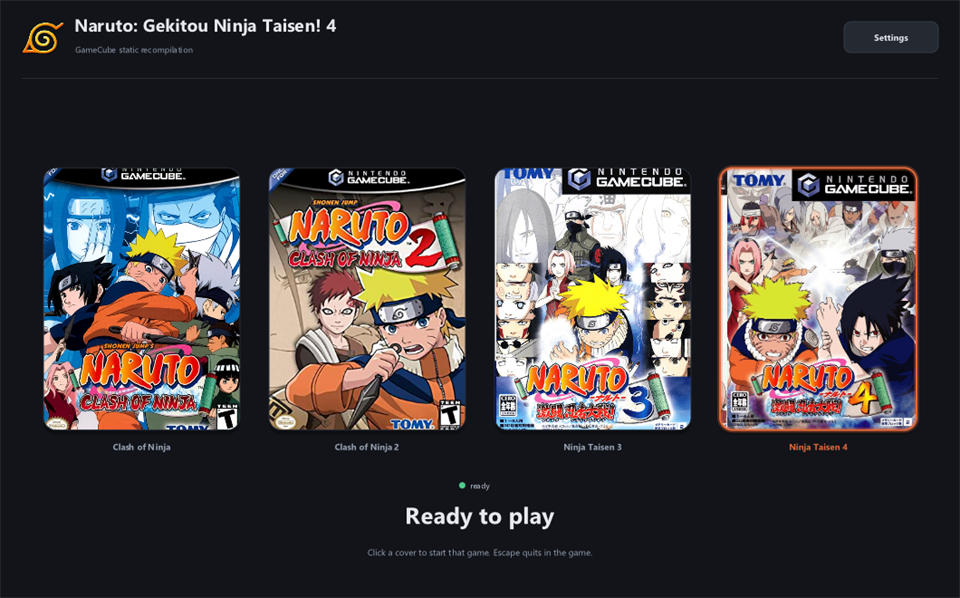
Box art is fetched on first run, never shipped.
Download and run
Releases are on the releases page (latest is v1.4.0).
| Platform | Download | Also needs |
|---|---|---|
| Windows 10/11 x64 | NarutoLauncher-Windows-x64-v<version>.zip (~4 MB) | nothing |
| macOS 14+, Apple Silicon | NarutoLauncher-macOS-arm64-v<version>.zip (~13 MB, tools inside) | a C++ compiler: xcode-select --install (free) or Xcode |
| Linux | none — build from source, see BUILDING.md | cmake ninja-build g++ libsdl2-dev python3 |
- Unzip it. On Windows use a path with no spaces in it, for example
C:\Games\NarutoLauncher— MinGW-w64 will not run from one. Windows may also warn that the publisher is unknown, as the launcher is not code-signed yet: More info → Run anyway. On macOS, right-click → Open the app the first time (it is signed ad hoc, not notarised). - Start the launcher. It lists the game projects in your checkout, one cover each.
- Click a cover and choose your disc image. The first click extracts the disc and builds the game, which takes a few minutes; on Windows it first fetches about 190 MB of build tools, with a progress bar.
- Play. After that a click starts the game. Saves and controller mappings stay in that game's folder.
The NarutoLauncher-tools-windows-x64-v<version>.zip asset is that same toolchain, for anyone
who would rather fetch it by hand than on the first build. You do not need it otherwise.
From a terminal instead of the launcher:
tools/setup.sh --run "/path/to/your disc image" # add naruto2, gnt3 or gnt4 as a second argument
You need your own disc image either way, in any format nodtool reads: ISO, CISO, RVZ, WIA, GCZ, WBFS, TGC or NFS. It is read once and can be deleted afterwards.
Read more
| Building and running | disc setup, a build from source, the command line |
| The launcher | what it does, and how to build it |
| Recompilation notes | how far each game gets, how the disc reaches it, the steering tables, what each disc turned out to be |
| Releases | CI, the Windows and macOS packages, and what may be published |
Licensing
MIT © 2026 Jack Musajo; see LICENSE. What it builds on — gcn-recomp, glad, SDL2, stb —
is listed in THIRD-PARTY-NOTICES.md and licenses/.
No game data is included, in any form. You need your own disc.
Unofficial. Not affiliated with, endorsed by or licensed by Nintendo, Shueisha, or the game's developers and publishers.