NSMB Wii Multiplayer Decompilation
NSMB Wii Multiplayer Decompilation is a native port of New Super Mario Bros. Wii for Android and Windows that supports LAN and Tailscale multiplayer. Confusingly, it has "decompilation" in the title but describes itself as a static recompilation.
- Type: PC port
- Game: New Super Mario Bros. Wii
- Runs on Windows and Android
- By WitherBlitz
- Latest release v0.0.3, 2026-10-07
- Source: https://github.com/WitherBlitz/NSMB-Wii-Multiplayer-Decompilation
README
NSMB Wii Decompilation - LAN Multiplayer





A native port of New Super Mario Bros. Wii for Android phones and Windows PCs, made with static recompilation.
There's no emulator in the loop, no interpreter, no JIT, no PowerPC anywhere at runtime.
Port made by WitherBlitz with the help of WiiCompiled's code, and was entirely coded by Claude Opus 5.5.
[!IMPORTANT] There are no game files in this project or its releases: no disc image, no levels, music, graphics or sounds. You need your own copy of New Super Mario Bros. Wii (USA,
SMNE01, revision 1) and Dolphin on a computer to extract it. The downloads do contain the game's code, translated to native code, the way KartPad's do. See What the downloads contain.
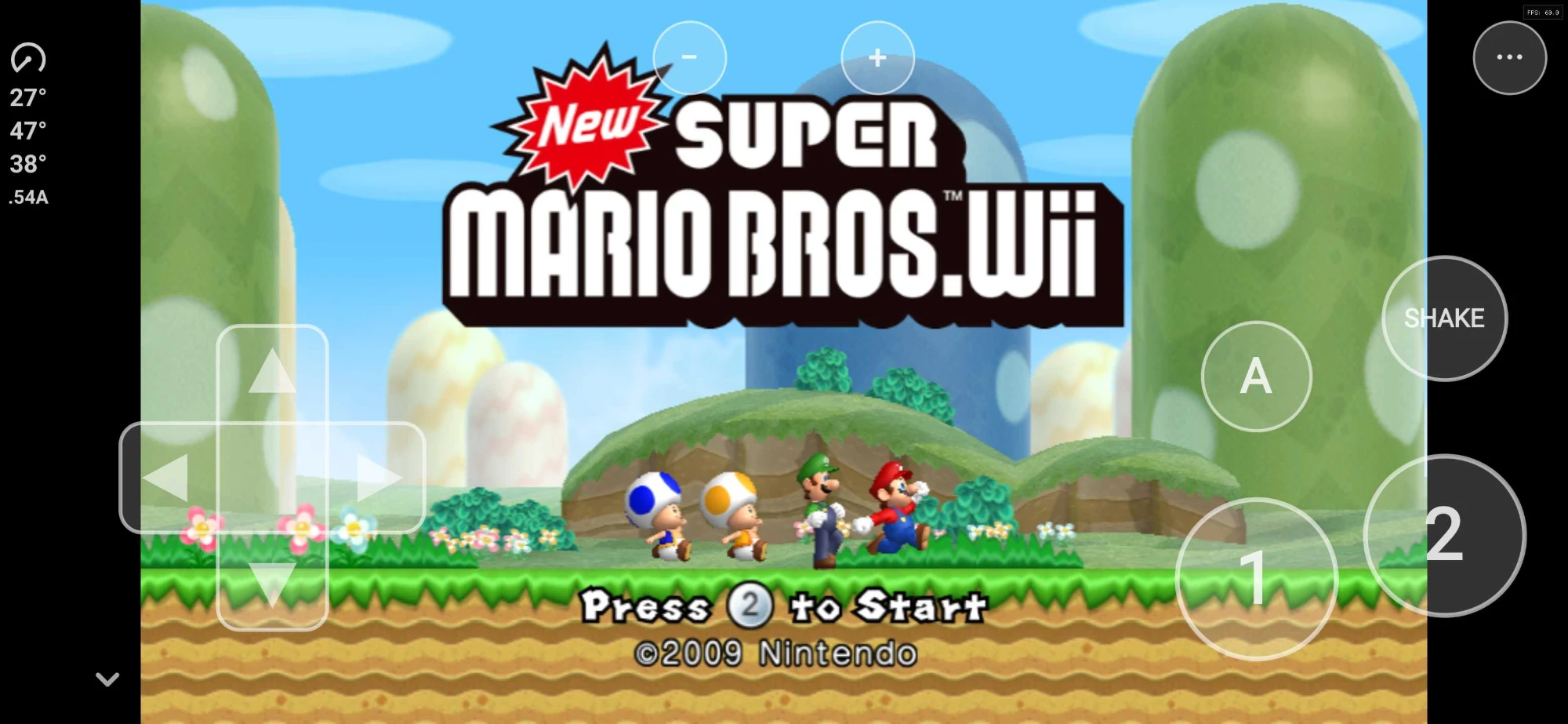
Running natively on Android at 60 fps, with the on-screen sideways Wii Remote.
What it does
Runs natively on your phone. The whole game is compiled to ARM64 code ahead of time. It runs at a full 60 fps on a Snapdragon 6 Gen 1 phone.
LAN and Tailscale multiplayer across phones and PCs. On the save file screen, pick LAN or Couch. LAN lets you Create Room (choose how many are playing, then start the room when everyone is in) or Join a room from a list that finds games by itself: on your Wi-Fi, and over the internet on your Tailscale network, phones included. Every device runs the game and only the players' inputs travel, in lockstep. If a player drops, the others get a message instead of a frozen game, and the host keeps the progress. See LAN and Tailscale multiplayer.
Touch controls, tilt and shake. An on-screen sideways Wii Remote (D-pad, 1, 2, A, Shake, + and -) with adjustable opacity and vibration. Turn the phone like a steering wheel to tilt, jolt it to shake. Each can be turned off.
Any aspect ratio. Original 4:3, 16:9, or Fill, which widens the view to fit your whole screen.
Native rendering via aurora. The graphics layer is built on aurora, a source-level GameCube & Wii compatibility layer, running on Vulkan (Android) or Direct3D 12 / Vulkan (Windows).
High internal resolution. Render at more than the console's 480 lines, on phones and on PC.
In-game menus. On Android, the ⋯ button opens Display (aspect ratio, render resolution, FPS counter, graphics compatibility), Controls, Leave LAN Game and Quit. On Windows, press F10 for the settings bar. Everything you change is saved and restored next launch.
Skip Start Menu. On Android, the app can open straight into the game; the ⋯ menu's Start Menu brings you back.
Tested devices
| Device | Chipset | GPU | Android | Result |
|---|---|---|---|---|
| Samsung Galaxy S26 Ultra (SM-S948U) | Qualcomm Snapdragon 8 Elite Gen 5 for Galaxy (SM8850) | Adreno 840 | 16 | 60 fps, LAN play |
| T-Mobile REVVL 7 5G (TMRV075G) | Qualcomm Snapdragon 6 Gen 1 (SM6450) | Adreno 710 | 14 | 60 fps, LAN play |
| Windows 10 PC | AMD Ryzen 5 5600G | NVIDIA GeForce RTX 5070 | - | 60 fps, LAN play with the phones |
[!WARNING] Untested on Mali GPUs (most phones with MediaTek, Samsung Exynos or Google Tensor chips). Adreno GPUs needed workarounds for their shader compilers (Display > Graphics Compatibility); Mali may need its own. If you try one, please open an issue with what you see.
Requirements
- Android: an arm64 phone on Android 11 or newer, with Vulkan. About 1 GB free for the app, the game files and the import.
- Windows: Windows 10 or 11, 64-bit, with a Direct3D 12 or Vulkan GPU.
- Your own USA
SMNE01revision 1 copy of New Super Mario Bros. Wii, and Dolphin on a computer to extract it.
Only the USA disc, revision 1 works. Other regions and revisions put the game's code at other addresses, so the app and the PC version check the disc and refuse anything else.
[!NOTE] Nobody here will tell you where to get the game. Dumping your own disc is on you, and links to game files won't be provided or tolerated.
Getting the game files
You do this once, with Dolphin on a computer:
- In Dolphin, right-click New Super Mario Bros. Wii and choose Properties.
- Check the Info tab: the game ID must be
SMNE01and the revision 1. - Open the Filesystem tab, right-click the disc at the top and choose Extract Entire Disc.
Pick an empty folder. You get a folder with
filesandsysin it.
Android: copy that folder (or a zip of it) to your phone. Open the app and tap Import from Extracted Game Data Folder… or Import Game Data Zip… and choose it. The app checks the game, copies it in, and you can delete the copy afterwards. Your saves are kept when you import again.
Windows: start NSMBW.exe and choose that folder when it asks. Or name the folder game and put
it next to NSMBW.exe. Keep the folder: the PC version reads it every time.
The app's start screen shows these steps until a game is imported, and Help shows them again.
Installing
Download from the Releases page:
- Android:
NSMBW-0.0.3-android-arm64.apk. Open it on your phone and allow installing from that app when Android asks. Updates install over it and keep your saves and game files. - Windows:
NSMBW-0.0.3-windows-x64.zip. Extract it anywhere and runNSMBW.exe. Settings and saves stay in theUserDatafolder next to it.
[!CAUTION] Only take builds from this repository's Releases page. If someone's sharing an APK or zip anywhere else, don't touch it.
Controls
Android: the on-screen remote, tilt and shake, all adjustable under ⋯ > Controls.
Windows (a Wii Remote held sideways):
| Key | Wii Remote |
|---|---|
| Arrow keys | D-pad |
| X or Space | 2 (jump) |
| Z or Left Shift | 1 (run, fireball) |
| C or Ctrl | Shake (spin, pick up) |
| Q / E | Tilt left / right |
| A | A |
| Enter | + (pause) |
| Minus or Tab | - |
| F10 | Settings bar |
A game controller also works on Windows as a sideways Wii Remote.
LAN and Tailscale multiplayer
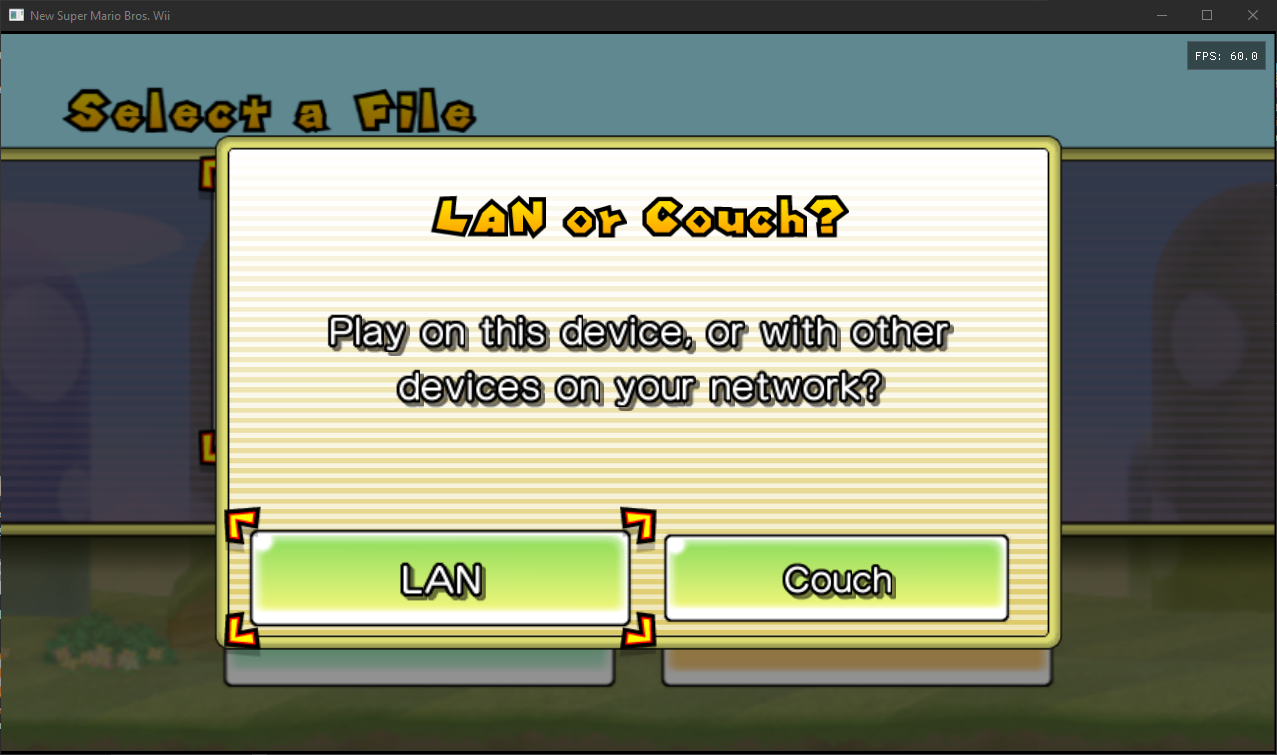
"LAN or Couch?" on the save file screen (Windows), drawn in the game's own style.
Up to 4 players, on any mix of phones and PCs. Every player needs their own game files.
- One player picks LAN on the save file screen, then Create Room and how many are playing.
- The others pick LAN, then Join, and choose the room from the list.
- The host starts the room. Every device restarts into the session with the host's save, and the game goes to the player select by itself.
Same Wi-Fi: rooms show up by themselves.
Over the internet, with Tailscale: install Tailscale on every device and sign in to the same tailnet (or share a device with friends). Tailscale can't broadcast, so the game finds rooms there like this:
- A PC asks every device in
tailscale status, and a PC's room is announced to every Tailscale device, so it shows up on the phones by themselves. - Devices remember the Tailscale devices they meet (on the same Wi-Fi or over Tailscale) and pass them on: once any device has seen another, every game device on the tailnet learns it.
- To find another phone the very first time with no PC around, add its Tailscale name (as shown
in the Tailscale app, e.g.
s26-ultra) or its 100.x address under Tailscale & LAN Devices: on the start menu or the in-game ⋯ menu on Android, or F10 > LAN Play on Windows. Those screens also show the device's own addresses to tell others. Only one of the two needs to add the other.
Rooms on the same Wi-Fi are always used over the Wi-Fi, even when Tailscale is on. Tailscale play was tested between the Windows PC and the REVVL 7 over Tailscale alone, in both directions.
Windows asks to let the game through the firewall the first time you host a room; allow it, or others can't find your room. Couch is the normal local multiplayer on one device.
Building from source
Owning the game is still required even if you compile everything yourself.
You'll need: .NET 8 SDK, CMake, Ninja, LLVM/Clang (LLVM-MinGW for Windows, the Android NDK for
Android) and Python 3. The full steps, from Dolphin's extraction to the APK and the exe, are in
projects/nsmbw/BUILDING.md.
- The NSMBW project:
projects/nsmbw(translator config, function map, tools). - The runtime, retargeted from Mario Kart Wii to NSMBW:
runtime. - The Android app:
android. - WiiCompiled's own README, for the translator and the runtime it comes from:
docs/WiiCompiled-README.md.
What the downloads contain
The release downloads include the game's code, translated from the disc's PowerPC executable to native ARM64 and x86-64 code, but no game files: no disc image, no levels, music, graphics or sounds, and no console keys. You supply those from your own disc. This is the same model KartPad uses for Mario Kart Wii. WiiCompiled itself does not ship translated code: its setup translates the game on your own machine.
The source code in this repository is free software under the GPLv3 (see License). That license covers this project's code only; it gives no rights to Nintendo's game, its code or its assets.
FAQ
Is this an emulator? No. Everything is compiled to native code before you ever press play. At runtime there's nothing emulating a Wii CPU or GPU.
Is it a decompilation? Not in the hand-written sense: it's a static recompilation. WiiCompiled's translator turns the game's PowerPC code into C++ automatically, and that is compiled for your phone or PC. The runtime around it (graphics, audio, input, the Wii's system software) is source code.
Do you provide the game? No. Don't ask.
Which game version works?
USA SMNE01, revision 1. Other regions and revisions are rejected: their code sits at other
addresses, and this port's runtime hooks the game at exact addresses.
Will you fix original bugs? No, behaving like the real game is the goal. Only report things where this port differs from the original game on a Wii or in Dolphin.
The game crashed or shows something wrong.
Open an issue with your device, what you did, and (on Windows) the log from UserData\Logs next to
NSMBW.exe.
Is it done? No, this is 0.0.3. It boots and plays on the tested devices, but not every level has been checked, and rendering, performance and LAN play are still being worked on.
AI usage
This port was entirely coded by Claude Opus 5.5, Anthropic's AI model, directed and tested by WitherBlitz on the devices above. That includes moving WiiCompiled's runtime from Mario Kart Wii to New Super Mario Bros. Wii, the Android app, and LAN play.
Credits
- WiiCompiled by patchzyy and contributors - the static recompiler and runtime this port is built on.
- KartPad - WiiCompiled on Android, whose approach and game-file import steps this port follows.
- aurora - the GX rendering/windowing backend. MIT licensed.
- Dawn - Google's WebGPU implementation, powering aurora's Vulkan and Direct3D backends.
- Dolphin Emulator - the reference for Wii hardware behavior, the free DSP coefficient ROM and the default WiiConnect24 tree bundled with the runtime, and the tool you extract your game with.
- The NSMBW reverse-engineering community - RootCubed's NSMBW symbols, the NSMBW decompilation and the NSMBW address maps, which the function map is built from.
- Everyone in the static recompilation community.
Bundled third-party components and their licenses live in
THIRD-PARTY-NOTICES.md.
License
This project is free software: you can redistribute it and/or modify it under the terms of the GNU General Public License, version 3 as published by the Free Software Foundation, like WiiCompiled, which it is based on.
It is distributed in the hope that it will be useful, but WITHOUT ANY WARRANTY; without even the implied warranty of MERCHANTABILITY or FITNESS FOR A PARTICULAR PURPOSE. See the GNU General Public License for more details.
Not affiliated with, endorsed by, or associated with Nintendo. New Super Mario Bros. Wii is a trademark of Nintendo.