OutRun 2006: Coast 2 Coast Launcher (rea-outrun-2006)
OutRun 2006: Coast 2 Coast launcher is a tool for Windows and Linux that lets you play your own copy of the game with automatic setup and mod installation.
- Type: tool
- Runs on Windows and Linux
- By AkitaOnRails
- Latest release v0.3.2, 2026-11-05
- Source: https://github.com/akitaonrails/rea-outrun-2006
README
OutRun 2006: Coast 2 Coast Launcher
Play your own copy of the 2006 PC game OutRun 2006: Coast 2 Coast on Windows 10/11, the Steam Deck and Linux (Proton, your own Wine, or the AppImage, which brings its own Wine). Point the launcher at your installed game, pick a look and press Play. Everything the game needs is bundled and set up for you: no mods, patchers, winetricks, DLL overrides, compatibility modes or registry edits by hand. Your game folder is only read, never changed; the launcher plays from its own private copy.
This project contains no game files: you need your own copy of the game.
Status. Played end to end on Linux (Wine 11, DXVK, gamescope, an Xbox-style pad). Native Windows 10/11, the Steam Deck and Proton without
or-playhaven't been play-tested yet. Reports are very welcome at https://github.com/akitaonrails/rea-outrun-2006/issues.
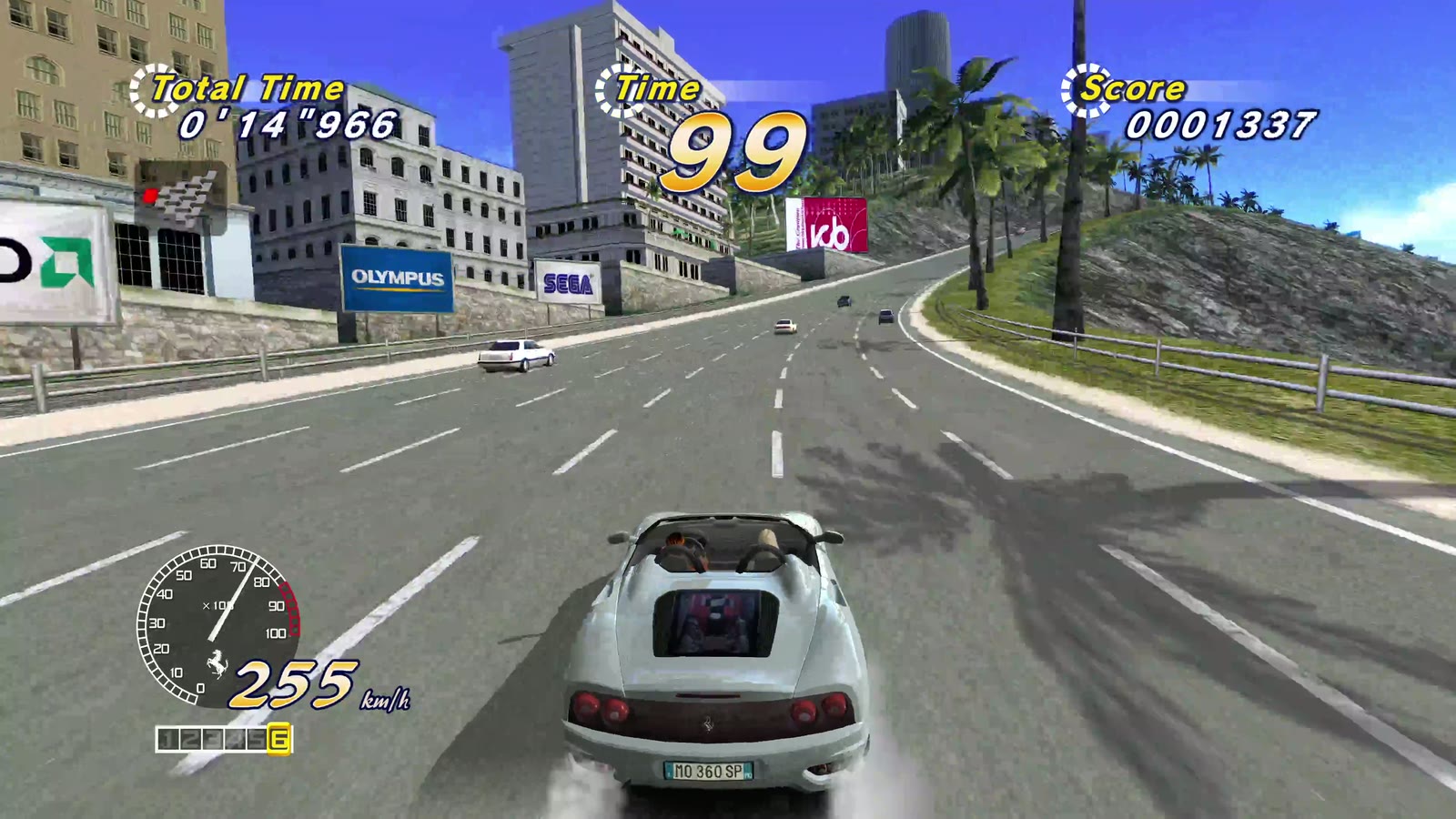
The settings window, then the game in 4K with the HD texture pack, played on Linux. Click to watch (2:43, with sound).
Problems this launcher solves
| Problem | What the launcher does |
|---|---|
| The 2006 EXE is wrapped in disc DRM that fails on modern Windows and breaks mod loaders. | Uses the DRM-free replacement EXE from OutRun2006Tweaks, the community mod that fixes the PC release, and installs the mod itself. |
| Tweaks' tagged releases are years old; current builds only exist as download links that expire after 90 days. | Ships a pinned, play-tested Tweaks build kept in this project's releases. |
| The mod needs a recent 32-bit Visual C++ runtime that most PCs don't have. | Puts the three runtime files next to the game. No installer runs. |
On Linux: DXVK, DLL overrides, winetricks, and repacks that ship a SpecialK d3d9.dll which takes over Direct3D. | Sets up DXVK and the DLL overrides itself and keeps stray d3d9 files out of its copy. A fresh Wine prefix is enough. |
| Settings live in two INI files with dozens of keys, and the in-game overlay can quietly override them. | One settings window (and one commented launcher.cfg). Both INI files are written from it on every start; overlay changes to the keys it manages are reset. |
| Modern pads: shared trigger axes and phantom inputs; under Wine, a d-pad that doesn't move the menus. | Turns on Tweaks' new input system (full trigger range, rumble, impulse triggers) and picks the input method that works on your system. |
| Wine picking a portrait monitor or switching your desktop's video mode. | On Linux, runs the game inside gamescope at the size you chose, scaled to your screen. |
| The PC release's "Rush a Difficulty" is missing its first two seconds. | Applies Tweaks' official patch to the launcher's copy of your song. No music is distributed. |
| The community HD texture pack is a 3.2 GB manual download with no licence. | Downloads it when you ask, checks it, unpacks it and switches it on; the game reads it where it is. |
| Patching the game folder risks the copy you own. | Your folder is only read; the launcher works on its own private copy. |
Screenshots
| Play | Picture | HD Pack |
|---|---|---|
 |  |  |
| Controls | Extras |
|---|---|
 |  |
What you need
OutRun 2006: Coast 2 Coast for Windows PC, installed: the folder with
OR2006C2C.exe. The launcher recognises the original 2006 OR2006C2C.exe
and a folder already patched with OutRun2006Tweaks' replacement EXE.
If your OR2006C2C.exe is another version, the launcher says so, shows
its SHA-256 and doesn't start it. Report that code (never the EXE itself)
with the
unknown edition form.
Download and install
Download from the latest release:
OutRunLauncher-<version>.zip for Windows, Steam and your own Wine, or
OutRunLauncher-<version>-x86_64.AppImage for Linux.
Windows
- Unpack the zip anywhere.
- Keep its folders (
tweaks,vc,linux,soundtrack) next toOutRunLauncher.exe. - Run
OutRunLauncher.exe. The launcher is not signed, so on the first start from a downloaded zip Windows may say "Windows protected your PC": choose More info, then Run anyway.
Steam Deck
In Desktop Mode, either run the AppImage, or unpack the zip and add
OutRunLauncher.exe to Steam (Add a Non-Steam Game), then force a Proton
version in its Properties → Compatibility. The window recommends the
Steam Deck look, and in Game Mode the game runs in Steam's own
gamescope. Game Mode hasn't been tested yet.
Linux: AppImage
chmod +x OutRunLauncher-<version>-x86_64.AppImageand run it.- It brings its own Wine and keeps its Wine prefix in
~/.local/share/or-launcher/prefix.
Install gamescope for the
best result; without it the game runs in a normal window. Your Linux files
are drive Z: in the window.
Linux: Steam (Proton)
Add OutRunLauncher.exe from the unpacked zip as a non-Steam game and
force a Proton version in its compatibility settings. The launcher notices
Proton and sets up DXVK and the DLL overrides itself.
Linux: your own Wine
Run linux/or-play from the unpacked zip: the settings window, then the
game in gamescope. It needs wine (and ideally gamescope).
or-play          # the settings window, then the game
or-play --play   # the game with the saved settings, no window
or-play stop     # end the game
or-play status   # running or idle
linux/README.md has its options (another prefix, a wrapper such as a distrobox).
First run
- Press Browse… and choose the folder with your
OR2006C2C.exe. Under Wine your Linux files are driveZ:, e.g.Z:\home\you\Games\OutRun 2006. - Pick a look. Coast to Coast is recommended (Steam Deck on a Deck-sized screen).
- Press Play (or Enter, or Start on a pad).
The first start copies the game into the launcher's own folder (about 1 GB, once); later starts only copy what changed. The HD texture pack is optional: nothing is downloaded unless you press Download in the HD Pack tab.
The settings window
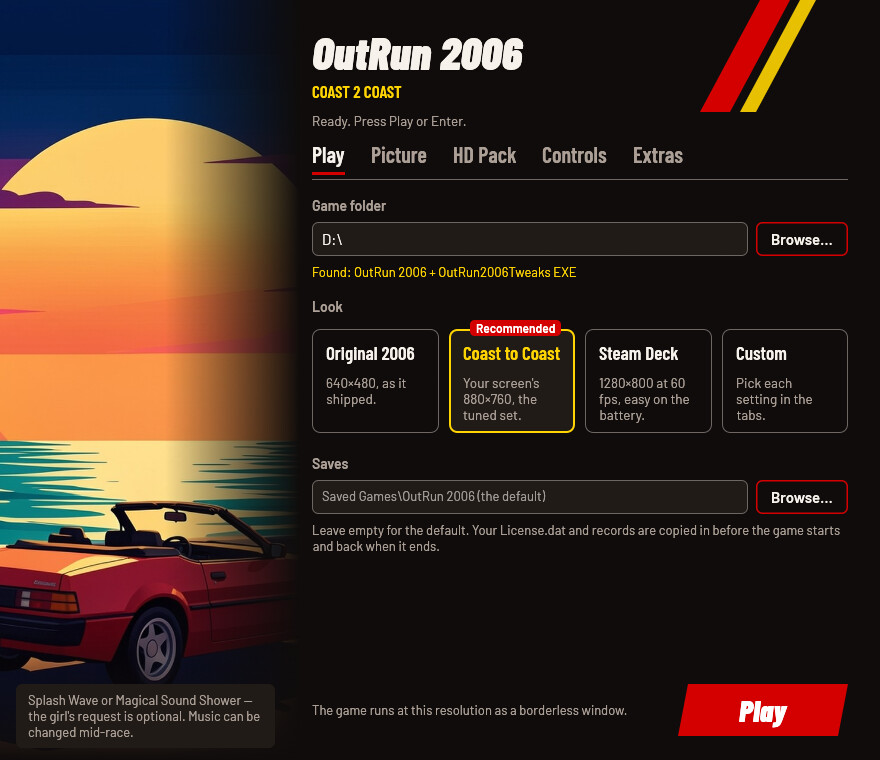
Play: the folder with your game, the four looks, and your saves folder.
| Look | Resolution | Frame rate | What else | When to pick it |
|---|---|---|---|---|
| Original 2006 | 640×480 | 60 | the game's own picture | to play the game as it shipped |
| Coast to Coast (recommended) | your screen's | 60 | longer draw distance, sharp reflections, 16× anisotropic filtering, the console versions' sky glow, the hi-def characters, the CD switcher, no boot logos, free drive | the first run picks it on most screens |
| Steam Deck | 1280×800 | 60 | lighter reflections, easy on the battery | picked on a Deck-sized screen |
| Custom | — | — | any change in the other tabs | when you change something yourself |
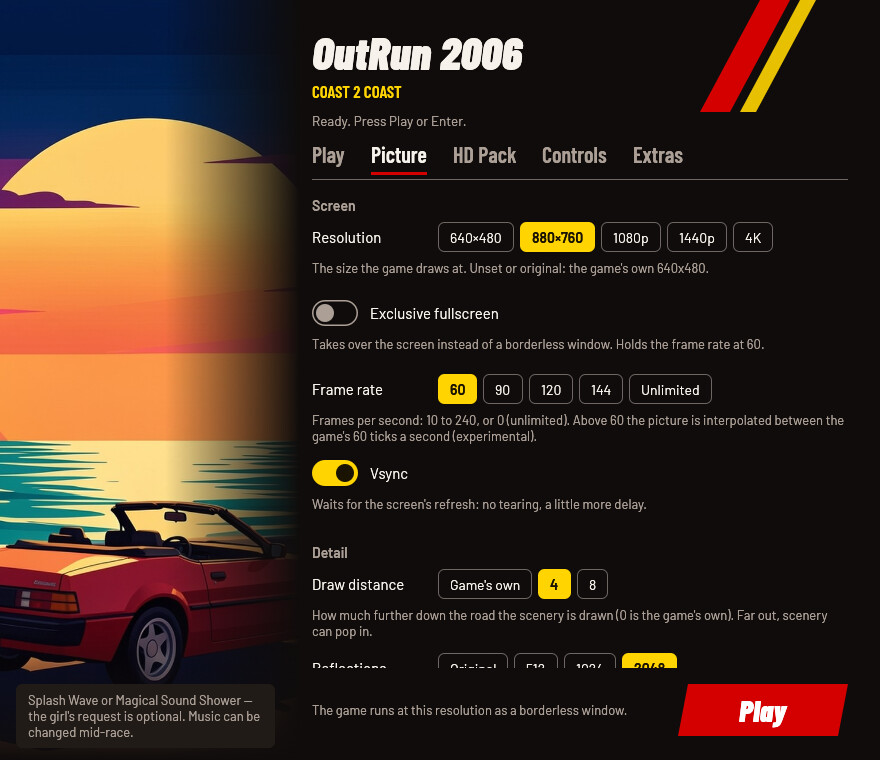
Picture: the screen (resolution as a borderless window, exclusive fullscreen, frame rate, vsync), the detail (draw distance, car reflections, anisotropic filtering, anti-aliasing) and effects (sky glow, Xbox brightness, hi-def characters). On Linux, how gamescope enlarges the picture: Smooth, Sharp, Even pixels or FSR.
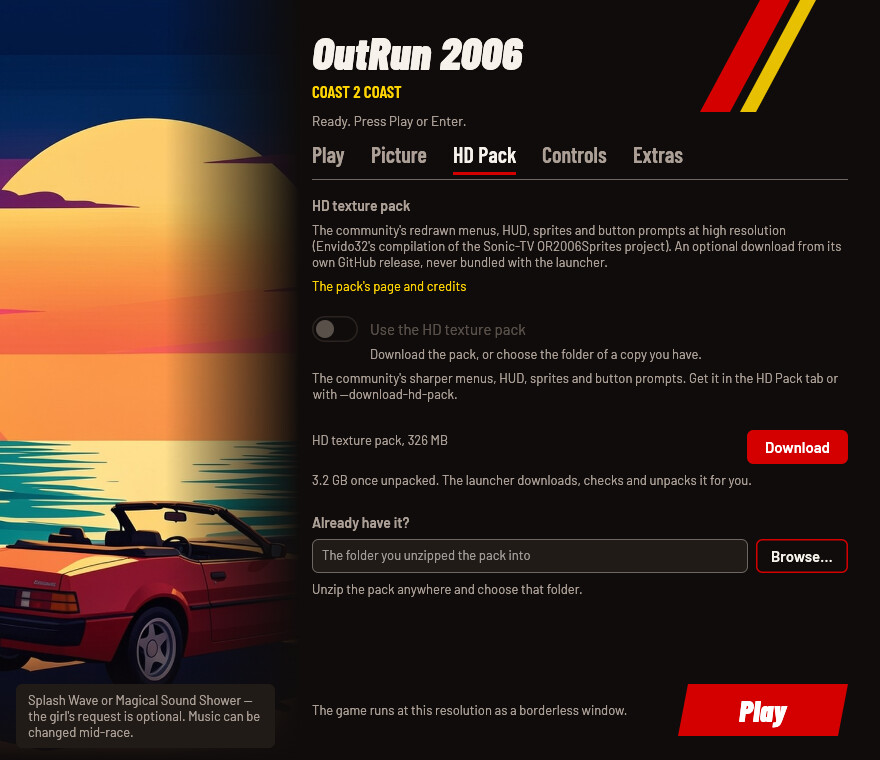
HD Pack: the community HD texture pack redraws the menus, HUD, sprites and button prompts (Envido32's compilation of the Sonic-TV OR2006Sprites project). Download fetches it from the pack's own GitHub release (326 MB) with progress, speed and time left; Cancel stops it, and Download later carries on from where it stopped. The launcher checks the download and the free space, unpacks it (3.2 GB) and switches it on; Remove deletes it. Or choose a copy you already unzipped. Details: docs/HD_TEXTURES.md.
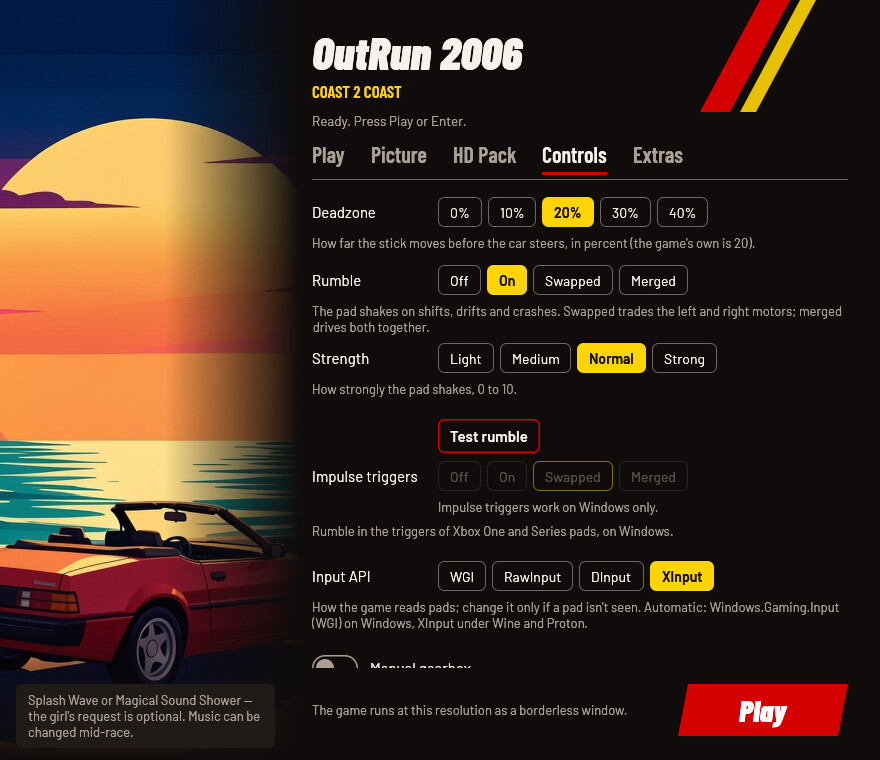
Controls: the steering deadzone, rumble (off, on, motors swapped, or merged) with its strength and a Test rumble button for Xbox-style pads, impulse triggers for Xbox One/Series pads (Windows only), the input API (only for a pad that isn't seen), and the manual gearbox.
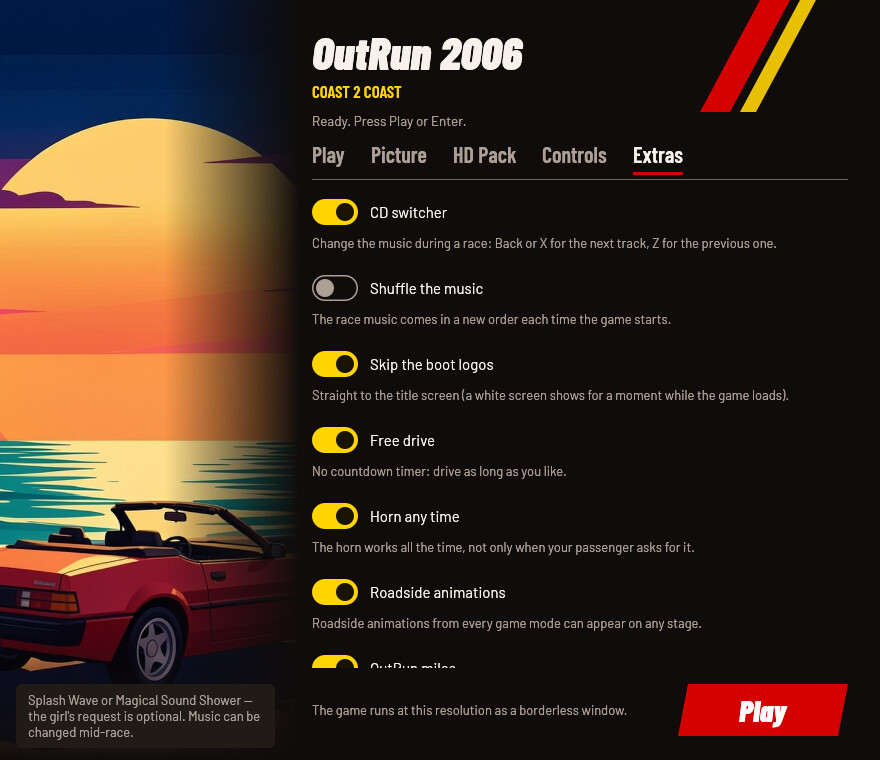
Extras: the CD switcher (change the music during a race: Back or X for the next track, Z for the previous one) with optional shuffle, skipping the boot logos, free drive (no countdown), the horn any time, roadside animations from any game mode, OutRun miles on the menu, and the "Rush a Difficulty" fix. Online play goes to the community server (clarissa.port0.org); pick a user name and password in the game's multiplayer menu.
The window works with a pad or the keyboard alone: the d-pad or arrows move, A or Enter press, LB/RB or Ctrl+Tab change tabs, Start plays. Every row says in one line what it changes, and a control you can't use right now (impulse triggers under Wine, shuffle without the CD switcher) is greyed out with the reason under it.
Options
Every option has the same name in the window, in launcher.cfg (with
underscores) and on the command line (with hyphens). Where things live
says where launcher.cfg is; the first run writes it with every option
commented. Settings are saved when you press Play.
launcher.cfg / flag | In the window | Values | Unset | What it changes |
|---|---|---|---|---|
game / --game | Play: Game folder | a folder | the launcher's own folder, if the game is there | The folder with your OR2006C2C.exe. Only read, never changed. |
look / --look | Play: the look cards | original, coast_to_coast, steam_deck | Coast to Coast | Every picture, control and extra setting at once; settings given on their own win over it. |
saves / --saves | Play: Saves | a folder | Saved Games\OutRun 2006 | Where your saves are kept: copied into the game before it starts and back when it ends. |
runtime / --runtime | — (file and flag only) | a folder | %LOCALAPPDATA%\OutRunLauncher\OutRun2006 | Where the launcher keeps its private copy of the game. |
resolution / --resolution | Picture: Resolution | WIDTHxHEIGHT, original or off | the game's 640×480 | The size the game draws at, as a borderless window. |
fullscreen / --fullscreen | Picture: Exclusive fullscreen | on, off | off | Takes over the screen instead of a borderless window. Holds the frame rate at 60. |
fps_limit / --fps-limit | Picture: Frame rate | 10 to 240, or unlimited (0) | 60 | Frames per second. Above 60 the picture is interpolated between the game's 60 ticks a second (experimental). |
vsync / --vsync | Picture: Vsync | on, off | on | Waits for the screen's refresh: no tearing, a little more delay. |
draw_distance / --draw-distance | Picture: Draw distance | 0 to 8 | 4 | How much further down the road the scenery is drawn (0 is the game's own). |
reflections / --reflections | Picture: Reflections | original (128), 512, 1024, 2048 | 2048 | How sharp the reflections on the car are. |
anisotropy / --anisotropy | Picture: Anisotropy | 0 to 16 | 16 | Keeps the road's texture sharp into the distance (0 is the game's own). |
antialiasing / --antialiasing | Picture: Anti-aliasing | 0, 2 (the game's 4× MSAA) | 0 | Smooths jagged edges; on NVIDIA under Windows, trackside cloth and barriers too. |
sky_glow / --sky-glow | Picture: Sky glow | on, off | on | The console versions' glowing sky. |
xbox_brightness / --xbox-brightness | Picture: Xbox brightness | on, off | off | The brighter picture of the Xbox release. |
hd_characters / --hd-characters | Picture: Hi-def characters | on, off | on | The detailed driver and passenger models the PC release shipped but never used. |
scaler / --scaler | Picture: Scaler (Linux only) | nearest (Sharp), pixel (Even pixels), fsr, linear (Smooth) | linear | How gamescope enlarges the picture to your screen. |
hd_textures / --hd-textures | HD Pack: Use the HD texture pack | on, off | off | The community's sharper menus, HUD, sprites and button prompts. |
hd_textures_folder / --hd-textures-folder | HD Pack: Pack folder | a folder | the downloaded pack, or textures-pack next to the launcher | Where the HD pack was unzipped. |
deadzone / --deadzone | Controls: Deadzone | 0 to 50 | 20 | How far the stick moves before the car steers, in percent. |
vibration / --vibration | Controls: Rumble | off, on, swapped, merged | on | The pad shakes on shifts, drifts and crashes; swapped trades the motors, merged drives both together. |
vibration_strength / --vibration-strength | Controls: Strength | 0 to 10 | 7 | How strongly the pad shakes. |
impulse_triggers / --impulse-triggers | Controls: Impulse triggers | off, on, swapped, merged | swapped | Rumble in the triggers of Xbox One and Series pads, on Windows. |
input_backend / --input-backend | Controls: Input API | auto, wgi, raw, dinput, xinput | auto: WGI on Windows, XInput under Wine and Proton | How the game reads pads; change it only if a pad isn't seen. |
manual_gearbox / --manual-gearbox | Controls: Manual gearbox | on, off | off | Races start with the manual gearbox selected. |
cd_switcher / --cd-switcher | Extras: CD switcher | on, off | on | Change the music during a race. |
music_shuffle / --music-shuffle | Extras: Shuffle the music | on, off | off | The race music comes in a new order each time the game starts. |
skip_logos / --skip-logos | Extras: Skip the boot logos | on, off | on | Straight to the title screen. |
free_drive / --free-drive | Extras: Free drive | on, off | on | No countdown timer: drive as long as you like. |
horn / --horn | Extras: Horn any time | on, off | on | The horn works all the time, not only when your passenger asks for it. |
random_anims / --random-anims | Extras: Roadside animations | on, off | on | Roadside animations from every game mode can appear on any stage. |
show_miles / --show-miles | Extras: OutRun miles | on, off | on | Shows your OutRun miles next to the menu's sign-in text. |
soundtrack_fix / --soundtrack-fix | Extras: Soundtrack fix | on, off | on | Restores the first two seconds of "Rush a Difficulty". |
An unset option gets the launcher's default, the Coast to Coast value
shown in its #key = line (the resolution is the exception: unset, it is
the game's own 640×480). On every start the launcher sets the keys it
manages in the game's outrun2006.ini and in OutRun2006Tweaks.ini, and
keeps every other line of both (the game's language, comments, keys it
doesn't manage).
Any option on the command line skips the window and plays; options
override launcher.cfg for that run, and only --game is remembered. The
launcher's own switches:
| Switch | What it does |
|---|---|
--no-window | play with the saved settings (and any options given) |
--settings | only the settings window; exit code 0 when Play was pressed, 3 when it was closed, 4 when no window could be shown, 5 when another launcher or its game is running (--linux adds the Linux scaler, for or-play) |
--check | checks the game folder and the launcher's files without playing; the report is printed and goes to launcher.log; exit code 0 ready, 1 not, 5 when another launcher is open (the window, or the game) |
--download-hd-pack | downloads the HD texture pack and switches it on; exit code 5 when another launcher is open (the window, or the game) |
--help | every option and its values |
A bad option or value exits with code 2 and says what it takes.
Where things live
| What | Windows | Linux (AppImage, or-play) |
|---|---|---|
Settings (launcher.cfg) and log (launcher.log) | %LOCALAPPDATA%\OutRunLauncher\ | in the prefix, drive_c/users/<you>/AppData/Local/OutRunLauncher/ |
| The launcher's copy of the game | %LOCALAPPDATA%\OutRunLauncher\OutRun2006 (about 1 GB) | in the prefix, …/AppData/Local/OutRunLauncher/OutRun2006 |
| Your saves | %USERPROFILE%\Saved Games\OutRun 2006 (or the folder you chose) | in the prefix, drive_c/users/<you>/Saved Games/OutRun 2006 |
| The downloaded HD pack | %LOCALAPPDATA%\OutRunLauncher\hd-pack (3.2 GB) | in the prefix, …/AppData/Local/OutRunLauncher/hd-pack |
| Wine prefix | — | ~/.local/share/or-launcher/prefix |
or-play's log (play.log) and lock | — | ~/.config/or-launcher |
Registry: the game's graphics preference (GpuPreference=2;, the high-performance GPU) | HKCU\Software\Microsoft\DirectX\UserGpuPreferences, a value named after the copy's OR2006C2C.exe (%LOCALAPPDATA%\OutRunLauncher\OutRun2006\OR2006C2C.exe by default) | — |
| Registry, in the Wine prefix only | — | OR2006C2C.exe's DLL overrides (HKCU\Software\Wine\AppDefaults\OR2006C2C.exe\DllOverrides, recorded in HKCU\Software\rea-launcher\DllOverrides\OR2006C2C.exe), the settings window's UseEGL = N (HKCU\Software\Wine\X11 Driver) and the controller baseline under HKLM\System\CurrentControlSet\Services\winebus; a value you set yourself is kept |
A launcher.cfg next to OutRunLauncher.exe is used instead when it
exists (a portable install). Under Proton everything is in Steam's
compatdata/<appid>/pfx for the non-Steam game. The game writes its saves
(License.dat, your records) into the launcher's copy; the launcher copies
them into your saves folder when the game ends and back in before the next
start, so your saves folder always has them.
Troubleshooting
- "This OR2006C2C.exe is a version the launcher doesn't know." Your EXE isn't one of the known builds. Report the SHA-256 it shows and where your copy comes from with the unknown edition form.
- "OutRun 2006 or its launcher is already running." The launcher you started first is still waiting for the game, or is running without a window, or the game is still running from the launcher's copy after its launcher was closed. Quit the game (or let that launcher finish), then start the launcher again. The launcher exits with code 5.
- The pad isn't seen, or the d-pad doesn't move the menus. Try another Input API in the Controls tab (XInput under Wine and Proton, then DirectInput). On 8BitDo pads use the X-input mode switch.
- The HD pack is on but the game looks the same. Check the HD Pack
tab: the note under the folder says whether it holds the pack.
launcher.logsays which folder the game was given. - Your own
WINEDLLOVERRIDESdon't apply. Rules for the DLLs the launcher sets (dinput8,d3d9,mscoree,mshtml) are replaced by the