parasite-eve-pc
Native PC port of Parasite Eve (PS1), built on the matching decompilation and PsyZ
- Type: PC port
- Game: Parasite Eve
- Runs on Windows, Linux and macOS
- By khasinski
- Latest release 0.7, 2026-10-28
- Source: https://github.com/khasinski/parasite-eve-pc
README
Parasite Eve

A native PC port of Parasite Eve, built from the original game code with our PsyZ fork.
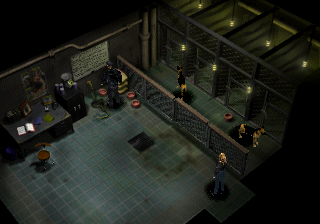
Play
Download the game from GitHub Releases. This is an early alpha; see the release notes for available platforms and known issues. See the changelog for changes.
You need your own North American CUE/BIN images. Game data is not included. Keep each CUE file next to its BIN file.
- Launch Parasite Eve and select your disc images. Selecting both discs enables automatic switching.
- You can start with either disc. If the other is needed, the game asks for it by name.
- Press Escape for graphics, controls, audio and disc settings. You can add the other disc there later.
Enter is START and skips movies; in a story movie, START pauses it and asks whether to skip. View or change all bindings in Escape → Controls. A speed button can be bound there too: the game runs at 2x while it is held, or 3x or 4x with the arrows either side of the number (Left/Right on that row). It is unbound until you choose a key or button, and keeps your VSync setting.
The left stick provides analog movement. Escape → Controls → Field run threshold sets how far to push it before Aya runs (85% by default).
Settings and selected disc paths are saved automatically. Memory cards are kept in memory-cards beside your user preferences. Older bu00/bu10 cards from the launch or executable folder are imported once, keeping the original files.
Escape → Graphics includes geometry correction, antialiasing, model texture filtering and an optional Widescreen aspect ratio. Widescreen shows more of the original background where available; narrow scenes and movies stay in 4:3.
If the game crashes, it saves a report and shows where to find it. Attach that file when reporting the problem on Discord.
Mods
Downloads include an optional mod host. When building from source, enable it with -DPE_MODS=ON. Without it, the
PE_HOOK(...) lines in the game compile to nothing. In a mod build, F1 opens the Mods panel;
mods start only after F1 → Manage mods → All mods is turned on and the game restarted.
Settings are saved in pe_mods.ini. See the mod guide for writing a mod.
PE Enhancements
Open F1 → PE Enhancements to configure them.
- Movement (
pe_qol): Always Run and configurable walk, run, combat and battle-entry speeds (walking and running default to 1.75×). - Encounters (
pe_qol): no random battles, or Normal, 2×, 4× or Every Check frequency. Story and room rules still apply; this changes how often fights happen, not their size. - Key-item pocket (
pe_qol): story keys and Chrysler elevator keys stay out of the bag but still count for story checks; browse them through Key Items in Aya's main menu. - Remembered sorting (
pe_qol): Auto keeps the game's own sort settings; moving items by hand switches back to Manual. Square in the Use Item list opens sorting. - Combat rules (
pe_rebalance): Vanilla, Rebalanced and Custom rules for gun and armor effects: Heat/Frost, Rate of Fire, gun progression bonuses, Attack All crowd damage, status chances, Critical Up, Quickdraw and armor tradeoffs; weapon DPS in the help text. - Parasite Energy rules (
pe_rebalance): Vanilla, Rebalanced and Custom healing amounts and power costs. - Half-bar turns (
pe_rebalance): items, Quick PE powers and weapon changes on half a bar, with a gauge indicator; attacks and other powers still need a full bar. - Medicine combining and Panacea (
pe_rebalance): two Medicine 1/2/3 become the next tier; Medicine 4 and Full Cure become Panacea (400 HP and cures ailments). - Junk economy (
pe_economy): a shared Junk counter, battle and steal rewards, Super/Duper Junk conversion, difficulty presets, rare drops with soft pity, a Junk counter beside the bag's Quantity, and four economy armor effects (Bargain, Scavenger, Lucky Find, Salvager). - Mod Catalog (
pe_economy): dismantle equipment to unlock effects, then install, remove or replace them on equipped gear, from Aya's main menu or F1; Rebuild buys dismantled gear back. - Requisition and Wayne's Workshop (
pe_economy): buy medicine, ammo, Smoke Grenades, Revive and Tools with Junk, from F1 or Wayne's own menu (also Mod Permit Cards); Warner offers storage and the Workshop where he stands guard on Day 4. Smoke Grenades escape ordinary battles. - Bestiary and Wardrobe (
pe_collection): 75 creatures revealed by kills, Scan or Junk; Aya's outfits and character skins to unlock and wear. Skins are built from your own disc with the decomp bridge tools and stay hidden until present. Unlocks are kept across games inpe_collection.ini; other mods can register their own creatures and costumes.
Mod builds are experimental; a passing build or test does not establish full in-game compatibility.
Build
Requires Git, CMake 3.21 or newer and a C11 compiler.
git clone https://github.com/khasinski/parasite-eve-pc
cd parasite-eve-pc
git submodule update --init third_party/psyz
git -C third_party/psyz submodule update --init external/SDL
cmake -S . -B build -DBUILD_TESTING=OFF -DCMAKE_BUILD_TYPE=RelWithDebInfo
cmake --build build --parallel
./build/parasite-eve-pc
Build with mods
cmake -S . -B build-mods -DCMAKE_BUILD_TYPE=RelWithDebInfo -DPE_MODS=ON
cmake --build build-mods --parallel
./build-mods/parasite-eve-pc
PE_MOD_LIST picks the mods by folder name (default: pe_qol;pe_rebalance;pe_economy;pe_collection).
For development details, see code organization.