Pokémon TCG 2 Native Port
Pokémon TCG 2 Native Port is a native port of Pokémon Trading Card Game 2 for Windows, Linux, macOS and Android with American English translation.
- Type: PC port
- Game: Pokémon Trading Card Game 2: The Invasion of Team GR!
- Runs on Windows, Linux, macOS and Android
- By Brian Blakely
- Latest release v0.1.3, 2026-11-01
- Source: https://github.com/brianblakely/pokemon-card-game-2-native-port
README
Pokémon Card GB2: native port
A native port of Pokémon Card GB2 - GR Dan Sanjou! (Game Boy Color, 1999) for Linux, macOS, Windows and Android. The game's own program runs as native code, translated to Rust from the pret disassembly. No Game Boy emulator is involved, and the port uses a fraction of the power emulation does. The picture scales to any window size, and presentation follows any display's refresh rate. The game plays in American English, the port's own translation, or in its original Japanese.
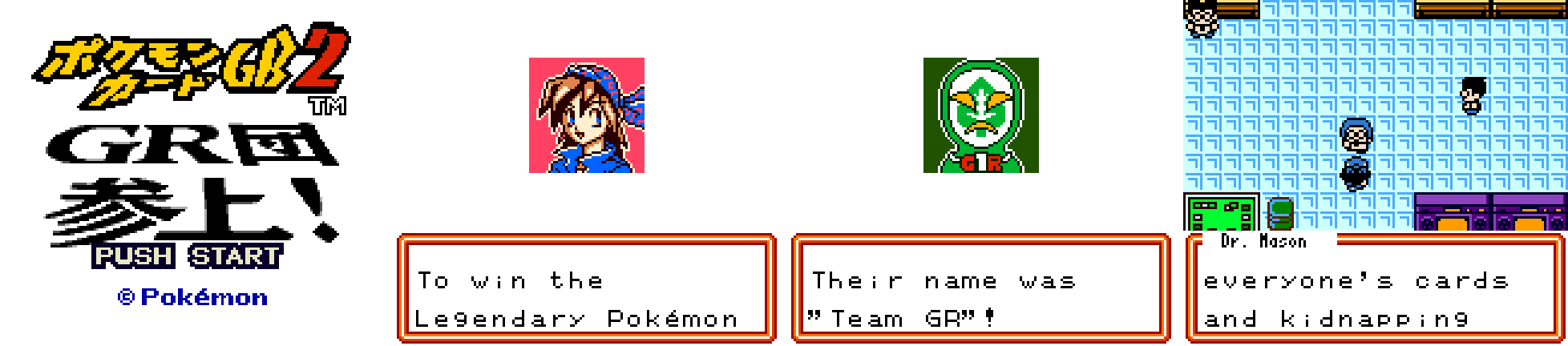
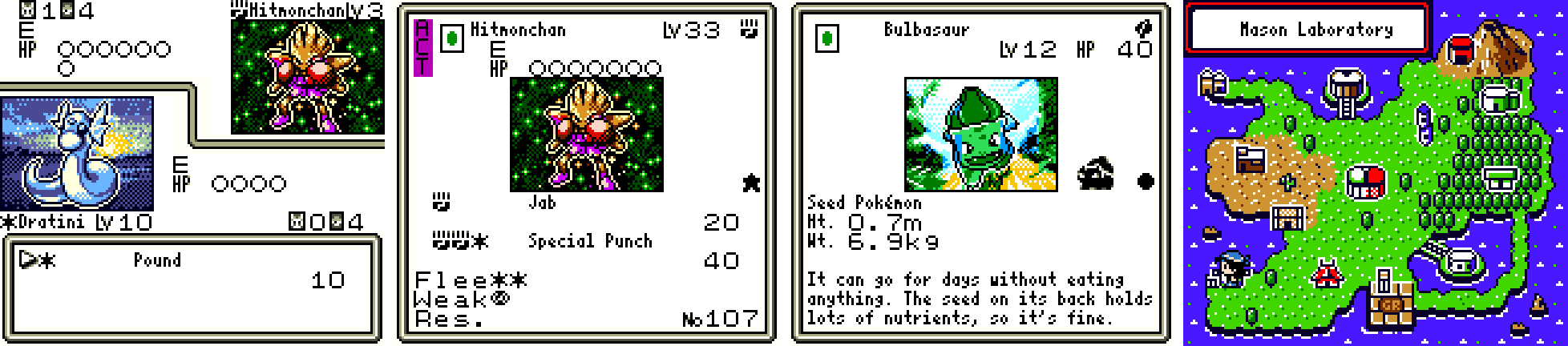
Download the latest release: Windows, macOS, Linux and Android
The port contains no game data. It reads the graphics, text, cards and music from your own ROM at run time. The English translation and its font are the port's own work, laid over the game's text when the ROM is loaded. The pictures above are the game running in the port.
How it works
src/decomp/   the original game as RGBDS assembly (pret's disassembly); it
              rebuilds the ROM byte for byte
     │  tcg2-recomp, at build time: assemble an annotated copy, find every
     │  instruction, write each function as Rust
     ▼
tcg2-kernel   the game's program in Rust: 131,000 instructions in 6,400
              functions, plus the dispatcher that runs them
     │  runs on
     ▼
tcg2-core     the Game Boy Color as host services: memory map, MBC5 cartridge
              over your ROM, LCD (computed from the clock, drawn only when
              something changed), sound synthesis, timer, joypad, link ports
     │  hosted by
     ▼
tcg2-desktop  SDL3 window, 2D renderer, input and sound; on Android the
              same app as a library under SDL's Java activity, with the
              console's buttons drawn for touch
This is the architecture of
Xenogears: Ex Machina.
The decompilation stays a pure, byte-identical build of the original game and is
the only implementation of its logic. Everything the port adds lives outside
src/decomp/. See docs/runtime.md for the details.
- Translation, not emulation. Every SM83 instruction becomes the Rust statements that do the same thing to the machine: registers, flags, memory and cycle count. A function runs straight through as native code until control leaves it. Nothing decodes or interprets instructions at run time.
- Lazy hardware. No device is stepped cycle by cycle. The LCD's line and
mode, the timer and the sound unit are computed from one clock when the game
touches them, and their interrupts are scheduled events.
haltskips the clock straight to the next event. - Asleep between frames. Each 1/59.73 s the host runs one frame in a burst of native code, then sleeps in SDL's event wait until the next frame is due or the player presses something.
- Nothing drawn twice. Lines are redrawn only when something visible changed, and a picture is presented only when it differs from the last one. A static menu costs no drawing and no GPU work. The sound device pauses when the game makes no sound.
- Translated, not patched. The game prints every text through one table.
tcg2-localewrites the English text into the ROM image's free upper banks and points that table at it. Your ROM file, the decomp and the translated program stay unchanged (Languages).
Battery use
Host CPU time per second of play, measured on an Intel i9-9900K. Each figure is the game alone running as fast as possible, with the same input:
| Title and new-game screens | Five minutes of random play | |
|---|---|---|
| This port (kernel) | 2.9 ms (0.3% of one core) | 3.6 ms |
| gambatte (libretro, a fast emulator) | 9.0 ms (3.1×) | 9.8 ms (2.7×) |
| SameBoy (libretro, an accurate emulator) | 93 ms (32×) | 58 ms (16×) |
The app adds:
- Drawing a new picture: SDL's 2D renderer scales one 160×144 texture with the system's drivers. The Linux release build, on an RTX 5070 Ti under Wayland (OpenGL), used 2.3% of one core over the first 10 s from boot (532 pictures presented), game included. Static screens cost nothing.
- Wake-ups: one per game frame on the main thread, about 47 a second on the audio thread, and none while the game is paused or the window is minimised.
The game's own instructions are under 5% of the kernel's time. The rest is drawing changed lines and synthesizing sound.
Playing
- Download a release (Windows, macOS, Linux, Android), or build it.
- Put your ROM of Pokémon Card GB2 - GR Dan Sanjou! (J) in
rom/beside the app. It must be 2 MiB with SHA-1a7e12bcc5f514e3aad8de570fd511aab0a308822; the file name doesn't matter. Therom/folder is in.gitignore. - Run
pokemon-tcg2. The game starts in American English; F9 switches to the original Japanese and back.
Battery saves go to saves/poketcg2.sav, a raw 32 KiB file in the same format
emulators use, so existing saves can be copied in. Screenshots go to
screenshots/ and settings to settings.ini. All of these sit beside the app,
or in your user data folder if that folder isn't writable. On macOS they sit
beside the .app only if you create a rom/ folder there; otherwise they go in
~/Library/Application Support/pokemon-card-game-2-native-port/pokemon-tcg2/.
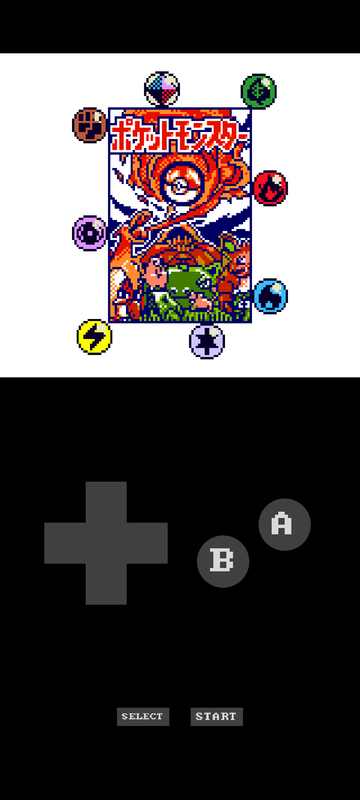
On Android (8 or newer), install the APK and start Pokémon Card GB2. The
first time, it asks for your ROM and opens the system's document picker, and
it keeps a copy. Its files are in the app's folder,
Android/data/io.github.pokemon_card_game_2_native_port/files/, which a
computer reaches over USB. The console's buttons are drawn on the screen:
below the picture in portrait, as on a Game Boy, and on both sides of it in
landscape. They give way to a gamepad while one is connected. A keyboard works
as on the desktop, F-keys included; without one, the settings are changed in
settings.ini in the app's folder.
| Action | Keys | Gamepad |
|---|---|---|
| D-pad | arrows, W A S D | D-pad, left stick |
| A / B | X or K / Z or J | east or north / south or west |
| Start / Select | Enter / Backspace or right Shift | Start / Back |
| Fullscreen | F11, Alt+Enter | |
| Scaling filter (sharp, nearest, smooth) | F1 | |
| GBC LCD colours | F2 | |
| Frame blending | F3 | |
| Fit (aspect, integer, stretch) | F4 | |
| Save state / load it | F5 / F7 | |
| Language (American English, Japanese) | F9 | |
| Screenshot / pause / fast-forward | F12 / P / hold Tab |
Any resolution: the 160×144 picture fills any window or screen. Sharp scaling keeps every pixel square and crisp at fractional scales. Integer fit shows exact multiples, and stretch fills the window.
Any frame rate: the game always runs at the console's 59.73 Hz. Pictures
are presented through the display's vsync at whatever rate it refreshes (60,
120, 144 Hz or VRR), and only when they change. speed = display instead
locks the game to a ~60 Hz display's rate, so every frame is shown exactly
once. max_fps = 30 (or any value) caps how often pictures are presented to
save more power, while the game itself keeps full speed. Frame blending
reproduces the LCD's slow response, which some of the game's flicker effects
rely on.
Languages
language | |
|---|---|
en-US (default) | American English, the port's own translation |
ja | Japanese, the game's text as your ROM has it |
Press F9 while playing to switch, or set language in settings.ini (or
--set language=ja).
- Everything the game says is translated: dialogue, menus, duel messages, the in-game books and glossary, and every card's name, attacks, rules and Pokédex entry. Card text follows the English cards of the time, and names follow the first game's English release where it had them (Dr. Mason, Ronald, Imakuni?).
- A letter to a tile where it fits. Where a text has the room, it is drawn as the Japanese is: a letter to an 8×8 tile, in the ROM's own full-width font. That is all the dialogue, the duel's messages and questions that fit their box, a card's text where it fits its page, letters, the glossary, and the menus whose items all fit. English needs about twice the room of Japanese, so card names, longer card text, Pokédex entries, lists and most labels are drawn two letters to a tile (half-width), as the first Pokémon Trading Card Game's English release did, in the port's own, easier-to-read font. The engine pads what it fills into a half-width sentence (a card's name, a number) to a whole tile, so after an odd number of letters a narrow extra space can appear.
- Your name is typed on the game's own keyboard: its ABC and abc pages type Latin letters, its other pages kana. A typed name is full-width, so it matches the dialogue around it, and so are the default names.
- Switching mid-game. What is on screen stays until the game draws it again, and the next text it prints is in the new language. Names the game has already stored, such as your decks' names and the Challenge Machine's records, keep the language they were made in.
- Pictures with lettering are redrawn in English: a duel's turn and setup banners, the play area's location labels, the win, lose and draw stamps at a duel's end, the special-rules banner, the slot machine's signs, the booster packs' names, the Card Pop! and Rare Card Pop! screens and the deck diagnosis title. A few keep their Japanese lettering: the title logo, and the Pokémon Card Game logo on the booster packs and in the opening.
Building
Everything builds inside the pinned Nix shell, which provides Rust 1.97.1, RGBDS 1.0.4 and SDL3:
nix develop path:./nix/runtime
cd src/runtime
cargo build --release -p tcg2-desktop     # target/release/pokemon-tcg2
cargo run --release -p tcg2-desktop       # play (rom/ in the repository root works too)
The kernel's build script assembles src/decomp (an annotated copy in
OUT_DIR, checked against rom.sha1) and translates it. This takes about 5 s,
plus about 35 s to compile the generated Rust.
- Arch Linux:
cd packaging/arch && makepkg -sibuilds against the system's SDL3. - The host's GPU drivers from a Nix build: the development shell's SDL can't
load a non-NixOS host's drivers. Build as the Linux release does, with SDL
compiled in and only glibc linked:
nix develop path:./nix/runtime#linux -c bash -c 'cd src/runtime && cargo zigbuild --release -p tcg2-desktop --features static-sdl --target x86_64-unknown-linux-gnu.2.31'. - Windows: cross-build with
nix develop path:./nix/runtime#windows --command cargo build --release --target x86_64-pc-windows-gnu -p tcg2-desktop. - Android: the APK (arm64-v8a and x86_64) with
tools/release/shell.sh android python3 tools/release/package.py android --version v0.1, after translating the kernel tobuild/kerneland making the notices (packaging). The#androidshell holds the SDK, the NDK, a JDK and an emulator; the APK is made with the SDK's own tools, with no Gradle and no downloads. - Releases:
.github/workflows/release.ymlbuilds and publishes every platform from the pinned Nix shells. See docs/releases.md.
The decomp builds on its own too (nix develop path:./nix, then
make -C src/decomp), and its CI checks the SHA-1.
Verification
-
Instruction for instruction.
tcg2-lockstepruns the translated kernel beside an independent SM83 interpreter (test tooling, never in the app) on identical machines. It compares the CPU after every dispatch and all memory at every frame. Six 100,000-frame sessions of seeded random play (2.9 billion instructions) matched throughout. -
The whole program.
tcg2-lockstep --blocks 10runs every one of the 52,090 translated entry points from 10 randomised register sets each, on the kernel and on the interpreter. All 520,900 trials matched. The 0.2% of trials where random registers made code switch its own ROM bank are set aside. -
Against a real emulator.
tcg2-libretroruns the ROM in SameBoy or gambatte with the same input. In Japanese (--language ja), screens match SameBoy pixel for pixel: the title, menus and new-game screens exactly, and the animated intro on 552 of 700 frames. The intro's other frames differ only by the phase of the boot timing, plus one palette fade that lands a few dozen cycles apart. The music's notes match SameBoy's (87% overlap of pitch histograms). -
Duels. The game's own debug duel, against a random opponent with a saved starter deck, plays to its end in lockstep. It covers the AI, card effects, attacks and the win/lose screens.
-
Everywhere alike. The Windows build (under Wine) ends a scripted run on the same clock and memory hash as the Linux build. A save state resumed in a new process ends the same as an uninterrupted run.
-
The translation.
cargo test -p tcg2-localechecks that every Japanese text of the decomp has an English translation, that the game's font can draw it, that no line outgrows its text box, and that each text is full-width exactly where it fits the box the decomp prints it in. The lockstep checks run on the English image.
docs/development.md has the commands.
Layout
| Path | What |
|---|---|
src/decomp/ | The disassembly: RGBDS sources, its tools, Makefile, rom.sha1 |
src/runtime/crates/tcg2-recomp | The translator (SM83 to Rust) |
src/runtime/crates/tcg2-kernel | The translated game and its dispatcher |
src/runtime/crates/tcg2-core | The machine: memory map, cartridge, LCD, sound, timer |
src/runtime/crates/tcg2-locale | The game in other languages: the American English translation and font (locales/en-US/), laid into the ROM image at load |
src/runtime/crates/tcg2-render | The picture's look: fit, LCD colours, frame blending (CPU, per new picture) |
src/runtime/crates/tcg2-desktop | The app: pokemon-tcg2 on the desktop, libmain.so on Android (its touch buttons in touch.rs, the rest in android.rs) |
src/runtime/android/ | The Android app's manifest and its activity (SDL's, passing the app its arguments) |
src/runtime/crates/tcg2-headless | The game without a window: scripted input, screenshots, measurement |
src/runtime/crates/tcg2-reference | Test tooling: the reference interpreter, lockstep, libretro comparison |
nix/ | Pinned toolchains: nix/ for the decomp, nix/runtime/ for the port |
packaging/ | Release packaging (Linux, Windows, macOS, Android, Arch) |
docs/ | Runtime and development guides |
plan.md | Phases, status and possible next steps |
Legal
This project contains no ROM, graphics, music or other game data in its builds.
The app needs your own legally obtained copy of the game. The disassembly in
src/decomp/ is pret's. Pokémon and Pokémon Trading Card Game are
trademarks of their respective owners. This project is not affiliated with or
endorsed by Nintendo, Creatures, GAME FREAK or The Pokémon Company.