LikeTheWind
LikeTheWind is a native PC port of Power Drift that supports ultrawide resolutions and remastered audio.
- Type: PC port
- Game: Power Drift
- Runs on Windows and Linux
- By hojoworks
- Latest release v1.2, 2026-11-09
- Source: https://github.com/hojoworks/likethewind
README

LikeTheWind
Version 1.4
Download the latest version here
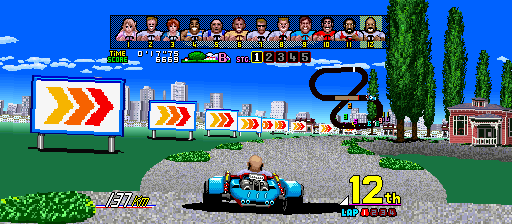
LikeTheWind is a native PC port of Power Drift (Sega, 1988) using static
recompilation. It runs the original arcade game code through a hand-written
Sega Y Board runtime. You supply your own pdrift.zip; the port verifies and
prepares it for you.
Power Drift, unleashed
The 1988 arcade classic is back! Sharper, louder, and wider than ever!
More screen. More speed. More Fun.
Play in crisp 4:3 or tear across 16:9, 18:9, 19:9, 20:9 and full 21:9 ultrawide! More road, more rivals, and more of the race in view.
Turn it up loud, dude!
The arcade soundtrack has been lovingly remastered by hand by a professional audio engineer and rebuilt for modern speakers. Switch between the original arcade mix and the remastered version. Hear this amazing arcade soundtrack like never before!
Steering that finally feels right.
Power Drift feels great straight out of the box. The default setup is tuned for the keyboard, and plugging in a joystick or gamepad feels just as good with no setup required. Want to fine-tune it? Advanced steering controls are there when you need them.
Lost voices from the arcade, restored for the first time!
Emily and Lucy finally have their original, unused voices restored! But that's not all: previously hidden voice lines have also been uncovered for the other drivers, including passing and collision reactions. Now every overtake and scrape brings a little more personality to the race!
The grand tour you were never meant to see.
One driver. Five championships. Two legendary bonus stages. Special Tour strings the entire Power Drift world together into a single run, then sends you through the secret Afterburner and Hang-On stages.
How to run it
You need:
- Windows 10/11 x64, or x86_64 Linux with glibc 2.34+
- X11 or Wayland on Linux
- Your own MAME
pdrift.zipWorld, Rev A
Linux AppImage (recommended)
- Download
LikeTheWind-1.4-linux-x86_64.tar.gzand extract it. - Put
pdrift.zipin the extractedromsfolder. - Make the AppImage executable and run it:
cd LikeTheWind-1.4-linux-x86_64
chmod +x LikeTheWind.AppImage
./LikeTheWind.AppImage
The tar contains the AppImage, a ROM folder, and a short README. The AppImage
includes SDL2 and the Linux audio runtime libraries. If it is moved to a
read-only location, its data goes to ~/.local/share/likethewind instead.
Windows zip
- Unzip the LikeTheWind release.
- Put
pdrift.zipin theromsfolder besideLikeTheWind.exe. - Run
LikeTheWind.exe.
The first launch verifies the ROM and creates roms\.prepared\; later launches
reuse that cache. The release is portable and needs no installer.
Default controls
| Action | Keyboard | Gamepad/joystick |
|---|---|---|
| Steer | Arrow keys / A, D | Left stick or D-pad |
| Accelerate | Up / W | RT or A |
| Brake | Down / S | LT or B |
| Gear | Space | Y |
| Start | 1 / Return | Start |
| Coin | 5 / C | Back |
| Service / Test | F1 / F2 | N/A |
| Settings menu | Tab | LB + RB |
| Quit | Esc | N/A |
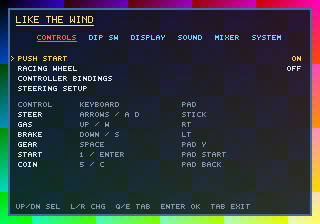
Menu basics
Press Tab to open the menu. Use Up/Down to select, Left/Right to change a value, Q/E for the previous/next page, Enter to confirm, and Backspace to go back. Run in Background is on by default; turn it off in System to pause the game and audio behind the menu.
Use Controls > Controller Bindings to remap buttons and axes. Steering Setup contains the steering/pedal dead zones, digital and analog steering rates, centre rate and rebound. Racing Wheel uses the selected wheel axis directly. Enable Automatic Gearbox to shift into high gear at 160 km/h and back down below it.
Video
LikeTheWind supports 4:3, 16:9, 18:9, 19:9, 20:9 and 21:9 aspect ratios, with 60, 120 and 144 FPS modes. New installs default to 16:9 @ 60 FPS. 60 FPS presents one new board frame per refresh (60 presents/sec); 120 and 144 add cross-faded in-between frames, capped by the display refresh rate.
Audio
The Sound page controls the music, effects, engine and master levels. The Mixer page has individual channel levels, chorus and plate reverb. Use Audio Mix to switch between the flat Stock mix and the per-song Hojo's Mix.
Hidden voices from the arcade, finally restored for the first time!
The original arcade release had more to say, and now you can hear it.
- RESTORE EMILY / LUCY VOICES - Emily and Lucy get their original female driver lines back for the first time ever!
- ADDITIONAL RESTORED VOICES - Hear even more attitude and unluck additional voice lines for all characters never heard before!
The full Power Drift grand tour.
Flip on SPECIAL TOUR MODE in System and the arcade’s one-course credit becomes a proper championship! Battle through all 25 courses plus the hidden Afterburner and HangOn stages! Record your total tour score for bragging rights and prove you are the Power Drift master!
Supported ROM
LikeTheWind supports the pdrift.zip set (World, Rev A) only. The
pdrifta, pdrifte, Japanese and link versions are not compatible. The game
verifies all 48 required source files by size, CRC-32 and SHA-1.
How it works
A lot of projects called “recompilations” are really emulators with extra steps: the game is decoded instruction by instruction every frame, or only a few hot functions are translated while everything else stays interpreted. Others rewrite the game by hand.
LikeTheWind actually converts the game. During the build, the original 68000 routines are translated into C and compiled into the PC executable. At runtime those native routines are the game. The PC side provides the arcade hardware around them: memory, video, sound and input. The original game code, registers, stack, interrupts and timing stay in charge.
If the translator hits a computed jump or an address it could not see at build time, the fallback interpreter catches it and reports the address. That path is added to the next build and translated. Missing code is treated as a bug to fix, not hidden behind an emulator.
Troubleshooting
- If the ROM is rejected, make sure it is
pdriftWorld Rev A, notpdrifta. - If the Linux window stays offscreen or missing, check that
libSDL2-2.0.so.0is beside the executable, then runldd ./LikeTheWind-linux | grep "not found"to check for missing libraries. - Special Tour always continues from the final course into the Afterburner and Hang-On bonus stages, regardless of placement.
- Crash reports are written as
crash.logbeside the executable.
Build it yourself
The build host is Windows 10/11 x64 with Python 3.10+.
powershell -ExecutionPolicy Bypass -File tools\build.ps1
Use -EntriesOnly to seed the recompiler from the checked-in analysis entries
and coverage data:
powershell -ExecutionPolicy Bypass -File tools\build.ps1 -EntriesOnly
Build the portable Linux release:
powershell -ExecutionPolicy Bypass -File tools\build_linux.ps1
Build both releases into dist\:
powershell -ExecutionPolicy Bypass -File tools\build.ps1 -Package -EntriesOnly
For a development run:
python tools\prepare_rom.py roms\pdrift.zip --out work\roms
build\LikeTheWind.exe --rom work\roms --play
To record sound commands and game state while playing:
build\LikeTheWind.exe --rom work\roms --play --sound-log work\play-sound.csv
During play, press F5 for a passing line, F6 for a wall hit, F7 for
an enemy hit and F8 for an announcer line. Each key writes a marker row to
the CSV; every queued sound command is logged with the current frame, mode,
selected character, speed and input state.
For a passive recording that needs no key presses, log the actual PCM sample starts instead:
build\LikeTheWind.exe --rom work\roms --play --sample-log work\play-samples.csv
This writes one row per sample lane start with the sample ID in hex, source voice, mixer group and the same game-state fields.
Legal
No ROMs, generated code from ROMs, or playable game data are distributed here. You need to own the arcade board or otherwise be authorised to use its ROM data. Power Drift and Sega are trademarks of their respective owners; this is an unofficial fan preservation project.
The project's own code is MIT. Third-party licences are listed in
THIRD_PARTY_NOTICES.md.