RE-Code-Veronica-PS3-HD-Recomp-PC
RE-Code-Veronica-PS3-HD-Recomp-PC is a native Windows port of Resident Evil Code: Veronica X for PlayStation 3 with practice tools and 60 FPS support.
- Type: PC port
- Game: Resident Evil Code: Veronica X
- Runs on Windows
- By kastieloficial
- Latest release v1.1.11, 2026-10-29
- Source: https://github.com/kastieloficial/RE-Code-Veronica-PS3-HD-Recomp-PC
README
Resident Evil Code: Veronica X — PC Port
An unofficial native Windows port of the PlayStation 3 version, made by static recompilation.
English | Português (Brasil) | Español
Replay the PS3 version on PC. Practice routes with a native SRT, room selection and saves anywhere.
Important
No game files are included. This repository and its releases contain only the port: no game data, no game executable and no code generated from it. You need your own original copy of the PS3 game (PSN release). Resident Evil, Code: Veronica and all related names, characters and images are trademarks and copyrights of Capcom. This is a fan project. It is not affiliated with, authorized or endorsed by Capcom or Sony Interactive Entertainment.
Downloads — v1.1.2
Improved D3D12 texture-upload compatibility for lighter-related black screens on affected installations, including the reported RTX 2080 Ti case. Includes the previous audio and shadow fixes. Update through the launcher or download below. Previous releases remain available.
Code Veronica Recomp Release v1.1.2
| Download | Contents |
|---|---|
| Code.Veronica.Recomp.Release.v1.1.2.zip | Windows port with launcher and EU/JP/US support. Extract everything and open Code Veronica.exe. |
| Veronica-PKG-Extractor-v1.0.zip | Optional tool to prepare your own PKG. RPCS3 is also supported for extraction. |
| CodeVeronica-LiveSplit-Speedrun-v1.0.zip | Any%/S-Rank split lists with icons and official LiveSplit catalog setup instructions. |
English and Portuguese instructions are included in each ZIP. Original game files and licenses are not included.
Contents
What is this?
This is a native Windows x64 port of Resident Evil Code: Veronica X for PlayStation 3. It is not an emulator. The game's PowerPC (PPU) and SPU code is translated ahead of time into C/C++ with ps3recomp, then compiled into a normal Windows executable. The PS3 system libraries are reimplemented, and the RSX graphics run on Direct3D 12.
On top of that, the port adds its own launcher, modern graphics options, 60 FPS, frame generation, a speedrun-ready SRT overlay, practice tools and more. Everything is described below.
Why the PS3 version
I am a big fan of Resident Evil and of Capcom, and Code: Veronica is one of my favourite games in the series. I chose the PS3 version because it is the one many speedrunners use, and I wanted them to have a fast, stable PC version with tools made for practice: health, inventory, enemies and time on screen, plus the ability to jump to any room.
The port is for every player: people who want to replay the game with higher resolution, 60 FPS and modern controllers, and also people who run it competitively.
Built for speedrun practice
Alongside a modern PC presentation, Veronica Port is built for speedrun practice. Repeat a difficult room, prepare a boss fight or work on an inventory route using tools available directly in the port.
| Practice tool | What it helps you do |
|---|---|
| Native SRT · F8 | Monitor player and enemy health, inventory, ammo and in-game time. |
| Room selection · F7 | Load a room and choose its entry point to repeat a section. |
| Save and load anywhere · F7 | Keep separate practice saves and return to a setup quickly. |
| Item menu · F6 | Prepare weapons and supplies for a specific test. |
| LiveSplit integration | Use the included autosplitter that also attaches to the port. |
Enable the optional practice tools in Cheats. They are tools for training; whether a run is eligible depends on its category and community rules.
Supported versions
Only the PSN releases, version 01.00, are supported. Each region has its own executable; they all share the same launcher, settings, saves and caches, and each launcher starts the right executable for the chosen game folder.
| Region | Title ID | Executable | License file (.rap) |
|---|---|---|---|
| Europe | NPEB00553 | CodeVeronicaPort.exe | Required |
| United States | NPUB30467 | CodeVeronicaPort_US.exe | Required |
| Japan (BIOHAZARD CODE: Veronica Kanzenban) | NPJB00135 | CodeVeronicaPort_JP.exe | Not needed |
Game updates, disc releases and other versions are not supported. The launcher checks the version and tells you if a folder is not compatible.
Requirements
- Windows 10 or 11, 64-bit.
- A graphics card with Direct3D 12 support.
- The Microsoft Visual C++ Redistributable (x64). Without it, Windows reports a missing
MSVCP140.dllorVCRUNTIME140.dll. - Your own copy of the game, as a folder (see below).
No PS3 firmware and no RPCS3 are needed to play.
Test PC
The port was developed and tested on this PC, where the game was completed from start to finish:
| Part | Model |
|---|---|
| CPU | AMD Ryzen 5 5600X |
| GPU | AMD Radeon RX 6700 XT 12 GB |
| RAM | 32 GB DDR4 |
Other PCs should work, but this is the configuration that was actually tested.
Preparing your game
The port reads the game from a folder, not from a .pkg file. It works like the PS4 ports that use shadPS4-style game folders: the PKG must be installed or extracted first. A .pkg file cannot be opened directly.
The folder you choose must contain PARAM.SFO and USRDIR\EBOOT.BIN:
NPEB00553\            (or NPUB30467 / NPJB00135)
├── PARAM.SFO
├── ICON0.PNG
└── USRDIR\
    ├── EBOOT.BIN
    └── BHCV\ ...
Step by step
- Get the game folder from your PKG. Choose either method:
- Veronica PKG Extractor (optional, separate download): when available, download
Veronica-PKG-Extractor-v1.0.zipfrom the project's Releases, alongside the latest port ZIP. Unzip the tool, openVeronicaPKGExtractor.exe, drop or select your PKG, choose a destination and click Extract PKG. It creates theNPEB00553,NPUB30467orNPJB00135folder with the original package files. Add that folder to the launcher. This tool is only for the three supported Code Veronica PSN base releases, version 01.00. - RPCS3: install your PKG using File → Install Packages/Raps/Edats. The game folder is at
RPCS3\dev_hdd0\game\NPEB00553(orNPUB30467/NPJB00135). Add that folder to the launcher. RPCS3 is only needed for this preparation step. Both methods produce the game folder the port needs. You only need one method. If your game is already extracted, the extractor download is unnecessary. The launcher does not open PKGs directly, and the extractor does not create RAP licenses.
- Veronica PKG Extractor (optional, separate download): when available, download
- Find your license (
.rap) for the European and American versions. It is the.rapfile of the account that bought the game. In RPCS3 it is indev_hdd0\home\00000001\exdata, with the title ID in its name (for exampleEP0102-NPEB00553_00-….rap). If the.rapfile is inside the game folder, the launcher finds it on its own. The Japanese version does not need a.rap. - Keep the original files as they are. You do not need to decrypt anything: on the first start, the port decrypts
EBOOT.BINwith your license into its owneboot_cachefolder (it takes less than a second). Your game files are never modified.
Installing and playing
- Install the Visual C++ Redistributable (x64) if you do not have it yet.
- Extract the whole ZIP to a folder where you can write, for example
C:\Games\CodeVeronica. Do not run it from inside the ZIP or fromProgram Files, and keep all files together. - Open
CodeVeronicaPort.exe(any of the three executables opens the same launcher). - On the Games page, add your game folder for each version you own, and the
.rapfor EU/US if it was not found automatically. - Select a version, adjust the graphics and controls, and press PLAY.
The first sessions may stutter a little while shaders are compiled. They are saved in shader_cache and are not compiled again.
Where things are (all inside the port folder): settings in cv_launcher.ini; saves in gamedata\dev_hdd0\ (a different folder can be chosen in the launcher); caches in shader_cache\ and eboot_cache\ (safe to delete, they are rebuilt); screenshots in screenshots\; the last session's log in run-log.txt, useful when reporting a problem.
The launcher can also check the GitHub releases and update itself (it can be turned off in the launcher).
Features
Launcher
- Its own launcher, available in 13 languages: Português (Brasil), English, Español, 日本語, Français, Deutsch, Italiano, Polski, Türkçe, العربية, 简体中文, 한국어 and Русский.
- Game library with the three regions, version and license checks, and region flags.
- Stays open during play as the in-game options menu (
Insert/F5), so settings can be changed without leaving the game. - Pages: Games, Graphics, Saves & captures, Controls, Shortcuts, Patches, Mods, SRT, Cheats, Performance and Advanced (language, shader cache, live game log viewer).
- Optional pause when the game window loses focus.
Graphics and performance
- Render resolution: 480p, native 720p, 1080p, 1440p and 4K (3840×2160). Windowed, borderless window or fullscreen.
- Anti-aliasing: FXAA (light) or SMAA (best).
- Anisotropic filtering: 2x, 4x, 8x and 16x.
- Sharpening with AMD FSR 1 RCAS, from 10% to 100%.
- Frame limit:
- 30 FPS (original): the same experience as the PS3, where the game runs at 30 FPS.
- 60 FPS: the game logic stays at its original 30 Hz and the extra frames come from interpolating character and object poses, so the timing of the game is kept. Interpolation runs on the CPU by default, with an experimental GPU mode. If the PC cannot hold 60 FPS, the game runs slower.
- AMD FSR 3.1 Frame Generation (optional, 60 FPS mode only): up to 120 FPS when the PC holds 60 FPS.
- VSync (60 FPS mode): no tearing. It cannot be used together with frame generation.
- Performance overlay with FPS, frame time, CPU, GPU, RAM, VRAM and SPU/RSX load, in any corner.
- Persistent shader and pipeline cache, loaded in the background, with optional progress note.
- Movies (FMV) decoded with FFmpeg and ATRAC3plus audio decoded natively: no PS3 firmware needed.
SRT for speedrunners
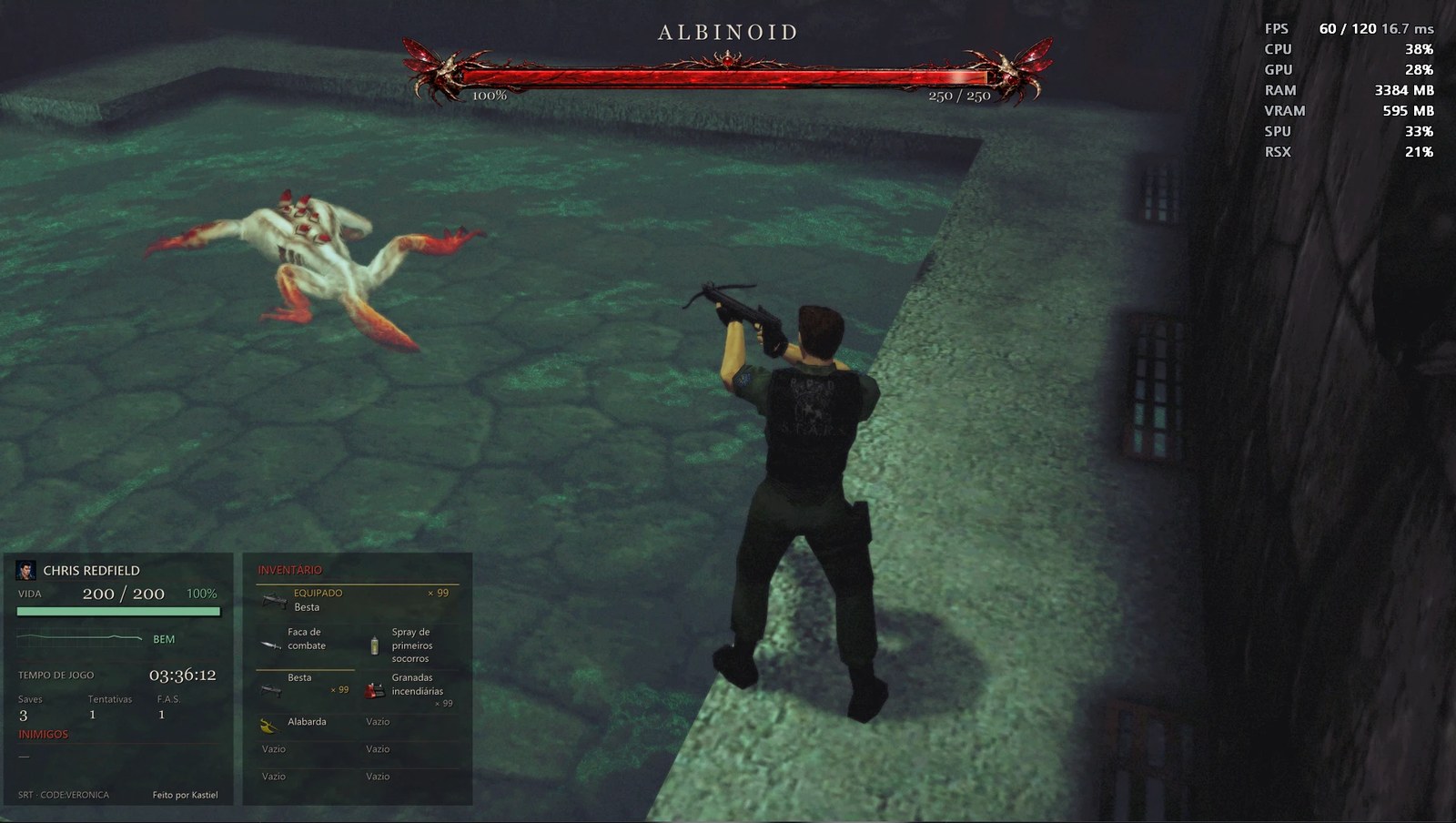
Native SRT and boss health bar during gameplay.
View the SRT panel in detail
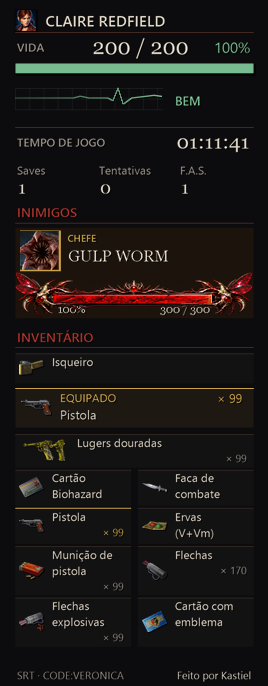
A native SRT (speedrun tool) overlay drawn by the game itself, toggled with F8:
- Character name and portrait, health (value, percentage and status: fine, caution, danger, poisoned, gas).
- In-game time, saves, retries and first-aid sprays (F.A.S.).
- Enemies with health bars and portraits, and boss health bars (in the panel, or centered at the top or bottom of the screen).
- Inventory with the equipped weapon, ammo and the game's own item icons, read from your game files.
- Any corner, row or column layout, inventory beside or below, size from 50% to 200%, background opacity, border, panel language, or a separate window you can place anywhere (for example on a second monitor or in OBS).
- LiveSplit official catalog: in Edit Splits → Game Name, enter exactly Resident Evil: Code: Veronica X (PS3 Recomp), then click Activate → Settings. Select Compare Against → Game Time for load removal. The optional ZIP includes ready-made Any%/S-Rank splits with icons and catalog setup instructions. Setup guide.
Practice tools, saves and items
- Archives window (
F7, enabled in Cheats): load any room or map (with the room's entry point) to practice a section, save anywhere into an independent save library with thumbnails, and load those saves at any time. - Item menu (
F6, enabled in Cheats): put any item or weapon in the current character's inventory, or take one out, without leaving the game. - Cheats: infinite health and infinite ammo, switchable during play.
- Patches: skip door animations, skip the opening logos and intro, plus your own patches in RPCS3's
patch.ymlformat. - Choose where saves are stored.
In-game RECOMP SETTINGS and character swap
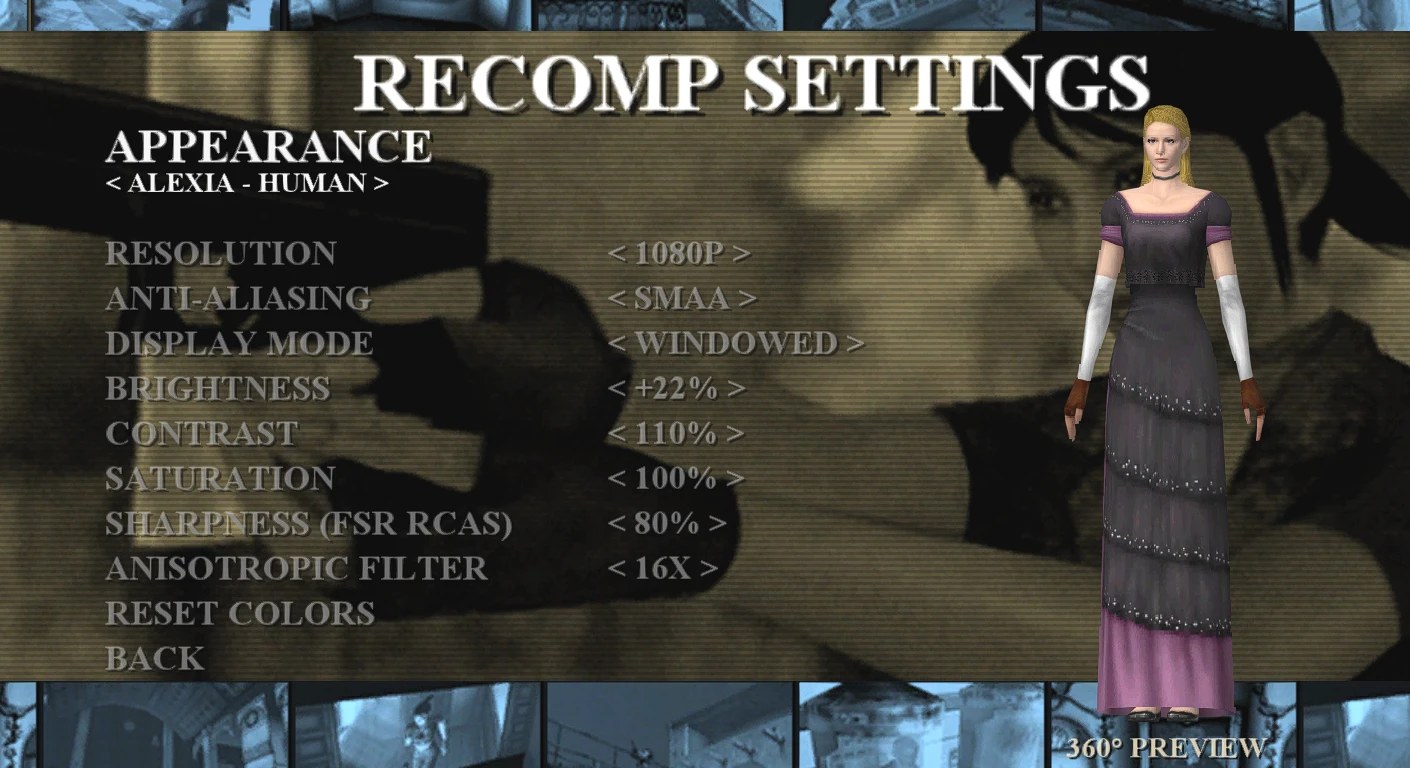
In the game's own OPTION menu, the RECOMP SETTINGS page changes resolution, anti-aliasing, display mode, brightness, contrast, saturation, sharpening (FSR RCAS) and anisotropic filtering without opening the launcher, with Reset colors to go back to the defaults.
At the top of the same page, APPEARANCE lets you play as another character model: press left/right to choose and see it in a rotating 360° preview. There are 33 options: Claire (original and alternate outfit), Chris, Steve, Wesker, 26 zombie variants and two forms of Alexia (first form and human). The chosen look is also applied when you play as Chris, Steve or Wesker. It only changes how the character looks; the story, the controls and your save stay the same.
Controls
- Xbox (XInput), PlayStation (DualShock 4 and DualSense) and Nintendo Switch controllers, plus keyboard, all at the same time.
- Vibration with an adjustable strength (0–200%).
- Any key or button can be remapped, with several keys per action.
- On-screen button icons for PlayStation, Xbox, Switch or keyboard, chosen automatically from the last device used, in HD.
Patches
The Patches page lists changes to the game's own code. They apply at once, even while the game is running.
- Skip door animations: the next room loads right away, without the door-opening animation (by Kapdap, from the RPCS3 patch list).
- Skip logos and intro: the game opens straight on the title screen, without the CAPCOM / MT FRAMEWORK logos and the intro movie.
- Your own patches: choose a folder with RPCS3
.ymlpatch files (the same format as RPCS3'spatch.yml). The patches for your game version are listed with their own switch. Patches that would change code this build was not compiled with are shown as unavailable.
Texture mods (experimental)
The port can replace the game's textures with PNG or DDS images and can also extract the original textures for you, already with the right names. Everything is on the Mods page of the launcher.
How the names work. Every texture has a code: 16 hexadecimal characters at the start of the file name, for example
1A2B3C4D5E6F7081_512x256_DXT5.png
└──── code ────┘ └size┘ └format┘
Only the code matters. A replacement can use a different resolution (a 512×256 texture can become 2048×1024 for HD), but its name must start with the same code. Packs accept .png and .dds, including mixed folders. If both use the same code, DDS takes priority.
DDS: 2D BC1/DXT1, BC2/DXT3, BC3/DXT5, BC7 and common RGB/RGBA/BGRA formats. Cutout and soft transparency are preserved; premultiplied-alpha files (including DXT2/DXT4) must be converted to straight alpha first. Compatible BC blocks remain compressed on the GPU, and supplied DDS mipmaps are used without recompression. BC7 requires base dimensions divisible by 4; small or unaligned BC1/2/3 textures fall back to RGBA. Cubemaps, arrays, volumes, HDR and other formats are not supported replacements; invalid or unsupported files leave the original texture in use.
Export: on the Mods page, choose Export format → PNG or DDS. This saved setting applies both to extraction during play and Extract textures from all maps. Full DDS extraction preserves stored DXT blocks and mipmaps; ARGB textures are exported as RGBA8 without additional quality loss. During play, DDS exports the base level: DXT stays compressed and other textures use RGBA8. Exported files still use PS3 codes and never overwrite existing files.
This support is part of the current source and requires a new build. Previously generated v1.0 distribution ZIPs are not updated automatically.
Step 1 — Extract the textures (to know the code of each one)
- Open the launcher and go to Mods.
- Choose an extraction mode:
- Extract textures from all maps: reads the game files without playing. Select it and click Start extraction. It takes a few minutes, shows its progress and can be canceled. A CSV file lists which game file each image came from.
- Dump textures from visited rooms: turn it on and play; every new texture that appears (rooms, characters, items, effects) is saved. Use it for images the game creates while running, which are not stored in the files.
- The files go to the Extracted textures folder (by default
mods\texture-dumps\<version>next to the executable). Existing files are never overwritten, so your edits are safe.
Step 2 — Make the mod
- Copy the PNG or DDS files you want to change and edit them (or upscale them) in any image editor.
- Keep the code at the start of the name. You may change the size.
- Put them in the Mod textures folder (by default
mods\textures), inside the subfolder of your version:NPEB00553,NPUB30467orNPJB00135. Without a subfolder, the folder itself is used for all versions. Subfolders inside it are allowed, so you can organize the pack as you like.
Step 3 — Use it
- Turn on Replace textures on the Mods page (restart the game if you changed the mod folder).
- In game, press F9 (controller: R1+R2+L1+L2+□ / RB+RT+LB+LT+X) to compare the mod with the original textures at any time.
- Big packs do not cost memory up front: each file is only loaded when its texture appears on screen.
Tip
Adapting PS2 HD texture packs. DDS files in the formats above can be used directly, without converting to PNG. Use Extract textures from all maps to obtain PS3 references, identify each matching image, and rename the pack file with its **16-characte