RE: Outbreak Recomp
RE: Outbreak Recomp is a PC port of Resident Evil Outbreak for PlayStation 2 with online co-op, mods, and cheats.
- Type: PC port
- Game: Resident Evil Outbreak
- Runs on Windows
- By Ninjacornix
- Latest release v1.0.20-rc1, 2026-10-31
- Source: https://github.com/Ninjacornix/reo
README
RE: Outbreak — Resident Evil Outbreak Native PC Port






Resident Evil Outbreak (PS2, Biohazard Outbreak) running natively on PC, built with static recompilation and a PS2 compatibility runtime — not an emulator. Play Outbreak File #1 from start to finish, with online co-op through openSNAP, a randomizer, cheats, controller support and modern video settings up to 4K.
Latest release: v1.0.19 | Download for Windows | Requirements | All releases
This is an unofficial fan project. You must provide your own legally obtained game data. Game files and generated game code are not included.
Features
- Outbreak File #1 is fully playable — menus, scenarios, cutscenes, movies, audio and saves, on Windows x64.
- Online co-op (up to 4 players) through the bundled openSNAP server: host from the launcher, friends join by address or LAN discovery. No registration, no external account.
- Mods — Randomizer: seeded weapon, ammunition, item and enemy-spawn randomization, shared from the host to every co-op player. Create your own mod.
- Cheats: health, infection, ammunition and progression unlocks, plus a supported subset of PCSX2
.pnachcheats. - Controller support: DualSense (light bar and rumble), Xbox / XInput controllers and keyboard, with full remapping.
- Video settings: HD, Full HD, 2K and 4K output, 2× / 4× internal resolution, 16:9 or 4:3, FXAA / SMAA anti-aliasing, anisotropic and linear texture filtering, brightness and gamma, borderless fullscreen and a performance counter.
- Audio mixer: separate master, music, effects, voice and menu volume.
- One-click launcher: checks your ISO, builds the game locally, manages memory cards, logs and updates.
Get started
- Install the .NET 8 Desktop Runtime (x64) if you don't have it, and keep your graphics driver current (Vulkan is required).
- Download RE-Outbreak-v1.0.19-Windows-x64.zip from Releases, extract it into a new folder and open
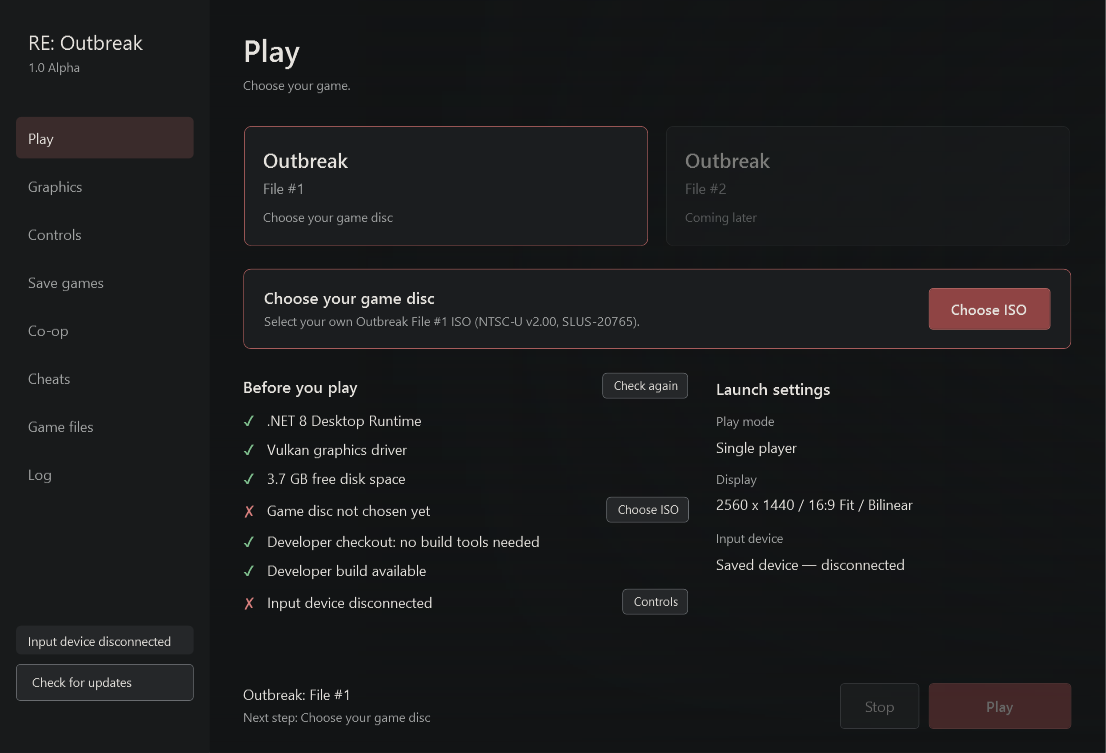
Outbreak.Launcher.exe. - The Play page tells you the next step. Click Choose ISO and pick your own Outbreak File #1 NTSC-U v2.00 ISO (SLUS-20765). The launcher checks it and shows a green ✓ when it is supported.
- Click Build game. This one-time setup imports the disc, prepares the build tools (about 173 MB, reused if the exact compiler is already installed) and compiles the game. It needs Internet and about 10 GB of free space, and can take over an hour. Progress stays visible at the bottom of every page.
- Click Play.
The Play page's Before you play checklist shows what is ready (✓) and what is missing (✗), with a button for each fix: Get driver opens your graphics card maker's driver page, Free up space opens Windows storage settings, Choose ISO picks your disc. .NET itself must be installed before the launcher can open; Windows offers the download link if it is missing.
Later launches reuse the finished build. After a build, the launcher deletes its temporary generated sources and keeps only a compile cache (about 1.2 GB) so future updates rebuild only what changed. Remove game in Game files deletes the imported disc data, the built game and that cache; your ISO stays, and saves and build tools are only removed if you tick those options. No compiler installation, environment variable or terminal command is needed. Keep the ISO available; the game reads it directly.
Already compiled the game with a compatible launcher? In Game files, click Use existing build and choose reo_recomp.exe from that build folder. Keep the folder complete (local-build.json, DLLs and the reo-gpu-present shaders). Your ISO is still required.
Status
- Outbreak: File #1: fully playable on Windows. Performance can still vary in CPU-heavy rooms.
- Outbreak: File #2: a placeholder in the launcher; not playable yet (port in progress).
- Launcher: guided first-run setup, ISO check before import, local build with cached reuse, display and filtering options, controller remapping, memory cards, cheats, logs, co-op hosting/joining and GitHub release updates.
- Online co-op: working through openSNAP for up to four players; see below.
- Mods: enable Randomizer for File #1 to randomize weapons, ammunition, common items and enemy spawns from separate seeded pools. Keys and starting equipment stay fixed; scripted enemies retain their original family. See Creating a mod. Cheats: built-in health, infection, ammunition and progression-unlock options plus a supported subset of PCSX2 data cheats.
GPU rendering is implemented through paraLLEl-GS.
The development build offers named window resolutions: Native (512 × 448), HD (1280 × 720), FHD (1920 × 1080), QHD / 2K (2560 × 1440) and 4K (3840 × 2160). Existing window sizes remain available. Windows may limit window sizes larger than the desktop; borderless fullscreen uses the desktop resolution. Internal resolution separately chooses Native, 2× (1024 × 896) or 4× (2048 × 1792) scene rendering before output scaling; higher settings increase GPU load. The 4× option requires GPU sampling support; unsupported devices report an error instead of silently substituting 2×.
The development renderer prepares the selected resolution's shaders before gameplay and reuses its pipeline cache on subsequent launches. The launcher shows preparation progress; a first run or a driver cache reset can take longer. Compiler work finishes before gameplay starts. On Windows, the game requests precise timers and opts out of process power throttling while running, restoring the previous policy on shutdown. These changes reduce compilation and scheduling hitches; they do not guarantee a constant update rate in CPU-heavy rooms.
Only File #1 NTSC-U v2.00 (SLUS-20765) is supported. Before extraction, the launcher checks SYSTEM.CNF's boot executable, identifies known game/region serials and verifies the executable SHA-256. PAL, Japanese, File #2, unknown games and other/modified executable revisions get a specific error beside the ISO controls. The ISO filename and SYSTEM.CNF's VER field do not establish the game revision.
Report problems on the issue tracker. The previous v1.0.0 game-binary package remains withdrawn.
For development builds, see Building on Windows. Existing local executables and generated sources are preserved for development and are not public release assets. Maintainers can follow prerelease preparation for the repository and package requirements. Native Linux support is in development; no playable Linux package is currently available.
Online co-op
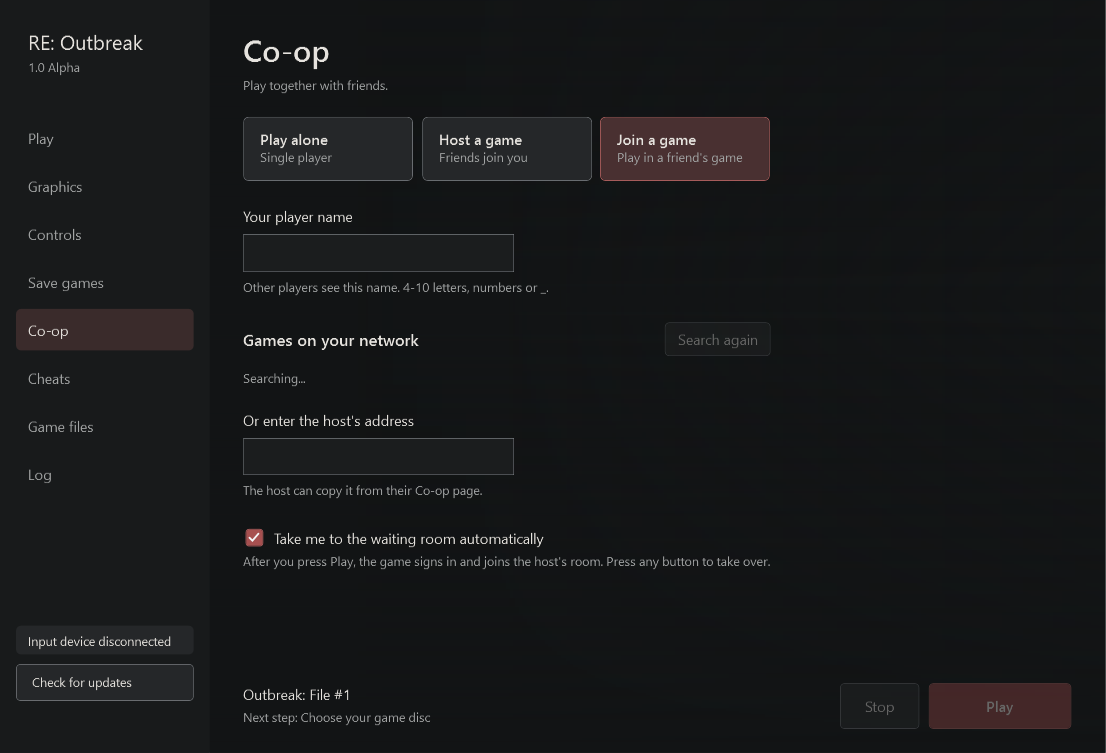
Open Co-op, pick Host a game or Join a game, and enter a player name. There is no registration or password: the launcher creates the account on the host's server for you.
- Host a game opens your game for friends right away. Choose the address they should use (home network, VPN or internet) and click Copy address. The first time, the launcher prepares the hosting server: it uses an installed Python 3.12 if you have one, otherwise it downloads a private copy, then installs the server packages into Local AppData. Later starts reuse it.
- Join a game lists games hosted on your network, or you can type the host's address.
- With Take me to the waiting room automatically (on by default), pressing Play signs in and brings you to the host's room. The host opens a room for four players; friends join it. Press any button to take over at any point. The host chooses START SCENARIO.
Playing over the internet needs the host to be reachable. The easiest way is a VPN such as Tailscale or ZeroTier. Otherwise forward these ports to the host (the launcher can ask your router through UPnP):
| Port | Use | Can it change? |
|---|---|---|
| UDP 9090 | Login | No, built into the game |
| TCP 10127 | Game app server | No, built into the game |
| UDP 9091 | Game server | Yes, under Ports |
| TCP 10128 | Player sign-up (was TCP 80 before v1.0.12) | Yes, under Ports |
| UDP 10129 | Finding the host and sharing session settings | Yes |
If a port is busy, the launcher names the program using it. Internet play cannot always work behind carrier-grade NAT without a VPN. Hosts' IP addresses are visible to the players who join them.
What works: hosting from the launcher, automatic sign-up, joining over LAN or the internet, shared randomizer settings from the host, and playing a full scenario together. Movement, pickups, removal of collected items, duplicate-pickup prevention and ammunition changes stay in sync on every client, and enemies spawn in the same order with the same health. See server setup for advanced overrides and networking notes for details.
Developer page (next release)
The launcher's Developer page turns on diagnostic recordings, saved in each game's session folder. Leave them off for normal play.
| Toggle | Setting | Records |
|---|---|---|
| Packet timing | REO_COOP_TRACE_FILE | Every co-op packet's time, direction, size and header (coop-trace.jsonl); full payloads, including login, are removed when the game closes |
| Network transport log | REO_NET_TRACE | Socket calls and results in stderr.log |
| SN@P packet log | REO_SNAP_TRACE | The first 64 game protocol packets in stderr.log |
| Frame timing | REO_FRAME_PACING_FILE | Per-frame timing for about 9 minutes (frames.csv) |
| Game clock and player position | REO_GAME_CLOCK_LOG | File #1 game clock, room and player position for 10 minutes (clock.csv) |
Source layout
| Directory | Purpose |
|---|---|
launcher/ | Windows launcher and input adapter |
recomp/ | Recompilation configuration and game-specific overrides |
runtime/, src/ | Original runtime/scaffold components |
tools/parallel_gs_backend/ | Graphics backend and movie/geometry integration |
tools/ | Extraction, generation, diagnostics and regression checks |
third_party/ | Pinned PS2Recomp submodule and local dependency patches |
game/, media/, network/ | Format, media and network components at varying implementation stages |
Generated sources, captures, saves, build outputs and private handoffs remain local. See developer tools and CONTRIBUTING.md.
License
This fork's original contributions are GPL-3.0-only. Inherited upstream and third-party components retain their licenses and attribution; see LICENSE and NOTICE.md.
Resident Evil and Outbreak are trademarks of their respective owners. This project is not affiliated with or endorsed by Capcom or Sony.
Keywords: Resident Evil Outbreak PC, Biohazard Outbreak PC port, RE Outbreak Windows, PS2 static recompilation, PS2Recomp, Resident Evil Outbreak online co-op, openSNAP, Outbreak randomizer, Outbreak File 1 PC, native PS2 port.