SAROS Recomp
Saros-Recomp is a Windows port of Saros that targets 120 FPS at 1440p and includes performance benchmarks.
- Type: PC port
- Game: Saros
- Runs on Windows
- By portingpete
- Latest release v0.2.0-windows-drop-in, 2026-11-22
- Source: https://github.com/portingpete/Saros-Recomp
- Website: https://portingpete.github.io/Saros-Recomp/
README
Saros on Windows
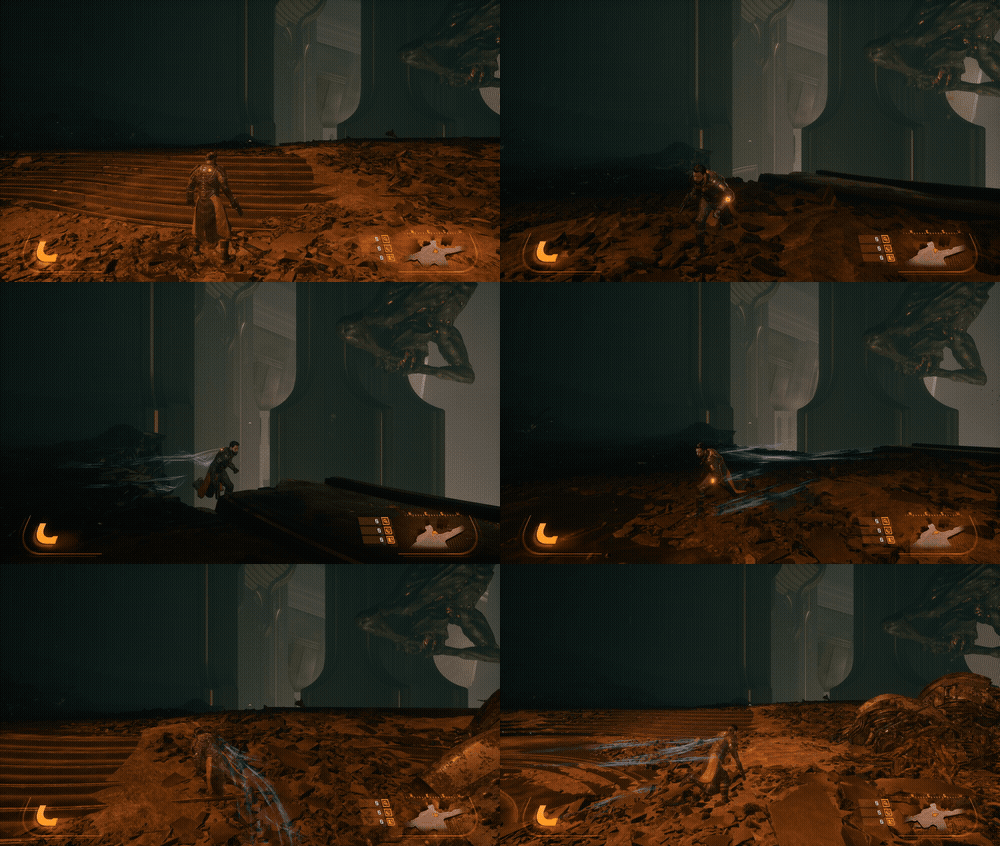
Watch the prologue recording and see the latest movement benchmark.
This project tracks a Windows recompile using AnyPS5. The target is 120 FPS at a native render resolution of 2560 × 1440. Terra measures two 30-second prologue routes with simultaneous character movement and camera rotation. Each 10 FPS gain in their combined average gets a new recording and benchmark entry.
The benchmark runner reads the last published average from GitHub and checks the next 10 FPS gain or the final 120 FPS target. It counts completed game frames over the total time for both routes and checks the engine frame rate, internal render scale and clean exit. When a run qualifies, Terra reviews images from both routes and the new gameplay recording for visible movement and complete scenery. An accepted run publishes the recording and benchmark entry together.
Play on Windows
Download Saros for Windows (74 MB)
- Extract the ZIP. For best disk use, put it on the same NTFS drive as your game.
- Drag your own Saros folder onto Play Saros.exe. You can also double-click the launcher and select the folder containing
eboot.bin. Use the extracted, decrypted PPSA07631 version 01.000.000. - On the first two screens, hold Enter for about three seconds. Use WASD to move. Open Play Saros.exe again to resume.
The kit includes the host, renderer and tools. It builds 41 Windows images locally, prepares native 2560 × 1440 output, and keeps your saves under Saros Windows/play/_sd inside the kit. First launch and entering new areas can pause while shaders compile.
Terra tested the exact download with an empty save and empty game shader cache on Windows with an RTX 5080. The test reached the Movement & Camera tutorial, verified forward movement, camera rotation and strafing, and closed normally. A second launch reopened the same save with a double-click, reused all 41 generated images and verified movement again. This release has been verified through the opening prologue. Gameplay capture · Fresh-install and resume evidence · Source downloads and checksums · Launcher CLI
Native 1440p benchmarks
The drop-in release averaged 33.57 in-game FPS on the route-warmed run. The tight route reached 40.98 FPS and the wide route 26.16 FPS. The first pass with only the prologue cache averaged 26.23 FPS. The wide runs followed different paths, and eight compute pipeline stalls of at least 100 ms overlapped 7.43 seconds of the warm wide run. Release timings · Six gameplay frames
The earlier benchmark renderer averaged 41.02 FPS, then 38.51 FPS on a repeat. Its independently built counterpart averaged 39.76 FPS with a warm cache. Those results cover two moving prologue routes at 100% internal scale, with FXAA enabled and frame generation disabled. The drop-in release uses a different renderer. Route timings and renderer hashes · Original v0.1.0 source kit
Other rendering experiments
A separate frame-interpolation experiment produced 66.16 completed flips per second at native 1440p while the game advanced 33.11 frames per second. The benchmark includes both moving routes, six consecutive swapchain images and the renderer source changes. Interpolation results and build instructions
The Windows optical-flow build at 2560 × 1440 reached 122.04 and 123.15 driver-reported scanouts per second on the two moving routes. The game engine advanced at 29.80 and 29.91 FPS with five generated images per original frame. Repeating those routes with the same build produced 114.79 and 109.58 refresh-separated scanouts per second. Display timing, source patch and launcher
The Windows build scripts reproduce the executable, all 40 guest modules and the native display configuration from your local game files. The 30.96 FPS milestone includes its measured settings and a launcher for an assembled installation.
Build and launch instructions · Measured milestones · Movement video