Screamer Trilogy Launcher
Screamer Trilogy Launcher is a tool for Windows and Linux that launches Screamer, Screamer 2, and Screamer Rally with features like widescreen and extended draw distance.
- Type: tool
- Game: Screamer, Screamer 2, Screamer Rally
- Runs on Windows and Linux
- By AkitaOnRails
- Latest release v0.8.0, 2026-11-03
- Source: https://github.com/akitaonrails/rea-screamer-trilogy
README
Screamer Trilogy Launcher
Play your own copy of Screamer (1995), Screamer 2 (1996) and
Screamer Rally (1997) on Windows 10/11, the Steam Deck and Linux, with
native Windows and Linux builds. Point the launcher at one game's folder
or at a folder holding all three, and press Play. DOSBox, the game's
setup and the controller support come with it: no SETUP.EXE, no DOSBox
configuration, no mapper files. Your game folder is only read, never
changed; the launcher plays from a private copy.
This project contains no game files: you need your own copy of the games.
Played end to end on a Linux desktop (all three games). Native Windows 10/11 and the Steam Deck have not been tested with the real games yet; reports are welcome in the issues.
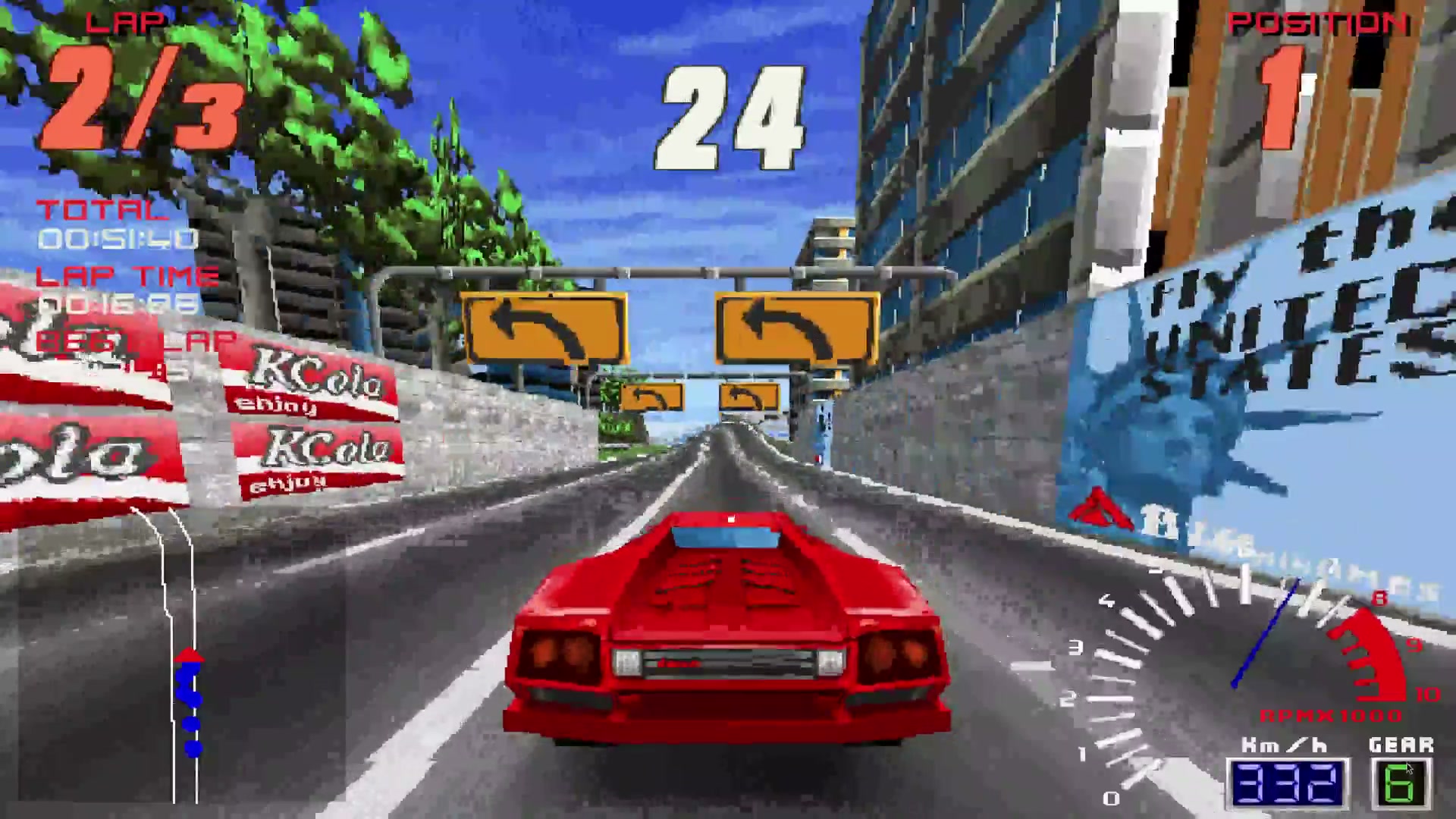
Screamer (1995) running through the launcher with the Enhanced look on Linux. Click to watch (2:02, with sound).
Problems this launcher solves
| Problem | What the launcher does |
|---|---|
| The games are MS-DOS programs and need DOSBox, a sound card setup and a joystick setup before they start. | Ships its own DOSBox (dosbox-staging) and writes the games' sound, path and controller settings for you before each start. |
| GOG's copies come as CD images with cue sheets, and the music is on the CD's audio tracks. | Finds the CD image in your folder and mounts it with its music. |
Screamer 2's 3dfx version doesn't run from GOG's copy, and the 3dfx versions quit with MAXCACHE or a Glide error partway through. | Uses Screamer Rally's DOS 3dfx driver for Screamer 2 when both games are in the folder, and fixes the texture-cache bug that made them quit. |
| A few spots in the games crash or hang under DOSBox (the graphics mode, the memory check). | Fixes them in the private copy of each game it recognises. |
| The picture is 4:3 and gets stretched on a widescreen. | 16:9 widescreen that shows more to the sides instead of stretching (seen in Screamer; see Known limitations). |
| Scenery pops in close to the car. | Extended draw distance: scenery and cars appear farther ahead. |
| A modern gamepad isn't seen, or steers like a digital joystick. | Analog steering, trigger pedals, rumble and your own button layout, with the pad and the keyboard working together in menus and races. |
| Patching the game folder by hand risks your only copy. | Your folder is only read. The launcher works on a private copy and refuses any build it doesn't know, with a link to report it. |
Screenshots
| Play (Screamer 2) | Play (Screamer Rally) |
|---|---|
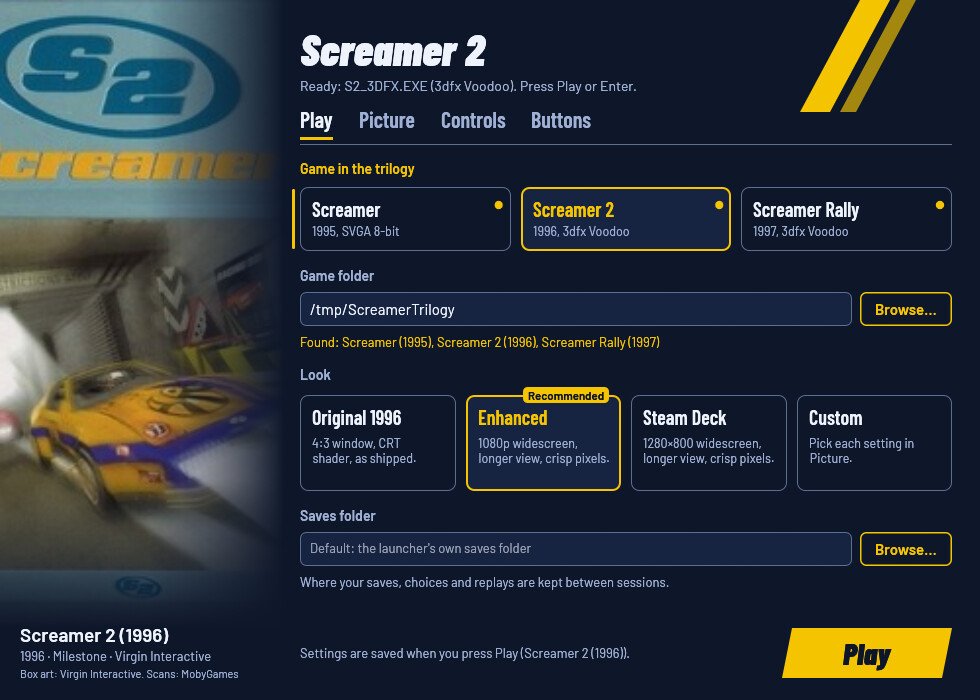 | 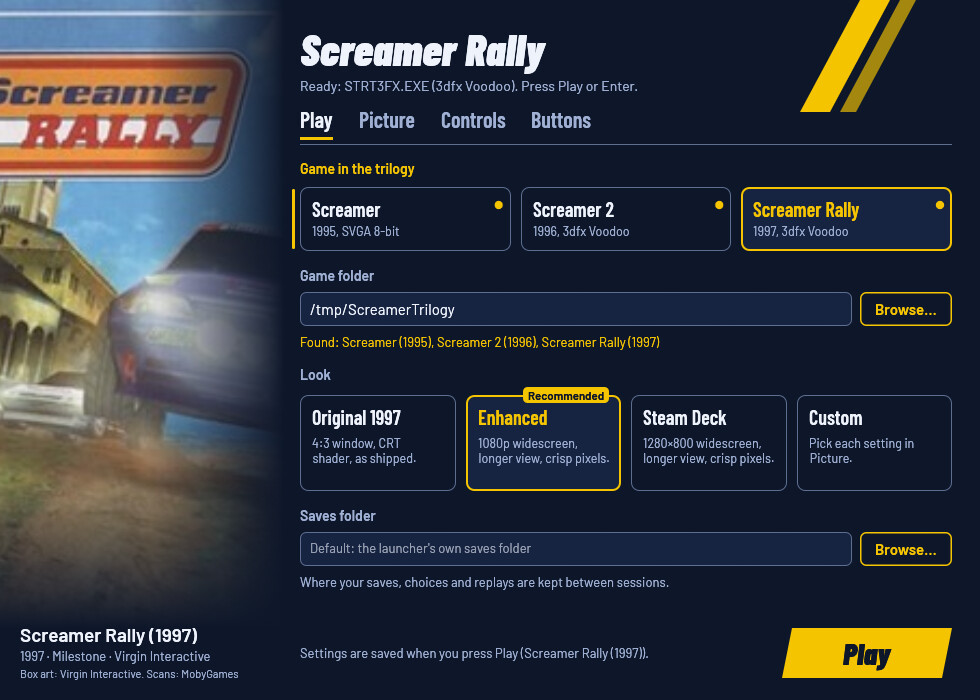 |
| Picture | Controls | Buttons |
|---|---|---|
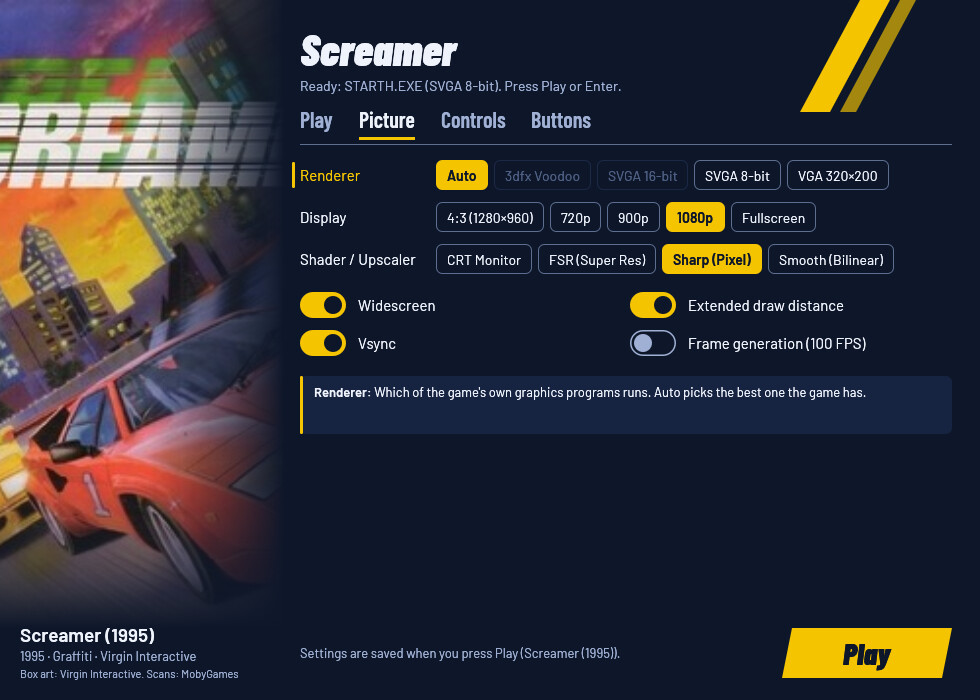 |  |  |
What you need
- Your copy of Screamer, Screamer 2 or Screamer Rally, or all three: the GOG releases or the original CDs. One game's folder works, and so does a folder holding the three games' folders.
- Nothing else: the launcher brings its own DOSBox.
The launcher recognises each game's programs (STARTH.EXE,
S2_3DFX.EXE, STRT3FX.EXE and the others) by their SHA-256. A program
with a game's name that it doesn't know is not used: the window and
--check show its SHA-256 and a link to the
unknown edition form.
Report the code, never the file.
Download and install
Download from the latest release:
- Windows:
ScreamerLauncher-v<version>-windows-x86_64.zip - Linux:
ScreamerLauncher-v<version>-x86_64.AppImageorScreamerLauncher-v<version>-linux-x86_64.zip
Windows
- Unzip it anywhere outside your game folder, for example
C:\Games\ScreamerLauncher. - Keep
ScreamerLauncher.exe,dosbox.exe, the DLLs and theresourcesfolder together. - Run
ScreamerLauncher.exe.
Steam Deck
- In Desktop Mode, keep the AppImage somewhere (for example
~/Games/ScreamerLauncher.AppImage) and make it executable (Properties → Permissions, orchmod +x). - Steam → Games → Add a Non-Steam Game to My Library… → Browse, and pick the AppImage. No Proton: it is a native Linux program.
- Back in Game Mode, start it from your library. The Steam Deck look is recommended on the Deck's screen, and the pad drives the window. Game Mode has not been tested with the real games yet.
Linux: AppImage
chmod +x ScreamerLauncher-v<version>-x86_64.AppImage
./ScreamerLauncher-v<version>-x86_64.AppImage
It contains the launcher, its DOSBox and the libraries they need. If gamescope is installed, the game runs in it at the size you chose, scaled to the screen; otherwise in a plain DOSBox window.
Linux: zip
Unpack it, for example into ~/Games/screamer-launcher, and run
linux/screamer-play (the window, then the game; it uses gamescope when
installed). screamer-play --play plays with the saved settings,
screamer-play stop ends the game, and screamer-play status says
whether it runs. linux/README.md has the details,
Steam and the environment variables.
First run
- Under Game folder, press Browse… and pick the folder with your game, or the folder holding all three.
- Pick the game under Game in the trilogy. Games not in the folder say so.
- Pick a look: Enhanced is recommended, Steam Deck on a Deck.
- Press Play (or Enter, or Start on a pad).
The first start copies the game into the launcher's private folder (about the size of the game's folder; code files are linked instead of copied when they are on the same drive, and CD images stay in your folder). Later starts copy only what changed.
The settings window
- Play: the game, your game folder, the look and where your saves are kept.
- Picture: which of the game's graphics programs runs (Auto picks the best one the game has), the window size, the shader, and switches for widescreen, draw distance, vsync and frame generation. A board under the settings explains the one you point at.
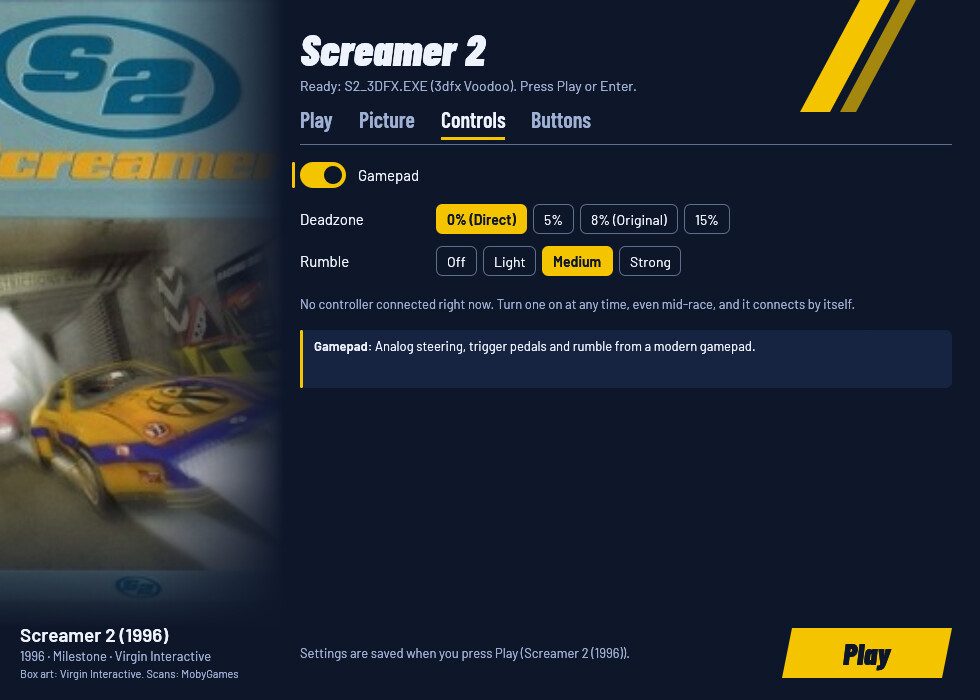
- Controls: the gamepad, its deadzone and rumble.
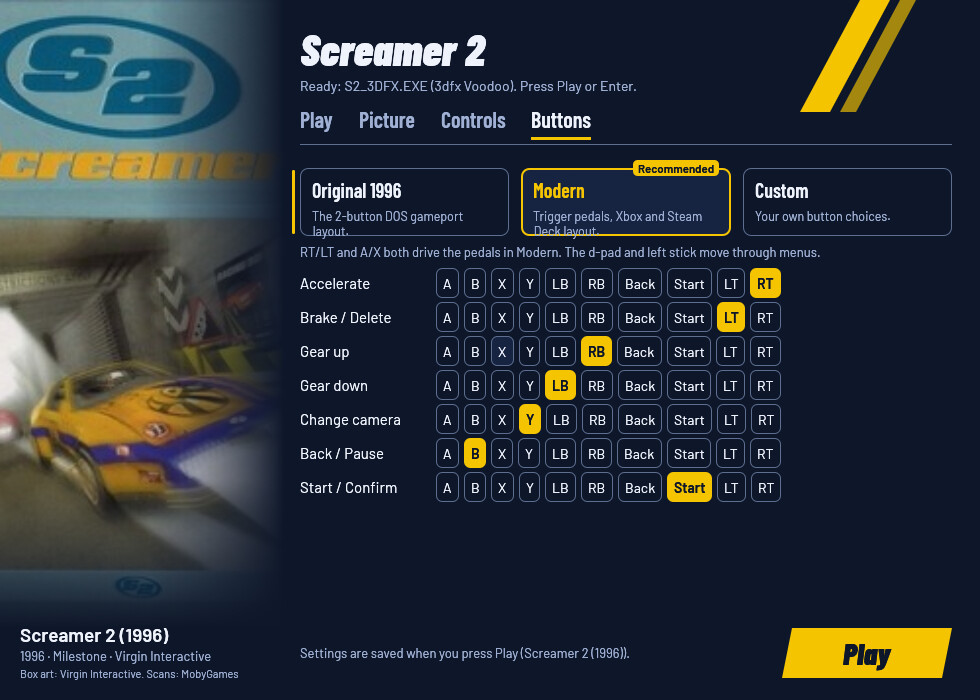
- Buttons: the button layout (Original, Modern or your own) and the button for each action.
| Look | Window | Widescreen | Draw distance | Shader | When to pick it |
|---|---|---|---|---|---|
| Original (1995, 1996 or 1997) | 4:3, 1280×960 | off | as shipped | CRT Monitor | The game as it shipped. |
| Enhanced | 1920×1080 | on | extended | Sharp (Pixel) | Recommended on a desktop or laptop. |
| Steam Deck | 1280×800 | on | extended | Sharp (Pixel) | Recommended on the Deck; picked automatically there. |
| Custom | your choice | Any change in the Picture tab. |
The first run saves the recommended look for your screen. Every look runs the game at its own 50 frames per second.
The window works with the keyboard alone (Tab moves, arrows change a row, Space switches, Ctrl+Tab changes tab, Enter plays) and with a pad (d-pad moves and changes, A switches, LB/RB change tab, Start plays). A greyed-out choice says why on the window, under its row (and when you point at it), for example a renderer the chosen game doesn't have.
Gamepad
The launcher reads the pad itself and gives the game analog steering, trigger pedals and rumble, in all three games. Turn the pad on at any time, even mid-race, and it connects by itself. The keyboard keeps working alongside it. Tested with an 8BitDo Ultimate 2.
The Modern layout (the default):
| On the pad | In menus and name entry | In a race |
|---|---|---|
| D-pad / left stick | Move | Steer |
| RT / right stick up | Accelerate (analog) | |
| LT / right stick down | Brake (analog) | |
| A | Confirm, type a letter | Full throttle |
| B | Back | Pause |
| X | Delete a letter | Full brake / reverse |
| Y | Change camera | |
| RB / LB | Gear up / down | |
| Start | Skip the intro, confirm your name | Confirm in the pause menu |
| Back / Select | Back | Pause |
Original is the two-button DOS gameport layout, and Custom lets you pick the button for each action in the Buttons tab.
Options
Every option has the same name in the window, in launcher.cfg
(underscores) and as a command-line flag (hyphens). launcher.cfg is
listed under Where things live; the first run writes it with every
option, commented out.
launcher.cfg / flag | In the window | Values | Unset | What it changes |
|---|---|---|---|---|
which / --which (or a bare 1, 2, rally) | Play: Game in the trilogy | screamer, screamer2, screamer-rally | screamer | Which game Play starts. |
game / --game | Play: Game folder | a folder | SCREAMER_GAME_DIR, else none | The folder with your game, or with two or three of them. Only read. |
saves / --saves | Play: Saves folder | a folder | the launcher's saves folder | Where your saves, choices and replays are kept between sessions. |
runtime / --runtime | (file and flag only) | a folder | the launcher's runtime folder | Where the launcher keeps its private copy of the game. |
dosbox / --dosbox | (file and flag only) | a dosbox-staging program | the bundled one | Runs the game with another DOSBox. |
look / --look | Play: Look | original, enhanced, steam_deck | none (the first run saves the recommended one) | Sets every picture option below at once, as the look cards do. Picture options set after it win; --look replaces the saved picture for one run. |
renderer / --renderer | Picture: Renderer | auto, 3dfx, svga16, svga8, vga | auto | Which of the game's graphics programs runs; Auto picks the best one the game has. |
resolution / --resolution | Picture: Display | WIDTHxHEIGHT, fullscreen, original (4:3, 1280×960) | 1920×1080 | The window size. |
texture_filter / --texture-filter | Picture: Shader / Upscaler | original (CRT), fsr, sharp, smooth | sharp | How the picture is enlarged: CRT look, FSR, crisp pixels or smooth. |
widescreen / --widescreen | Picture: Widescreen | on, off | on | On a 16:9 screen, shows more to the sides instead of stretching. |
extended_draw_distance / --extended-draw-distance | Picture: Extended draw distance | on, off | on | Scenery and cars appear farther ahead, so less pops in. |
vsync / --vsync | Picture: Vsync | on, off | on | Waits for the screen's refresh, so the picture never tears. |
frame_generation / --frame-generation | Picture: Frame generation (100 FPS) | on, off (the old fps_limit still works: 60 or more is on) | off | Shows 100 frames per second by blending a frame between each of the game's 50; the game runs as always. Experimental. |
scaler / --scaler | Picture: Scaler (Linux only) | nearest, pixel, fsr, linear | fsr | How gamescope enlarges the game to the screen (read by screamer-play). |
gamepad_axes / --gamepad-axes | Controls: Gamepad | on, off | on | Analog steering, trigger pedals and rumble from a modern pad. |
deadzone / --deadzone | Controls: Deadzone | 0 to 30 (percent) | 0 | How far the stick moves before the car steers (the game had 8). |
rumble / --rumble | Controls: Rumble | 0 to 100 | 60 | How strongly the pad rumbles when you brake hard. |
buttons / --buttons | Buttons | modern, original, or 8 button numbers | modern | The pad's buttons for accelerate, back, camera, gear down, brake, gear up, select and start. |
An unset key uses the launcher's default in the Unset column; the launcher writes the games' own setup files at every start, so there is no game value to keep.
On the command line, options override launcher.cfg for one run, and
only --game and --which are saved. The launcher's own switches:
--no-window: play with the saved settings, without the window.--settings [--linux]: only the window. Exit code 0: Play pressed; 3: closed without Play; 4: no window possible (play with the saved settings).--check: checks every game in the folder and every fix, without playing, and writes the report tolauncher.logtoo.--controllers: lists the connected pads.--help: every option and switch.
Exit codes for scripts: 0 played or checked, 2 an error (see
launcher.log), 5 the launcher or its game is already running (nothing
started), otherwise the game's own.
Where things live
| What | Windows | Linux |
|---|---|---|
Settings (launcher.cfg) and log (launcher.log) | %APPDATA%\ScreamerLauncher\ | ~/.config/screamer-launcher/ |
| The launcher's copy of each game (runtime) | %LOCALAPPDATA%\ScreamerLauncher\runtime\<game>\ | ~/.local/share/screamer-launcher/runtime/<game>/ |
Your saves (CHOICE.DAT, *.SAV, replays) | %APPDATA%\ScreamerLauncher\saves\<game>\ | ~/.local/share/screamer-launcher/saves/<game>/ |
screamer-play's logs and lock | ~/.config/screamer-launcher/ |
A launcher.cfg next to ScreamerLauncher is used instead (a portable
setup), and the log goes next to it. runtime = and saves = in
launcher.cfg choose other folders (never inside the game folder).
The games write their saves into the runtime copy. The launcher copies them to the saves folder when a game ends and back before the next start, so the saves folder holds your progress, and the runtime copy has a copy of it too.
Troubleshooting
- "… is a build this launcher does not know, SHA-256 … It is not used." Your copy has a program the launcher hasn't seen. Report the SHA-256 with the unknown edition form; never attach the file.
- "No Screamer, Screamer 2 or Screamer Rally in this folder." Pick
the folder that holds the game's programs (
STARTH.EXE,S2_3DFX.EXE,STRT3FX.EXE), or the folder above the three games' folders. - 3dfx Voodoo is greyed out for Screamer 2. GOG's Screamer 2 lacks the DOS 3dfx driver. Put Screamer Rally's folder next to it (in the same parent folder) and the launcher uses Rally's driver.
- The pad isn't seen. Run
ScreamerLauncher --controllers(orscreamer-play --controllers) to list the pads the launcher finds; wake a wireless pad before starting. - The window doesn't open (Linux, no display or OpenGL). The launcher
plays with the saved settings instead;
launcher.logsays why. - Anything else: run
ScreamerLauncher --check, then open a bug report withlauncher.log(remove personal paths). Never attach game files.
Known limitations
- The games run at 50 frames per second. Every attempt to raise it broke their physics, so it stays. Frame generation shows 100 frames per second on top of that (measured in a Screamer race).
- At the Enhanced and Steam Deck sizes, Screamer 2 and Screamer Rally draw their 3D at twice the original resolution in software and can show fewer frames: about 40 in Screamer 2 and 30 in Rally in a headless test on a machine that was also running other tests. The race itself keeps its speed. The Original look, or Frame generation, gives a smoother picture there.
- Widescreen in Screamer 2 and Screamer Rally was checked in screenshots only: the 3D view is wider without stretching, but the dashboard (speedometer, lap panel) is stretched to 16:9.
- The games' control setup (
CONFIG/CONTROLS.CFG) is written at every start. The games themselves never save it (only their setup program does, which the launcher never runs), so nothing is lost. - Not yet tested with the real games: native Windows 10/11, the Steam
Deck, 1440p and 4K screens, ultrawide screens. What was checked is in
docs/RUNTIME_NOTES.md.
Uninstall
- Back up your saves:
%APPDATA%\ScreamerLauncher\saves\on Windows,~/.local/share/screamer-launcher/saves/on Linux (or the folder you set assaves). The steps below delete them. - Delete the launcher's folder, or the AppImage.
- Windows: delete
%APPDATA%\ScreamerLauncher(settings, log, saves) and%LOCALAPPDATA%\ScreamerLauncher(the private copies of the games, about the size of your game folders). - Linux: delete
~/.config/screamer-launcherand~/.local/share/screamer-launcher, after copying the saves out. If you added it to Steam, remove the shortcut.
Your game folder was never changed, so there is nothing to undo there.
For developers
Rust (edition 2024) for the launcher and the hooks, MinGW-w64 (x86_64)
with lld for the Windows build (GNU ld 2.47 links an executable that
crashes before main), Wine for the Windows-target tests, cargo-deny;
the gaming distrobox has them all. Building the bundled DOSBox also
needs meson, ninja-build, pkg-config, libsdl2-dev,
libopusfile-dev, libspeexdsp-dev, libasound2-dev, libpng-dev,
zlib1g-dev and libgl1-mesa-dev, plus libwayland-dev and
libxkbcommon-dev for the settings window.
git submodule update --init --depth 1 vendor/dosbox-staging
./scripts/build-dosbox.sh                          # target/release/dosbox with the hooks linked in
cargo build --release --workspace                  # target/release/ScreamerLauncher
dosbox-staging is a submodule at vendor/dosbox-staging, patched with
patches/dosbox-staging-screamer-hooks.patch; the screamer-hooks crate
builds libscreamer_hooks.a, which is linked into it.
The checks (the same list as AGENTS.md):
cargo fmt --all --check
cargo test --workspace --locked                    # host tests, the window headless
cargo clippy --workspace --all-targets --locked -- -D warnings
cargo clippy --target x86_64-pc-windows-gnu --workspace --all-targets --locked -- -D warnings
cargo deny check
for t in linux/tests/*.sh; do sh "$t"; done
cargo build --release --locked --target x86_64-pc-windows-gnu
sh sdk/packaging/check-imports.sh target/x86_64-pc-windows-gnu/release/*.exe
sdk/scripts/wine-test --locked --workspace --target x86_64-pc-windows-gnu   # Windows-target tests under Wine, headless
sh <sdk>/scripts/sdk-sync --check .                # sdk/ matches the pinned SDK tag
- Moving to a new SDK:
sdk/scripts/sdk-bump vX.Y.Z(Cargo tags,sdk/, workflow pins; prints the Migration notes), thensdk/docs/playbooks/sdk-change.md. A weekly workflow opens that pull request by itself. - Freeing disk space:
sdk/scripts/clean(dry run), thensdk/scripts/clean --yes. - Golden snapshots of
--help, the template and what each look writes are incrates/screamer-launcher/tests/snapshots/. Review every diff;UPDATE_SNAPSHOTS=1 cargo test --test snapshotsaccepts one. - The real-game test:
SCREAMER_GAME_DIR=<folder> cargo test -- --ignored(read only). - CI (GitHub Actions, the SDK's reusable workflows) tests every push,
builds the Linux zip and AppImage and the Windows zip, and a
v*tag publishes them with build-provenance attesta