Sega Rally Revo Launcher
Sega Rally Revo Launcher is a tool for Windows and Linux that lets you play Sega Rally Revo at 4K without stutter.
- Type: tool
- Game: Sega Rally Revo
- Runs on Windows and Linux
- By AkitaOnRails
- Latest release v0.3.2, 2026-11-04
- Source: https://github.com/akitaonrails/rea-sega-rally-revo
README
Sega Rally Revo Launcher
Play your own PC copy of Sega Rally Revo (2007) on Windows 10/11, the Steam Deck and Linux (the AppImage, Proton or Wine), at 4K and without the stutter. Point the launcher at your game folder and press Play: everything the game needs is bundled and set up, with no patchers, winetricks, DLL overrides or registry edits by hand. Your game folder is only read, never changed: the launcher plays from a private copy.
This project contains no game files: you need your own copy of the game.
Played end to end with the Linux AppImage on a 4K desktop, menus and a full race with a gamepad. Native Windows 10/11, the Steam Deck, Steam's Proton and ultra-wide screens are not tested yet: reports are welcome (bug-report form).
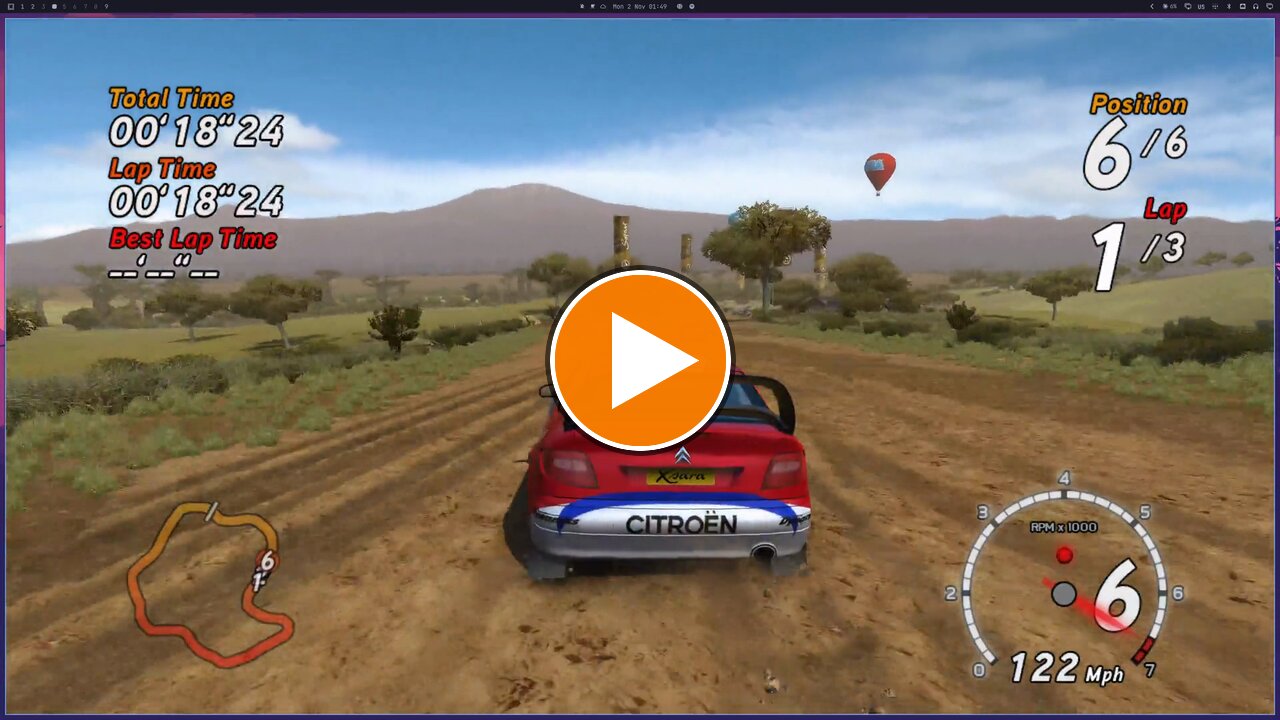
The AppImage on a Linux desktop (Hyprland, RTX 5090, 4K): Play in the launcher, the game's own start-up, then a Safari race on a gamepad with the stutter fix on. Click to watch (2:49, with sound; the first-run loading wait is cut out).
Problems this launcher solves
| Problem | What the launcher does |
|---|---|
The game wants registry entries, a config.ini and a Documents folder made by its installer or its settings tool, which misbehaves under Wine | Writes all of them itself, the way the original tool would, and keeps your controller bindings |
| Exclusive fullscreen crashes on multi-monitor and high-refresh Linux desktops | Runs the game inside its own Wine desktop at the resolution you chose |
| On hybrid-GPU laptops and desktops the game renders on the integrated GPU and shows a black screen | Makes the game use the discrete GPU |
| Startup stalls on the logo videos under Wine | Turns the two logo videos off in the private copy |
| Every race microstutters, and Championship stages after the first judder | Applies the launcher's stutter fix (a clean-room rewrite after stuken's analysis) to the private copy |
| Frame pacing is uneven | Caps the frame rate at 60 fps, or 120 or off for high-refresh screens (Linux, Wine and Proton) |
| Community fixes overwrite your install | Everything happens in a private copy; your game folder is only read |
Screenshots
| Play | Picture | Controls |
|---|---|---|
 |  |  |
What you need
Your PC copy of Sega Rally Revo, version 4.0.6.0 (the English, French,
German, Spanish, Italian and Polish release). The launcher plays the clean
SEGA Rally_SSE1.exe (the stutter fix needs this one) or the no-DVD
SEGA Rally.exe found in common copies, as they are: it can't and won't
remove a disc check or any other DRM.
The launcher checks the exact game files before it changes anything. A
version it doesn't know is refused with a code (its SHA-256) and a link to
report it on the
unknown-edition form.
Report the code, never the game files. The retail DVD's own
SEGA Rally.exe isn't known yet.
The supported files, to check by hand
| File | SHA-256 |
|---|---|
SEGA Rally_SSE1.exe (clean) | 22655a54bad6932239ade58325703bd4b5a2020376737748026443fa5aadf76e |
SEGA Rally.exe (no-DVD) | ad84ecea6ac5e86e1f1a420f07595866429bba63e7c489b40661a8032ba391d7 |
Download and install
Download from the latest release:
SRRLauncher-<version>.zip (Windows, and Linux with your own Wine) or
SRRLauncher-<version>-x86_64.AppImage (Linux, Steam Deck).
Windows
- Unzip
SRRLauncher-<version>.zipanywhere outside the game folder. - Run
SRRLauncher.exe.
The launcher is not signed, so the first start from a downloaded zip may show "Windows protected your PC": click More info, then Run anyway.
Steam Deck
- In Desktop Mode, keep the AppImage somewhere in your home folder and make it executable (right-click → Properties → Permissions).
- In Steam, Add a Non-Steam Game and pick the AppImage.
- Back in Game Mode, start it from your library. The Steam Deck look is recommended on a Deck.
Game Mode is not tested yet.
Linux: AppImage
chmod +x SRRLauncher-<version>-x86_64.AppImage
./SRRLauncher-<version>-x86_64.AppImage
It brings its own Wine and DXVK, so nothing else needs installing. Its
Wine prefix is ~/.local/share/srr-launcher/prefix, and your Linux files
are on drive Z: inside it.
Linux: Steam (Proton)
Add SRRLauncher.exe from the zip as a non-Steam game and force a Proton
version in its Properties → Compatibility. Proton then uses its own DXVK
(the frame limit still applies) and the GPU choice is left to Steam.
Linux: your own Wine
Run linux/srr-play from the zip:
srr-play            # settings window, then play
srr-play --play     # play with the saved settings, no window
srr-play stop       # end the game
srr-play status     # running or idle
The AppImage takes the same commands. Variables and a distrobox setup are in linux/README.md.
First run
- Start the launcher. On the Play tab, click Browse… and choose the
folder that holds
SEGA Rally.exeorSEGA Rally_SSE1.exe. Under Wine your Linux files are on driveZ:, e.g.Z:\home\you\Games\Sega Rally. - Pick a look (Modern is recommended, Steam Deck on a Deck) and leave the stutter fix on.
- Press Play (or Enter, or Start on a pad). The first launch copies the game (about 4.2 GB) into the private copy; later launches copy only the files that changed.
On Windows, press Download under Microsoft DirectX 9 files on the Play tab once. Windows 10 and 11 don't include the DirectX 9 files the game was built with, and their licence doesn't let the launcher ship them, so this fetches Microsoft's own package (100 MB) and puts the files in the private copy. On Linux the game runs without them. Nothing downloads unless you press the button.
The settings window
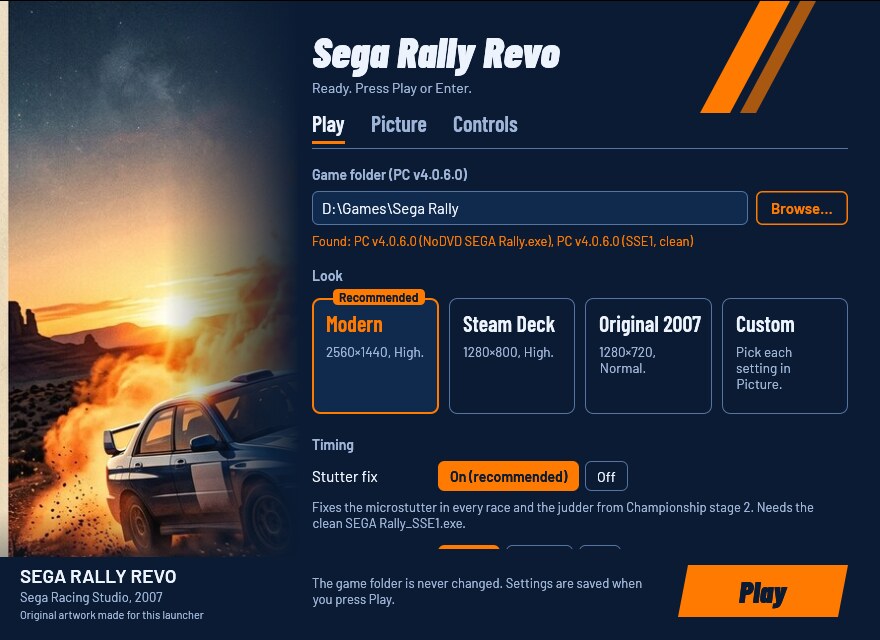
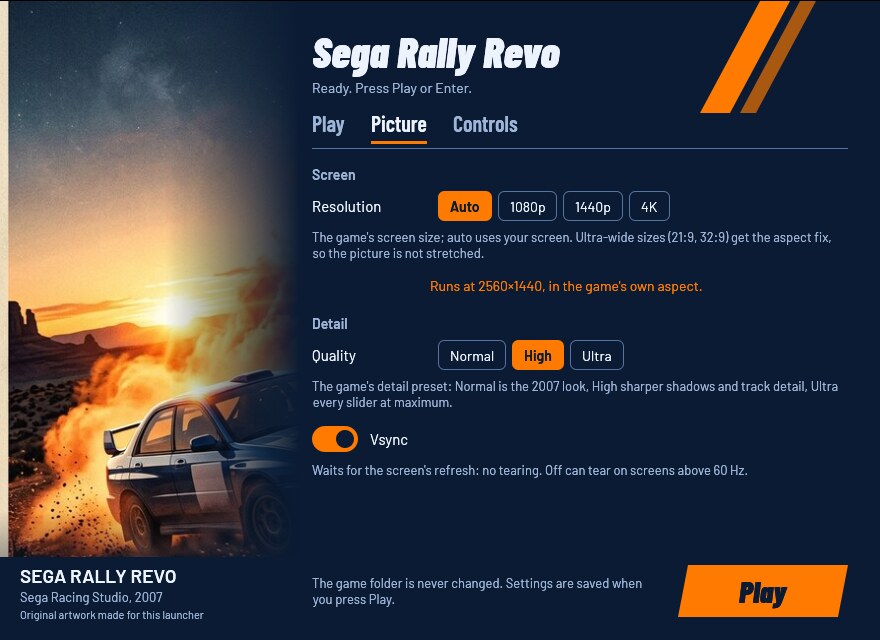
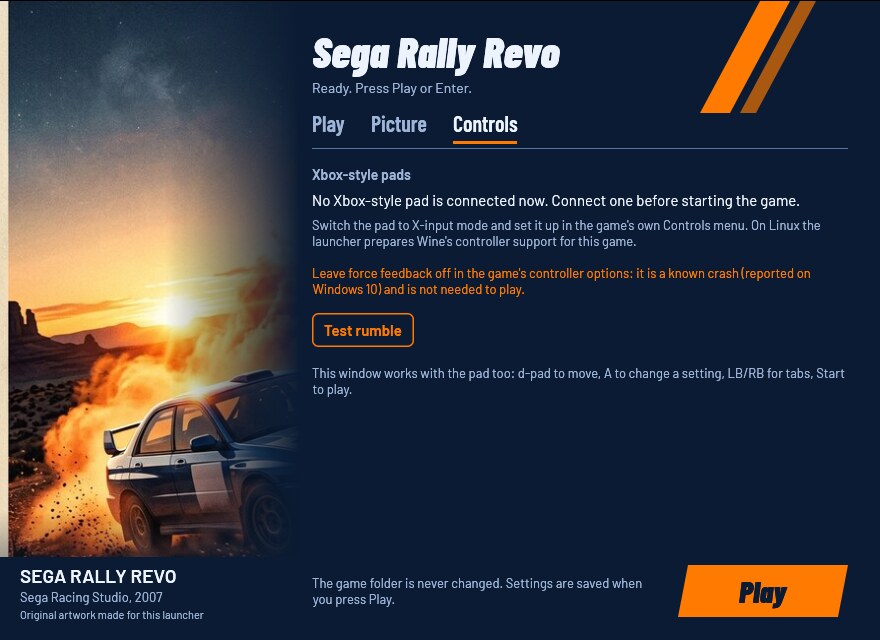
Play has the game folder, the looks, the stutter fix, the frame limit, the menu language and the DirectX 9 download. Picture has the resolution (with the size and aspect the game will run at), the quality and vsync; changing any of them turns the look into Custom. Controls shows the connected Xbox-style pads and has a Test rumble button, which only checks that the pad accepts rumble.
| Look | Resolution | Quality | Vsync | When to pick it |
|---|---|---|---|---|
| Original 2007 | 1280×720 | Normal | on | the game as it looked in 2007 |
| Modern | your screen | High | on | most screens (recommended) |
| Steam Deck | 1280×800 | High | on | the Deck (recommended there) |
| Custom | what you set on the Picture tab |
The first run picks the recommended look. The window works with a pad (d-pad to move, A to change a setting, LB/RB for tabs, Start to play) and with the keyboard alone (Tab to move, Space to change a setting, Ctrl+Tab for tabs, Enter to play). A greyed-out control says why when you point at it.
Gamepad
The game has its own gamepad support, and the launcher remaps nothing to the keyboard. Switch the pad to X-input mode and bind it once in the game's own Controls menu. On Linux the launcher sets up Wine's controller support for this game.
Keep the game's force feedback off: it is a known crash (reported on Windows 10) and adds nothing.
Keyboard
You can also drive with the keyboard. These are the game's keys, from its manual:
| Key | Action |
|---|---|
| A | Accelerate |
| Z | Brake / reverse |
| , (comma) | Steer left |
| . (period) | Steer right |
| Space | Handbrake |
| S | Shift up |
| X | Shift down |
| Left Ctrl | Change camera |
| Tab | Show or hide driver names |
| O / P | Time Trial: class up / class down |
The game has no menu to change these keys. The settings tool that came with the game can't change them either: it only sets up DirectInput pads and wheels. Changing keys is tracked in issue #1.
Options
Every option has the same name in the window, in launcher.cfg (with
underscores) and on the command line (with hyphens). Where launcher.cfg
is: Where things live. The first run writes a
commented launcher.cfg listing every option.
launcher.cfg / flag | In the window | Values | Unset | What it changes |
|---|---|---|---|---|
game / --game | Play: Game folder | a folder | asked on the first run | The folder with SEGA Rally.exe or SEGA Rally_SSE1.exe. It is only read, never changed. |
runtime / --runtime | — (file and flag only) | a folder outside the game folder | %LOCALAPPDATA%\SRRLauncher\SegaRally | Where the launcher keeps its private copy of the game. |
look / --look | Play: Look | modern, steam-deck, original, custom | the recommended look | A ready-made picture. On the command line it sets that look's resolution, quality and vsync for one run; other options still win. |
stutter_fix / --stutter-fix | Play: Stutter fix | on, off | on | Fixes the microstutter in every race and the judder from Championship stage 2. Needs the clean SEGA Rally_SSE1.exe; without it the game runs from SEGA Rally.exe and your choice is kept for later. |
frame_limit / --frame-limit | Play: Frame limit | 60, 120, off | 60 | The highest frame rate under Linux, Wine or Proton (through DXVK). On native Windows the game follows vsync and the control is greyed out. |
language / --language | Play: Language | English, French, German, Spanish, Italian, Polish | the game's (English when it has none) | The language of the game's menus. |
resolution / --resolution | Picture: Resolution | auto or WIDTHxHEIGHT | the game's (your screen on a first run) | The game's screen size; auto uses your screen. Ultra-wide sizes (21:9 such as 3440×1440, 32:9 such as 5120×1440) get the aspect fix so the picture isn't stretched. |
quality / --quality | Picture: Quality | normal, high, ultra | the game's (High on a first run) | The game's detail preset: Normal is the 2007 look, High sharper shadows and track detail, Ultra every slider at maximum. |
vsync / --vsync | Picture: Vsync | on, off | the game's (on on a first run) | Waits for the screen's refresh: no tearing. Off can tear on screens above 60 Hz. |
An unset option keeps the game's own value: once the game has its
config.ini, the launcher writes only the options set in launcher.cfg,
so a choice made in the game's menu stays. The window saves every value
when you press Play.
Any option on the command line skips the window and plays. Options
override launcher.cfg for that run only; only --game is remembered.
Wrong values are refused with a message saying what the option takes.
Older settings files keep working: frame-limit and stutter-fix are
still read, and old aspect and fullscreen lines are ignored.
The launcher's switches:
--settings: only show the settings window.--no-window: play with the saved settings, no window.--check: check the game folder and exit (exit code 1 if it can't play).--setup: prepare the private copy and the game's settings without playing.--download-directx: download Microsoft's DirectX 9 files, then exit. With the settings window open it exits with code 5 and tells you to use the window's Download button.--check,--setupand--download-directxdon't run while the settings window is open or the game runs: they say so and exit with code 5.--linux: set bysrr-playand the AppImage.--help: list every option.
--help, --check and errors print to the terminal you started the
launcher from, or show a message box when there is none. Exit codes for
scripts: after a game, the game's own exit code; 1 for an error or when
--check found a problem; 2 for a command line the launcher can't read
(an unknown option or a bad value: it prints the problem and --help's
list, and shows no message box when you started it from a terminal); with
--settings, 0 Play pressed, 3 closed without Play, 4 no window possible;
5 the game is already running (another launcher is running it, or it
is still running from the launcher's copy), or --check, --setup or
--download-directx found the settings window open.
The game always runs fullscreen. Under Wine that fullscreen is its own Wine desktop, a window of the chosen size on your desktop.
Where things live
| What | Windows | Linux (AppImage, srr-play) |
|---|---|---|
Settings (launcher.cfg) and log (launcher.log) | %LOCALAPPDATA%\SRRLauncher\ | in the prefix, drive_c/users/<you>/AppData/Local/SRRLauncher/ |
| The launcher's copy of the game | %LOCALAPPDATA%\SRRLauncher\SegaRally | the same path inside the prefix |
Your saves and the game's config.ini | Documents\SEGA Rally\Saved Games; rank tables and ghosts in Public Documents\SEGA Rally\Shared Data | the prefix's drive_c/users/<you>/Documents (Wine often links it to your ~/Documents) and drive_c/users/Public/Documents |
| DirectX 9 files (after Download) | %LOCALAPPDATA%\SRRLauncher\directx | the same path inside the prefix |
| Wine prefix | — | ~/.local/share/srr-launcher/prefix |
srr-play's logs and lock | — | ~/.config/srr-launcher |
A launcher.cfg next to SRRLauncher.exe is used instead of the one in
%LOCALAPPDATA% (a portable setup). Under Steam's Proton everything is in
Steam's compatdata/<appid>/pfx prefix.
The launcher creates the saves only when they are missing and never
deletes them. In an existing config.ini it leaves the audio and
controller settings alone.
Registry entries the launcher writes:
| Entry | Where | Why |
|---|---|---|
HKLM\SOFTWARE\WOW6432Node\Sega\SEGA Rally (or its VirtualStore copy under HKCU) | Windows, and the Wine prefix | the game's install values, the way its installer writes them |
HKCU\Software\Microsoft\DirectX\UserGpuPreferences, a value named after the private copy's game exe (…\SRRLauncher\SegaRally\SEGA Rally_SSE1.exe or SEGA Rally.exe) = GpuPreference=2; | Windows only, only when you haven't chosen a GPU for it | the game uses the high-performance GPU |
HKLM\System\CurrentControlSet\Services\winebus (DisableHidraw, DisableInput, Enable SDL, Map Controllers, each only when missing) | the Wine prefix | pads reach the game once, through Wine's SDL bridge |
HKCU\Software\Wine\X11 Driver UseEGL = N (only when missing) | the Wine prefix | the settings window draws through OpenGL GLX |
HKCU\Software\Wine\AppDefaults\<game exe>\DllOverrides, and the launcher's record of them under HKCU\Software\rea-launcher\DllOverrides\<game exe> | the Wine prefix | the bundled DXVK d3d9.dll is loaded |
Troubleshooting
- "This launcher supports the Sega Rally Revo PC v4.0.6.0 build": your game files are not a version the launcher knows. The message shows a code (SHA-256); report it on the unknown-edition form so the version can be added.
- The game doesn't start on Windows ("d3dx9_… .dll was not found") or
crashes at the main menu: press Download under Microsoft DirectX 9
files on the Play tab (or run
SRRLauncher --download-directx), then Play again. - Black screen while the game seems to run (Linux, hybrid GPU): check
the
GPU:linesrr-playprints when it starts; it should name the discrete GPU. - The pad does nothing in the game: switch the pad to X-input mode, then bind it in the game's Controls menu.
- "Sega Rally Revo is already running from this launcher": the game from an earlier start is still running. Quit it first.
- Anything else: run
SRRLauncher --check, then open an issue with the bug-report form and attachlauncher.log(remove personal paths). Never attach game files.
Known limitations
- Championship mode caps itself at 62.5 fps inside the game; the launcher can't change that.
- On native Windows the frame limit doesn't apply (no DXVK); vsync sets the pace.
- Not tested yet: native Windows 10/11 (including whether the game needs
the DirectX 9 download), the Steam Deck in Game Mode, Steam's Proton
running
SRRLauncher.exe, and the ultra-wide aspect fix on a real 21:9 or 32:9 screen. See docs/RUNTIME_NOTES.md.
Uninstall
- Back up your saves first:
Documents\SEGA Rally\Saved GamesandPublic Documents\SEGA Rally\Shared Dataon Windows. On Linux they are in the Wine prefix (drive_c/users/<you>/Documents, often linked to your own~/Documents, anddrive_c/users/Public/Documents), and step 4 deletes the prefix. - Delete the launcher's folder (or the AppImage).
- Windows: delete
%LOCALAPPDATA%\SRRLauncher(settings, log, the private copy of about 4.2 GB, the DirectX 9 files). The registry keyHKLM\SOFTWARE\WOW6432Node\Sega\SEGA Rally(or its VirtualStore copy under HKCU) can go too, unless you still play the game without the launcher. InHKCU\Software\Microsoft\DirectX\UserGpuPreferences, delete the value whose name ends inSRRLauncher\SegaRally\SEGA Rally_SSE1.exeorSEGA Rally.exe(Settings → System → Display → Graphics lists it too). - Linux: after copying the saves out, delete
~/.local/share/srr-launcher(the Wine prefix, with the private copy) and~/.config/srr-launcher. With Proton, removing the Steam shortcut offers to delete its prefix, saves included.
Your game folder was never changed, so there is nothing to undo there.
For developers
Rust (edition 2024), MinGW-w64 for i686 with lld (GNU ld 2.47 mis-links
the Windows imports; see .cargo/config.toml), Wine for the
Windows-target tests and cargo-deny; the gaming distrobox has them
all.
cargo fmt --all --check
cargo test --workspace --locked                        # host tests, the window headless
for t in linux/tests/*.sh; do sh "$t"; done            # Linux helper tests
cargo clippy --release --target i686-pc-windows-gnu --workspace -- -D warnings
cargo deny check
cargo build --release --locked --target i686-pc-windows-gnu
sdk/packaging/check-imports.sh target/i686-pc-windows-gnu/release/SRRLauncher.exe
sdk/scripts/wine-test --locked --workspace             # Windows-target tests under Wine, headless
sh <sdk>/scripts/sdk-sync --check .                    # sdk/ matches the pinned SDK tag
sh packaging/package.sh <version> dist target/i686-pc-windows-gnu/release   # zip + AppImage
- Moving to a new SDK:
sdk/scripts/sdk-bump vX.Y.Z(Cargo tags,sdk/, workflow pins; prints the Migration notes), followingsdk/docs/playbooks/sdk-change.md. A weekly workflow (sdk-update.yml) opens that pull request. - Freeing disk space after a release:
sdk/scripts/clean(dry run), thensdk/scripts/clean --yes. - Golden snapshots:
crates/srr-launcher/tests/snapshots/holds `--