Shadow Recompiled
Shadow Recompiled is an unofficial PC port of Shadow the Hedgehog for Windows and Linux with an installer, options menu, widescreen support, and achievements.
- Type: PC port
- Game: Shadow the Hedgehog
- Runs on Windows and Linux
- By FoxWorkshop
- Latest release v1.0.0, 2026-11-15
- Source: https://github.com/FoxWorkshop/ShadowRecomp
README

Happy 21st Birthday, Shadow The Hedgehog
Download · Requirements · Features · Known Issues · Controls · FAQ · Building · Credits
Shadow Recompiled is an unofficial PC port of the original Xbox version of Shadow the Hedgehog (2005) created through the process of static recompilation. The port supports Windows and Linux.
This project does not include any game assets. You must provide the files from your own legally acquired copy of the game to install or build Shadow Recompiled.
XboxRecomp2 (previously XboxRecomp) is the main recompiler used for converting the game's original x86 code into compatible C++. The development of that recompiler was directly inspired by XenonRecomp, which was used to create Sonic Unleashed Recompiled.
Minimum System Requirements
- CPU: Sandy Bridge (2011) equivalent or newer
- GPU with support for Direct3D 12.0 (Shader Model 6) or Vulkan 1.2
- Anything 2012+ for AMD/Nvidia and 2015+ for Intel
- Operating System:
- Windows 10 (1909+)
- A modern Linux distro
- Storage:
- 2.4 GiB required
Features
Easy to Use Installer
A built-in installer will guide you through the game installation process, performing many integrity checks to ensure the process goes as smoothly as possible.
Options Menu
A new options menu for PC has been added, replacing the game's original settings. Get access to many quality of life features and graphics options directly in-game with navigation that is fully compatible with a controller.
Widescreen and Ultrawide Support
Aspect ratios for 16:9 and 16:10, as well as ultrawide displays (such as 21:9 or even wider) are supported with options to adjust the alignment of the UI.
High Frame Rate Support
Support for high frame rate has been added as an available option. Many glitches that normally occur at higher frame rates have been fixed and are included as part of the recompilation. Cutscenes have also an option to play at unlocked frame rate.
Enhancements
Extra care and attention was taken to make the experience the best as possible:
- Bloom has been overhauled to fixes many issues such as not covering the whole screen, bottom artifacts, and extra dark band / box blending on the screen.
- Sound effect limits are expanded to fix sound cutting off in areas with many sound effects.
- Edge artifacts that are in every version of the game has been completely fixed.
- Shadow's shoes have been patched to restore the use of 4 Jet Effects instead of 3.
- Cutscenes can always be skipped even if you never watched them before.
- Player 2 can now properly control the Partner on the screen like on the others versions of the game.
- Animated textures which normally have a chance to not work in every version of the game have been fixed.
- Space Gadget's gravity system has been updated to fix wrong rotation issues, fixing the infamous inverted Spin Dash, slide, and landing flip bugs.
- Many audio issues exclusive to the Xbox port have been fixed (distance, loop etc.).
- Various minor graphics glitches like transparency issues and the Xbox exclusive 'white flash' on object load-in have been fixed.
other fixes:
- Drop shadows vanishing during laser lock-on (e.g. 4SHOT, 8SHOT, Satellite Laser).
- AirSaucer Effect Speed Multiplying by Number of Saucers
- Rails applying velocity on detach incorrectly
- Fixed Black Hawk softlock at end of some paths (e.g. Cryptic Castle)
- Black Tank invincible while waiting for the player
- Ball Switches ignoring melee hits
Achievements
Achievements have been implemented to the game, they can be checked from the pause menu; a full new menu has been added.
You will be rewarded with achievements as you progress through the game.
Note
Achievements cannot be used with platforms such as Steam or RetroAchievements.
Mod Support
The game includes a mod loader compatible with SA Mod Manager.
The mod format uses the same standard as the one used by Sonic Adventure mods.
Note
Code modding is currently not possible and is planned for a future update. As a workaround for the time being, some codes have been directly embedded into the game and can be accessed through SA Mod Manager's Codes tab.
Known Issues
Before reporting any issues, check if they are listed here.
Controls
Default keyboard controls:
- Loosely based on Dolphin Emulator's default keyboard layout
- Adapted to the Xbox controller
- Remap them in the in-game options, or in
config.toml
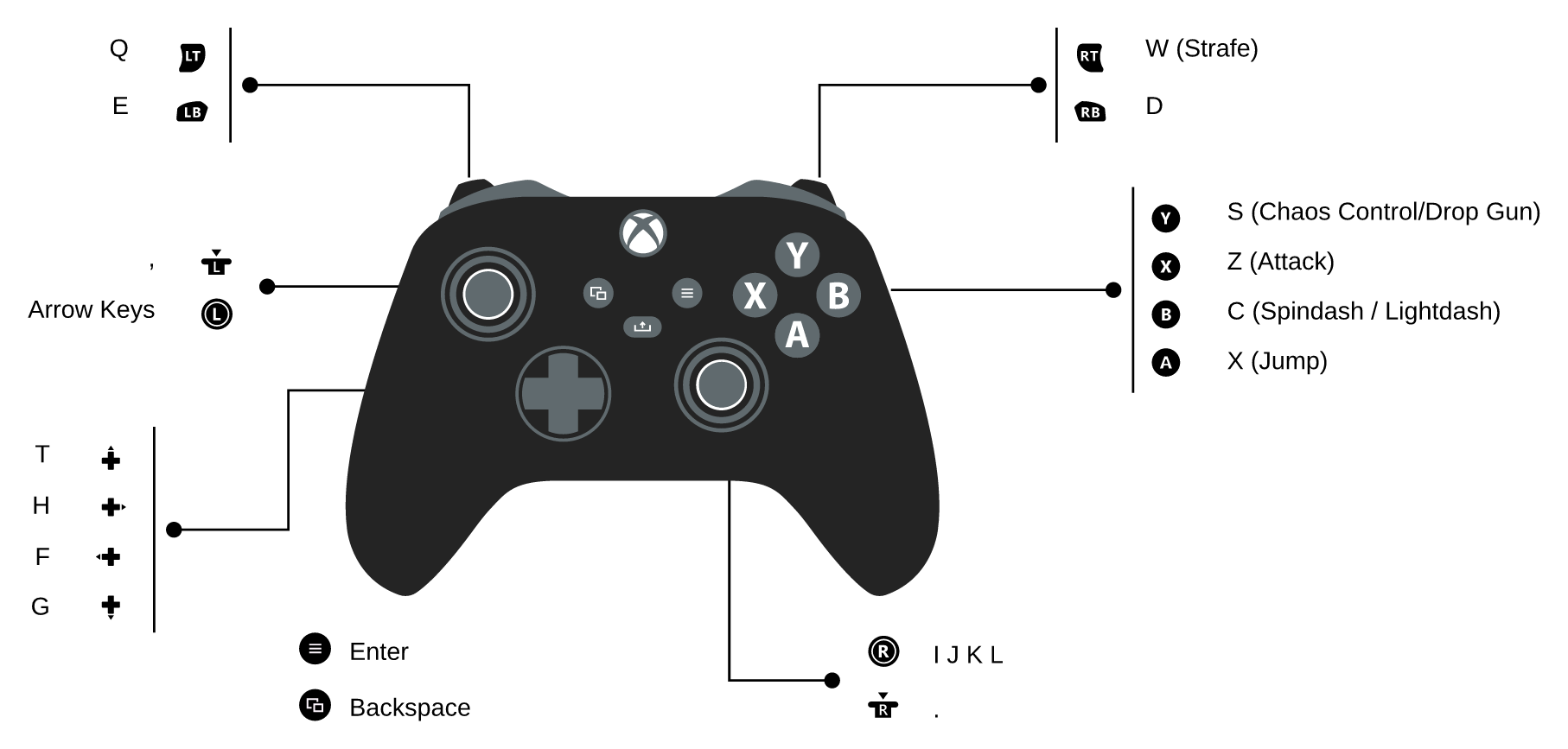
| Hotkey | Action |
|---|---|
| Alt+Enter | Toggle fullscreen/windowed mode |
| Ctrl+1 | Keyboard controls port 1 |
| Ctrl+2 | Keyboard controls port 2 |
| Ctrl+3 | Keyboard controls port 3 |
| Ctrl+4 | Keyboard controls port 4 |
| F1 | Toggle profiler |
| F8 | Toggle HUD |
FAQ
Do you have a website?
Shadow Recompiled does not have an official website.
Please link here when directing anyone to the project.
Caution
Do not download builds of Shadow Recompiled from anywhere but our Releases page.
We will never distribute builds on other websites, via Discord servers or via third-party update tools.
Can I install the game using a GameCube / PlayStation 2 version?
You cannot use the files from the GameCube or PlayStation 2 version of the game.
Supporting these files would require an entirely new recompilation to handle all the differences.
Where are save data & configs?
- Windows:
%APPDATA%\ShadowRecomp\ - Linux:
~/.config/ShadowRecomp/
Inside, saves are in save/ and settings in config.toml.
You can also create portable.txt beside the .exe to keep everything in
your game folder.
How do I update?
Copy the files from a new release over your existing install.
- Saves and settings are kept
- Reinstall not needed afterwards. Just boot the game
How do I run the installer again?
Launch the game with --install.
In a console/terminal window.
You'll only need this if you changed the game files; and want to revert to a stock setup.
Why does some of the UI have visible lines or gaps?
This is a vanilla game issue. Higher resolutions unfortunately make this issue easier to see.
- Please don't open an issue for it.
- To fix it, use HD GUI mod(s).
Why are some sound effects missing
The Xbox version of the game has several missing sound effects. See details here if interested.
You will need to use a SFX Restoration mod to fix these defects.
What other platforms will be supported?
We only have Windows + Linux machines.
We'd happily accept community contribution for macOS.
But folks who want to support platforms that require more significant modifications (e.g. touchscreen on mobile); should make a fork.
Known Issues
Before reporting any issues, check if they are listed here.
Building
Check out the building instructions here.
Credits
Shadow Recompiled
-
Sora: Creator and Lead Developer of the recompilation, as well as the developer of technologies created for it such as XboxRecomp (before the XboxRecomp2 switch) and XShaderRecomp. Provided French localization for the custom menus. Final design decisions and UI for installer, achievements, and other custom menus.
-
dreamsyntax: Second Developer, source for Shadow knowledge, ensuring port accuracy, and identifying flaws with the Xbox port of the game. Provided English localization for the custom menus.
-
Sewer56: Third Developer. Added nix support, Discord RPC, implemented better widescreen, better framepacing and >4x'd performance with shaders and XboxRecomp2.
-
TheHatedGravity: First installer design, UI polish, spotting visual flaws
-
DonutStopGaming: Help with understanding RenderWare and finding Shadow functions.
-
Jesus_PK: Provided Spanish localization for the custom menus, also helped testing and finding bugs.
-
Deep-Sea Berry: Artist behind the project logo, along with custom options icons. Provided German localization for the custom menus and helped testing and finding bugs.
-
Emasplatter: Provided Italian localization for the custom menus.
-
Windii: Provided Japanese localization for the custom menus.
-
Kondrashov's Lair: Produced the installer music (original prod. by Sins Of A Divine Mother).
Tester Thanks
- Rawlins
- DarkShadow17
- The Spectral Star
- Pixel The Retro
- ultra0000
- Many others who helped briefly test
Special Thanks
-
CXBX-Reloaded Development Team: This project would not have been possible without the CXBX emulator. Nearly every aspect of the development was guided by referencing CXBX's research on the original Xbox, especially the graphics part.
-
extract-xiso: extract-xiso devs (in@fishtank.com and other extract-xiso contributors) for core extraction in the installer.
-
Unleashed Recompiled Development Team: Created much of the ground work that made all of this possible and sped up development time considerably.
-
Marathon Recompiled: Used as a reference for various features and help with debugging.
-
Skyth: Provided help to understand how Recompilation works, also the author of the original graphics pipeline code which was (mostly) reused here.
-
Darío: Creator of the graphics hardware abstraction layer plume, used by the project's graphics backend.
-
MattKC: Useful explanation of Xbox's Push Buffers system on his blog with Reburn3.
-
ocornut: Creator of Dear ImGui, which is used as the backbone of the custom menus.