OpenSGolf
OpenSGolf is a reimplementation of Sid Meier's SimGolf for Windows, macOS, Linux, and Android that runs on modern systems and offers optional extras like enhanced graphics and bigger courses.
- Type: PC port
- Game: Sid Meier's SimGolf
- Runs on Windows, Linux, macOS and Android
- By crspytopgn
- Latest release v0.5.13, 2026-10-27
- Source: https://github.com/crspytopgn/opensgolf
- Website: https://crspytopgn.github.io/opensgolf/
README
OpenSGolf



OpenSGolf is an open source game engine that plays Sid Meier's SimGolf (2002). It uses the original game's files if you have them, or its own free graphics and sound if you don't. It runs on Windows, macOS, Linux, Android and in the browser.
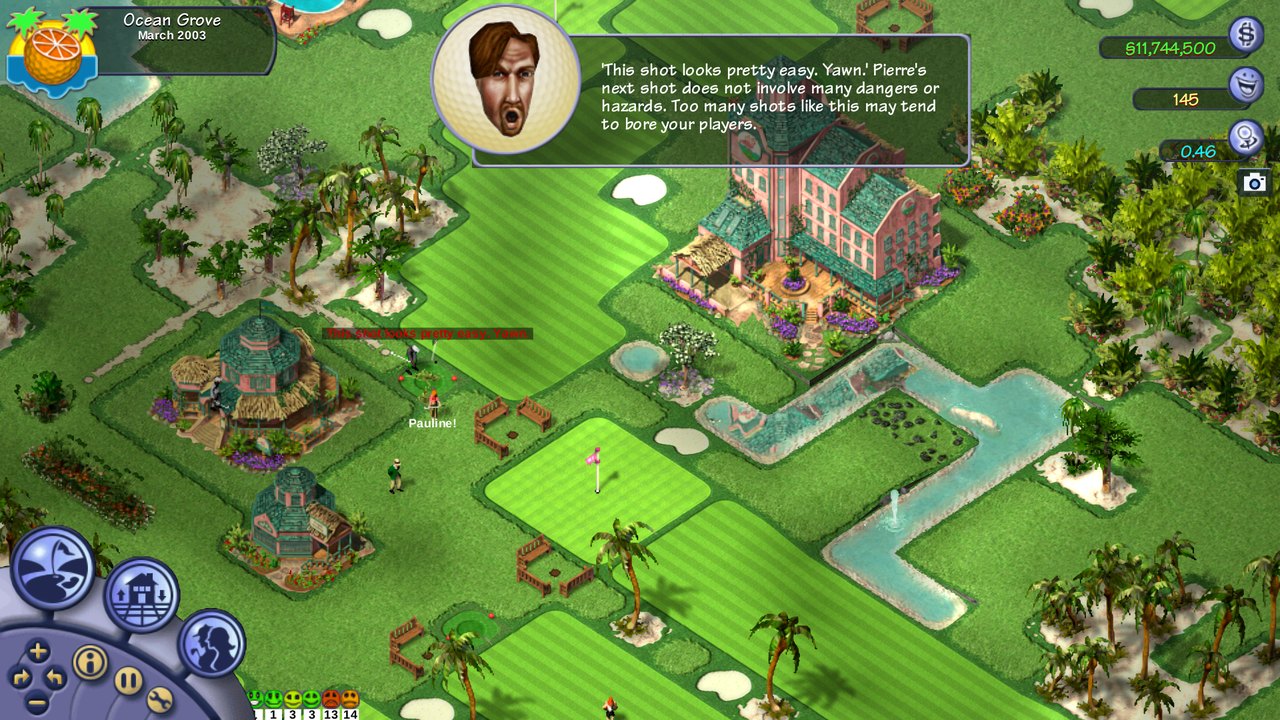
Screenshot taken with the original SimGolf files (not included). More pictures on the website.
Watch the trailer (one minute, 4K, played with the original SimGolf files):
Table of contents
- About
- Playing
- Game files: original or free
- Differences from the original
- Reporting bugs and contributing
- Roadmap
- Legal
- Licence
- Supporting the project
- For developers
About
OpenSGolf is a reimplementation of the golf course management game Sid Meier's SimGolf (Firaxis, 2002), written in Rust. It aims to play exactly like the original, in the same way that OpenTTD does for Transport Tycoon Deluxe: the rules and numbers are rebuilt from facts read out of the original game, and with every option at its default the game looks and plays like the 2002 release.
On top of that it adds things the original never had: it runs on today's systems and screens, saves anywhere, fixes the original's own bugs, and offers optional extras and mods. Everything new is optional, and the original game is always one click away.
Playing
The quickest way to play is in the browser: crspytopgn.github.io/opensgolf. Nothing needs installing.
Downloads for every system (all releases):
| System | Download | Notes |
|---|---|---|
| Windows | opensgolf-windows.zip | Unzip and run opensgolf. If Windows warns, choose More info, then Run anyway. |
| Windows on ARM | opensgolf-windows-arm64.zip | As for Windows. |
| macOS | opensgolf-macos.zip | Unzip, then right-click OpenSGolf and choose Open the first time. |
| Linux | AppImage · tar.gz | Mark the AppImage as executable and run it. |
| Linux on ARM | AppImage · tar.gz | 64-bit systems, for example a Raspberry Pi 4 or 5. |
| Android | opensgolf-android.apk | Open the file on the phone and install it. |
| Steam Deck | Linux AppImage | Add it to Steam as a non-Steam game; it starts full screen in Game Mode and plays with the Deck's controls. |
| iPhone and iPad | Browser version | Works by touch in Safari; hold it sideways. |
Or install it with a package manager:
| System | Command |
|---|---|
| Windows (Scoop) | scoop bucket add games then scoop install opensgolf |
| macOS (Homebrew) | brew install --cask crspytopgn/tap/opensgolf |
Every download is a real app that runs offline; the browser version is there for devices without one (iPhone and iPad) or for a quick try. Controllers (Xbox, PlayStation, Switch, Steam Deck) work on Windows, macOS, Linux and in the browser. The Windows and macOS warnings appear because the project has no paid code-signing certificate. Details for each system are in docs/INSTALL.md; how to play, keys and touch controls are in docs/PLAYING.md.
Game files: original or free
OpenSGolf needs a set of graphics, sounds and text. There are two:
-
The original SimGolf files. If you own the game, point OpenSGolf at your SimGolf folder, the one containing
Data,FlicsandSounds(on Windows usuallyC:\Program Files\Maxis\SimGolf), or at a .zip of it. In the browser, choose Choose game folder; in the app, choose Use my SimGolf files… on the title screen. The app and the browser also take the SimGolf CD itself, or an image of it (.iso, or a Mac's .cdr), with nothing to install (INSTALL.md). The files are read on your own device and never uploaded.Want the original sounds and music? Use the SimGolf CD or an image of it (.iso), or a full installed copy. Some downloaded copies have the art but leave the sounds out (their
SoundsandSimsFXfolders are empty); the game still plays with those, using the free OpenSGolf sounds instead, and says so.Zips made by Windows (Deflate64 for big files), 7-Zip, Keka or The Unarchiver (BZip2, LZMA, PPMd) are read too, even on an iPad whose Files app shows their sound folders empty.
-
opensgolf-free, the free base set. Like OpenGFX for OpenTTD, it contains nothing from the original: art, sounds and text made by the engine itself. It is used automatically when no SimGolf files are found. It is simple for now and open to contributions from artists.
Differences from the original
With its default settings OpenSGolf plays like the original, apart from these:
- Fixes for the original's own bugs, such as gaps at waterfalls, costs charged twice and the golfer list picking the wrong golfer (docs/FIXES.md). On by default; they can be turned off in the preferences.
- Modern systems and screens: saving anywhere, undo for building and terrain (Ctrl+Z), full screen (F11), game speeds ×2 and ×4, remappable keys, touch controls (aim or place with a finger, then Swing or Place), controllers and a frame-rate cap.
- Building tools: a measuring tape in yards (the ' key) and, with a terrain brush, Shift+drag for a rectangle and Alt+click to fill a region, with the cost shown before you commit.
Optional, and off by default. Start New Game has a one-click choice of preset: Original, Original + helpers (screens, helpers and looks that leave play unchanged), OpenSGolf (the helpers plus a few light gameplay extras) or your own Custom mix; each option says whether it changes the looks, helps, or changes the gameplay:
-
Enhanced graphics for 4K and widescreen: sharp scaling, water (depth, waves with the wind, shorelines, rain rings, reeds, ducks, swans, jumping fish, frozen ponds), light, weather by each place's climate, seasons, late-winter snow, desert heat waves, birds of prey, butterflies and falling leaves, grass tufts, tournament crowds, lit windows at night, dawn sprinklers, morning frost, pixel-perfect whole-number scaling (Classic too) and a photo mode (docs/ENHANCED.md); a showcase fly-over of the course hole by hole (Shift+O).
-
Bigger courses: Large, Huge and Giant, up to 128 × 128 tiles.
-
Preferences, sorted: the original's four ticks first, then one line per group of the port's own options (Game options, Graphics, Controls and keys, Text size, Game files, More), each describing itself at the box's foot.
-
OpenSGolf extras: gameplay extras (a Hardcore economy, animals to buy, higher staff limits, setting a hole's par, left-handed golfers (and a left-handed pro), weather that matters (rain, snow, heat waves and thunderstorms change how balls roll and who comes out to play), more visitors (touring pros and invented celebrities, moddable through data/visitors.toml), the calendar at half or quarter speed or stopped, sandbox switches (freeze golfer happiness, unlock everything), and, experimental, cut content restored as decorative landmarks), looks (turning buildings, path styles and lamp posts, random trees, the desert's Ravine and Brush art the right way round), a search over every Preferences option with a reset to the original, and interface extras such as a People screen, message history, autosave (the last three kept), a map of each saved course, pausing in the background or on big news, and course sharing: copy a course code, a friend pastes it and tries to beat your course record.
-
A hidden Cheats box (Ctrl+Shift+C): add or take away money, force a VIP visit, buy all the land, the sandbox switches. A game in which a cheat was used says so on the Load list, and its course record is no shared challenge.
-
Saved games of the original SimGolf (
.sve) come over as games of the port's own: course, holes, buildings, money, date, members, people and staff (docs/PLAYING.md). -
Quick save and quick load (Shift+F5, Shift+F9) and a staff areas view (Shift+A) that shows every employee's work ring and the fairways and greens no groundskeeper reaches.
-
Golfer insight (interface extras): a landing map of where golfers' shots on each hole end up (Shift+D), with heat maps of where balls land, golfers wait and golfers complain, for a hole or the whole course, and each hole's most frequent golfer comments this month, last month and this year (Shift+I).
-
Text size (Preferences): normal, 125% or 150% text in the message window, pop-up boxes, tooltips, name tags, touch labels and the port's own pages, the boxes growing with it and staying on screen.
-
History graphs (interface extra): the club's and each hole's months as line graphs on the Histograph's page: rounds, revenue, costs, profit, cash, happiness, ratings and members, and each hole's plays, strokes over par, happiness and fees (Shift+Y).
-
Live scorecards, a clickable ticker, the year in numbers and home-site details (interface extras): any golfer's round so far on the original's scorecard, a click on a ticker message to go to its golfer or place, a page after the End of Year report with the year against the last, and what a home site cost, sold for and is worth.
-
Camera bookmarks and modern mouse controls: four kept views of the course (Ctrl+Shift+F1..F4 keep, Shift+F1..F4 return), dragging with the middle button, and interface extras that zoom towards the pointer and drag the course with the right button (a right click stays the original's undo).
-
Drag to place (interface extra): drag to lay a row of benches, flower beds, ball washers, willows or bridges, with the row and its cost shown before you let go; and Original and Modern control presets on the Change keys screen.
-
Random trees (interface extra): every tree planted takes a random size and species of its kind, and every scenic tree a random one of the seven.
-
The desert's Ravine and Brush art (interface extra, issue #89): the original's desert draws the Ravine as dry weeds and the Brush as a crack, on the course and on their buttons; this trades the two pictures, play unchanged.
-
Updates from the title menu: Check for updates, then Update now downloads the new version, checks its signature and installs it in place (Windows, macOS, Linux, Android); on Windows and with the Linux .tar.gz it downloads only the programs and the pack files that changed. A Preferences tick (Preferences → More) checks once at each start. Only GitHub is contacted, and only then.
-
Content packs and game scripts that change prices, buildings, terrain, golfers, text, art and sounds, add scenarios, and can be downloaded from inside the game (docs/MODDING.md).
-
Your own art, in high resolution: a content pack can bring hand-drawn pictures and PNG sprite sheets at 2x or 4x the original's size, drawn sharp at any window size;
sgtool hd-kitmakes a starter kit andsgtool pack-checkchecks the pack (docs/MODDING.md). -
A course editor (Course editor... on the title menu): build a course free of charge with the game's own tools, import a heightmap picture, choose the land owned at the start, the starting cash, the difficulty and goals, and save it as a scenario to play and share (docs/PLAYING.md).
-
Report a problem (Preferences → More, or Shift+F8): opens the bug report form in your browser filled in with the version, platform and a short system line, and puts a copy of your game (and a screenshot) in a Reports folder to attach. Nothing is sent until you submit the form (docs/PLAYING.md).
How close each part is to the original is tracked in docs/PARITY.md.
Reporting bugs and contributing
Please report bugs and suggest ideas on the issue tracker (in the game, Preferences → More → Report a problem... or Shift+F8 fills in the bug form for you). Contributions of code, art for the free base set and translations are welcome; see CONTRIBUTING.md and docs/TRANSLATING.md.
Roadmap
The rule for every version: the original game, exactly as it was, is always one click away. Everything new is optional and off by default; only fixes for the original's own bugs are on.
0.3 brought the one-click choice between the original game and the OpenSGolf extras, undo, autosave, save pictures, course sharing with challenges, controllers and the Steam Deck, and new Enhanced graphics (weather by place and year, wildlife, crowds, winter, grass, sharpening).
Ideas for later: a community course gallery, club events, more translations and an installable phone and tablet app.
Legal
OpenSGolf is an unofficial fan project; it is not affiliated with or endorsed by Electronic Arts, Firaxis Games or
Take-Two Interactive. The original game's art, sounds, music and videos belong to Electronic Arts and are not part of this
project; the game reads them from your own copy at runtime and never uploads or redistributes them. The English text of the
original's in-game messages, which exists only inside the original program, is included in lang/en.txt so the game can
read word for word like the original; it remains Electronic Arts' text. SimGolf and Sid Meier's are trademarks of their
owners and are named here only to say which game OpenSGolf plays and whose files it can use.
The engine is a clean-room reimplementation. No code from the original is included (its message text is, see above); its rules are written from facts read out of the publisher-supplied golf.exe (docs/PUBLISHER_EXE_NOTES.md), the original manual and footage of the game, and nothing here removes or bypasses copy protection.
Licence
OpenSGolf is free software under the GNU General Public License, version 2 or (at your option) any later version (GPL-2.0-or-later), the same licence as OpenTTD: see LICENSE. Anyone may use, change and share it, and changed versions must stay open under the same terms. The bundled Liberation Sans font is under the SIL Open Font License. Content packs (mods) choose their own licence; the free base set is GPL-2.0-or-later too.
Supporting the project
OpenSGolf is free and always will be. If you enjoy it and feel like buying me a coffee, that's always nice: buymeacoffee.com/crspytopgn. The game itself asks at most twice, gently, after an hour of play and again five hours later if you said Maybe later (the play time is counted on your device; Don't ask again ends it; see docs/PLAYING.md). Preferences > More has a Support OpenSGolf line.
Privacy: the play-time count. So I can see how much OpenSGolf is played, the GitHub release builds and the browser
version send an anonymous count to the project's GoatCounter: one at start
(start/<platform>/<version>) and one per 15 minutes of play (play-15min/<platform>), nothing else (no ids, names,
saves or cookies). The game says so once; Preferences > More > Count my play time (anonymous) turns it off. Store
builds (Flathub, F-Droid) do not include it. See docs/PLAYING.md.

Thank you to everyone who reports bugs, tests on their devices, draws art for the free set and shares the game, and to Sid Meier, Firaxis and the original SimGolf team for a game people still love twenty years on.
For developers
Free base set (opensgolf-free)
Like OpenGFX for OpenTTD, opensgolf-free is a complete set of art, sounds and text that contains nothing from the original:
panels and buttons, terrain textures for the four themes, golfers, staff, celebrities and animals with all their views and
animation frames, buildings, trees, flowers and landmarks, synthesised sound effects and voices, our own stories, characters,
famous golfers and terrain descriptions, and Liberation Sans (OFL) as the fonts. It is drawn by the engine itself
(crates/sg-core/src/freeset/) when the game reads a file, in exactly the sizes and layouts the engine expects, so nothing has
to be downloaded. It is simple placeholder art meant to grow through contributions: artists replace files one at a time in
packs/opensgolf-free (see CONTRIBUTING.md).
- The game uses it by itself when it finds no SimGolf files (no
--gamefolder, or one without them), and says so. --base opensgolf-freepicks it for a run even with your copy present (--base originalthe reverse); Preferences > Game files > Content packs picks it for good.- In the browser: Play with free graphics on the start page.
sgtool freeset DIRwrites all 5,465 files to a folder (about 82 MB, which is why they are made at run time rather than committed).
Modding and content
The plan, as in OpenTTD: game content lives in data packs (terrain types, buildings, prices, golfers, properties, text), loaded in order on top of a base set; mods add or override data, art and sounds; scenarios and courses are shareable files; an in-game content list downloads community packs (docs/CONTENT_INDEX.md); translations are plain text files (docs/TRANSLATING.md). See docs/MODDING.md for the design and its progress, and CONTRIBUTING.md to help.
Build and run
Install Rust (https://rustup.rs), then from this folder:
cargo build --release
target/release/opensgolf --game "/path/to/game/Program_Files_(ENGLISH)"
target/release/opensgolf            # no copy of the game: the free base set
On Windows the programs are target\release\opensgolf.exe and