Free Riders Recompiled
Free Riders Recompiled is an unofficial port of the Xbox 360 version of Sonic Free Riders for Windows, Linux and Android, built through static recompilation. Play with a controller or keyboard, use Kinect / Kinect v2 or webcam motion controls on Windows, and bring your own VRM model to the in-game AVATAR rider. Kinect v2 support is experimental and still needs hardware validation.
- Type: PC port
- Game: Sonic Free Riders
- Runs on Windows, Linux and Android
- By YuutaTsubasa
- Latest release v0.4.2, 2026-09-30
- Source: https://github.com/YuutaTsubasa/Free-Riders-Recompiled
README
Free Riders Recompiled
Free Riders Recompiled is an unofficial port of the Xbox 360 version of Sonic Free Riders for Windows, Linux and Android, built through static recompilation. Play with a controller or keyboard, use Kinect / Kinect v2 or webcam motion controls on Windows, and bring your own VRM model to the in-game AVATAR rider. Kinect v2 support is experimental and still needs hardware validation.
The game's PowerPC code is translated to C++ with XenonRecomp and its Xenos shaders with XenosRecomp, then runs on a native runtime that stands in for the console's kernel, graphics, audio, input and Kinect.
This project does not include any game assets. You need your own legally acquired copy of the game (the USA/Europe disc) to play it: the launcher installs the game's data from your disc image. Prebuilt versions are on the Releases page; to build it yourself, see Building.
[!IMPORTANT] This is a work in progress. The game boots, its menus work and races can be played, but many parts of it are untested and it may stop or misbehave.
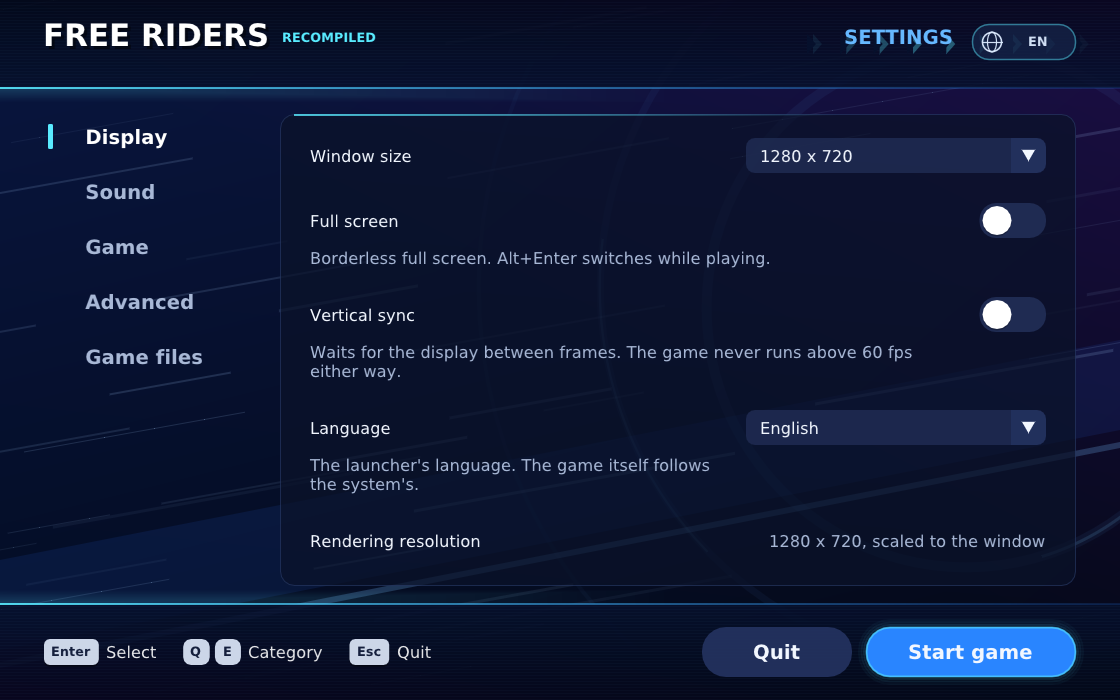
Table of Contents
- Status
- System Requirements
- How to Install
- Settings
- How to Build
- Controls
- Kinect and Kinect v2
- Camera motion input
- VRM Avatar models
- FAQ
- Repository Layout
- Credits
- License
Status
What works today:
- Booting from the title screen through the menus into races: Free Race from start to results, and Grand Prix from its story scenes into the first race.
- Direct3D 12 and Vulkan rendering, with the shaders translated as the game meets them; sound; saving and loading records.
- Playing without Kinect: the Kinect is emulated. Buttons stand in for the voice commands the menus understand, and the pad drives the body a race reads (leaning, jumping, kick dash, grabbing, tricks).
- Physical Kinect and Kinect v2 input on Windows, with sensor skeletons passed to the game. Xbox 360 Kinect has been tested through races; Kinect v2 support is experimental. See setup and requirements.
- A launcher that installs the game from your disc image and keeps its settings, in English or Traditional Chinese, on every platform.
- Linux (Vulkan, SDL2), and Android (arm64-v8a) with on-screen touch controls and tilt steering.
- Optional webcam motion input for 1P on Windows, with estimated 3D body joints, controller handoff and a separate skeleton debug window.
- Experimental custom VRM Avatar models, selected in the launcher, with game-driven animation and hand-held items.
Known limits:
- Only the USA/Europe disc is supported.
- Much of the game has not been played through yet; stages and modes beyond those above may stop on something the runtime does not do yet.
- Linux and Android use shaders translated beforehand on Windows
(
shaders.pack, included in the releases). The game creates all of its shaders while it boots; releases include the matching shader pack. - Android has been tried in the emulator and on one Adreno 750 handheld.
Progress notes (mostly in Traditional Chinese) are in docs/, starting with docs/progress.md.
System Requirements
- Windows: Windows 10 or 11 (x64), a CPU with AVX, a GPU with Direct3D 12 (or Vulkan 1.2).
- Linux: x86-64 with AVX and a Vulkan 1.2 driver (tested on Ubuntu 22.04).
- Android: Android 9 or later, arm64-v8a, Vulkan 1.1; about 2 GB free for the installed game. Releases also offer an Android 10+ APK using native thread-local storage to reduce CPU overhead; prefer that build on Android 10 or later. Android performance remains experimental: 3D races are still slow on the tested Pocket S2 Pro.
- Building needs the tools listed in docs/building.md.
How to Install
- Download the release for your system from
Releases:
the Windows zip, the Linux tarball, or the Android APK.
For Android 10+, choose
android10-arm64.apk; theandroid-arm64.apkpackage retains Android 9 compatibility. Both use the same app identity and update existing installations without requiring an uninstall. - Unpack it into a folder of its own (on Android, install the APK).
- Start
FreeRidersRecompiledand choose your disc image (.iso) when the launcher asks; it copies the game's data beside itself. Then press Start game.
Settings
The launcher groups settings by what you want to change:
| Category | Settings |
|---|---|
| General | Launcher and game languages, movies, restore defaults |
| Graphics | Window and rendering resolutions, fullscreen, backend, VSync, expandable performance options |
| Sound | Game volume and launcher sounds |
| Controls | Each player's input source and controller, button/key bindings, Android touch and tilt |
| Motion input | Kinect/webcam mode, device and preview, mirror, skeleton debug, voice commands |
| Avatar models | Select or clear a custom VRM/GLB model |
| Game files | Installation, data locations and shader pack |
Window and rendering resolutions sit together under Graphics > Resolution: the first sets the output window size, while the second controls the pixels the game draws. Changes to game settings apply on the next game launch.
How to Build
In short, on Windows:
python scripts/bootstrap.py
./scripts/build_tools.ps1
python scripts/rom_tool.py extract --iso "your disc.iso" --output private/game --path default.xex
python scripts/prepare_recomp.py
./scripts/build_shader_translator.ps1
./scripts/build_tools.ps1 -Diagnostic
./out/build/host/FreeRidersRecompiled.exe
The launcher asks for your disc image on first run and installs the game beside itself. Linux and Android builds, and what each step does, are in docs/building.md.
Controls
| Action | Keyboard | Controller |
|---|---|---|
| Menus: move / turn the menu ring | Arrow keys | D-pad |
| Confirm (say "OK") | Z or Space | A / ✕ |
| Back | Esc, X or Backspace | B / ○ |
| Select (BACK) | Tab | BACK / Share |
| Start, pause | Enter | START |
| Race: lean | Arrow keys | Left stick |
| Crouch (hold), jump (release) | Z or Space | A |
| Kick dash | C | X |
| Brake, grab | X | B |
| Switch stance | V | Y |
| Use / shake an item | F | RT |
| Skills | Q / E | LB / RB |
| Hand cursor (Kinect-only menus) | I J K L | Right stick |
Xbox and PlayStation controllers both work. On Android, translucent touch buttons cover the same actions when no controller is connected, and tilting the phone steers in a race. Details: docs/race-controls.md, docs/pad-menus.md.
Kinect and Kinect v2
The Windows version supports physical Kinect v1 and Kinect v2 sensors for body tracking. Kinect is optional: controller and keyboard play do not require a sensor or its SDK.
| Sensor | What you need | Current status |
|---|---|---|
| Kinect for Xbox 360 / Kinect for Windows v1 | SDK 1.8 and a powered USB connection; the Xbox 360 sensor requires the full SDK, while Kinect for Windows v1 can use Runtime 1.8 | Xbox 360 Kinect tested through races on Windows 10 |
| Kinect v2 / Kinect for Xbox One | SDK 2.0, USB 3.0 and a compatible powered PC adapter | Experimental; skeleton tracking is implemented, but hardware gameplay validation is still pending |
Install the matching SDK, connect the sensor, then select Kinect in the launcher's Motion input > Camera setting and choose Open preview to check tracking. Both generations use the same option: the runtime tries v1 first, then v2. Keep your whole body visible and allow enough space to move.
Kinect v1 can supply skeleton, depth and color data. The current v2 backend supplies skeletons only, with additional skeleton-based steering and crouch/jump handling. Physical Kinect input is Windows-only; Linux and Android releases do not provide it.
SDK links, adapter requirements and troubleshooting: Kinect sensor guide (Traditional Chinese). For motion controls with an ordinary webcam, see the next section.
Camera motion input
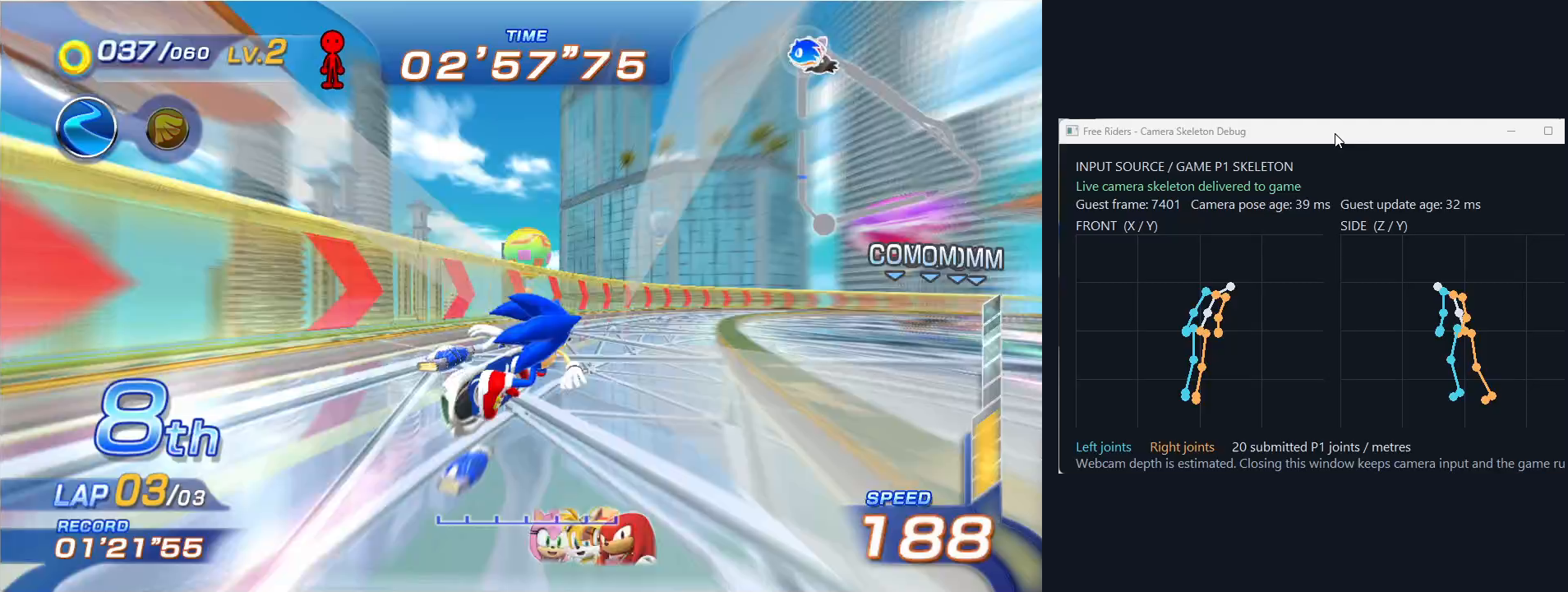
Gameplay and the skeleton delivered to the game, cropped from the same recording frame and arranged side by side. The debug window shows front and side views of the joints, without displaying the webcam image.
Windows releases include the models and runtime for webcam motion input. Select Motion input > Camera > Motion in the launcher and keep your whole body in view. Skeleton debug window opens front and side views of the joints the game receives; it does not show the camera image.
Camera input controls 1P. Using the controller takes priority; after 1.5 seconds without controller input, fresh camera tracking resumes. If tracking is lost, controller input remains available. Set 2P input to Off for single-player play.
Inference runs locally using ONNX Runtime
1.30.0 (MIT), with the OpenCV Zoo MediaPipe pose model
and person detector
(Apache 2.0). These models originate from Google's MediaPipe; this port uses
their ONNX exports, without requiring the MediaPipe or OpenCV runtime.
Model downloads are pinned by SHA-256 in
scripts/fetch_pose_model.py. Licences and
third-party notices are included in the Windows archive's licenses/ folder.
A webcam estimates relative 3D pose; it does not measure depth like Kinect. The Linux and Android prebuilt packages do not enable camera motion input. Setup, gestures, source builds and limitations: Camera input.
VRM Avatar models
Starting with v0.3.0, you can use your own VRM 0.x / VRM 1.0 model for the in-game AVATAR rider. Camera motion input is optional; controllers and keyboard controls work with the model too.
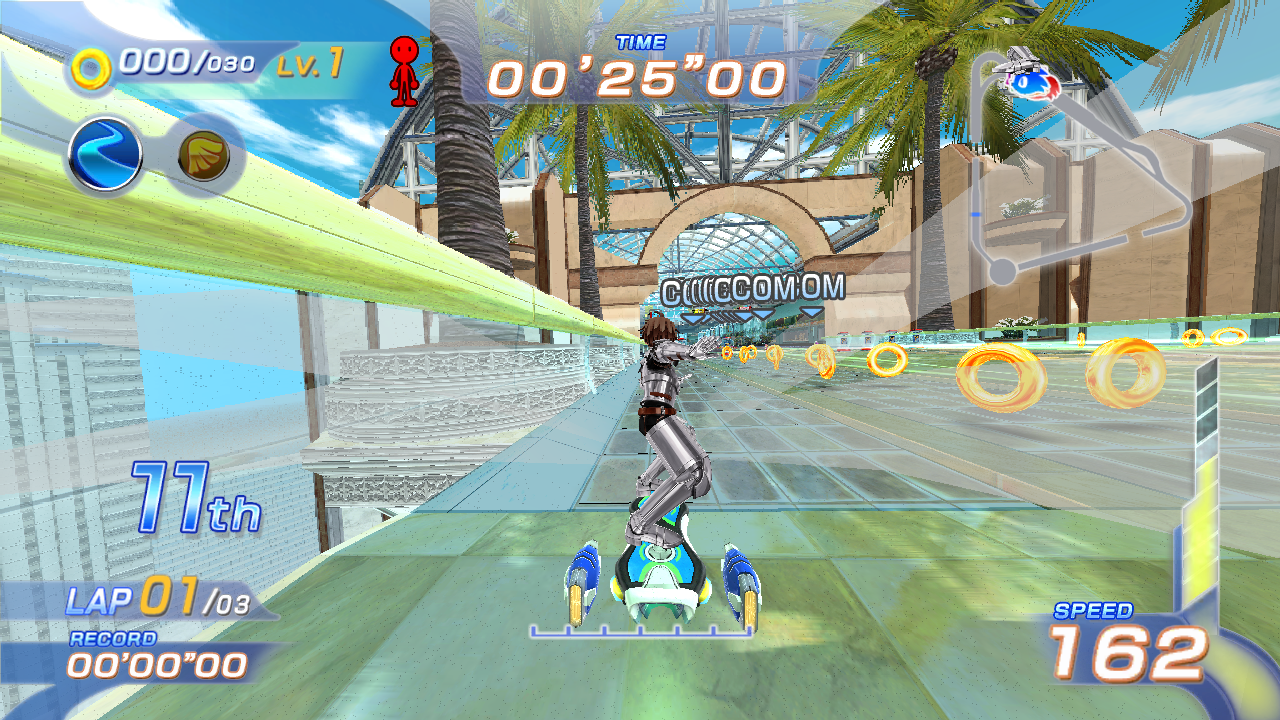
A custom VRM model replacing the in-game AVATAR rider.
- Open the launcher's Avatar models tab.
- Choose Browse and select a
.vrmor binary.glbfile. Desktop users can also type its path; Android imports a copy into the app's storage. - Start the game and select AVATAR in the character menu, then choose your Gear. AVATAR must already be available in your game save; selecting a model does not unlock it.
- To change models, return to the launcher and restart the game. Clear disables the custom model.
One model setting is shared by both local players; it applies to whoever selects AVATAR, with separate poses for each player. Ordinary characters are unchanged. The model appears in Loading and races, follows the game's main body animation, jumps and stance changes, and supplies hand positions for held items. Models are read locally; no avatar model is bundled or uploaded.
This is experimental. A .glb without VRM humanoid bones stays static.
Full MToon shading, transparent blending, spring bones, facial expressions
and finger animation are not implemented. Some poses and item grips can
look different between models, and complex models can reduce performance.
Windows D3D12/Vulkan gameplay has been checked; full two-player VRM gameplay
and physical Linux/Android VRM gameplay still need broader testing.
Troubleshooting and platform details: VRM Avatar guide.
FAQ
How do I select Spanish or another game language? Open General > Game language
in the launcher and choose English, Japanese, German, French, Spanish or Italian,
then start the game. System language is the default. This is separate from
the launcher's English/Traditional Chinese interface. Unsupported system languages
use English; unavailable or unmapped system countries use the US profile and
record a warning in game.log, without requiring changes to your OS settings.
For direct runtime launches, set SFR_GAME_LANGUAGE to auto, en, ja, de,
fr, es or it. Invalid values behave as auto.
How do I choose Vulkan or D3D12? On Windows, open Graphics > Graphics backend and choose either backend before starting the game. New settings default to Vulkan; existing saved choices are preserved. Linux and Android use Vulkan.
Can I change the game's internal resolution? Yes. Rendering resolution offers 360p, 540p, native 720p (default), 1080p and 1440p, independently of output window size. Apply it before starting the game. Lower values may help a limited GPU; higher values draw more detail at a greater cost. See Internal resolution.
How can I compare performance without changing game speed? Keep the normal 60 FPS cap and compare the same part of the same course, including slower-frame times. Uncapping currently speeds up the game logic too. Recording instructions and the limits of testing on a faster PC: Performance measurements. Guided 1P, 2P, Camera and VRM comparisons: Benchmark scenarios. Current local verification and hardware limits: Validation report.
Why is there a preparation screen before the game starts? Builds with a pipeline
manifest prepare known graphics pipelines before the first game frame, reducing
first-use compilation stalls. The first start may take longer; later starts reuse
this device's cache. Keep the pipeline-cache folder. Close the window or press
Escape to cancel (hold Back on Android). Unrecorded combinations can still compile
during play. See Pipeline preparation.
Where are the settings and saves? Beside the launcher: settings.ini,
save/ and game.log (on Android, in the app's files directory). The game
plays as a local profile named "Player"; answer Yes when it asks "Are you
Player?" and create save data when offered.
Why does the game need shaders.pack on Linux and Android? The Xbox
shaders are translated with Windows tools while the game runs. The pack
carries them, already translated, to machines without those tools; the game
creates every shader it has while it boots, so a pack made with
python scripts/pack_shaders.py after starting the game once on Windows
(under Vulkan too, for the SPIR-V) is complete. Releases include one.
Can I use the No Kinect Patch or other mods? No mod support exists. The Kinect emulation here is the project's own code (see Credits).
Why does the release need my disc? The release holds the recompiled
program, but none of the game's data (models, textures, sound, movies): that
comes from your own disc image. The workflow in .github/workflows builds and
tests only the parts that contain nothing from the game; releases are built
from a disc on the maintainer's machine (docs/releasing.md).
Repository Layout
| Path | Contents |
|---|---|
src/ | The runtime (kernel, memory, threads, files, graphics, audio, input, Kinect emulation), the launcher and the game-specific hooks |
scripts/ | Bootstrap, disc tools, code generation, builds and packaging |
config/ | Pinned dependency revisions, the supported disc's fingerprints, recompiler configuration |
tests/ | C++ (CTest) and Python tests |
android/ | The Android app's manifest, activities and resources |
patches/ | Patches bootstrap applies to pinned dependencies |
docs/ | Building, platform notes and the development record |
Not in the repository, by design (see .gitignore): your disc image
(__ROM__/), anything extracted from it (private/, game/), generated code
and build outputs (out/, generated/), downloaded dependencies (tools/),
saves and local reference checkouts.
Credits
- XenonRecomp and XenosRecomp: the PowerPC and shader recompilers.
- Unleashed Recompiled and Marathon Recompiled: the ports this project learned from (runtime layout, graphics, the launcher's shape). None of their art is used; the launcher's art and sounds are drawn and synthesized by its own code.
- Plume (rendering), SDL (Linux and Android), Dear ImGui (launcher), DirectX Shader Compiler (through dxc-bin).
- Xenia: reference for the Xbox 360 kernel's behaviour.
- ONNX Runtime (camera pose inference), OpenCV Zoo and MediaPipe (person detection and 3D pose models). Dependency versions and licences: THIRD_PARTY.md.
- No Kinect Patch by Rei-SanTH (tested by SmileyWorld, MagicShad and ivaschia): its reverse-engineering notes showed where the game reads the Kinect's voice commands and hand cursor, which guided the Kinect emulation here. The patch is licensed CC BY-NC-ND 4.0; none of its code or files are used or included.
This project was developed with the help of AI models: GPT-6 and Claude Opus 5.
Licences and exact revisions: THIRD_PARTY.md, config/dependencies.lock.json.
Sonic Free Riders is © SEGA. This project is not affiliated with or endorsed by SEGA or Microsoft.
License
The project's code is licensed under the GNU General Public License v3.0 or later (COPYING). The game's own code and data remain SEGA's and are not covered by that grant.