SSX (2012) Recomp
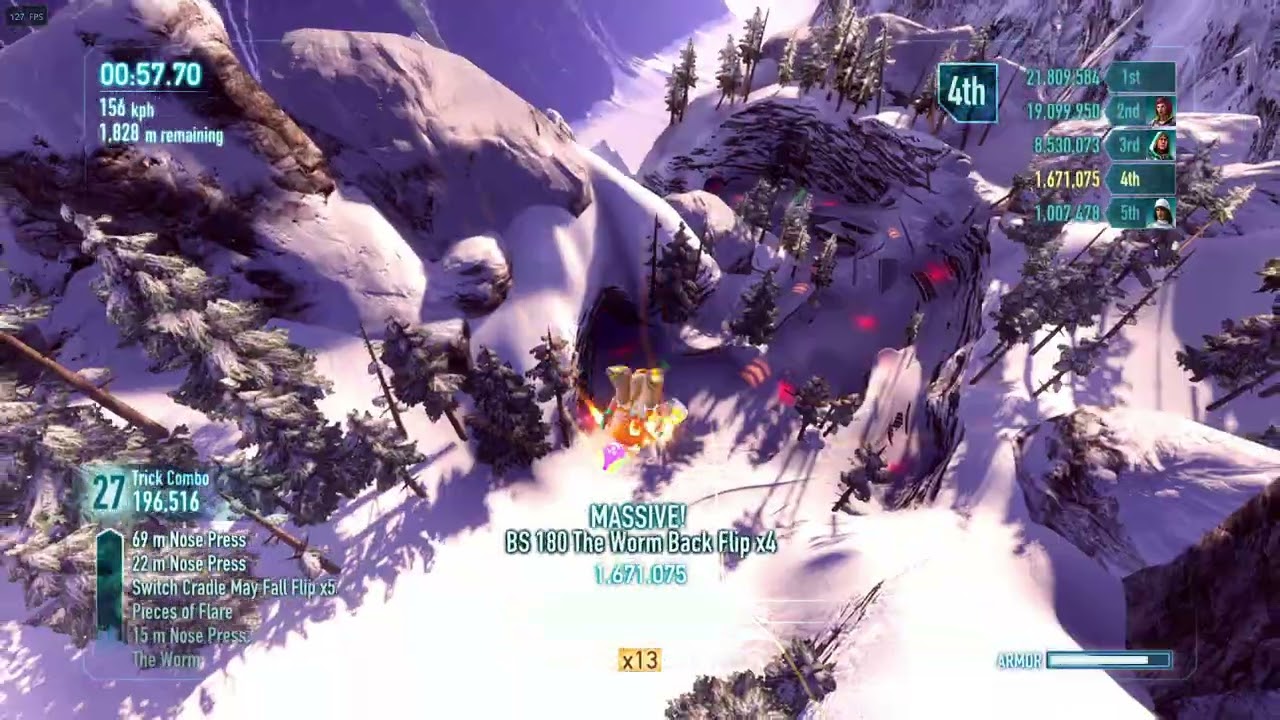
SSX (2012) recomp is a native Windows port of EA's SSX (2012) that runs up to 300 fps and supports AMD FSR 1 upscaling.
- Type: PC port
- Game: SSX
- Runs on Windows
- By AmarilloNL
- Latest release v1.1.0, 2026-11-09
- Source: https://github.com/AmarilloNL/ssx-recomp
README
🏂 SSX (2012) — Native PC Port
EA's SSX, running natively on Windows — up to 300 fps, sharper, no emulator.





⬇️ Download · 🎬 Gameplay · ✨ Features · 🛠️ Install · 🎮 Controls · 📦 DLC & update · 🗺️ Roadmap
Caution
You need your own copy of the game. This repository contains no game code, graphics, music, video or any other EA content, and the installer downloads none. You need SSX (2012) for Xbox 360, dumped from your own disc to an ISO. The PC version is built on your computer from that ISO.
ISOs, game files and pre-built executables will not be provided. Requests or links to pirated copies are removed.
A native Windows build of EA's SSX (2012), made by statically recompiling the Xbox 360 executable to x86-64 with the ReXGlue SDK. The game's code runs natively, and its Xbox 360 graphics are translated to Direct3D 12.
🎬 Gameplay
✨ Features
| ⚡ Up to 300 fps | or match your monitor, at real-time game speed (the original runs at 30; 3× is locked to 60) |
| 🖥️ Sharper image | 1200×640 rendering (the 360 renders 1120×584), optional 2× or 3× scale (up to 3600×1920) |
| 🔍 AMD FSR 1 | upscaling by default, plus CAS sharpening, FXAA and anisotropic filtering |
| ⚙️ Settings menu | in game: F1, or Back + Start on a controller |
| ⌨️ Keyboard & controller | key rebinding, vibration, deadzone |
| 🪪 Your name & picture | instead of "User" and an empty square (settings → Profile) |
| 💿 Runs from your ISO | saves stay in Documents\ssx |
| 📦 DLC support | Mt. Eddie, Japan and the other packs, from your own console (how) |
| 📈 Title update | the game's last update: the gear for levels 11 to 15, from your own console (how) |
🛠️ Installing
- 💿 Make an ISO of your own SSX (USA) Xbox 360 disc.
- ⬇️ Download
SSX-Installer.exefrom the latest release. - ▶️ Run it. SmartScreen may warn because the installer isn't code-signed: click
More info → Run anyway. Its source is
installer/SSXInstaller.cs. - ✅ Click Next, select your ISO, optionally click Add files... for DLC and the title update from your own console (which files), tick the ownership box, and click Install.
- 🏂 When it says DONE, click Play SSX or use the desktop shortcut.
Note
Needs Windows 10/11 x64, about 10 GB free (mostly build tools that other software can share; the game folder itself is about 1 GB), an internet connection and 10–30 minutes the first time. To update, just run the installer again: it rebuilds only what changed, and your saves and settings stay.
What the installer does on your PC
Everything happens locally:
- checks that the ISO is the supported release,
- installs the build tools that are missing (CMake, Ninja, LLVM and the Visual Studio 2022 Build
Tools) through
winget, or from their official downloads ifwingetisn't available; Windows asks for administrator permission for LLVM and Visual Studio, - downloads the prebuilt ReXGlue recompiler SDK (no game code; see
scripts/build-sdk-package.ps1) and recompiles the game, - produces the playable folder
SSX-PC\source\dist\SSX.
If something goes wrong, the log is build-ssx.log in the install folder. Please attach it to an
issue.
Supported disc
| Game | SSX (USA), Xbox 360 |
| Title ID / Media ID | 4541096D / 55ABAB6C |
default.xex SHA-256 | F509845401D65A6791C5D28A3E9636A6558DA204F3851028B0B369A44A4B68EA |
| Title update (optional) | version 0.0.3.2, see the title update |
Other regions or versions aren't supported yet, because the recompilation settings are tied to these exact executables. Some ISOs named "World" contain this same release; the installer checks the file for you.
🎮 Playing
| ⚙️ Settings | F1 / Esc (controller: Back + Start, LB/RB switch tabs, B closes) |
| ⌨️ Keyboard | WASD steer · Space jump · arrow keys = trick stick · Q/E triggers · 1/3 bumpers · Enter start · Tab back |
Tip
1× + FSR runs at very high frame rates and looks sharp. 2× is noticeably sharper (about
60% of the 1× frame rate). We recommend 2×: 3× has a locked frame rate (see below). If a setting ever stops the game from starting, delete ssx.toml next to
ssx.exe.
Warning
3× is limited by the graphics card; we recommend 2×. It draws about 4K (3600×1920), and every pixel goes through the emulation of the Xbox 360's graphics chip. The settings menu warns you when you pick it.
Its frame rate is locked:
| Scale | Frame rate choices | Default |
|---|---|---|
| 1×, 2× | 30, 60, 120, 144, 165, 240, 300 or match your monitor | 60 |
| 3× | 30, 40, 50, 55, 60 | 60 |
Higher rates keep the graphics card at its limit all the time. The frame rate then keeps jumping, which feels like stutter, and on some PCs the game can become unstable (graphics driver hangs or crashes). Tested on an RTX 4080 SUPER: 3× is smooth at every choice, with a short, small dip at 60 in the heaviest spots (riding into the cave on The Dagger), and stutters at 70.
When the GPU can't keep up, the game slows its pace a little so frames still come out evenly, and returns to full speed as soon as the scene gets lighter.
Why is 3× limited to 60 fps, and what happened to 4×?
- The pixel count. 3× draws 3600×1920 = 6.9 million pixels per frame: 9 times the 1× image, close to 4K (8.3 million). Every pass the game draws (snow, lighting, particles, glow, blur) is drawn at that size.
- Emulated console video memory. The Xbox 360 renders into a small, fast on-chip memory. The port reproduces it in shaders, which costs extra work for every pixel.
- Measured on an RTX 4080 SUPER while playing: the GPU at 99% the whole time, at full clock speed and well within its power and heat limits. The CPU is at about 20%. The GPU is simply out of headroom.
- Already done: shadows are drawn at 1× when scaling (about 15%), the full-screen images the game reads back as textures are loaded without an extra copy (about 12%), and depth-only passes skip the emulated memory's pixel ordering. Most of the remaining time goes into the main scene itself.
- 4× was removed. It draws 4800×2560 (12.3 million pixels). Even after all of the above, an RTX 4080 SUPER needs about 18 ms per frame there, and it stuttered at anything above 40 fps. On a 1440p screen 3× looks almost the same.
📦 Adding DLC and the title update
The base game works without DLC and without the title update. Like the game itself, neither is included: you need the files from your own Xbox 360, bought or downloaded on your own Xbox Live account.
| Package | Size | Contents |
|---|---|---|
| 🏔️ SSX Mount Eddie | ~250 MB | the Mt. Eddie region and the classic riders |
| 🎁 SSX Presell Pack | ~9 MB | the pre-order bonuses: Japan (Mount Fuji), Eddie as a rider, Mac's Ultimate Board |
| 🗾 SSX Japan Range | ~9 MB | pre-order bonus: Japan (Mount Fuji) |
| 🧔 SSX Eddie Pack | <1 MB | pre-order bonus: Eddie as a playable rider |
| 🏂 SSX Mac Board Pack | <1 MB | pre-order bonus: Mac's Ultimate Board |
All five work. Japan Range, Eddie Pack and Mac Board Pack are the original pre-order versions: with Mount Eddie and the Presell Pack installed, Japan, Eddie and Mac's Ultimate Board are already there, so they add nothing new (installing them anyway does no harm).
Quick version: in the installer, click Add files... on the Your game page and select the
package files; they're copied to Documents\ssx\dlc. Or copy them there yourself. The game
installs them the next time it starts.
Full guide: finding, copying and checking the DLC files
What the files look like. Xbox 360 DLC is stored as package files with a long hexadecimal name and no extension. SSX's DLC lives in a folder named after the game's title ID and the content type "marketplace":
Content\0000000000000000\4541096D\00000002\
Getting them off your console. Copy the game's DLC from your console's hard drive to a USB
drive (Settings → System → Storage), or connect the console's drive to your PC. Xbox 360
storage uses its own file system, so use an Xbox 360 file tool (for example FATXplorer,
Velocity or Horizon) to open it and copy the package files out of the 4541096D\00000002
folder. Copy the package files themselves, not the folder.
Installing them. The easiest way is the installer: run SSX-Installer.exe, click
Add files... on the Your game page and select the package files. It shows each package's name
(or why a file isn't an SSX DLC package) and copies them when you click Install. By hand:
- Close the game.
- Open the folder
Documents\ssx\dlc. The game creates it the first time it starts, or you can create it yourself. - Copy the package files (the long-named files) directly into it, not in a subfolder.
- Start the game. On startup it unpacks each new package into
Documents\ssx\0000000000000000\4541096D\00000002\. This happens once per package, and the files indlccan be deleted afterwards.
Checking it worked. Mt. Eddie and Japan appear on the world map, and the classic riders and
Eddie are selectable.
The game's log (logs folder next to ssx.exe) shows a line starting with DLC: installed
for each package. If it says failed to install, the file isn't an Xbox 360 content package:
check that you copied the long-named package file, not a folder or an archive.
📈 The title update
SSX's last title update (version 0.0.3.2) adds the gear for levels 11 to 15 to the store, and riders above level 10 from an existing save work. A new rider still stops at level 10: the higher level cap came from EA's servers, which are offline (issue #4). With it, the game is built from the updated version of its own code, so everything in this port (frame rates, resolution scale, DLC, your name and picture) works the same.
Getting it off your console: like the DLC, with an Xbox 360 file tool. Installed title updates
are in Content\0000000000000000\4541096D\000B0000\ on the console's storage. If there are two
files, use the larger one (about 9 MB, version 0.0.3.2). The smaller one (about 1 MB) is an older
update that's already contained in it.
Adding it: in the installer, click Add files... on the Your game page and select the title update file, then click Install. To add DLC too, click Add files... again for the files in the other folder: the picks add up. The installer checks that it's the supported update and tells you if you picked the older one. Running the installer again later keeps it; you only add it once.
- Saves: they work with both versions. The update loads saves from the disc version, and the disc version also loads saves the update wrote.
- Going back to the disc version: run the builder with
-NoTitleUpdate:powershell -ExecutionPolicy Bypass -File "%USERPROFILE%\SSX-PC\source\scripts\build-ssx.ps1" -NoTitleUpdate(or your own install folder instead of%USERPROFILE%\SSX-PC). It asks for your ISO again.
🗺️ Roadmap
The game is playable and is being tested by playing through the whole World Tour.
🔧 Being worked on
- 🏔️ Playing through every region to find and fix bugs, especially the Deadly Descent mechanics (cold, darkness, oxygen and so on), which depend on details of the original hardware.
- 💻 Installer reliability on more PCs, based on the reports in the issues.
✅ Fixed so far
- ✅ Antarctica's thermal protection (the rider froze in the sun)
- ✅ Yellow specks on dark rock (Africa's caves)
- ✅ Blocky bands on the snow at 2× resolution scale (snow trails now show up at 2× too)
- ✅ Flickering yellow/green noise in the flare light on night Deadly Descents (Alaska)
- ✅ Uneven frame pacing (stutter) when the GPU is at its limit
- ✅ Stutter with a 60 fps cap at 3× (frames came out in pairs, which looked like 30 fps), and long slowdowns after a short spike
- ✅ Uneven frame times at 2× with an uncapped frame rate (frames jumped between 3 and 40 ms)
- ✅ High resolution scales about 12% faster (full-screen images load without an extra copy)
- ✅ Stutter at 3×: its frame rate is now locked to what a fast GPU holds there (up to 60 fps)
- ✅ Your own name and gamer picture instead of "User" and an empty square
- ✅ Washed-out, overexposed image at 2× and 3× (worst at 3×, for example on the Alaska map and in bright races): the game's automatic exposure measured the screen's brightness wrong when scaled
- ✅ All five DLC packs work, and the installer can add them for you (Add files...)
- ✅ The title update (0.0.3.2) from your own console: the gear for levels 11 to 15
👀 Known issues
- A peak label on the world map was once seen drawn as a solid box (Africa). Not reproduced yet; screenshots are welcome.
- Only SSX (USA) is supported, with or without its last title update (0.0.3.2).
- Render sizes above 1200×640 aren't available: they break the game's own render buffers. Use the resolution scale instead.
- Online features (RiderNet, global events) don't work, because EA's servers are gone.
Tip
Found a bug? Open an issue with a screenshot, where it happened (region,
peak, event) and, if the game crashed, the newest file from the logs folder next to ssx.exe.
🧑💻 Building manually / development
powershell -ExecutionPolicy Bypass -File scripts\build-ssx.ps1 -Iso "D:\path\to\your\SSX.iso"
patches/ holds the fixes applied to the ReXGlue SDK, ssx_config.toml holds the recompilation
overrides, and src/ holds the PC-side code (settings, launcher, hooks). PROGRESS.md
is the development log.
The builder uses the CMake preset ssx-player, which builds against the prebuilt SDK package made
by scripts/build-sdk-package.ps1 (the SDK source at a fixed
commit plus patches/). For SDK development, the ssx-release preset builds the SDK from source
in tools/rexglue-src.
🙏 Credits
- ReXGlue SDK by Tom Clay: the static recompilation toolkit and runtime
- Xenia: the Xbox 360 research the ReXGlue runtime is derived from
- XenonRecomp (hedge-dev): the codegen approach ReXGlue builds on
- xenia-canary game patches (Margen67): the SSX 60 fps and render size findings
- AMD FidelityFX (FSR / CAS)
⚖️ Unofficial fan project, not affiliated with or endorsed by Electronic Arts. SSX is a trademark of Electronic Arts Inc. The code in this repository is released under the MIT license and contains no Electronic Arts code or assets.