Provenance: Elite Force II decomp
Provenance: Elite Force II decomp is a native Android and Linux port of Star Trek: Voyager — Elite Force II with a Vulkan renderer and local-network multiplayer.
- Type: PC port
- Game: Star Trek: Elite Force II
- Runs on Linux and Android
- By imjustadudegamer
- Latest release v1.2.0, 2026-11-19
- Source: https://github.com/imjustadudegamer/Provenance-Elite-Force-II-decomp-Android-linux
README
Provenance: Elite Force II decomp (Android/Linux)
A native Android and Linux port of Star Trek: Voyager — Elite Force II (Ritual Entertainment, 2003). The engine descends from id Tech 3 through OpenMoHAA, with a from-scratch Vulkan renderer written for this port. The game runs on your own retail installation — no game data is included, and the DLL that ships with the game is used only as a proof-of-ownership check. It is never executed.
A follow-up to my own Android ports — Voyager Elite Force: SP for Android (the first game) and Klingon Honor Guard: Android — and inspired by VoyagerNX, faithvoid's Nintendo Switch port of the first game.
Why "Provenance"?
Every function, struct, table and constant in this port is held to a witness. Where the original source was published, that source is the authority: id Software's GPL engine release, and Ritual's own Elite Force II fgame code. Everything else is read out of the shipping retail binaries, the little known Mac PPC release first and the PC build as a secondary corroboration, and every value is checked against the retail data that ships with the game. Behaviour is not assumed from the binaries alone: the retail game itself is instrumented and measured, and port behaviour is diffed against retail's own output. A claim that cannot be tied to one of those is recorded as open rather than asserted. The name says that the code carries its own evidence chain. Ask where a behaviour comes from and there is an answer.
Features
- Vulkan renderer, written for this port — the shipping default. The GLES 3.2 twin ships beside it and is selectable in Graphics → Renderer.
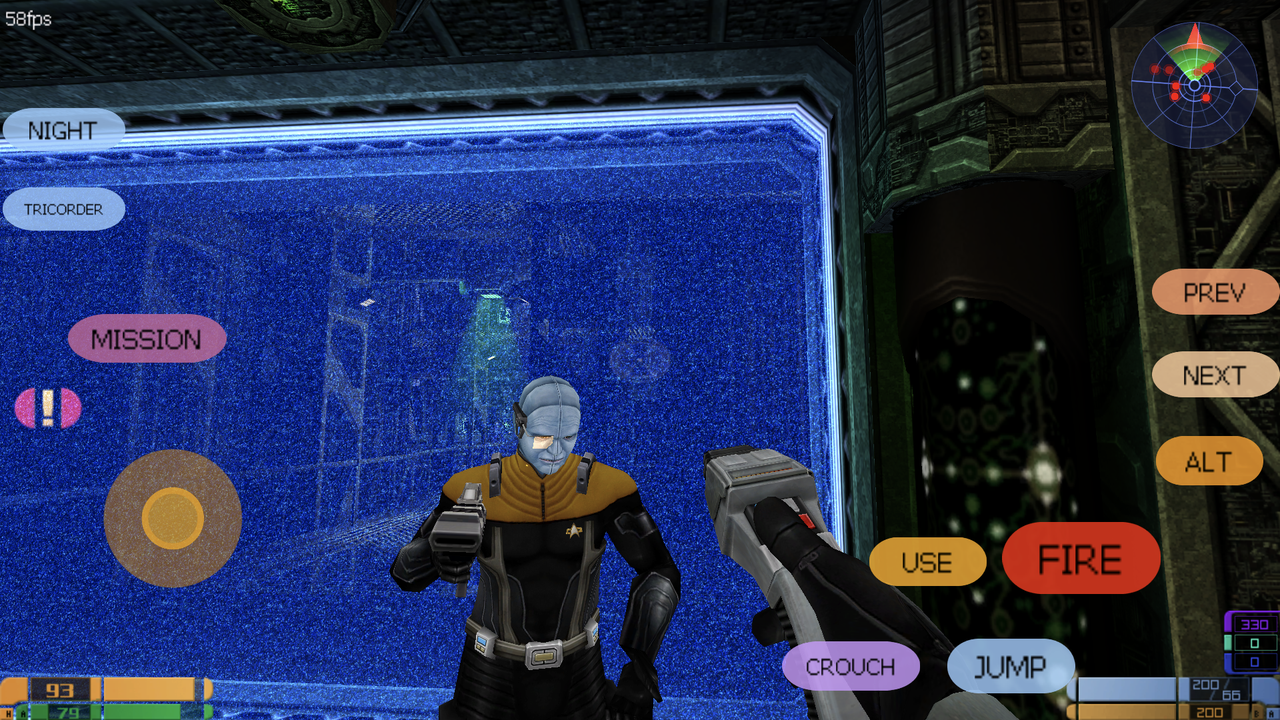
- Touch controls: virtual stick, look area, and on-screen pills for fire, jump, crouch, use, night vision and the tricorder.
- Full gamepad support (SDL GameController, EF1-style layout — see the table below), sharing one key map with the touch controls.
- First-run game import through the system file picker — no storage permission needed.
- Local-network multiplayer: host a match on one device and join it from another on the same network, with no master server, no port forward and no account. The engine's own notes are in docs/LAN_MULTIPLAYER.md.
- Widescreen support for the 3D view, the HUD and the 2D menus.
- Android 8.0+ (
arm64-v8a, 16 KB page-size compatible) and Linux x86-64 from one tree.
Requirements
- Android 8.0+ with a Vulkan driver, or Linux x86-64 with a Vulkan driver.
- Your own retail Elite Force II data: the game's
.pk3paks and the game DLL.
Install
Android
- Install the APK from Releases and launch it.
- On first run, pick your retail paks and the game DLL in the file picker (multi-select). The game copies them into place and starts.
- Manual placement, if you prefer:
adb push base/. /sdcard/Android/obb/com.provenanceef2/base/
Linux
- Download
ProvenanceEF2-<version>-x86_64.AppImagefrom Releases, make it executable and run it. - On first run, a dialog asks for your retail installation folder — the one
holding
EF2.exeand itsbase/directory. The choice is remembered; nothing is copied. - Point the game yourself, if you prefer:
./ProvenanceEF2-<version>-x86_64.AppImage +set fs_basepath /path/to/elite-force-ii
or drop the retail base/ directory into ~/.local/share/provenanceef2/,
where the engine looks on its own. Configs and saves land in the same tree.
The Linux release is Vulkan only.
Controls
Gamepad (EF1-style layout, remappable in the in-game menu):
| Input | Action |
|---|---|
| Left stick | Move (click: walk) |
| Right stick | Look (click: aim) |
| Right trigger | Fire |
| Left trigger | Alt-fire |
| Right shoulder | Next inventory item |
| Left shoulder | Previous inventory item |
| A | Jump |
| B | Crouch |
| X | Use |
| Y | Night vision |
| D-pad up | Reload |
| D-pad down | Context action (+button3) |
| D-pad left/right | Lean |
| Back | Objectives |
| Start | Menu |
Touch: virtual stick, look area, and the on-screen pills (fire, jump, crouch,
use, night vision, tricorder). Keyboard and mouse keep the retail layout
(WASD, mouse to aim and fire, wheel for inventory, F6/F9 quick-save/load,
n night vision, 1–6 weapon select).
Known issues
This port is not fully play tested and the campaign has not been played end to end; expect the occasional stutter while a new effect compiles. The graphics have been through a retail-diff pass — the Borg generator effects (plasma rings and the sparkle dome), lens flares (including the through-wall bug), phaser scorch marks, decal fade and lifetime, ship trails, beam shapes, the additive light blend and the view bob are all checked against retail's own output — so almost all of the graphical bugs reported here are fixed. What is still open:
- No stencil shadows —
cg_shadows 2draws nothing on this renderer, so the character shadows are the simple set (cg_shadows 1, the default). - A few effects may still be missing — unplayed areas can hide one; the dampening-field volumes draw only where retail itself draws them.
- The GLES 3.2 renderer is selectable, not the default — Graphics → Renderer switches between Vulkan and the GLES 3.2 twin; Vulkan remains the default and the renderer the release ships first. (On Linux the release is Vulkan only: the AppImage does not carry the GLES 3.2 module.)
- Saves are one way in practice — a save written here can load oddly or crash in retail, so back your saves up and finish a run in this port.
- Multiplayer is local-network only — the retail internet server list needs a master server this port does not configure, so hosting and joining are for one network. Use a home router or a phone hotspot with the VPN off; guest and hotel networks that block device-to-device traffic cannot carry a match.
- One deliberate divergence — some scripted movement threads resume in this port that retail itself cannot resume from its own saves; this is kept on purpose and will not be "fixed".
- REPORT YOUR ISSUES PLEASE!
Build
Everything needed to build is in this repository; no game data is required to build, only to run.
Android: SDK (android-35), NDK 27.0.12077973, CMake 3.31.5, JDK 17+,
Gradle 8.13 (wrapper pins it):
echo "sdk.dir=$HOME/Android/sdk" > local.properties
app/build_apk.sh assembleDebug          # app/build/outputs/apk/debug/app-debug.apk
Linux x86-64: CMake 3.31.5+, Ninja, a Vulkan driver:
cd app/src/main/cpp && cmake --preset linux-gles3 && ninja -C build -j16
The Linux output lands in build/Release/ (provenanceef2 plus game.so,
cgame.so, renderer_vulkan.so, renderer_gles3.so), and reads its game data
from a base/ directory beside it, or +set fs_basepath /path/to/install.
Linux release: app/package_appimage.sh builds the engine and packs one
relocatable AppImage, app/appimage/dist/ProvenanceEF2-<version>-x86_64.AppImage,
with a .sha256 and a build-information file beside it. It needs CMake 3.31.5+,
Ninja and the SDL 2 and Vulkan development headers (libsdl2-dev,
libvulkan-dev); the AppImage tools themselves are downloaded once into
~/.local/share/appimage-tools and checked against the pins in
app/appimage/tools.lock. The version in the file name comes from
app/src/main/cpp/VERSION, the same file the engine banner and the APK read.
The Linux release is Vulkan only — the GLES 3.2 twin is an Android concern
and is configured out of this build (-DBUILD_RENDERER_GLES3=OFF). It also
carries no diagnostic row emitters: the tree ships without them, so the image
cannot print a probe row, and it writes no qconsole.log unless the engine log
is asked for. The crash channel (the fatal backtrace, crashlog.txt and the
fault rows) stays.
app/package_appimage.sh
The AppImage carries no game data. Run it and point it at your own retail installation:
./ProvenanceEF2-<version>-x86_64.AppImage +set fs_basepath /path/to/elite-force-ii
or drop the retail base/ directory into ~/.local/share/provenanceef2/, which
the engine searches on its own; configs and saves land in the same tree. The
image is bundled with the SDL it was linked against and nothing else from the
desktop — glibc, the X11/Wayland client libraries, ALSA/PulseAudio and the
Vulkan loader and driver all come from the host, so the image needs the build
machine's glibc or newer (that floor is measured and printed, not assumed).
.github/workflows/appimage.yml builds it by hand on an Ubuntu 22.04 runner,
which is the same 2.35 floor the EF1 port targets, and uploads it as an
artifact — no release is cut. The pipeline never runs the game: the image is
verified statically (ldd -r, readelf, objdump, desktop-file-validate,
appstreamcli, and an --appimage-extract round trip), and first launch is
yours.
Licence
Mixed-licence work. The engine lineage is GPL-2.0-or-later (id Tech 3 via
ioquake3 and OpenMoHAA — keep the notices intact and ship the source). The Elite
Force II game layer is not GPL: the 2003 SDK portions carry Ritual's own
limited-use licence (docs/EF2-SDK-licenseAgreement.txt), and the reconstructed
client/UI code asserts no copyright and grants no rights — it remains the property
of its respective holders. No game assets are distributed here; you must own
the game (GOG). Unofficial
fan project, not affiliated with or endorsed by Ritual, Activision, id Software or
Paramount/CBS. See LICENSING.md,
CREDITS.md and THIRDPARTY.md.
Parts of this port were built with the help of AI tools (model/texture formats, the bot and NPC AI system, special effects, and engine/client reconstruction).