3SXW
3SXW brings Street Fighter III: 3rd Strike [3SXW] to PC.
- Type: PC port
- Game: Street Fighter III: 3rd Strike [3SXW]
- Runs on Linux, macOS and Windows
- By guimaraf
- Latest release rolling-pre-release, 2026-08-20
- Source: https://github.com/guimaraf/3sxw
README
3SXW
A port of the greatest fighting game of all time for modern platforms - fork with fixes and improvements.
This is a hard fork of 3SX, the original Street Fighter III: 3rd Strike PC port project.
Requires an official copy of Street Fighter III: 3rd Strike or Street Fighter Anniversary Collection for PlayStation 2 to play.
Based on a decompilation of the PlayStation 2 port.
Legal notice
- This repository is an independent fan-made reverse engineering and portability project.
- It is not affiliated with, endorsed by, sponsored by, or approved by Capcom.
- Capcom, Street Fighter, Street Fighter III: 3rd Strike, and all related names, logos, characters, audio, artwork, and game assets are the property of their respective rights holders.
- This repository does not include the original game assets, audio, artwork, BIOS, firmware, or other proprietary data required to play the game.
- To use this project, you must provide your own legally obtained original copy of the game.
- If you do not own an original copy, do not use this project.
Changes in this fork
Save system - 100% working
The save system has been fixed and is fully operational. Saving and loading progress works reliably, with no errors or data corruption.
Virtual Memory Cards for slots 1 and 2 are created and formatted automatically when first needed. Save data and match replays have been validated on both cards, including closing the game, reopening it, and loading the stored content. Removing the data/saves/ directory simply causes clean cards to be created again on the next save operation.
All files stay in the project folder
In the original project, save files, configuration, and other data were stored in directories spread across the operating system (for example AppData\\Roaming\\CrowdedStreet\\3SX\\ on Windows). In this fork, all files generated by the game are kept inside the executable's own folder:
| File type | Location |
|---|---|
| Save / progress | <game folder>/data/saves/slot1/ and <game folder>/data/saves/slot2/ |
| Replays | <game folder>/data/saves/slot1/ and <game folder>/data/saves/slot2/ |
| Configuration | <game folder>/data/config |
| Key mapping | <game folder>/data/keymap |
| Critical error log | <game folder>/data/error.log |
| Screenshots | <game folder>/prints/ |
| Optional bezels | <game folder>/data/img/bezel.png and bezel-pixel-perfect.png |
| Required game resource | <game folder>/resources/SF33RD.AFS |
This makes the game 100% portable: just copy the folder to another location or computer and everything will work without reinstalling. Startup also verifies that the local data/ directory can be created, written, read, and cleaned up before the game begins using it.
Input and window behavior
- Press
F11orAlt+Enterto switch between windowed and fullscreen modes. Alt+Enteris suppressed from gameplay input, so it does not activate Start or add player 2 in Arcade Mode.- A fullscreen toggle requests the normal in-game pause during a match, while menu navigation remains unaffected.
- When focus is lost during gameplay, controller and keyboard states are cleared and the match enters pause as soon as gameplay resumes, including round and stage transitions.
- Disconnecting a controller clears its previous state and preserves the existing in-game reconnect flow.
- Analog sticks and triggers use a 25% deadzone to reduce drift without making directional inputs feel excessively long.
- Sequential fighting-game commands and direction-plus-button transitions were regression-tested without changing the original game-side command recognition.
- Only one game instance can run in the same operating-system session. A second launch displays an error and exits before accessing resources, saves, audio, or gameplay state.
Optional 16:9 bezel
The installation step copies the bundled img/bezel.png, img/bezel-pixel-perfect.png, img/bezel2.png, and img/bezel3.png to <game folder>/data/img/. Set bezel = true in <game folder>/data/config to display a bezel around the game area. The setting defaults to false. With scale-mode = square-pixels, the game loads bezel-pixel-perfect.png; every other scale mode uses bezel.png.
The bezel is loaded once at startup and is shown only while the game is fullscreen, the actual renderer output is 16:9, and aspect-ratio = preserve. It is hidden by aspect-ratio = stretch, in windowed mode, after Alt+Enter, and on non-16:9 displays. It is rendered above the game and scanline layers, using its transparent center to preserve the 4:3 image.
The installed image can be replaced without recompiling the project, but the game must be restarted to reload it. For predictable transparency, custom images should use an 8-bit RGBA PNG with a 16:9 resolution and a fully transparent center; 1920x1080 with a centered 1440x1080 transparent opening is recommended. A missing or invalid file is reported in data/error.log, and the game continues normally with black side bars. F12 screenshots include the bezel whenever it is active. Only distribute artwork that you have permission to use.
Optional scanlines
Set scanlines = true in <game folder>/data/config to apply scanlines only to the rendered game image in both preserved 4:3 and stretched modes. The setting defaults to false. Use scanline-opacity to control the effect intensity from 0 to 100; its default value is 20, and values outside this range are clamped and reported in data/error.log.
The scanline pattern is generated once at startup, follows the original 224-line game image, and is rendered in one additional blended texture operation per frame. It does not add another frame buffer, alter input processing, or perform per-frame allocations. System messages remain above the effect, the 16:9 bezel is rendered above it, and F12 screenshots include scanlines whenever they are enabled.
External configuration application
The project includes a standalone SDL3 configuration application. On Windows, run sf3config.exe next to SF3.exe to edit every setting currently supported by data/config: fullscreen, window dimensions, aspect ratio, scale mode, frame timing, bezel, scanlines, scanline opacity, and player rendering above the HUD. The Windows interface uses the system Segoe UI font with antialiasing for clear, native-looking text without bundling another font or DLL.
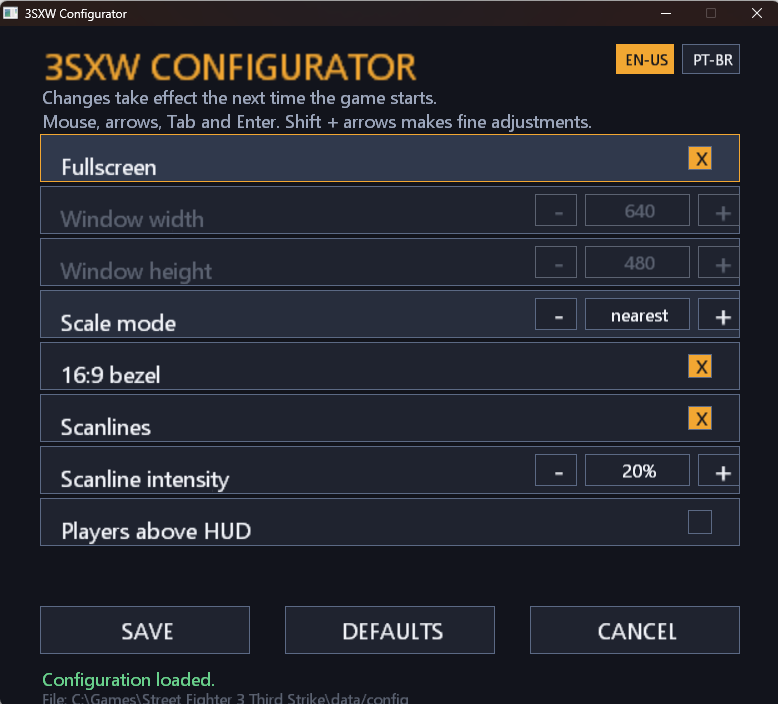
The configurator starts in English (EN-US) on every launch. Use the left and right arrows in the < EN-US > selector at the top of the window to switch the complete interface immediately between English (EN-US), Brazilian Portuguese (PT-BR), and French (FR-FR). This choice is limited to the current configurator session and does not add or change any game setting.
All built-in configurator text is centralized in appConfig/src/language.c. To add another compiled language, add its code to the enum in appConfig/src/language.h, add a complete translation entry in language.c, and rebuild. The language selector reads this table automatically. On Windows, sf3config.exe also embeds img/Hugo.ico as its application icon.
The generated configuration uses these defaults:
| Setting | Default |
|---|---|
| Fullscreen | true |
| Window size | 640x480 |
| Aspect ratio | preserve |
| Scale mode | nearest |
| Frame timing | arcade |
| Bezel | false |
| Scanlines | false |
| Scanline opacity | 20 |
| Players above HUD | false |
The application preserves comments and unknown settings, validates supported values, and replaces the configuration through a temporary file only after writing succeeds. Changes take effect the next time the game starts. Its source code is under appConfig/src/, its intermediate build output is under appConfig/build/, and cmake --install build --prefix build/application installs it beside the game executable. Generated binaries under appConfig/build/ are intentionally not tracked by Git.
aspect-ratio = stretch fills the complete output with the game image; preserve retains the original 4:3 presentation. Selecting stretch automatically changes square-pixels to nearest and clears the bezel setting, because those options only apply to the preserved presentation. frame-timing = arcade remains the default at 59.59949 FPS, while ps2 uses 60000/1001 FPS (approximately 59.94). scale-mode = square-pixels uses the corrected 300x224 presentation grid; at 1920x1080 it produces a 1200x896 game area aligned with the Capcom bezel. These settings change the full game frame cadence or presentation and require a restart.
JPEG screenshots
Press F12 to capture the current game screen. Screenshots are stored as high-quality JPEG files under prints/, using names in the following format:
sf3_YYYY-MM-DD_HH-MM-SS-mmm.jpg
Pixel readback remains on the main thread as required by SDL3. RGB conversion, JPEG encoding, and disk writing run on a low-priority worker thread with a bounded queue, reducing gameplay stalls while screenshots are generated. Pending accepted captures are completed during normal shutdown, and incomplete files are removed after errors.
FFmpeg dependency builds explicitly enable the MJPEG encoder used by this feature. Existing checkouts upgrading from an older dependency build must run build.bat deps once on Windows, or rebuild the dependencies using the platform-specific build script on Linux or macOS.
Resource validation and error handling
The resource startup flow validates SF33RD.AFS before gameplay begins. If the file is missing, the game can extract it from a legally obtained compatible PlayStation 2 image. Invalid images are rejected with the expected filename reported in data/error.log; canceling resource selection now closes the game instead of reopening the dialog indefinitely.
Critical runtime failures are written to the portable data/error.log file in Release builds. Texture, audio, resource, and screenshot failure paths include the affected file or operation whenever that information is available.
Rendering and audio stability
The sprite rendering path uses bounded buffering and asynchronous queue processing to avoid the repeated creation and destruction pattern that caused micro-stuttering in the original port. Texture operations include additional validation and fail safely when a resource cannot be prepared.
Audio resource reads and processing use asynchronous queues so music transitions and other I/O do not unnecessarily block the gameplay frame. Shutdown paths drain or cancel pending work before releasing their resources.
Build, installation and platform status
On Windows, build.bat configures, compiles, and installs the portable application in Release mode by default. Use build.bat deps for the first build or after dependency changes, and build.bat Debug for a Debug build. The install step assembles the game, runtime libraries, sf3config.exe, and the bundled bezel under build/application/.
The sound shutdown interface is now declared consistently between the game and port layers, fixing the previous Clang SPU_Quit undeclared-function build failure when warnings are treated as errors.
Windows is the primary and extensively tested target. Linux and macOS build and installation flows are prepared, but runtime validation on real Linux and Mac hardware is still pending. See the platform-specific Windows, Linux, and macOS guides.
GitHub Actions builds and installs portable Windows, Linux, and macOS application folders for every push and pull request to main. Each platform folder is published as a workflow artifact for download. The separate manual release workflow continues to produce the distributable archives.
Gill available from the start
In the original game, the character Gill must be unlocked by clearing the game with every character. In this fork, the game initializes the official Gill unlock prerequisite on a fresh save, so Gill is available to all players from the beginning while still following the normal in-game unlock state.
The domestic-version flow for Extra Options / Extra Mode is preserved: to unlock it, clear Arcade Mode with Gill and save the game. After saving, Extra Options remains available when the game is opened again.
Gill has also been validated in Arcade Mode, including the car bonus stage and Sean's parry bonus stage.
Runtime debug mode
This fork includes a runtime debug mode enabled with --debug-mode. It records diagnostic sessions under data/debug/ with frame timing, render, audio, I/O, and input logs to help investigate stutter and performance issues.
See debug-mode.md for commands, generated files, and reporting instructions.
Resources
Find instructions on how to build the project for Windows, Linux or macOS, plus the contribution guide and third-party notices, in the repository documentation.
Community
Join the Discord server to discuss the project, report bugs or share your ideas.
Acknowledgments
This project uses:
- FFmpeg for ADX playback and JPEG screenshot encoding
- SDL3 for window management, input handling, sound output and rendering
- libcdio / libiso9660 for
.isofile reading - zlib for file decompression
- argparse for parsing CLI arguments
- minizip-ng for unzipping
- TF-PSA-Crypto for checksum calculation
3SXW
Um port do maior jogo de luta de todos os tempos para plataformas modernas - fork com correcoes e melhorias.
Este e um hard fork de 3SX, o projeto original de port do Street Fighter III: 3rd Strike para PC.
Requer uma copia oficial de Street Fighter III: 3rd Strike ou Street Fighter Anniversary Collection para PlayStation 2 para jogar.
Baseado em uma decompilacao do port para PlayStation 2.
Aviso legal
- Este repositorio e um projeto independente de fans, voltado a engenharia reversa e portabilidade.
- Ele nao possui afiliacao, endosso, patrocinio ou aprovacao da Capcom.
- Capcom, Street Fighter, Street Fighter III: 3rd Strike e todos os nomes, logos, personagens, audios, artes e assets relacionados pertencem aos seus respectivos detentores de direitos.
- Este repositorio nao inclui os assets originais do jogo, audios, artes, BIOS, firmware ou outros dados proprietarios necessarios para jogar.
- Para usar este projeto, voce deve fornecer sua propria copia original obtida legalmente.
- Se voce nao possui uma copia original, nao utilize este projeto.
Mudancas neste fork
Sistema de save 100% funcional
O sistema de salvamento foi corrigido e esta totalmente operacional. Salvar e carregar progresso funciona de forma confiavel, sem erros ou corrupcao de dados.
Os Memory Cards virtuais dos slots 1 e 2 sao criados e formatados automaticamente quando usados pela primeira vez. Saves e replays de partidas foram validados nos dois cartoes, incluindo fechar o jogo, abri-lo novamente e carregar o conteudo gravado. Remover a pasta data/saves/ apenas faz com que novos cartoes limpos sejam criados na proxima operacao de salvamento.
Todos os arquivos ficam na pasta do projeto
No projeto original, arquivos de save, configuracoes e outros dados eram armazenados em diretorios espalhados pelo sistema operacional (por exemplo AppData\\Roaming\\CrowdedStreet\\3SX\\ no Windows). Neste fork, todos os arquivos gerados pelo jogo ficam dentro da propria pasta do executavel:
| Tipo de arquivo | Localizacao |
|---|---|
| Save / progresso | <pasta do jogo>/data/saves/slot1/ e <pasta do jogo>/data/saves/slot2/ |
| Replays | <pasta do jogo>/data/saves/slot1/ e <pasta do jogo>/data/saves/slot2/ |
| Configuracoes | <pasta do jogo>/data/config |
| Mapeamento de teclas | <pasta do jogo>/data/keymap |
| Log de erros criticos | <pasta do jogo>/data/error.log |
| Capturas de tela | <pasta do jogo>/prints/ |
| Molduras opcionais | <pasta do jogo>/data/img/bezel.png e bezel-pixel-perfect.png |
| Recurso obrigatorio do jogo | <pasta do jogo>/resources/SF33RD.AFS |
Isso torna o jogo 100% portatil: basta copiar a pasta para outro local ou computador e tudo funcionara normalmente, sem necessidade de reinstalacao. Antes de usar o armazenamento, a inicializacao tambem verifica se a pasta local data/ pode ser criada, gravada, lida e limpa corretamente.
Comportamento de input e janela
- Pressione
F11ouAlt+Enterpara alternar entre os modos janela e tela cheia. Alt+Entere suprimido do input do jogo, portanto nao ativa Start nem adiciona o jogador 2 no Arcade Mode.- Alternar a tela durante uma partida solicita a pausa normal do jogo, sem interferir na navegacao dos menus.
- Quando a janela perde o foco durante o gameplay, os estados do teclado e dos controles sao limpos e a partida entra em pausa assim que o gameplay comeca ou retorna, inclusive durante transicoes de round e cenario.
- Desconectar um controle limpa seu estado anterior e preserva o fluxo de reconexao exibido pelo proprio jogo.
- Analogicos e gatilhos usam deadzone de 25%, reduzindo drift sem deixar os comandos direcionais excessivamente longos.
- Comandos sequenciais de jogos de luta e transicoes entre direcao e botao foram testados novamente sem alterar o reconhecimento de comandos original do jogo.
- Somente uma instancia do jogo pode ser executada na mesma sessao do sistema operacional. Uma segunda abertura exibe um erro e encerra antes de acessar recursos, saves, audio ou o estado do gameplay.
Moldura opcional em 16:9
O passo de instalacao copia as imagens img/bezel.png, img/bezel-pixel-perfect.png, img/bezel2.png e img/bezel3.png fornecidas pelo projeto para <pasta do jogo>/data/img/. Defina bezel = true em <pasta do jogo>/data/config para exibir uma moldura ao redor da area do jogo. A opcao usa false como valor padrao. Com scale-mode = square-pixels, o jogo carrega bezel-pixel-perfect.png; todos os demais modos usam bezel.png.
A moldura e carregada uma vez na inicializacao e aparece somente quando o jogo esta em tela cheia, a saida real do renderer esta em 16:9 e aspect-ratio = preserve. Ela desaparece com aspect-ratio = stretch, no modo janela, depois de Alt+Enter e em monitores que nao estejam em 16:9. Ela e renderizada acima das camadas do jogo e das scanlines, usando seu centro transparente para preservar a imagem 4:3.
A imagem instalada pode ser substituida sem recompilar o projeto, mas o jogo precisa ser reiniciado para recarrega-la. Para garantir uma transparencia previsivel, imagens personalizadas devem usar preferencialmente um PNG RGBA de 8 bits com resolucao 16:9 e centro totalmente transparente; recomenda-se 1920x1080 com uma abertura transparente central de 1440x1080. Arquivos ausentes ou invalidos sao informados em data/error.log, e o jogo continua normalmente com faixas laterais pretas. As capturas feitas com F12 incluem a moldura quando ela estiver ativa. Distribua apenas artes que voce tenha permissao para usar.
Scanlines opcionais
Defina scanlines = true em <pasta do jogo>/data/config para aplicar scanlines somente sobre a imagem renderizada do jogo, tanto no mod