Super Odyssey PC Recomp
Super Odyssey PC Recomp is a native Windows PC port of Super Mario Odyssey made by static recompilation, featuring up to 4x internal resolution and NVIDIA DLSS/DLAA.
- Type: PC port
- Game: Super Mario Odyssey
- Runs on Windows
- By Simon3Sarkis
- Latest release v0.2.8, 2026-11-13
- Source: https://github.com/Simon3Sarkis/super-odyssey-pc-recomp
README
Super Odyssey PC Recomp
A native PC port of Super Mario Odyssey for Windows and Linux, made by static recompilation - from your own copy of the game.
Note
This is an AI-made project. The code of this port was written by AI: almost all of it by Claude (Anthropic's AI model, through Claude Code), with some fixes and features from OpenAI's Codex. The maintainer doesn't write the code; they direct the work, test every build on Windows and a Steam Deck, and run the releases. See Who made this.
Important
You must bring your own game. This project contains no game files, no game code and no assets -
only the installer and the source code. To play, you need the exefs and romfs folders of your own copy of
Super Mario Odyssey, already extracted. Instructions for getting game files are
not provided, and requests for game files will be closed.
Warning
This is an early preview. The whole game can be played, but there are known issues (see Known issues) and things that still need fixing. Please report what you find.
Current focus
Updates will come more slowly for a while: the maintainer works a day job and has limited time, but the project continues. The order of work:
- The same as on the Switch, at 60 FPS. Every kingdom compared with the Switch version (recordings and captures, side by side): rendering, effects, shadows, behaviour and timing. Any difference gets fixed, so that the port plays and looks 1:1 with the original.
- No stutter. The shader preparation is being reworked to cover everything the game draws, to finish faster and to take far less disk space, so a first visit to a kingdom or effect never hitches. Smooth, stable frame pacing matters more here than higher numbers.
- The open issues: crashes at start, slow performance on some AMD / Linux setups and handhelds, controller fixes.
- Then 90 and 120 FPS, and new features (frame generation, sharper HUD text, more graphics options, Steam Deck controller layout).
Releases will only go out once they've been tested on Windows and a Steam Deck with both game versions.
What it is
The game's ARM64 code is translated to C ahead of time and compiled into a regular Windows program - no emulator runs while you play. The parts of the Switch the game talks to (kernel, system services, the NVN graphics API, audio) are reimplemented on the PC, with Vulkan for graphics.
- Installer that takes your game's extracted
exefsandromfsfolders (1.0.0, or 1.4.1 with the update applied) - Every shader compiled at install time, so effects don't stutter the first time they appear
- Up to 4x internal resolution, NVIDIA DLSS / DLAA, AMD FSR 1, SMAA, ultrawide Fill window
- Native 90 or 120 FPS (experimental) or frame interpolation, anisotropic filtering, smooth gradients
- Keyboard and controller rebinding, RomFS mods, an in-game settings menu, and built-in updates from this page
Windows 10 / 11 (x64). Linux and Steam Deck: experimental - an AppImage, see docs/linux.md.
Install
- Download the latest
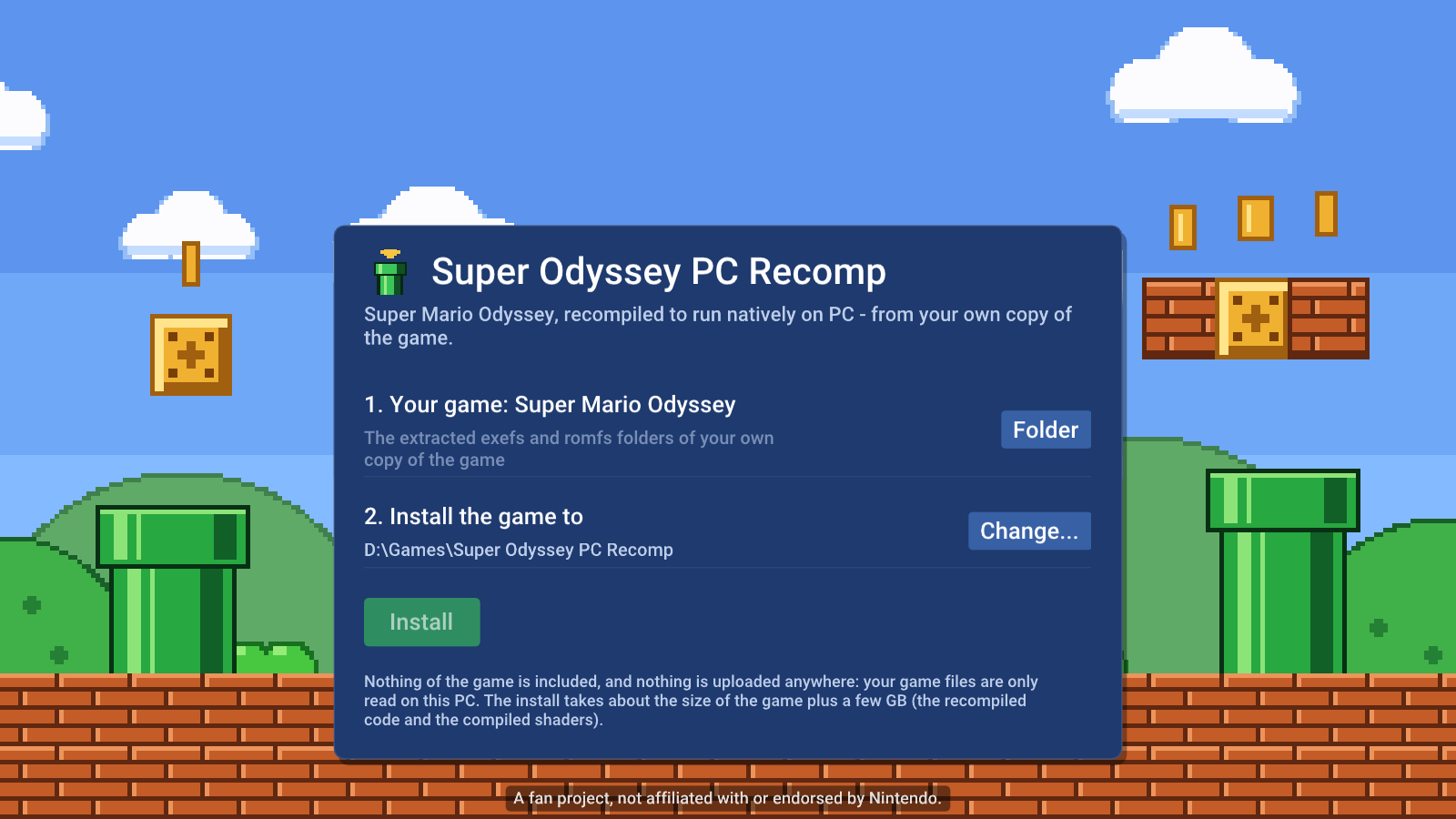
...-windows.zipfrom Releases and extract it anywhere you own (for exampleD:\Games, not Program Files). StartSuperOdysseyRecomp.exe. It isn't code-signed: if SmartScreen says "Windows protected your PC", choose More info, then Run anyway. - The installer asks for:
- Your game: the folder that holds the extracted
exefsandromfsfolders of your own Super Mario Odyssey - version 1.0.0, or 1.4.1 with the update already applied (its fullromfs, not only the update's).exefsholdsmain,main.npdmandsdk;romfsholds folders such asStageDataandSystemData. - Install the game to: where the game data, saves and shaders go (about 12 GB).
- Your game: the folder that holds the extracted
- Press Install. It copies the game data, recompiles the game code for your PC (a few minutes) and compiles every shader (several minutes, once).
- Press Play. The game opens in fullscreen; later starts go straight to the game.
Updating
New versions are published on this page. The game checks for them at start (in the background - only GitHub is contacted and nothing about you or your game is sent; you can switch this off) and shows a note when one is out. Open the menu (F1) > Updates > Download and install, then Restart now. Your game files, saves, settings and mods stay; if the new version needs it, the game code is rebuilt and the shaders re-prepared once, by themselves.
You can also download the new zip from Releases and extract it over your current folder.
Known issues
This is a preview. Known problems and things not done yet:
- Being worked on (from the issues):
- Crashes at start or in the first kingdom on some PCs (#19, #21).
- Very low FPS on some AMD graphics cards on Linux (#28, #32), and slowdown on the ROG Ally (#13).
- High memory use (#7).
- Upscaler jitter and bloom quality (#24); Mario's shadow can look distorted (#26).
- With a Switch controller, the map pointer doesn't select icons (#22). The game's own Joy-Con tips while playing can't be turned off (#23): the setting only skips the controller screen at start.
- Version 1.4.1 at 90 or 120 FPS can crash while loading Wooded Kingdom. Use 60 FPS there for now.
- Version 1.4.1 is newer in this port than 1.0.0 and less tested: native 90/120 FPS and the frame interpolation's pose smoothing are tuned on 1.0.0, so 1.4.1 can show more jitter or small glitches with them on.
- Native 90 and 120 FPS are experimental on both versions: some objects or effects can move unevenly or look doubled.
- A short stutter can still happen the first time a rare effect is drawn whose pipeline state nobody has recorded yet. It's prepared then and kept for next time.
- Online features of the game (anything that needs Nintendo's servers) don't work.
- Code mods (exefs patches, IPS / pchtxt, online mods) can't be used: the game code is rebuilt from the original. RomFS mods work.
- Windows Defender may flag the new, unsigned program by its machine-learning guess (a
!mldetection) - it reads game files, builds code and starts helper programs, which looks unusual. Please report it as a false positive at https://www.microsoft.com/wdsi/filesubmission and open an issue with the detection name. - Linux and Steam Deck are experimental: less tested than Windows (docs/linux.md). A CPU with AVX2 and a Vulkan 1.3 GPU are required everywhere.
- Graphics glitches can show up in places nobody has tested yet - please report them with a screenshot.
Reporting a problem
Open an issue with:
- what happened and where in the game (a screenshot helps),
- your game version (1.0.0 or 1.4.1), Windows version, CPU and GPU,
- the log,
SuperOdysseyRecomp.log, from the install folder (it doesn't contain any game files).
For a graphics glitch, pressing F9 where it happens saves the frame's details into the log, which helps a lot.
What you need
- Windows 10 / 11 (x64), a CPU with AVX2 (Intel Haswell / AMD Zen or newer), a GPU with Vulkan 1.3 and an up-to-date driver
- 8 GB RAM (16 GB recommended), about 12 GB free disk space
- The extracted
exefsandromfsfolders of your own Super Mario Odyssey (1.0.0, or 1.4.1 with the update applied)
Settings
Open the menu with F1 or Esc (controller: Home / Guide button). Switch tabs with L / R (Q / E); the text on the right explains the selected setting.
- Display: windowed, borderless or exclusive fullscreen, display resolution, aspect ratio (ultrawide Fill window)
- Graphics: internal resolution, NVIDIA DLSS / DLAA (presets, sharpening), AMD FSR 1, SMAA, anisotropic filtering, smooth gradients
- Performance: 90 or 120 FPS (native) or 120 interpolated, shader preloading and warm-up, FPS counter and performance overlay, compile shaders again at the next start
- Audio: volume, reverb, movie audio, mute in background
- Controls: language, motion controls, vibration, stick deadzone, mouse camera (sensitivity, invert), button prompts (keyboard, Xbox, PlayStation, Switch), skip the start-up controller screen, key and button rebinding
- Mods: switch RomFS mods on and off
- Updates: this version, check / install updates, the project page
Controls
| Switch | Keyboard | Controller |
|---|---|---|
| Left stick | W A S D | left stick |
| Right stick (camera) | mouse, or Num 8 / 4 / 5 / 6 | right stick |
| A / B / X / Y | K / J / L / I | by position (east = A, south = B) |
| L / R, ZL / ZR | Q / E, 1 / 3 | shoulder buttons / triggers |
| + / - | Enter / Backspace | Start / Back |
| Stick clicks | F / Num 0 | stick clicks |
| D-pad | arrow keys | d-pad |
Fullscreen: F11 or Alt+Enter. Everything can be rebound in the menu.
The mouse turns the camera while you play: the pointer stays in the window until you open the menu (Esc) or switch to another window. Sensitivity, invert up / down, or switching it off: menu > Controls > Mouse.
The game's button icons follow what you play with: after a key press or mouse movement they show the keys you bound (WASD for moving, a mouse for the camera), after a controller press that controller's own buttons: Xbox (A B X Y, LB / RB / LT / RT), PlayStation (cross circle square triangle, L1 / R1 / L2 / R2) or the Switch's. With two controllers connected, the one you press a button on takes over. Menu > Controls > Button prompts can fix them to one style.
Motion controls (shake to throw Cappy at a target, and the game's other motion moves) use the controller's gyro and accelerometer: PlayStation and Switch Pro controllers. Menu > Controls > Motion controls turns them off.
Files
The program folder holds the program; the install folder (the same one unless you chose another) holds:
extracted\- your game data as the installer wrote it and the game code built from it (odyssey_game.dll)save\- your saves,cache\- compiled shaders,powermoon.ini- settings,SuperOdysseyRecomp.log- the logmods\- optional RomFS mods, each in its own folder (mods\<Mod name>\romfs\...; the Atmosphere layout works too)
Never share extracted\ or anything built from it: it's Nintendo's game.
Building from source
Needs MSYS2 (UCRT64: clang, SDL3, FFmpeg, shaderc, Python) - tools\setup_windows.ps1 installs them. See
docs/BUILD-windows.md.
-
Put your extracted game folders into
extracted\(extracted\exefs\,extracted\romfs\), or start the built program and let its installer copy them there. -
From an MSYS2 UCRT64 shell in this folder:
make gen # recompile the game from extracted/exefs into generated/ make -j16 # build/SuperOdysseyRecomp.exe and the game code, build/odyssey_game.dll make dlls # copy SDL3 / FFmpeg / shaderc DLLs next to the exe -
A release:
make deps-windows(an LGPL-only FFmpeg),make gen-helper,tools/fetch_zig.sh, thenmake dist. The zip holds no game code.
How it works
tools/- the recompiler (Python):gen.pylifts every function of the game's NSO modules to C (lifter.py);odyssey_patches.pyholds the few game-specific patches for 1.0.0 and 1.4.1.runtime/- the program: module loader, a small Horizon kernel, IPC services, HLE of SDK functions, NVN on Vulkan with a Maxwell shader translator (runtime/nvn), movies with FFmpeg, the menu (Dear ImGui), the installer (runtime/ui/setup.mm), the game code build (runtime/gamebuild.c) and the updater (runtime/updater.c).- Debugging tools are environment variables (
ODYSSEY_*), documented where they're read.
Who made this
The code of this port was written by AI, not by the maintainer. Nearly all of it was written by Claude (Anthropic's AI model, working through Claude Code): the recompiler's patches, the runtime, the Vulkan renderer, the installer, the Linux version and the release pipeline. OpenAI's Codex contributed a number of fixes and features.
The maintainer, Simon3Sarkis, hasn't written the code. What they do:
- decide what gets worked on and in what order, and what's good enough to ship
- test every build on their own PC and a Steam Deck, on both game versions, before anything is released
- play through the game to find bugs, reproduce what players report, and compare the port with the Switch version
- run the project: the issues, the replies to players, the releases
Bug reports are read and worked on the same way: the maintainer tests, and Claude writes the fix.
Credits
- Power Moon Recomp by its contributors - the Super Mario Odyssey port this project continues (MIT license); its original repository is no longer online.
- LAS Recomp by Peiikai and its contributors - the static recompiler, runtime and renderer Power Moon Recomp is built on, and the frame interpolation (MIT license).
- PrimeRecomp by its contributors - the GPU ASTC texture decoder
(
runtime/nvn/vulkan/astc_gpu.c) and its GPU scratch memory (MIT license). - MacNativeGames - the game package reading code
runtime/nxpkg.cis ported from (MIT license,tools/vendor/macnativegames), and TotK PC Recomp's hactool build script (tools/build_hactool.py, MIT) used for checking - OdysseyDecomp - names and structure of the game's code, used for reading and debugging (no code from it is in this repository)
- Switchbrew and envytools - documentation of the Switch's system interfaces and the Maxwell GPU
- An MIT-licensed open-source project's audio renderer and shader instruction decoders (
third_party/ryujinx/LICENSE.txt) - Libraries: SDL 3 (zlib), FFmpeg (LGPL, linked dynamically), Dear ImGui (MIT), Vulkan Memory Allocator (MIT), shaderc (Apache 2.0), SMAA (MIT), AMD FSR 1 (MIT), the Roboto font (Apache 2.0), NVIDIA DLSS (NVIDIA RTX SDK license)
- In the release, to build the game code on your PC: Zig (MIT) with LLVM / Clang / LLD (Apache
2.0 with LLVM exception) and MinGW-w64 headers; the generator runs on Python (PSF license)
with Capstone (BSD), Unicorn (GPL 2.0) and
LZ4 (BSD). The release carries every licence in
licenses/.
The installer's pixel-art background and the icon are original artwork made for this project.
Legal
This is a fan project. It is not affiliated with, endorsed by or sponsored by Nintendo. Super Mario Odyssey and
Nintendo Switch are trademarks of Nintendo. No game files, game code, assets or fonts are included in this
repository or its releases, and nothing built from your game files (extracted/, generated/, odyssey_game.dll)
may be shared. You must provide the extracted files of your own legally obtained copy of the game.
License
The code of this repository is under the MIT License (it keeps LAS Recomp's and Power Moon Recomp's
copyright notices). Third-party components keep their own licenses (above, and in third_party/). The license covers
this project's code only - it grants nothing for Nintendo's game.