SMS Launcher for Android
SMS Launcher for Android is a native Android port of Super Mario Sunshine that supports touch controls and HD textures.
- Type: PC port
- Game: Super Mario Sunshine
- Runs on Android
- By chasem-dev
- Source: https://github.com/chasem-dev/sms-android
README

SMS Launcher for Android
A native Android launcher for the Super Mario Sunshine PC port. The APK includes the compiled port and SDL, but no game data: you import a disc image made from your own copy. It targets ARM64 Android 10 or newer, with GLES 3.1 or newer, and a controller or the on-screen touch controls. AYN Thor and similar modern Android handhelds are the intended hardware. On Windows, macOS and Linux, use the desktop SMS Launcher instead.
Download
APKs are published on this repository's
Releases page: full
releases, starting with 1.0.0, and tester previews between them as
pre-releases. Each has two: sms-android-<version>-arm64.apk plays Super Mario
Sunshine, and sms-android-eclipse-<version>-arm64.apk (SMS Eclipse) plays
Super Mario Eclipse. They install side
by side, each with its own disc and saves. Install over the previous release
or preview to keep your imported disc and saves. Previews 1 to
17 were published from the desktop launcher's repository as
android-pr-107-v* pre-releases; this repository's builds update them in place.
CHANGELOG.md lists what changed in each release and preview.
Status
See VALIDATION.txt for build and emulator results. Plaza gameplay is currently slow in the ARM64-translating emulator; handheld performance has not been measured on AYN Thor. An S24 Ultra tester reports near-60 FPS while recording but lower FPS during ordinary play. Performance requests and faster-core placement did not help in their comparisons. Their timing log identified an avoidable extra refresh wait in our background-work fallback; preview 12 replaces it with a short cooperative turn. The tester reports that build is much faster and supplies a sustained nominal-60 FPS 4:3 run, while widescreen still runs around 55–60 FPS. Preview 13 reduces CPU work in widescreen layout; its device FPS effect needs comparison. The two tester runs were not a controlled matching-camera benchmark.
Build
The game comes from the sms-port submodule, pinned to the
sms-pc-port commit this launcher
builds. Clone with submodules:
git clone --recurse-submodules https://github.com/chasem-dev/sms-android.git
To build a different port checkout, set SMS_PORT_ROOT to its location.
Install a JDK (17 or newer), Python 3, CMake, Git, curl, tar, patch, and the
Android SDK. Install these SDK packages:
platform-tools platforms;android-35 build-tools;36.0.0
ndk;28.2.13676358 cmake;3.22.1
Accept the SDK licenses, set ANDROID_HOME and JAVA_HOME, and run:
./build.sh
The script downloads checksum-verified SDL 2.32.10, initializes the port's
decompilation submodule, and uses the checked-in Gradle wrapper to build only
arm64-v8a. The installable debug APK is
app/build/outputs/apk/sunshine/debug/app-sunshine-debug.apk.
SMS_ECLIPSE=1 ./build.sh builds the Super Mario Eclipse app instead,
app/build/outputs/apk/eclipse/debug/app-eclipse-debug.apk: the game with
the Eclipse mods built in (the port's -DSMS_ECLIPSE=ON, which fetches their
sources at configure time; see the port's docs/ECLIPSE.md), and checked
against the mods' declarations after linking.
tests/check-input-monitor.sh, tests/check-controller-mapping.sh,
tests/check-texture-pack.sh, tests/check-language-pack.sh and
tests/check-update-check.sh run the input monitor's, controller mapping's,
texture pack installer's, language pack installer's and update check's unit
tests without the Android SDK, and tests/check-vcdiff.sh the Eclipse disc
patcher's.
Releases
Merging a pull request into main publishes a release automatically, through
.github/workflows/release.yml, when CHANGELOG.md has lines under
## Unreleased:
- It numbers the next preview of
smsAndroidVersion(0.2.0-preview.1,0.2.0-preview.2, …) from the existing release tags. - It builds the release APKs, Sunshine's and Eclipse's, with
release.sh, signed with the keystore in theANDROID_KEYSTORE_BASE64repository secret. - It publishes a GitHub pre-release with the Unreleased lines as its notes,
then commits those lines under the new preview's heading in
CHANGELOG.md.
Pull requests with nothing under Unreleased (tests, CI, docs) publish nothing.
To start a new release line, raise smsAndroidVersion in gradle.properties;
previews then count from 1 again. Each version allows 99 previews. Pull
requests are built by .github/workflows/build.yml, which uploads the debug
APK as an artifact.
To publish a full release instead of the next preview, set
smsAndroidFullRelease=true and smsAndroidVersion to the release's number in
the pull request that should publish it. Its version code must be above every
preview testers have (major × 1000000 + minor × 10000 + patch × 100 + preview),
so a full release of a version that already has previews needs a higher number
(0.2.0's previews were followed by 1.0.0). The workflow publishes it as the
latest release, with the Unreleased lines and every preview's since the last
full release as its notes, then sets smsAndroidFullRelease=false and moves
smsAndroidVersion to the next patch, whose previews the following pushes
publish.
To move the game, check out the new commit in the submodule
(git -C sms-port checkout <commit>), commit it with a changelog line for
each change testers will notice, and merge.
./release.sh builds the same signed APKs locally into dist/. It refuses to
run with uncommitted changes, so the footer names clean source revisions. It
signs with ~/.android/debug.keystore unless SMS_ANDROID_KEYSTORE (and
SMS_ANDROID_KEYSTORE_PASS, SMS_ANDROID_KEY_ALIAS) name another key, and
refuses to sign with a certificate other than the one previous previews used,
because Android won't install an update signed with a different key over an
existing install. Never commit or share the keystore.
Build identification
Both landscape panels scroll independently, with fixed headings, a swipe hint
and persistent scrollbars when content overflows. The launcher keeps a two-line
footer visible while either panel scrolls.
It shows the launcher version, preview number, debug/release variant,
ARM64 architecture and the launcher/game source revisions actually built.
Tracked local edits add -modified; source archives without Git show unknown.
The same metadata is written to the game log at startup and survives log export.
The game revision is the sms-port commit that was built.
smsAndroidVersion in gradle.properties and the preview number set the
version name (0.2.0-preview.1) and version code (major × 1000000 +
minor × 10000 + patch × 100 + preview), so each new preview is an
identifiable update. Local builds use preview 0 and have no preview suffix.
Install over the previous preview to retain data. Export a save backup before
uninstalling; uninstalling also removes the imported disc.
Use
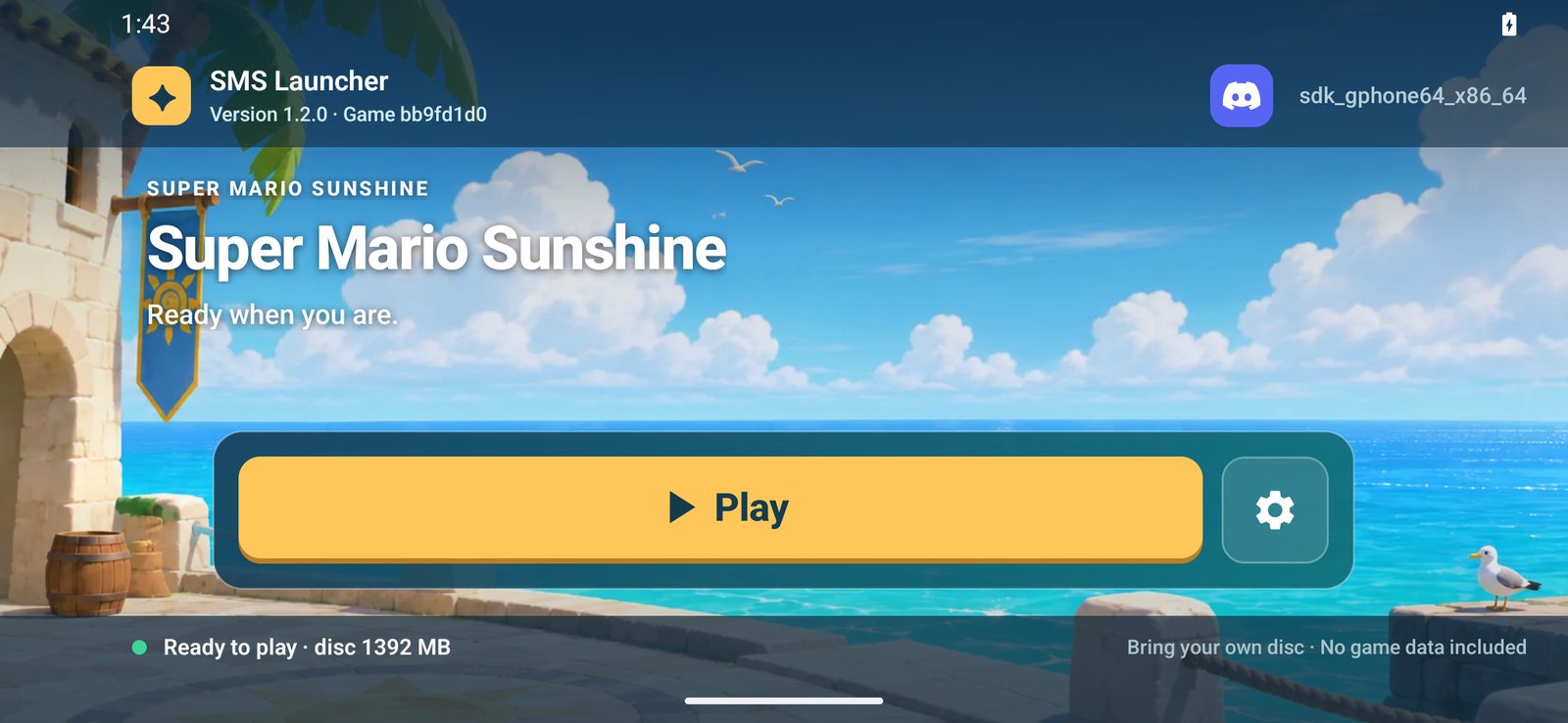
Install the APK and open the landscape SMS Launcher. Its big yellow button
does the next step until the game is ready: first Import disc image. Pick a
US revision 0 Sunshine ISO or GCM using Android's document picker. Import
copies it into private app storage; allow enough free space for that copy.
The button then reads Play. The gear beside it (or Start on a controller)
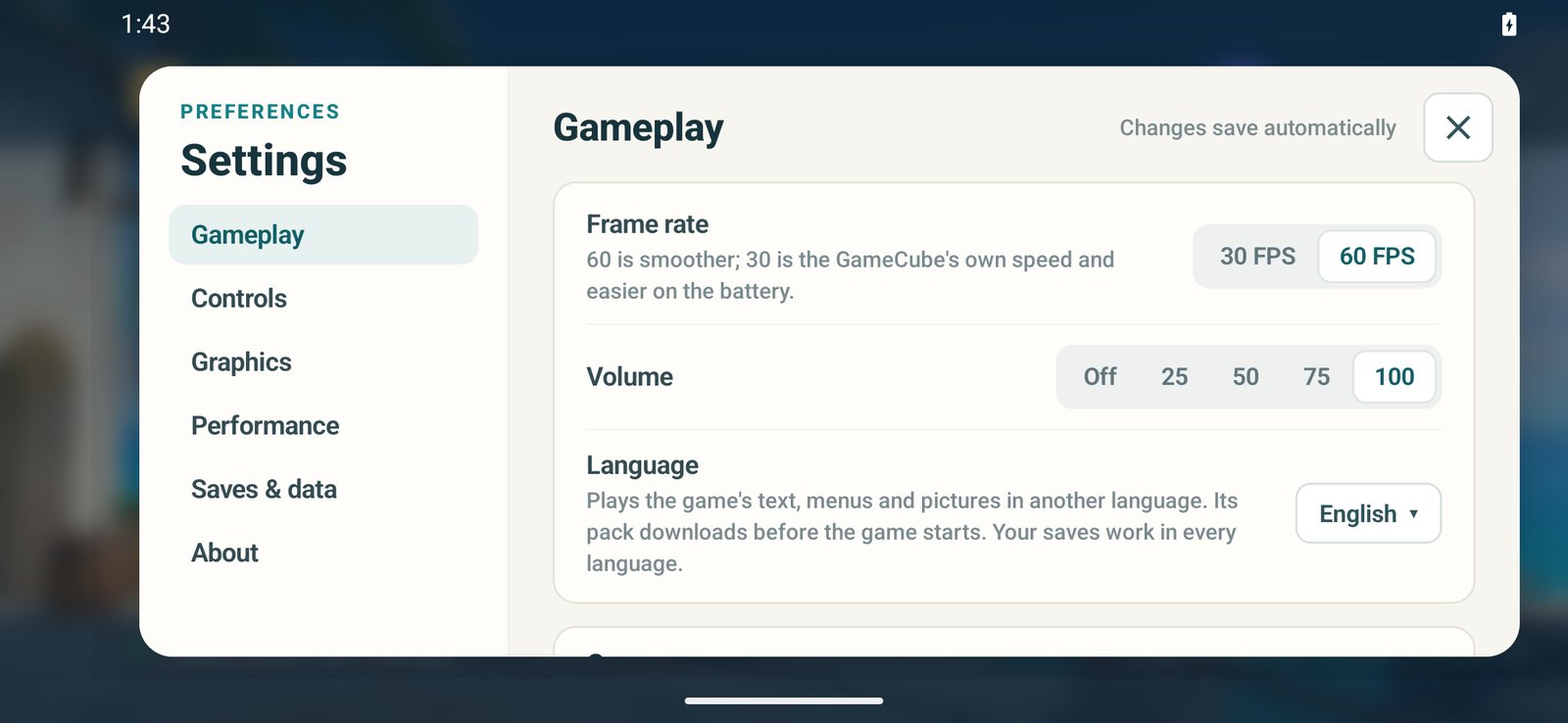
opens Settings: Gameplay, Controls, Graphics, Performance, Saves & data and
About. Changes save as you make them. A controller's D-pad or stick moves
through the launcher, A selects and B goes back. The Discord button in the top
bar opens an invite to the Discord server.
Language under Gameplay plays the game in English (the default, the
disc's own text) or in any language pack the game's
tools/mods/language-packs.json lists: Deutsch, Español, Français, Italiano
and Polski. Choosing Play downloads the chosen language's pack (about 1 MB,
from the HD texture extras
releases), checks it against its MD5 and installs it in private app storage,
as the desktop SMS Launcher does. Saves work in every language. The Eclipse
app has no Language setting: Super Mario Eclipse plays in English.
Android doesn't let the launcher update itself, so it checks this
repository's GitHub releases when it opens (at most every six hours) and,
when a newer version is out, shows a Get update button in the top bar,
which opens the release page. A full release hears of full releases; a
preview also hears of newer previews, as the desktop launcher's Stable and
Beta channels do. The new APK installs over the old one, keeping the disc and
saves, because every release is signed with the same key.
Picture sharpness is the internal resolution: Original (1×, the
GameCube's 640×528, the default), Sharper (2×), Very sharp (3×) or
Sharpest (4×). Higher settings need more of the graphics chip.
HD textures defaults off. Download HD textures fetches the
Super Mario Sunshine UHD Texture Pack
v2.1.1 (about 941 MB, from its authors' release page) and the port's
HD texture extras
(about 61 MB), the releases the game's tools/mods/get.py pins. Each
download is checked against its MD5 and unpacked into private app storage
(about 3.1 GB installed; allow 5 GB free during setup, since the archive is
kept until it is unpacked). A stopped or dropped download continues where it
left off. The switch turns on once both are installed, and Remove HD
textures deletes them. GPUs that sample the pack's BC7 images, such as the
Adreno 750, get every image at full size: Delfino Plaza's take about 175 MiB.
Other GPUs get them decoded to RGBA, four times their size, so the launcher
halves those with more texels than 1024×1024 and caps texture memory at
1 GiB; in the emulator, whose GPU takes no BC7, Delfino Plaza then needs
about 560 MiB. Loading screens take longer while the pack's images are
prepared.
Connect a USB/Bluetooth controller or use the handheld's built-in gamepad.
Touch screen controls (off by default) draws a GameCube controller over
the game: both sticks are analog, the D-pad takes diagonals, and L and R press
fully. The game shows GameCube button prompts while it is on. The controls hide
while a real controller is used and come back when the screen is touched.
Android performance hints defaults on and lets supported devices adjust
CPU scheduling to the frame workload. It does not force clock speeds or
bypass thermal limits. Toggle it off to compare the same scene and settings,
then back on: saved choices carry over between updates, so a comparison left
off stays off. On a Snapdragon 8 Gen 3 phone, 0.2.0-preview.6 holds 60 FPS with
hints on or off; low clocks there came from the game stalling mid-frame on
the GPU, which Android read as idle time.
Use performance CPU cores defaults on (from 0.2.0-preview.7; players who
changed it keep their choice). It restricts the game's
frame-producing thread and optional renderer worker to a detected group of
big/prime cores. It uses the current thread's allowed CPU mask, prefers
complete scheduler-capacity metadata, and falls back to complete maximum
frequency metadata from one source. It never guesses from core numbering,
never restricts to one core, and leaves placement unchanged if a distinct
multi-core tier cannot be identified. Android still controls clock speeds
and thermal policy. This works independently of ADPF: compare it on/off
with performance hints, headroom and display matching off, restarting Play
between runs. Game logs report requested/effective core masks or the reason
for falling back. Testers found it smoother on older builds, and on
0.2.0-preview.6 still a little smoother than without it, so it is now the
default; switch it off to save battery or to compare.
Request performance headroom defaults off and asks ADPF to finish frame
work within 80% of the frame interval (about 13.35 ms at nominal 60 FPS),
leaving a margin for presentation and scheduling variation. It changes the
requested deadline, not game speed or reported measurements. Switch it off
to restore the v8 full-frame target. This is a tuning experiment, not a
confirmed fix for a manufacturer's clock policy. The S24 Ultra tester reported
v9 was slower, so both headroom and display matching are opt-in from v10.
Existing explicitly saved choices are preserved; turn these two switches off
when comparing with v8. Supported Android 15+
sessions explicitly disable power-efficiency preference, which is already
the platform default; that call alone does not imply a boost.
Match display refresh to game FPS defaults off and sends a Surface frame
rate hint on Android 11+. Android chooses the actual display refresh rate.
The game also reports interruptible gameplay while its activity is resumed
and no gameplay on pause using Android 13+ Game State. The selected Android
Game Mode is read on resume; the app cannot select Performance mode for you.
No game-mode configuration overrides the manufacturer's interventions.
Log performance timings defaults off. Enable it to export steady frame
and presentation timing, SDK pacing waits and main-thread CPU time without
recording or touching the screen during the sample. A current CPU frequency
sample is included when Android allows reading it; -1 means unavailable.
SDK pacing also reports background-handoff average/max wall time. These
logs include a GX breakdown for vertex decoding, draw submission, textures,
copies and peeks to help investigate the extra widescreen cost. These
timers add some overhead, and swap/wait times are CPU wall time,
not asynchronous GPU measurements. Startup logs include Game Mode, reported
Game State, battery saver, current display refresh and the frame rate request.
Show performance overlay reports the port's game/shown FPS, frame time,
game work, GX submission, presentation/swap and idle time. This helps
separate game timing from an external SurfaceFlinger FPS counter.
Android Back returns to the launcher. Each game session uses a fresh process.
Preview 15 fixes the unsafe memory fallback reported by an Adreno 740 tester. If Android occupies the preferred game-arena address, the port reserves another compatible range and updates both SDK and renderer address conversions. It fails startup safely if no compatible range is available. The APK remains ARM64; some legacy game data still stores addresses in 32-bit fields. Confirm a successful title/save/stage load on the affected device before treating the physical-device crash as resolved.
Input test under Settings → Controls opens
a landscape monitor without starting the game. It lists Android input devices
and USB adapters, and shows live key/button down/up events, scan codes,
modifiers, held keys and stick/trigger/hat axes. Bluetooth/wireless keyboards
use the same monitor. Both panels scroll; Refresh updates device inventory,
Clear resets the sample, and Done returns to the launcher. Controller Back/B
is captured for testing instead of closing the screen; system Back still exits.
Capture runs only while the test screen is active, with a bounded event history.
Export writes sunshine-input.log through the document picker, including
phone/build metadata, connected devices and the last 256 events.
For a generic adapter with no game input, open Input test, connect it, Refresh, and press buttons/move sticks. Events here show what Android receives before SDL mapping or game bindings. A USB adapter listed without an Android input device suggests a different problem from a controller producing unmapped keys. Export the sample to identify the device IDs and received codes before choosing a mapping; the monitor itself does not fix or guess unknown controller layouts.
Super Mario Eclipse
SMS Eclipse, the second APK, plays Super Mario Eclipse v1.1.0 by the Eclipse
Team. Choose Import disc image and pick the same US revision 0 Sunshine
ISO; it must be the unmodified 1:1 image (MD5
0c6d2edae9fdf40dfc410ff1623e4119), since Eclipse's patch is made for that
disc. Then choose Download Eclipse: the launcher downloads the
Eclipse Team's release (about 851 MB, from SMS Launcher's mirror of its
GameBanana release, or GameBanana itself), checks it against its MD5 and
patches your disc with it, giving the same GMSE04 image Eclipse's own
patcher makes. Allow 3 GB of free space besides the imported disc; the
download and your Sunshine copy are deleted once the Eclipse disc is checked.
A stopped download continues where it left off. Unpacking the release needs
256 MB of the launcher's memory; on a device that grants less, make the image
with Eclipse's patcher on a computer and import that instead (it is checked
against MD5 caa546309e0443f7b47632b040a250d7). Its save backups hold the
GMSE04_ card files.
Settings → Saves & data has your saves and the game log. Back up your save
writes a ZIP you can keep or move to the desktop port's
card-a folder. Restore a backup accepts a ZIP containing the desktop
port's index.txt, super_mario_sunshine.dat and
super_mario_sunshine.stat, at the root or beneath card-a/. Import keeps
the prior card in a private saves/previous folder. Use Export before
uninstalling: uninstalling deletes the disc, saves, settings and caches.
The import does not support Dolphin .gci or whole memory card images.
Game log uses the document picker to save diagnostic output. Disc and save import need no broad storage permission, and gameplay is offline. The Android launchers supply the base game, Super Mario Eclipse and the optional HD textures.
Emulator validation
On an x86 Linux host, the Android 35 Google APIs x86_64 image includes
libndk_translation and advertises arm64-v8a. Use the host GPU, KVM,
and a GLES 3.1/3.2-capable host driver. Software renderers that expose only
GLES 3.0 cannot run this renderer. Verify the emulator's ABI list and GPU
before installing; a successful x86 APK test would not validate this ARM64 APK.
The Android 30 image's older translator crashes on a valid ARM64 floating-point
conversion instruction emitted by the compiler; use the newer image.
adb shell getprop ro.product.cpu.abilist
adb shell getprop ro.dalvik.vm.native.bridge
adb shell dumpsys SurfaceFlinger
adb install -r a