Syphon Filter 3 PC Port
Syphon Filter 3 PC Port is a native PC port of Syphon Filter 3 for PlayStation.
- Type: PC port
- Game: Syphon Filter 3
- Runs on Windows
- By astromen2009
- Source: https://github.com/astromen2009/Syphon-Filter-3-pc-port
README
Syphon Filter 3 PC
Version 0.9.1, Windows 10/11 64-bit.
Youtube:
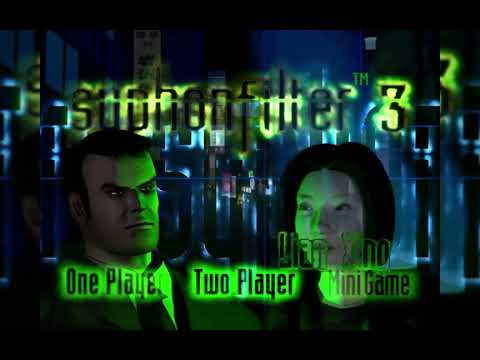
This project runs the original PlayStation Syphon Filter 3 (the SCUS_946.40 executable from the USA disc) and draws it with a native PC renderer. The game logic is not touched: AI, missions, combat and animations are the game's own. What changes is the picture, the controls and a few additions on top.
You need your own copy of the game (USA disc as .bin + .cue). No game files are included here.
Features
- Any internal resolution, MSAA/SMAA anti-aliasing and Hor+ widescreen.
- PGXP: no wobbling vertices or warping textures, real depth buffer.
- The game keeps its original speed on its own thread, and the picture is interpolated to the monitor's refresh rate.
- Rebuilt AU300 scope. The X-ray view now renders the real scene with the same camera, so it sees through walls, matches the outside view, has no lag and draws characters and their weapons in green like on the PS1.
- Scene lighting, muzzle flashes that light up the room, smoke, blood, glass, sparks, bullet marks, snow and breath in the cold missions, and night vision Redone like the original.
- 1:1 mouse aiming, configurable keyboard and gamepad, only classic mode in 2players.
- Weapon bank: any weapon can be used in any mission with its model, photo and sound (All weapons cheat). Weapons from Syphon Filter 1 and 2 were added in files for testing/debug and future purposes.
- Text and voice language are chosen separately: English (original), Spanish (text, voices and video audio) and Russian (text and dub).
- Windows launcher, PC options menu (F12), memory card saved as files, high quality main menu video, extra characters in the mini-game and two-player mode.
- Added a lot of characters in 2 players mode and Minigame Mode.
- 2players mode is not finished yet and it would look emulated, it would be improved on the future with an online/lan mode.
The full list is in FEATURES.txt.
How to play
- Put the USA disc (
.bin+.cue) in a folder, for exampleSYPHON3\. - Copy this project inside it, for example
SYPHON3\SF3_PC\. - Run
bin\sf3_nativo.exe. It looks for the disc in its own folder and in the folders above.
Resolution, language, controls and the rest are set in the launcher. In game, F12 opens the PC options, Esc opens the game's pause menu and Alt+Enter switches to full screen.
Optional data
Some features need data that is not distributed in this repository. Put it next to the exe or in one of the three folders above it.
| File | Contents |
|---|---|
idiomas.pak | Spanish and Russian text and voices, Spanish video audio |
armas.pak | Models, textures, icons, photos, sounds and settings (armas.txt) of the extra weapons |
personajes.pak | Extra characters for the mini-game and two-player mode (the personajes folder) |
m_media.pak | Own sounds, voices and videos (the sonidos, voces_propias and videos_propios folders) |
If you have the loose files (textos_es.pak, voces_es.pak, videos_es_*.pak, voces_ru_*.pak and the armas folder), bin\CREAR_PAKS.bat packs them into idiomas.pak and armas.pak. A loose file with the same name always wins over the one inside a pak.
bin\EMPAQUETAR_PERSONAJES.bat packs the personajes folder into personajes.pak, and bin\EMPAQUETAR_MEDIA.bat packs sonidos, voces_propias and videos_propios into m_media.pak. Run them again whenever those folders change. Loose folders still work and win over the paks.
Folders
bin/                 ready to play: sf3_nativo.exe, SDL2.dll and tools
source/
  apps/sf3_nativo/   window, renderer, menus, launcher
  src/, include/     R3000 emulation, GPU/SPU/CD, disc and file formats
  third_party/       PsyCross, pl_mpeg, stb_vorbis
  data/recursos.bin  compressed menu images and sounds
  build.sh           build script
Building
The project is built with Clang. For Windows use llvm-mingw, which also works from Linux:
cd source
SDL2_DIR=/path/SDL2/x86_64-w64-mingw32 \
OPENAL_INCLUDE=/path/openal-soft/include \
LLVM_MINGW=/path/llvm-mingw \
./build.sh win
You need the SDL2 development files, the OpenAL Soft headers (used by PsyCross) and Python 3 (to embed data/recursos.bin). ./build.sh linux builds the Linux version.
Credits
- PsyCross by the REDRIVER2 Project (MIT), base of the PC renderer
- pl_mpeg by Dominic Szablewski (MIT), menu video
- stb_vorbis by Sean Barrett (public domain / MIT)
- SDL2 (zlib)
Syphon Filter is a trademark of Sony Interactive Entertainment. This is a fan project with no relation to Sony or Bend Studio, and it does not include any files from the original game.