TMNT - Arcade game - Native Port
TMNT - Arcade game - Native Port is a C decompilation and native port of the 1989 arcade game Teenage Mutant Ninja Turtles for Windows, Linux, and macOS.
- Type: PC port
- Game: Teenage Mutant Ninja Turtles
- Runs on Windows, Linux and macOS
- By cheviman
- Latest release v1.0.0, 2026-11-06
- Source: https://github.com/cheviman/tmnt-port
README
Teenage Mutant Ninja Turtles — decompilation and port
A reconstruction of Konami's 1989 arcade game Teenage Mutant Ninja Turtles (a 68000 main board with a Z80 sound board) into platform-agnostic C, not an emulator, following the method of segasonic-decomp and outrunners-decomp: both of the game's programs decompiled one function at a time into readable C, and checked frame by frame against MAME in state, picture and sound.
Apart from the screenshots on this page, this repository contains no game data. The game's programs are here
as C, decompiled from the original machine code (src/); as with n64decomp/sm64,
you bring your own ROM set (MAME's tmnt) for everything else: the tools verify it, extract the assets, and you
build your own executable, which runs from the assets and opens no ROM.
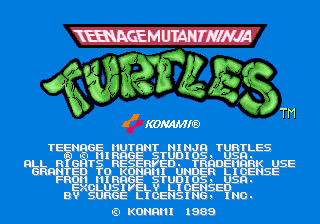
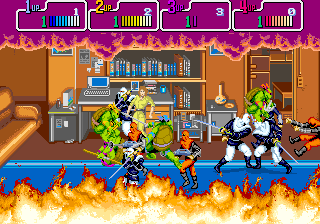
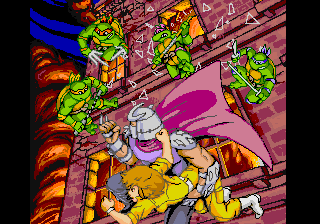
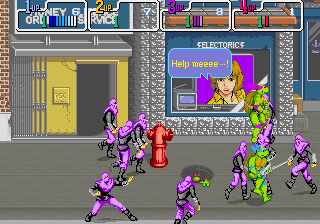
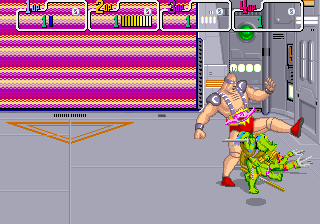
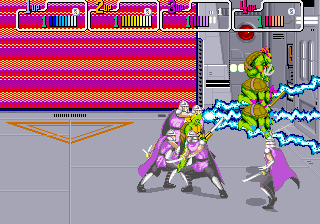
Frames drawn by the game's own video library (runtime/src/video.c) while the
decompiled game plays the scenarios of tests/controls/.
Playing it
Download the package for Windows, Linux or macOS from the
releases. Keep tmnt.zip beside the game, or drop it on its
window when it asks: the first time, it takes the assets out of it. Two games come in it, the same program:
- TMNT Arcade: the arcade game as it is: coins, the test mode, four players.
- TMNT: the console version (see "The console version (TMNT)"): no coins, START brings a player in, Splinter Way's modes (NORMAL, BOSS RUSH, RONIN), LAN for up to four computers (arcade-lan), WIDE 16:9 and 20:9, the pixels' filters, the pause.
The package also has the tools that make the game for your devices, with your ROM set:
- Nintendo Switch: TMNT NSP makes
TMNT.nspandTMNT Arcade.nsp, for a console with Atmosphere. - Android: TMNT APK makes
TMNT.apkandTMNT Arcade.apk, signed with a key of yours. - Anbernic's H700 handhelds (RG40XX H...): TMNT Anbernic makes the folder for PORTS.
What a tool makes has the game's data in it: it is yours alone, never share it. The package's README.txt
(docs/package/README.txt) has the controls and what each tool needs.
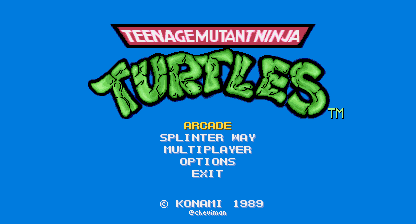
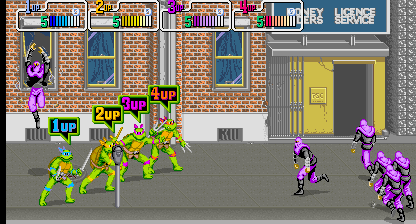
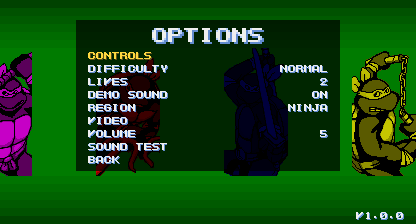
TMNT, the console version, in WIDE 16:9: its menu, four turtles on the street, OPTIONS.
Status
As of 06-11-2026:
- ROM set verification (MAME set
tmnt, World 4 Players, version X), by CRC32 and SHA-1 of every file - A reference: the original programs on MAME's 68000 and Z80 cores, with MAME's K052109, K051960, K007232
and uPD7759 and ymfm's YM2151, against a model of the board in C (
kref, in the shared core) - 18 scenarios (
tests/controls/): the attract mode, the test mode through every page and sound, games of one and four players, the continue and GAME OVER, the story before area 0 with no button pressed to its end, the DIP switches, and a game in each of the ten areas played until its boss falls, the last one through the ending and the staff roll: 513,383 frames, which run 25,526 addresses of the 68000 program and 4,486 of the Z80's - A 68000 disassembler identical to MAME's at every offset of the program and of an image of every opcode, and a static analysis that finds, without traces, every address the scenarios run: 28,515 instructions in the 68000 program, and the Z80's the same way
- Every byte of both programs explained: the 68000's 32.5 % code, 65.9 % data described with its layout, types and a name, 1.6 % fill; the Z80's 35.6 % code, 64.3 % data, 0.1 % fill. Nothing unexplained
- Both programs decompiled: 2,058 functions of the 68000 program and 381 of the sound program, no goto, every function, variable, field, parameter and local with a name and every function with a comment, the data read by name from the assets, never through an address of the ROM. 2,423 of the 2,439 functions (99.3 %, and 99.9 % of the lines) have nothing in them but the faithful leftovers "Reading the C" lists; each of the other 16 has its reason there too
- The game matches the reference in state, picture and sound in all 18 scenarios, frame by frame, and its own sound board matches MAME's in every frame (samples and RAM); the structure of every function, the code no scenario runs too, checks against its jumps; no executable holds a stretch of the ROM set
- The board in C (
runtime/): the memory map, the inputs, the interrupts, the video chips drawing what MAME draws pixel for pixel, the YM2151, the K007232, the uPD7759 and the title music sample making the samples MAME makes - The assets (see "The assets"): tiles and sprites in sheets by subject with their own colours, the programs' data as text by subject with every piece named, the samples as WAV, the music as Standard MIDI Files; the game loads them, and they build back into the ROM set byte for byte
- A window port (
ports/sdl2/, SDL2): the game with its sound, the keyboard and four game controllers, on Windows, Linux and macOS (the 18 scenarios identical on Linux too) - The port's first run in C: the game takes the assets out of your ROM set itself, the same files
extract_assets.pywrites, byte for byte; and the pack the devices load - The packages for Windows, Linux and macOS (see "The Windows package"): TMNT Arcade and TMNT, SDL2 inside them, an icon of the project's own, its README and licenses, the devices' tools; built by the CI, and released on a tag
- The console version (see "The console version (TMNT)"): its presentation, its menus, no coins, the turtle choice, Splinter Way's NORMAL, BOSS RUSH and RONIN, OPTIONS, WIDE 16:9 and 20:9, the pause
- LAN: up to four computers in one game, in lockstep through the host (arcade-lan)
- The devices: the Nintendo Switch, Android (touch controls) and Anbernic's H700 handhelds, each made on the
player's computer from the ROM set (
ports/PLAN.md); not yet tried on a real Switch or Anbernic - Save states, the original turtles as a mode of their own (
console/PLAN.md)
Getting started
Requirements: Python 3.10 or newer, CMake 3.20 or newer, a C11 and C++20 compiler (Visual Studio 2026 Build
Tools on Windows) and, for the game's window, the SDL2 development files: on Windows, unpack
SDL2-devel-2.x.x-VC.zip from SDL's releases into
build/downloads/sdl2/; elsewhere, the system's package (libsdl2-dev). Without SDL2 only the headless builds
are made.
-
Clone with the shared core, arcade-decomp, which this repository keeps in
tools/coreas a git submodule (a clone made without--recursivetakes it withgit submodule update --init):git clone --recursive https://github.com/cheviman/tmntarcade-decomp -
Put your own copy of MAME's
tmntset inrom/(the .zip as is, or its files), and check it:python tools/verify_rom.pyFile Size CRC32 What it holds 963-x23.j17,963-x24.k17128 KB each a9549004,e5cc906768000 program, 0x00000-0x3FFFF (even, odd bytes) 963-x21.j15,963-x22.k1564 KB each 5789cf92,0a74e27768000 program, 0x40000-0x5FFFF (even, odd bytes) 963e20.g1332 KB 1692a6d6Z80 sound program 963a28.h27,963a29.k27512 KB each db4769a8,8069cd2etile graphics (K052109) 963a17.h4,963a15.k4,963a18.h6,963a16.k6512 KB each b5239a44,1f324eed,dd51adef,d4bd9984sprite graphics (K051960) 963a30.g7,963a31.g19256 bytes each abd82680,f8004a1csprite address decoder, priority PROMs 963a26.c13128 KB e2ac3063K007232 samples 963a27.d18128 KB 2dfd674buPD7759 speech 963a25.d5512 KB fca078c7title music sample -
Extract the assets into
assets/, and check that they build back into your ROM set byte for byte:python tools/extract_assets.pypython tools/extract_assets.py --check -
Build the game and the development tools into
build/bin/:cmake -S . -B build/msvccmake --build build/msvc --config Release --parallel 6 -
Play:
"build/bin/TMNT Arcade"The game reads its assets from
--assets FOLDER, or from anassetsfolder beside the executable or in the current folder; with none, it takes them out of your ROM set itself, once (see "The port's first run"). The executable can be copied anywhere with SDL2's library andfont.bmpbeside it (the build puts them next to it): the assets come from your ROM set, so they are yours, not to share.Or run the game without a window, here with the controls of the attract mode, writing a hash of every frame:
build/bin/tmnt_game_headless --script tests/controls/attract.txt --hashes build/attract.txt
Playing
It is the arcade game for four: each player has a coin slot and no start button; a coin and the attack button bring a turtle in (player 1 is Leonardo, 2 Michelangelo, 3 Donatello, 4 Raphael).
| Control | Keys |
|---|---|
| Move (player 1) | the arrow keys |
| Attack, jump | Z or left Ctrl; X or left Alt |
| Coins 1-4 | 5, 6, 7, 8 |
| Service | 9 |
| Full screen | F11 or Alt+Enter |
| Smooth or sharp pixels | F3 |
| Quit | Escape |
Game controllers are players 1 to 4 in the order they are plugged in: the pad or the left stick moves, A attacks, B jumps, Back puts a coin in.
Options of TMNT Arcade and tmnt_game_headless: --script FILE plays a control script (format in
runtime/include/tmnt/script.h) instead of the controls (--fast in the window runs it without waiting for each
frame's time); --hashes, --video-hashes and --sound-hashes FILE write a hash of every frame's state,
picture and sound, as the reference does; --service turns the test mode's DIP switch on; --assets FOLDER
says where the assets are (a folder, or a pack: a file whose name ends in .assets); --write-pack FILE writes
the pack of the assets loaded and stops. tmnt_game_headless also takes --frames N, --dump FRAME --dump-dir DIR (the board's memories at the end of a frame) and --video-dump FRAME ... --video-dir DIR (those frames' pictures as BMP,
as the game's own video draws them: the screenshots above).
The port's first run
A player of the port has no Python: with no assets, TMNT Arcade takes them out of the ROM set itself, once.
- Where. It loads the pack
tmnt.assetsor the folderassetsbeside the executable, in the folder where the game keeps its files (beside the executable on Windows;~/.local/share/TMNTon Linux,~/Library/Application Support/TMNTon macOS) or in the current folder;--assetspicks one. With none, it looks for the ROM set,tmnt.zipor a folderrom/with its files (or its .zip), beside the executable or in the game's folder; with none there, a window asks for it to be dropped on it and says what it is doing and what failed. The assets go intoassets/in the game's folder, and the game plays. - The same files. The first run (
runtime/src/extract.cand the files beside it) writes the foldertools/extract_assets.pywrites, every file byte for byte: the sheets' PNGs packed as zlib's level 9 packs them (deflate.c), the WAVs, the data as text, the songs' MIDI files (extract_music.c,tools/sound_music.py's writer in C). What the Python tools work out from the static analysis (which bytes are which piece, their names and formats, the sheets' codes and palettes) it takes fromruntime/src/extract_layout.c, whichtools/extract_layout.pywrites with positions, names and codes only, no byte of the ROM; run it again whensymbols.txt,sound_symbols.txt,graphics_subjects.txtor the extractor change.tmnt_assets_check ROM_SET PYTHON_ASSETS [OUT](built with the reference tools) runs the first run into OUT and compares every file with the folderextract_assets.py --out PYTHON_ASSETSwrote. - Versions. The first run writes
version.txtlast (the version of its tables and writers); a folder of another version is taken out again, and one with nodata/layout.txt(a first run that did not finish) is not taken.extract_assets.py's folders have noversion.txtand are taken as they are. - The pack.
tmnt.assetsis one file with what the game loads (the video and sound chips' memories and the programs' data, as the assets give them), for the devices, which never take the assets out of a ROM set:"TMNT Arcade" --write-pack tmnt.assetsmakes it from the assets. It holds the version of the tables the game's C reads by name: a pack of another build says so instead of loading. - The window writes with Kenney Mini (CC0,
ports/sdl2/font/,font.bmpbeside the executable): none of the game's letters are there before its assets.
The Windows package
What a player downloads: tmnt-windows-x64.zip, a folder tmnt with TMNT Arcade.exe, TMNT.exe (the console
version) and the font.bmp their first run and TMNT's menus write with, the package's README.txt (docs/package/: what the player needs, their own ROM set, how
the first run takes it, the controls), LICENSE.txt, and licenses/ with MAME's and ymfm's terms (the board's
video and sound follow them), SDL2's and Kenney's. Nothing of the ROM set: the game takes its assets out of the
player's.
-
SDL2 inside.
TMNT_STATIC_SDL2builds SDL2 2.32.10 from its source (CMake's FetchContent, from GitHub) into the executable, and the C runtime with it: it needs no library beside it, nor Visual C++'s redistributable. Without it (the default) the build is the one above, SDL2's library beside the executable. -
The icon is the project's own drawing, nothing of the game's art (
tools/make_icon.pywritesports/sdl2/icon/: a manhole's lid lit from below): a resource of the executable, which Explorer and the window show. A picture of your own takes its place in your builds:local/icon_pc.png(local/is never committed) or-DTMNT_PC_ICON=PICTURE. -
Made locally in a build folder of its own, without the reference tools, its executables in
build/release/bin(the usual build's inbuild/binstay as they are):cmake -S . -B build/release -DTMNT_STATIC_SDL2=ON -DTMNT_REFERENCE_TOOLS=OFF -DTMNT_BIN_DIR=build/release/bincmake --build build/release --config Release --parallel 6 --target tmnt_packagewrites
build/package/tmnt-windows-x64.zip, and the folderbuild/package/tmntit packs. -
The CI (
.github/workflows/build.yml) builds and packs it the same way on a clean Windows with no ROM set, on every push to main and its pull requests: the zip is the job's artifact,tmnt-windows-x64.
The console version (TMNT)
TMNT (build/bin/TMNT.exe, beside TMNT Arcade) is the same game made for playing at home: the program with
the functions console/replaced.txt lists in the console's own versions (console/*.c; the decompiled C writes
their definitions as CONSOLE_ORIGINAL(name), so TMNT Arcade runs the program as it is). It starts with a Konami
presentation of its own (the fixed layer's Konami logo, large, lit by the four turtles running across it), then a
menu under the title's logo: ARCADE (the arcade game with no coins: a player's START puts the coin and the attack
in, and the boxes say PRESS START), SPLINTER WAY (the port's own modes: NORMAL, 5 lives and 3 continues; more to
come), OPTIONS (over BEST 10 PLAYERS' picture: the cabinet's DIP switches by the test mode's names, the region, the
volume, the pixels, WIDE 16:9 and 20:9 for the play and the menus; kept in tmnt.ini beside the executable), KONAMI
CODE (the level select the Konami code will open: any of the ten areas, infinite lives, every turtle in a red
bandana, everyone the same turtle) and EXIT. A game starts on the coin's screen, each player choosing the turtle he plays (the others come in with START).
Its menus write with the game's own letters; what it draws of the game's comes from your assets. Escape (or START of a
player in the game) pauses a game. console/PLAN.md has the plan, and what was done.
| Control | Keys |
|---|---|
| Move (player 1) | the arrow keys |
| Attack (in the menus: pick), jump (back) | Z or left Ctrl; X or left Alt |
| START | Enter, a controller's Start |
| Back in the menus | Escape |
| Full screen; the next kind of pixels | F11 or Alt+Enter; F3 |
tmnt_console_headless runs it with no window for scripted checks: the script's controls are the players',
--actions FILE gives the menus' actions by frame (FRAME up|down|left|right|accept|back|start [PLAYER]: with a
PLAYER, that player's own stick, buttons or START; pause, quit, restart in a game), --wide 1|2 WIDE
(--wide-check: each frame, the columns of its sides that are not their map's), and
--video-dump FRAME ... --video-dir DIR writes those frames with the console's picture over them
(tests/console/ has the menus' actions of a few runs):
build/bin/tmnt_console_headless --actions tests/console/arcade_donatello.txt --script tests/console/skip_intro.txt --video-dump 110 680 700 1200 --video-dir build
Changing the decompilation
src/ is written by the decompiler from your ROM set, symbols.txt and tools/game_profile.py; src/sound/
from the sound program and sound_symbols.txt. Change those (names, types, comments, what the analysis cannot
work out alone), not the C, and write it again:
python tools/decompile.py
python tools/decompile_sound.py --checks
decompile_sound.py also writes the Z80's timing table, build/sound/timing.txt, which the reference needs to
keep the sound program's time as the game's own sound board does: run it once in a new clone before the checks
below.
build/bin/kref runs the original programs on MAME's cores against the same board model. Both it and the game
take the control scripts of tests/controls/ (written by tools/make_scenarios.py), and both write hashes of
every frame. This runs every script on both, compares them frame by frame in state, picture and sound, and
checks that the static analysis alone finds all the code the reference ran (--native-only reuses the
reference's results of an earlier run, in build/scenarios_frames/):
python tools/check_scenarios.py --video --sound --jobs 6 --out build/scenarios_frames