IsaacRecomp
IsaacRecomp is a native PC port of The Binding of Isaac that runs at 60 fps and in high resolution.
- Type: PC port
- Game: The Binding of Isaac
- Runs on Windows, Linux and Android
- By whylurking
- Latest release v1.4.0, 2026-10-20
- Source: https://github.com/whylurking/IsaacRecomp
README






The Binding of Isaac (Flash), rebuilt as a native program.
No Flash Player, no emulator: the same game you know, at 60 fps and in high resolution,
on PC, Android and Nintendo Switch.
Important
This recomp was made by whylurking with the help of Artificial Intelligence. It is a free, non-profit fan project with no affiliation to Edmund McMillen, Florian Himsl, Nicalis, Valve or Nintendo.
The game is not included. To play, you need your own original copy from Steam: The Binding of Isaac and, for the expansion, Wrath of the Lamb.
😢 What is this?
The Binding of Isaac came out in 2011 as a Flash game. Flash is gone, and the Steam version still relies on an old player that runs at 30 fps, in a small window, with the performance limits of its time.
This project translates all of the game's original code into C++ and runs it on a modern, native engine
written from scratch. Graphics, sounds and music are read from your own Steam Isaac.exe at startup, so you
need the original game. What changes is how it runs, and where:
| Original Flash | Recomp | |
|---|---|---|
| Frame rate | 30 fps | 60 fps (or whatever your display does: 120, 144…) |
| Resolution | 800×600, upscaled | Native (1080p, 1440p, 4K…) |
| Game logic | 30 Hz | Exactly 30 Hz: same physics and patterns, checked frame by frame against the original |
| Performance | Can stutter with many enemies | Smooth, with drawing spread across CPU cores |
| Controllers | Needed JoyToKey | Supported out of the box, with analog movement |
| Versions | One per install | Original, Wrath of the Lamb and Eternal Edition in one program |
| Platforms | Windows / Mac | Windows, Linux, Android and Nintendo Switch (homebrew) |
📥 Downloads
Everything is on the Releases page. Pick the package for your device:
| Platform | File | Guide |
|---|---|---|
| Windows (64-bit) | IsaacRecomp_Win64.zip | Installation (PC) |
| Linux (64-bit) | IsaacRecomp_Linux64.tar.gz | Installation (PC) |
| Android (phone or tablet) | IsaacRecomp.apk | Android |
| Nintendo Switch | IsaacRecomp_Switch.zip | Nintendo Switch |
On every platform you also need the game's Isaac.exe from your Steam copy (see
Get the original game).
🕹️ Comparisons
30 fps → 60 fps
The logic still runs at 30 ticks per second, just like the original, so the game feels exactly the same. Every in-between frame is drawn by interpolating between the last two ticks: movement, animations, fades and room transitions all play at your display's refresh rate.
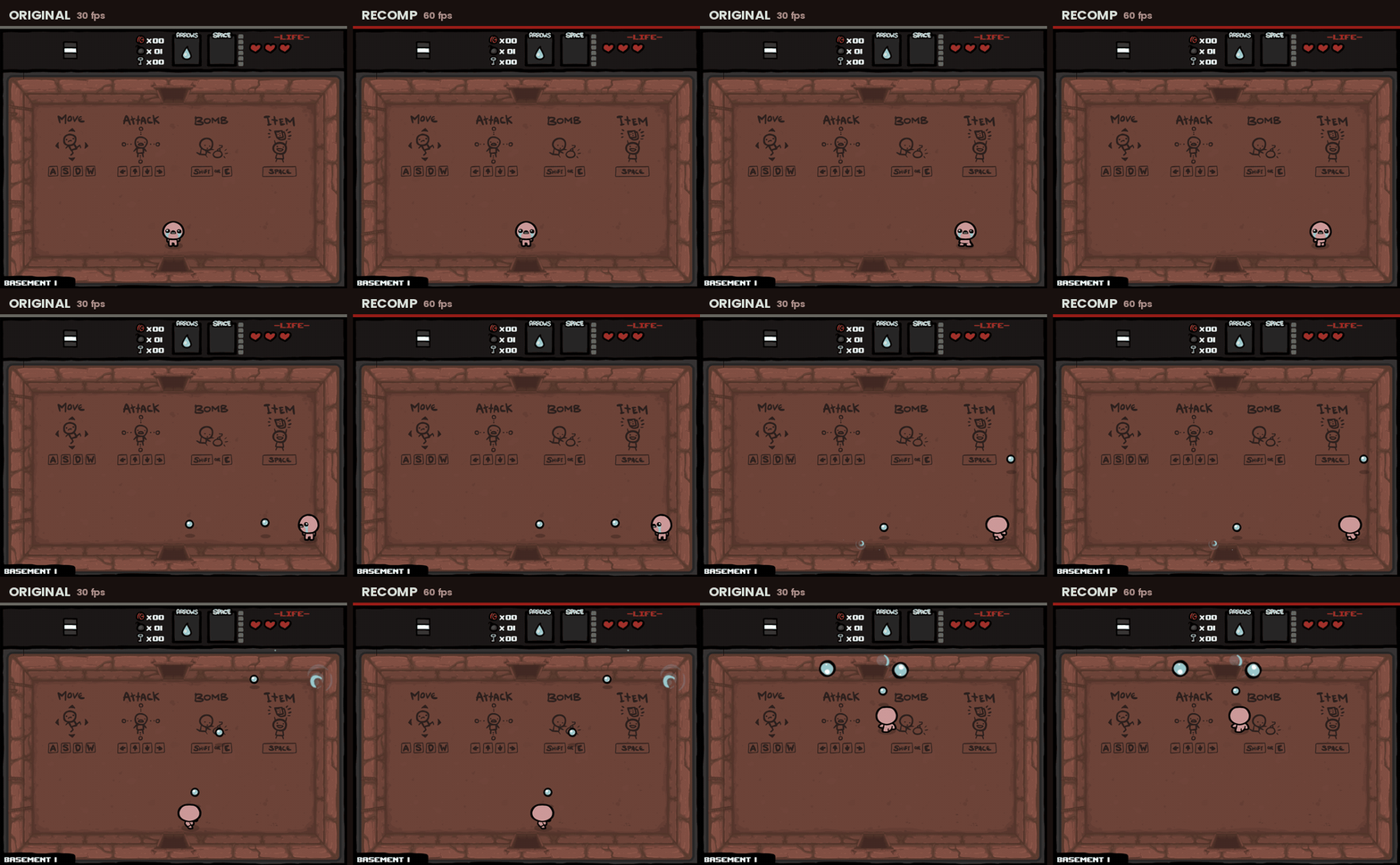
Shown in slow motion (×0.5) so the difference is visible on any screen.
Real-time 60 fps video.
Real high resolution
Vector art is rasterized at your screen's actual resolution, and the layers the game used to paint at 640×480 (floor, blood, shadows, minimap) are generated at 1440×1080.
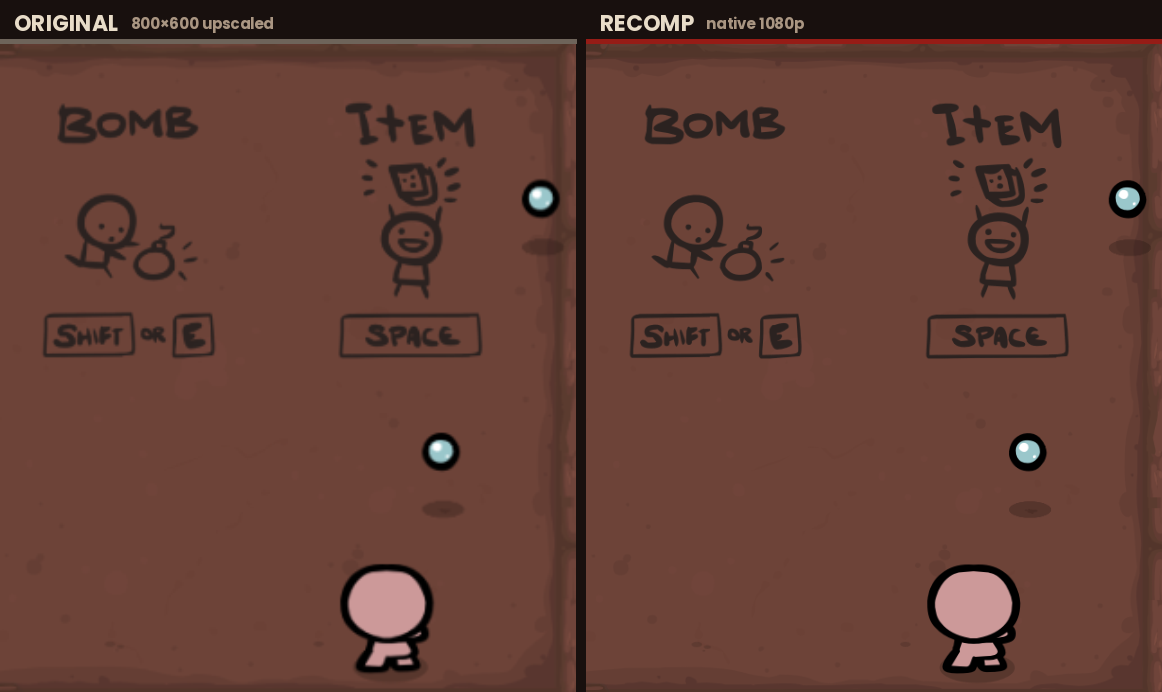
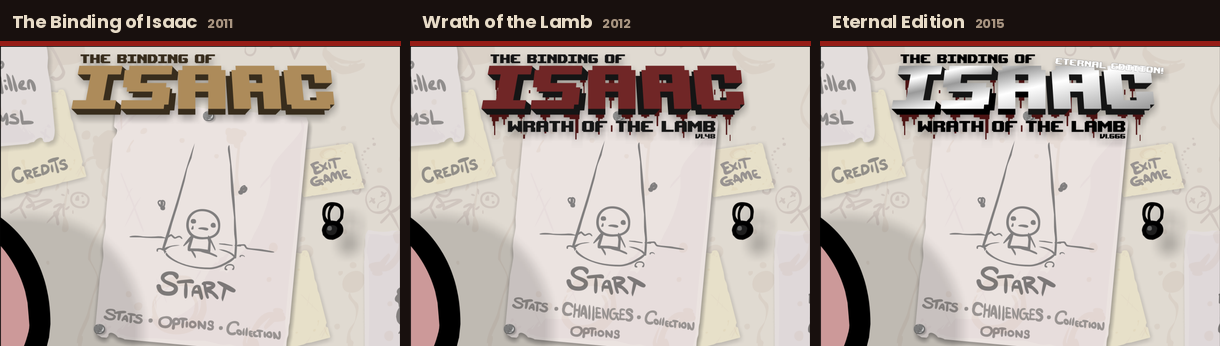
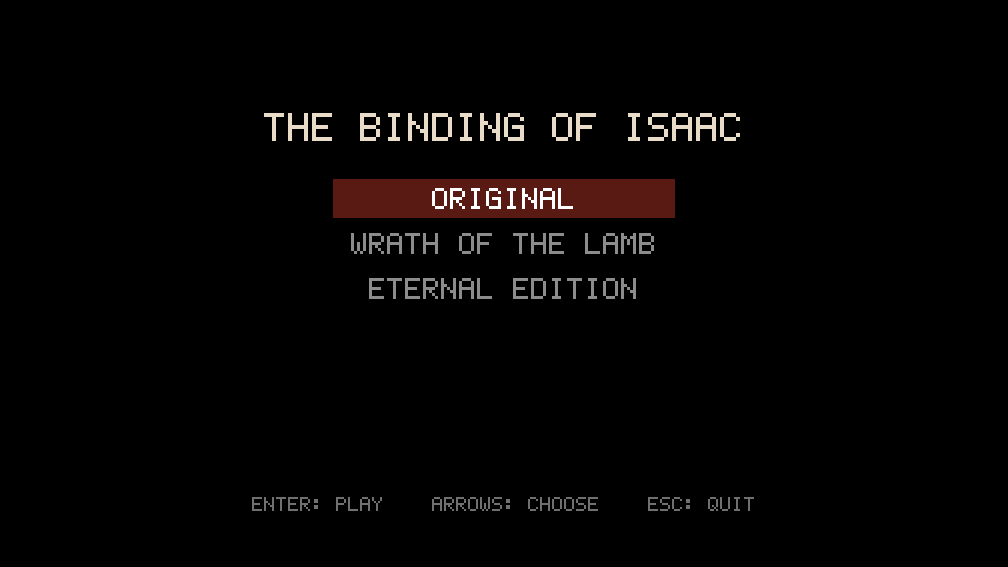
All three Steam versions
If you have more than one version of the game, the program recognizes each one by its content and lets you pick at startup. Each version keeps its own save file.
✨ What's new compared to the original
- 60 fps or more, with the game logic untouched at 30 Hz.
- Native 1080p / 4K, with no thin white seams between colored areas (shapes are rasterized the way Flash does it).
- No pop-in: graphics are prepared in the background while the opening cutscene plays.
- Smooth room transitions, with no sudden jumps after a hiccup.
- Controller support without external tools. Every menu works with the controller alone: the selected option is highlighted in pink, A/✕ presses it and B/◯ goes back.
- Control rebinding inside the game (Options → Controls → Rebind controls) for keyboard, controller and touch.
- Analog movement: with a stick, Isaac's speed follows how far you push it, like in Rebirth (it can be turned off).
- Touch controls on Android and on Switch in handheld mode: floating joysticks, tappable HUD and a pause button.
- Low input latency: input keeps being read while the program waits for the display.
- Cleaned-up options menu: options that depended on Flash and no longer do anything are gone.
- Fullscreen or windowed (F11 or Alt+Enter), fitted to your desktop's usable area.
- Built-in performance overlay (F3).
- Original, Wrath of the Lamb and Eternal Edition in a single program.
- Save converter to bring your progress from the Flash version (and back).
📦 Installation (PC)
1. Get the original game
Buy The Binding of Isaac on Steam (and Wrath of the Lamb if you want the expansion). Install it and open its folder: in Steam, right-click the game → Manage → Browse local files.
There are two executables in there:
| File | What it is |
|---|---|
Isaac.exe | The game itself: it contains all of its graphics, sounds and code. This is the one you need. |
Binding_of_Isaac.exe | Just the Steam launcher. Not useful here. |
2. Download the recomp
Go to Releases and grab the package for your system:
- Windows (64-bit):
IsaacRecomp_Win64.zip - Linux (64-bit):
IsaacRecomp_Linux64.tar.gz
3. Put them together and play
- Extract the recomp anywhere you like.
- Copy
Isaac.exefrom Steam next toIsaacRecomp.exe(on Linux, next toisaac). - Run
IsaacRecomp.exe(on Linux:./isaac).
Tip
Several versions at once? On Steam they are all called Isaac.exe. Copy them with different names, for
example Isaac-Original.exe, Isaac-WotL.exe and Isaac-Eternal.exe. The name doesn't matter: each version is
recognized by its content, and the program asks which one to open.
Requirements: 64-bit Windows or Linux, and a graphics card that supports OpenGL 3.3.
💾 Bringing your Flash saves over
Every package includes tools/save_converter.html: open it in any web browser (it works offline, nothing is uploaded).
It turns the Flash game's so.sol into the IsaacRecomp save file and back, for the original game, Wrath of the Lamb
and Eternal Edition. Stats, items, secrets, bosses and unlock order carry over. Close the game and back up your save
before replacing it. The converter was originally made by g333nza.
🎮 PC controls
The original controls, plus controller support. Controller buttons adapt to whether you are playing, paused or in a menu:
| Action | Keyboard | Controller (in game) | Controller (menus / pause) |
|---|---|---|---|
| Move | W A S D | Left stick (analog) / D-pad | Choose: left stick / D-pad |
| Shoot | Arrow keys | Right stick / A B X Y | — |
| Bomb | E / Shift | LB / left trigger | — |
| Active item | Space | RB / right trigger | — |
| Card / pill | Q | Right stick click | — |
| Pause | P / Esc | Start / Back / left stick click | Start / Back (resume) |
| Confirm / back | Mouse | — | A / B |
| Fullscreen | F11 / Alt+Enter | — | — |
| Screenshot | F12 | — | — |
| Performance overlay | F3 | — | — |
In menus, the selected option is highlighted in pink; the D-pad or left stick chooses another, the controller presses it with A (✕ on PlayStation controllers) and goes back with B (◯), which also closes the pause screen.
Rebinding: Options → Controls → Rebind controls (from the main menu or the pause screen) changes the controls of the device you are playing with. Pick an action and press the new key or button; Reset to defaults restores the original layout. With a controller you can also choose which stick moves.
📱 Android
The same native recomp, packaged as an APK. It runs the game on the 960×720 stage used on Switch, rendered with OpenGL ES 3.0 and scaled to fill the screen.
You need:
- A 64-bit ARM phone or tablet (practically every device since 2017) with Android 7.0 or newer and OpenGL ES 3.0.
- Your
Isaac.exefrom your Steam copy of the game (see step 1 of the PC installation).
Installation:
- Download
IsaacRecomp.apkfrom Releases and install it. Android will ask you to allow "install unknown apps" for your browser or file manager. - Create a folder called
IsaacRecompat the root of the internal storage (next toDownload,DCIM…) and copyIsaac.exeinto it. Several versions work as on PC (different names, a menu to choose). - Open Isaac Recomp. The first time, it asks for All files access (Android 11 and newer) or for access to
your files: the game,
isaac.ini, the saves andlog.txtall live in that folder.
Touch controls:
| Action | Touch |
|---|---|
| Move | Finger on the left half: a joystick appears where it lands (analog) |
| Shoot | Finger on the right half: a second joystick |
| Bomb | Tap the bomb counter |
| Active item | Tap the "SPACE" box |
| Card / pill | Tap it (top right, when you have one) |
| Pause | The button next to -LIFE-, or the back button / gesture |
| Menus | Tap the options; on screens without options (cutscenes, title cards) a tap continues |
The joysticks are semi-transparent, stay where your finger first landed and disappear when you lift it. Which side moves, the joystick size and its type (fixed base, or a base that follows the finger) can be changed in Options → Controls → Rebind controls. Bluetooth and USB controllers work exactly as on PC, and can be mixed with touch at any time.
Performance: the program renders at 720 lines and, if the device can't keep 60 fps during play, steps down to
600, 540 or 480 by itself (remembered in isaac.ini). It runs at the screen's refresh rate (90 or 120 Hz screens
included), with the logic and rendering pinned to the fastest CPU cores, and audio mixed at the device's own rate
through Android's low-latency audio path. To choose the resolution yourself, set render_height in isaac.ini.
Note
While the game is still loading its graphics (the first seconds, during the opening cutscene) touches are ignored; touching shows the progress. Saves are written when the app goes to the background, and the run is paused automatically.
🎮 Nintendo Switch (homebrew)
The same native recomp, built as a homebrew application (.nro, version 1.4.0). It contains no code or assets from
Nintendo or from the game: you provide the game's Isaac.exe yourself, exactly as on PC.
You need:
- A Switch that can run homebrew, with the Homebrew Menu.
- Your
Isaac.exefrom your Steam copy of the game (see step 1 of the PC installation).
Installation:
- Download
IsaacRecomp_Switch.zipfrom Releases and copy itsswitchfolder to the root of your SD card. You should end up withsd:/switch/isaac/isaac.nro. - Copy
Isaac.exeinto that same folder:sd:/switch/isaac/Isaac.exe. For several versions, use different names (for exampleIsaac-Original.exe,Isaac-WotL.exe,Isaac-Eternal.exe). - Open the Homebrew Menu in application mode: hold R while launching any installed game. Then pick The Binding of Isaac.
Warning
Don't launch it from the Album (applet mode). That mode only gives homebrew about 400 MB of memory, which isn't enough. Application mode has more than 3 GB.
Performance: 720p in handheld mode and 1080p when docked, at 60 fps with interpolation. The game logic runs on its own CPU core, and new graphics are prepared in the background on another core.
Switch controls:
| Action | Button |
|---|---|
| Move | Left stick (analog) / D-pad |
| Shoot | Right stick, or A / B / X / Y (→ ↓ ↑ ←) |
| Bomb | L |
| Active item | ZL |
| Card / pill | R |
| Restart the current run | Hold ZR for 5 seconds |
| Pause | + or − |
| Menus | Stick / D-pad choose (in red), A to accept, B to go back |
| Performance overlay | L3 + R3 |
Buttons can be changed in Options → Controls → Rebind controls.
Touch screen (handheld mode): the same touch controls as on Android: joysticks on the left and right halves of the screen, taps on the bomb counter, active item and card/pill, a pause button next to -LIFE-, and taps in menus. The pause button is only shown in handheld mode.
⚙️ Configuration
isaac.ini is created on first launch next to the program (Android: in the IsaacRecomp folder; Switch:
sd:/switch/isaac/isaac.ini).
| Option | Default | What it does |
|---|---|---|
swf | (empty) | Path to Isaac.exe, if it isn't next to the program |
game | (empty) | Last chosen version: og, wotl or eternal |
fullscreen | 1 | Borderless fullscreen (PC) |
vsync | 1 | Vertical sync |
smooth | 1 | Interpolation to the display refresh rate (0 = original 30 fps) |
filters | 1 | Blur effects in cutscenes |
volume | 100 | Master volume (0-100) |
cache_mb | depends | Video memory for already rasterized graphics |
low_latency | 1 | Keep reading input while waiting for the display (less input lag) |
interp_lead | 0 | Experimental, up to 0.5: draw slightly ahead for less visual delay (small overshoot when stopping) |
gc_after_tick | 1 | Free memory after each game tick has been sent to the screen, so it doesn't delay the image (0 = inside the tick, as in 1.3) |
max_margin | 0 (Switch: 6) | Cap, in ms, of how far behind the game the image is shown (0 = automatic, 4-30 ms). A cap keeps input delay constant in busy rooms |
performance | 0 | 1 = performance overlay always on, written to performance.txt |
joystick_acceleration | 1 | Analog movement: speed follows how far the stick is pushed (full speed at ¾ of its travel). 0 = always full speed |
touch_controls | 1 | Android / Switch: 0 turns off the touch joysticks, HUD taps and pause button |
render_height | 0 | Android: rendering resolution (0 = automatic; 1080, 720, 600, 540, 480) |
bind_keyboard, bind_controller, controller_move_stick, touch_move_side, touch_joystick_size, touch_joystick_type | (empty) | Written by the rebinding screen; empty = original controls |
Save files:
| Platform | Folder |
|---|---|
| Windows | The saves folder next to IsaacRecomp.exe |
| Linux | The saves folder next to isaac |
| Android | IsaacRecomp/saves/ in the internal storage (up to 1.3.1: IsaacRecomp/, copied over by 1.4.0) |
| Switch | sd:/switch/isaac/saves/ (up to 1.3.1: sd:/switch/isaac/, copied over by 1.4.0) |
There is one save file per version (isaac_og_save.sol, isaac_save.sol, isaac_eternal_save.sol), and the
format is the same everywhere, so you can copy saves between PC, Android and Switch.
Up to 1.3.0 the PC versions saved in %APPDATA%\IsaacRecomp\WrathOfTheLamb\ (Windows) or
`~/.local/share/IsaacRecomp/WrathOfTheL