KOF'98 Recomp
KOF'98 Recomp is a native PC port of The King of Fighters '98 that runs in widescreen.
- Type: PC port
- Game: The King of Fighters '98
- Runs on Windows, Linux and macOS
- By Danilo P. da Silva
- Latest release v0.1.1, 2026-10-21
- Source: https://github.com/danilopaulinodasilva/kof98recomp
README
KOF98 Recomp
The King of Fighters '98 running as a native PC program, in widescreen. The game's 68000 code is statically recompiled to C and runs natively on a model of the Neo Geo hardware.
This is the first step of a bigger plan: bring the whole KOF series, from '94 to 2003, to the same treatment.
No game data here. You need your own dumps of the game and the Neo Geo system ROM (MAME sets
kof98handneogeo). The recompiled C is generated from your dump, on your machine, at build time. It is never committed or distributed, and neither is anything else derived from the ROMs.
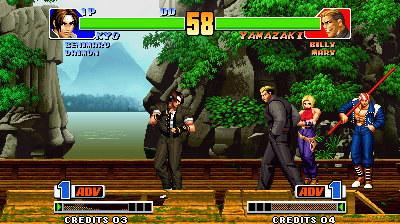
Screenshots
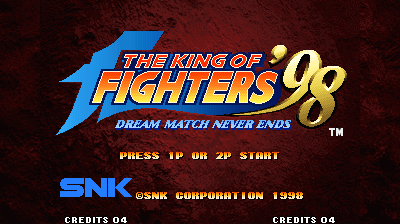
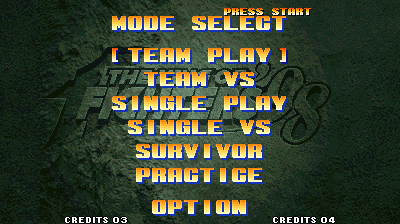
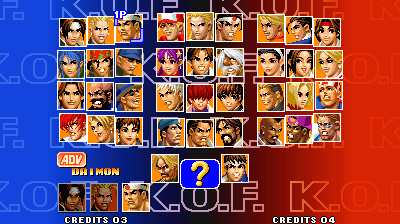
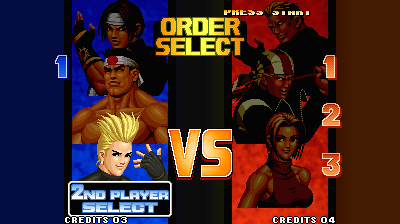
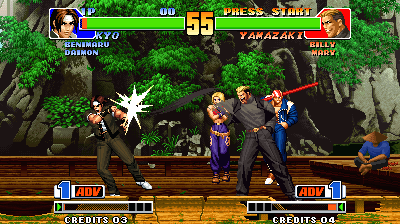
Real output from the recompiled build, in widescreen (--widescreen --headless --screenshot):
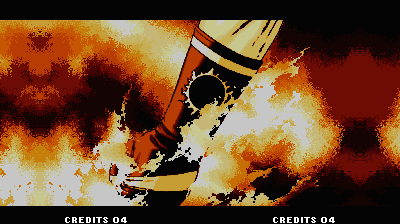 |  |
 |  |
 |  |
The stone behind the title and the menus uses new margin art (below).
Why
KOF98 is one of the best fighting games ever made, and it still runs, at best, inside an emulator built for a 4:3 CRT. A static recompilation turns the game into a regular program: it can be changed, fixed and extended like any other code, while every recompiled block is checked against an interpreter so it stays faithful to the original. Widescreen was the first thing that needed it.
Status
Alpha, with sound.
- Boots as an AES console, plays the intro, attract demos and team matches against the CPU, on recompiled code. The only interpreted code is a routine the game copies to RAM and runs once at boot.
--verifyreplays every recompiled block in the Musashi interpreter: 0 mismatches over 12.1M blocks of a 5-minute scripted session, and 11.7M in widescreen.- Widescreen (
--widescreen, 400×224; up to 480 with--width):- fights draw the stage across the whole width, on all nine stages, with the camera kept inside the stage art;
- menus and other backgrounds continue into the margins in the game's own graphics: mirrored textures, repeated patterns, gradients carried on in their edge colour;
- the stone behind the menus and the title has new margin art (below).
- Two players, on the keyboard or on gamepads, and a pause menu with display, sound and key settings.
What was done
KOF98 runs on neogeorecomp, a static recompilation toolkit for the Neo Geo by sp00nznet. This repo started as a fork of metalslug, its reference game. Bringing up KOF98 took:
- Banked program ROMs in the toolkit: KOF98's program is 5 MB, with four 1 MB banks it switches between at runtime. Each bank is recompiled in its own context and dispatched by the bank that is mapped.
- AES mode: the AES cartridge refuses to run on an arcade (MVS) board, so it runs as the home console.
- Widescreen, which the hardware never had:
- the game streams stage tiles for a 320-pixel window; patching 42 immediate operands at load time widens it, and narrows the camera range so the view never leaves the stage;
- patched operands are read from memory by the recompiled code, so the same build runs at any width and
--verifychecks it; - screens drawn at a fixed 320 pixels get their margins filled from copies of their own sprite columns, or from art loaded from disk.
docs/game-notes.md has the details.
Roadmap
- More in the menu: CRT shaders, save states, gamepad remapping, and unlocking every character (ROADMAP.md).
- The boss fight in the test sessions, so its code runs natively and is verified.
- The rest of the series, one repo per game, the same way:
- KOF '94 to '97 first: they are unencrypted and close to '98, so they are expected to need mostly their ROM layout and their own widescreen patches;
- then KOF '99 to 2003, which use encryption and protection chips, so the toolkit has to learn each scheme first.
ROADMAP.md has the smaller items.
Help wanted
This is a hobby project and help is very welcome. Useful things, roughly from easiest:
- Play it and report problems: what you did, what you expected, a screenshot or a
--recordclip. A scripted input file plus a frame number reproduces a run exactly. - Test the build on Windows and Linux, especially
Setup.cmd. - The launcher: video filters, input mapping and the options in ROADMAP.md.
- Reverse engineering for the next games: ROM layouts, protection, and the background routines widescreen has to patch.
See CONTRIBUTING.md before sending code.
Getting started
Installer (Windows, Linux, macOS)
- Download KOF98-Installer for your system from the latest release or, between releases, from the newest run of the installer workflow (signed in to GitHub). On Linux, unpack the
.tar.gz; on macOS, unzip the app. - Open it, choose the folder holding your
kof98h.zipandneogeo.zip(MAME sets), and press Build. It downloads this repo and runs the same setup as below, installing what's missing, with a progress bar; the full output is under Show details. - Press Play.
The installer holds no game data and builds from your ROMs on your machine (recomp-launcher). It isn't signed: on Windows, SmartScreen asks (More info, Run anyway); on a Mac, open it once, then Open Anyway in System Settings, Privacy & Security.
Quick start (Windows)
The Windows setup was carried over from the toolkit's reference game and hasn't been tried with KOF98 yet. If it trips, the step-by-step commands below work, and an issue saying where it stopped helps.
-
Download this repo: Code → Download ZIP, then unzip it. A
git cloneworks too. -
Put your
kof98h.zipandneogeo.zip(MAME sets) in the unzipped folder, or inDownloads. -
Double-click
Setup.cmd.It checks for Git, CMake, the Visual Studio C++ build tools and SDL2, and asks before installing anything that's missing (it says what and how big). It finds and checksums your ROMs, recompiles and builds the game (a few minutes), and leaves a KOF98 launcher in the folder. If something fails, it stops with one sentence on what to do and keeps the details in
setup.log. Running it again picks up where it stopped. -
Double-click KOF98.
On Linux or macOS, run ./setup.sh instead, optionally with --rom-zip PATH --bios-zip PATH. It does the same steps and offers to install anything missing with apt, or with Homebrew on a Mac (which also needs Xcode's command line tools: xcode-select --install). When it finishes, run ./kof98.sh.
Keys: player 1 arrows and Z X C V (buttons A B C D), 1 start; player 2 R F D G and A S Q W, 2 start. Gamepads work too: the first one is player 1, the second player 2.
Esc pauses and opens the menu: volume, fullscreen, scanlines, 4:3 or 16:9, each player's keys, reset and quit. The settings are kept for the next time. It runs as an AES, so there are no coins: press start on the title screen. Start pauses during a round. For widescreen, run ./kof98.sh --widescreen.
Step by step
These are the commands Setup.cmd runs.
Prerequisites: Git; CMake 3.21+; a C and C++ compiler (Visual Studio 2022 with Desktop development with C++ on Windows, gcc and g++ or clang elsewhere); SDL2 for the window (optional, since headless builds need nothing). On Linux: sudo apt install git cmake gcc g++ libsdl2-dev. On macOS: xcode-select --install, then brew install cmake sdl2.
- Clone with the toolkit submodule:
git clone --recurse-submodules https://github.com/danilopaulinodasilva/kof98recomp cd kof98recomp - Unzip your ROMs into
roms/. Fromkof98h.zip:242-pn1.bin 242-p2.bin 242-s1.bin 242-mg1.bin 242-c1.bin..242-c8.bin 242-v1.bin..242-v4.bin. Fromneogeo.zip(or a non-mergedkof98h.zip):neo-po.bin sfix.sfix sm1.sm1 000-lo.lo. docs/game-notes.md lists the CRC32s. - Configure. On Windows, point CMake at SDL2: vcpkg's toolchain file, or
-DSDL2_DIR=<SDL2-devel-VC>/cmake.cmake -S . -B build -DKOF98_ROM_DIR=roms - Build. The generator recompiles your ROMs into
build/generatedfirst:
Expected in the output:cmake --build build --config Release[m68krecomp] pointer scan: 38567 seeds [m68krecomp] kof98: 1555625 instructions emitted across routines [m68krecomp] 39917 routines, 57050 dispatch entries -> .../build/generated - Profile (optional). This plays two scripted sessions headless to find code only reached at runtime, then rebuilds with it:
cmake --build build --config Release --target profile cmake --build build --config Release - Play:
build/Release/kof98 --rom-path roms (Linux/macOS: build/kof98)
Trip-ups:
error: cannot open roms/242-pn1.bin: the ROMs are not inroms/, or you are running from a different folder. Pass--rom-path.- A "FOR USE WITH ORIGINAL SNK BOARDS ONLY" screen: you ran it with an MVS system ROM (
--bios sp-s2.sp1). Leave--biosout. - "Submodules missing": you cloned without
--recurse-submodules. Rungit submodule update --init --recursive. - No window, and "built without SDL2; run with --headless": CMake didn't find SDL2 (see step 3).
Usage
kof98 --rom-path roms                                      # play
kof98 --rom-path roms --widescreen                         # play in 16:9
kof98 --headless --frames 4400 --input tests/start_fight.txt --record run.mp4
kof98 --headless --verify --frames 19000 --input tests/play_long.txt
kof98 --headless --interp --frames 4400 --screenshot 4350:interp.png
The toolkit's docs/running.md covers every option and the input-script format. tests/start_fight.txt reaches the first round, tests/play_long.txt is the 5-minute soak, and tests/modes/ has one script per game mode, with both players fighting.
Building from source
See Step by step above. KOF98_ROM_DIR is the only game-specific option. Without it, the build is interpreter-only, which is useful for working on the toolkit without regenerating.
Widescreen art
Mirroring works for most backgrounds, but it shows on the stone textures behind the menus and the title. Those take their margins from new art, painted for this project, in assets/: indexed PNGs in each background's palette that hold only the margins. The game draws them through its own palette, so they fade and dim with the screen. To try your own, point KOF98_ASSETS at another folder. docs/game-notes.md has the formats.
Documentation
- docs/game-notes.md: the ROM set, what the game needed from the toolkit, and how widescreen works
- neogeorecomp: the toolkit's architecture and recompiler docs
- CHANGELOG.md · ROADMAP.md · CONTRIBUTING.md
Credits
- Danilo P. da Silva: the project, KOF98, widescreen and its margin art, and sound in the toolkit.
- sp00nznet: neogeorecomp and metalslug, the toolkit and the template this builds on.
- Claude Code (Anthropic): AI pair programmer for the reverse engineering, the toolkit changes and the widescreen work. Every change was tested by Danilo before it was pushed.
- Third-party code in the toolkit: Musashi (68000 interpreter and
--verifyoracle), z80 (sound CPU), ymfm (YM2610 sound synthesis), stb_image (PNG decoding). - MAME's documentation of the hardware and of the ROM sets, used for reference only.
License
The code in this repo is MIT (LICENSE). The King of Fighters '98 is © SNK; this project contains none of its code or data and needs your own dump to do anything.