zelda-inside-the-dream
Zelda Inside The Dream is a PC port of The Legend of Zelda Link's Awakening that adds first-person and VR views.
- Type: PC port
- Game: The Legend of Zelda: Link's Awakening
- Runs on Windows, Linux and macOS
- By Port0r
- Latest release v0.1.1, 2026-11-17
- Source: https://github.com/jacquesdupontd/zelda-inside-the-dream
- Website: https://port0r.com/zelda-inside-the-dream/
README
Zelda: Inside The Dream
A Port0r project.
This is a work in progress. There will be bugs, there is no way around it. That is exactly why the whole project is open source: anyone can take it, fix what is broken and make it better. If you build a mod on top of it, we would love to be mentioned.
Where it comes from
It all starts with LAS Recomp, a project by Peiikai. LAS Recomp takes The Legend of Zelda: Link's Awakening (2019) and recompiles it so that it runs natively on a PC, without an emulator. None of this would exist without it.
Then came an idea. Link's Awakening is a dream, and we have always watched it from above. What would it feel like to be inside that dream, standing on Koholint Island and seeing it through Link's eyes?
What we built
Inside The Dream turns the game into a first-person game. The camera sits in Link's eyes, so you walk the beach, the village and the dungeons at their real scale, with the sword and the shield in your hands. You can also follow Link from behind, choose how far and how high the camera sits, and fly back up to the classic view from above whenever you want.
Most of the work went into making the island hold up when you see it from the ground. The game was only ever meant to be seen from above. The distant scenery now has to be loaded all around you, and the sky has to reach the horizon. The tricks the game used to hide what you were never supposed to see had to be found and removed, one by one.
It runs on three platforms:
- Windows: on your screen, or in VR through SteamVR (a Meta Quest works through Steam Link or Quest Link). On a fast monitor, the view follows your movements at the screen's own refresh rate, 165 Hz on ours, between the game's frames.
- Linux: on your screen, as a single AppImage.
- Mac with Apple Silicon: on your screen.
The music
The music in the video is my remix of the Ballad of the Wind Fish. Two weeks ago, I bought an M-VAVE FM-1. I started writing a software to find its firmwares and flash them on the device. Then it grew into a DAW, with a different firmware on every track of the sequencer. This music was made with it, entirely. Everything related to the FM-1 is coming soon on this GitHub.
Everything is on port0r.com.
Download
| Platform | File | How you play |
|---|---|---|
| Windows 10 / 11 | InsideTheDream-v0.1.1-windows-setup.exe (the one-click installer), or InsideTheDream-v0.1.1-windows.zip | In VR through SteamVR, or on the screen |
| Linux (x86-64) | InsideTheDream-v0.1.1-linux-x86_64.AppImage | On the screen |
| Mac (Apple Silicon) | InsideTheDream-v0.1.1-macos.dmg | On the screen |
The checksums are in SHA256SUMS.txt next to the files.
Before you start: your own copy of the game
Inside The Dream doesn't include the game. There is nothing from Nintendo in this repository or in the downloads, and we won't tell you where to find the game. You need your own copy of Link's Awakening for Nintendo Switch, and the app takes care of the rest.
What the app needs are the game's files, already extracted. That means two folders: exefs, which holds the game's
program, and romfs, which holds everything else (the island, the characters, the music, the text). Point the app to the
folder that contains both of them, or to a folder with their contents. A packed game file like an .nsp, .xci or .nca
won't work. If you give it one, the app will tell you it needs the extracted folders instead.
We play and test with version 1.0.0, the game as it first came out, without any update. Versions 1.0.1 and 1.1.0 are accepted too.
What your computer needs
On Windows and Linux, you need:
- a 64-bit processor with AVX2: an Intel Core from the 4th generation onwards, or any AMD Ryzen;
- a graphics card with an up-to-date Vulkan 1.3 driver;
- 8 GB of memory, or 16 if you can.
Seen through Link's eyes, the island shows much more than it ever did from above, so a stronger graphics card makes a real difference.
To play in VR, you need a PC VR headset that works with SteamVR. A Meta Quest works too, through Steam Link or Quest Link.
On a Mac, you need an Apple Silicon Mac (M1 or newer) with macOS 15 or newer. The Mac version plays on the screen. On an Apple Silicon Mac with a Retina screen, we recommend setting Internal resolution to 50% in Settings > Video.
Wherever you play, keep about 12 GB free on your disk for the first launch.
Install
Windows.
- Download
InsideTheDream-v0.1.1-windows-setup.exeand open it. It asks where to install, then installs without administrator rights, puts an Inside The Dream shortcut on your desktop, and opens the app. The game's data goes in that folder and takes about 9 GB, so pick a disk with enough room. - If you'd rather not use an installer,
InsideTheDream-v0.1.1-windows.zipholds exactly the same app. Unzip it wherever you like, and openlasrecomp.exein the Inside The Dream folder. - Windows may say it protected your PC, because the app isn't signed with a paid certificate. Click More info, then Run anyway.
Linux.
- Download
InsideTheDream-v0.1.1-linux-x86_64.AppImageand make it executable, either in its Properties (Permissions) or withchmod +xin a terminal. Then open it. - If it doesn't start, your system may be missing FUSE. Run it with
APPIMAGE_EXTRACT_AND_RUN=1in front of the command, and it will start without it.
Mac.
- Download
InsideTheDream-v0.1.1-macos.dmg, open it, and drag Inside The Dream into Applications. - The first time you open it, macOS will probably refuse, because the app doesn't come from the App Store. Open System Settings, go to Privacy & Security, scroll down, and click Open Anyway.
The first launch
The first time you open Inside The Dream, it shows a page called Set up the game:
- Click Choose the folder and pick the folder with your
exefsandromfs. - Click Set up the game.
The app copies what it needs from your files, then rebuilds the game's code for your own computer. This only happens once, and it takes a few minutes: about seven on a recent desktop PC, a bit more on a laptop. Your own files are never changed. When it's done, the start screen lets you play.
If the setup fails, the page tells you why. The app also writes everything it knows to a file called setup-report.txt,
and the SHOW THE REPORT button opens the folder that holds it. Send us that file on
the Port0r Discord, and we will help you.
To play in VR, turn your headset on and start SteamVR first. Then click PLAY IN VR on the start screen. That is Windows only. In the headset, the game's text, hearts and buttons sit on a panel at eye level in front of you. The panel stays put while you look around, and it comes back in front of you when you turn your head away. You can change its height and size, or stop it from following your head, in Settings > Gameplay.
The three views
Inside The Dream lets you play Link's Awakening in three different ways, and you can switch between them at any moment, in the middle of a fight or a dungeon.
When you start a game, you're in the game's own view from above, as Nintendo made it. Click the right stick to dive into Link's eyes. You can also turn on First-person view in the menu, and the game will start in his eyes from then on: it always remembers the view you left.
Through Link's eyes
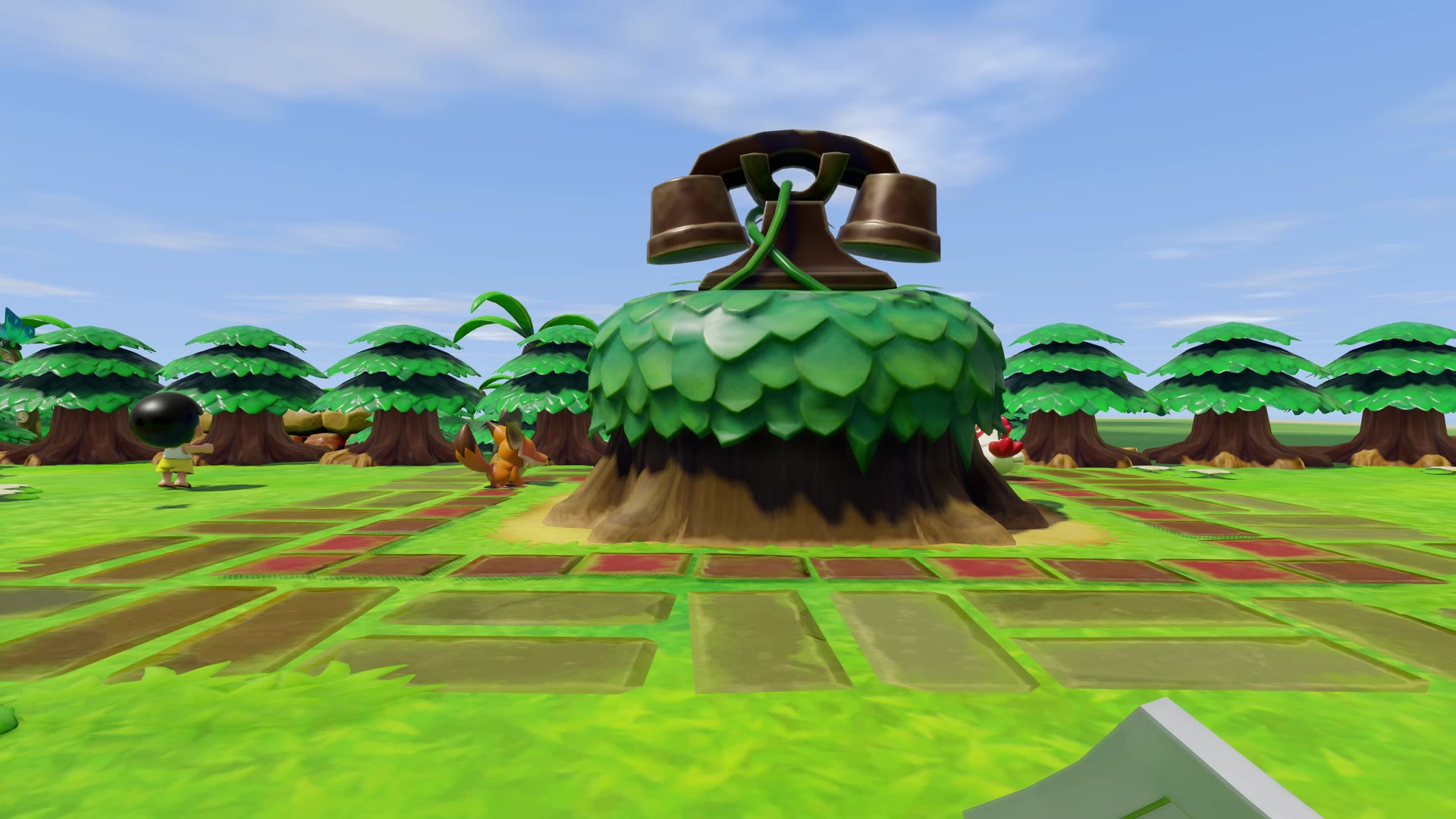
This is the heart of Inside The Dream. The camera sits in Link's eyes, with his sword and shield in front of you. You look around with the right stick or the mouse, and the left stick walks him where you look. When you swing the sword, throw something or talk to someone, Link turns to face where you're looking first.
On Windows and on a Mac, a screen faster than 60 Hz turns the view at its own rate, between the game's frames. That's 165 times a second on our PC monitor, and 120 on a MacBook Pro.
Behind Link
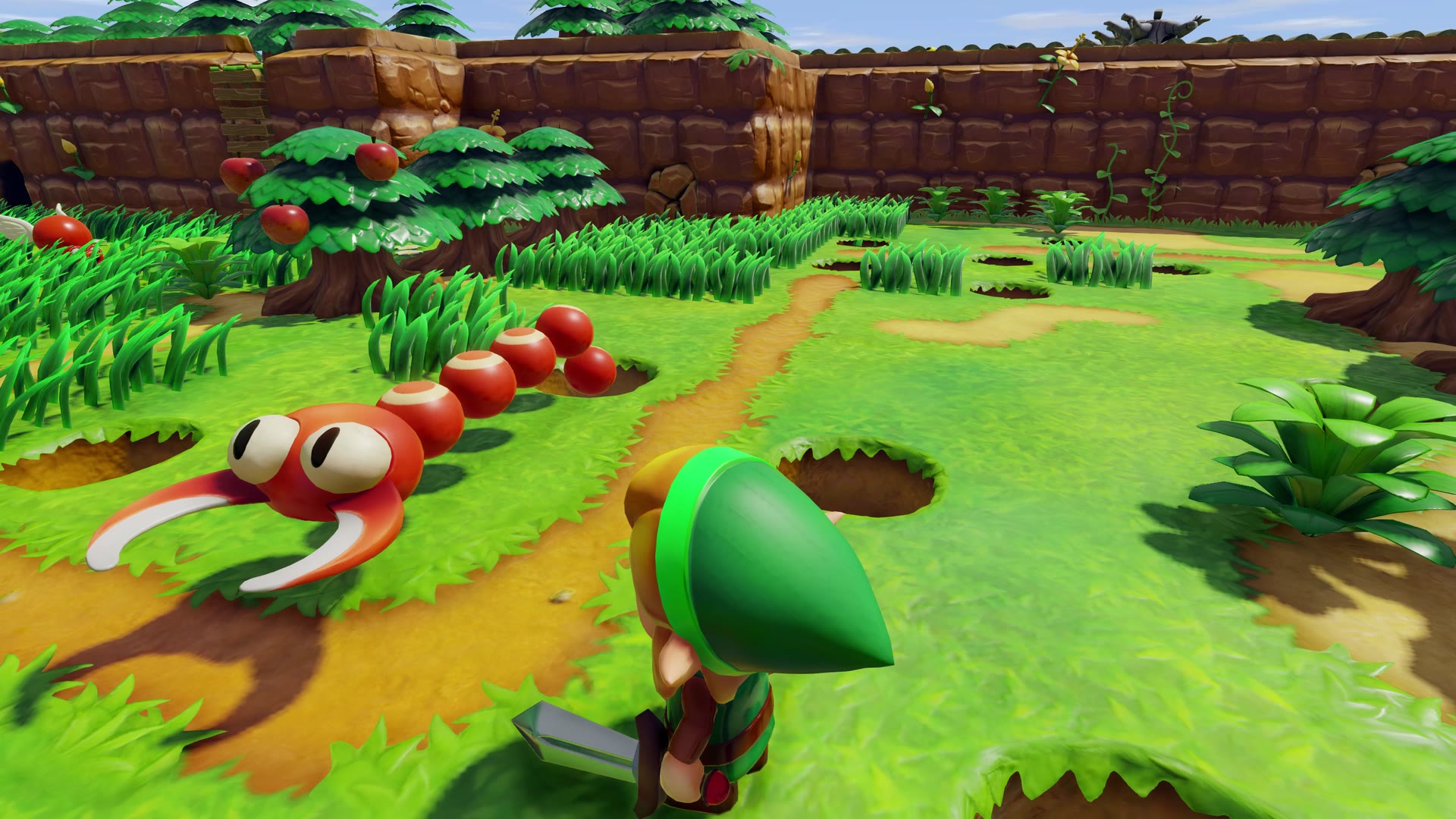
Click the left stick, or press F5, and the camera glides back to sit a little behind and above Link, so you can see him in the world. The sticks and the mouse work exactly the same. Click again and you're back in his eyes. In the menu, you can choose how far behind him and how high the camera sits.
From above, as in the original
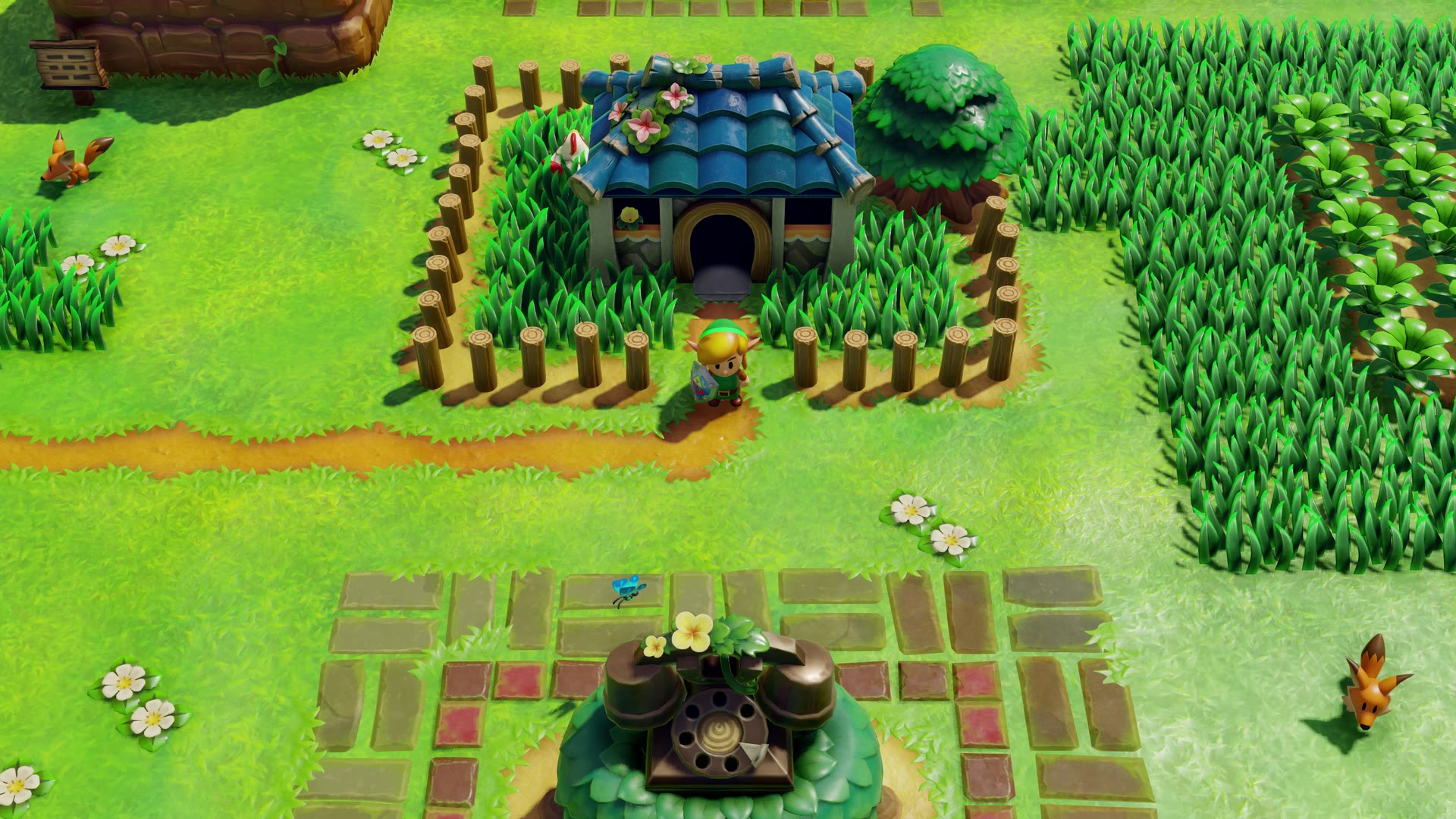
Click the right stick and the camera flies up to the game's own view from above. It's there for a tricky puzzle, or just to get your bearings. Click it again and you dive back into Link's eyes. A few side-view passages always keep the game's own camera, the way they were designed.
Switching views
| Gamepad | Keyboard | |
|---|---|---|
| Link's eyes ↔ the view from above | Click the right stick | Numpad 0 |
| Link's eyes ↔ behind Link | Click the left stick | F or F5 |
| Look around | Right stick | Mouse |
| Open Inside The Dream's menu | Press − and + together | F1 or Esc |
On a gamepad, − on its own opens the game's map, and + on its own opens the pause screen and the inventory.
Your saves and settings
Updating or reinstalling the app keeps your saves. They live in the save folder, inside the app's data folder:
- on Windows, the app's own folder, which is
%LOCALAPPDATA%\Programs\Port0r\InsideTheDreamif you used the installer. If you use the zip, unzip new versions into the same folder; - on Linux,
~/.local/share/lasrecomp; - on a Mac,
~/Library/Application Support/com.peiikai.lasrecomp.
Controls
You look around with the right stick or the mouse. R3 switches between the first-person view and the game's own view from above, and L3 (or F5) puts the camera behind Link and back. On a gamepad, the left menu button (−) opens the map, the right one (+) opens the pause and the inventory, and pressing both together opens Inside The Dream's own menu. In the headset, you start the game with PLAY IN VR on the start screen.
The full list is in docs/CONTROLS.md.
Build it yourself
The whole source is here. docs/BUILD.md explains how to build each platform.
Credits
Zelda: Inside The Dream is made as part of Port0r. It is built on LAS Recomp by Peiikai, which recompiles the game for PC, with the randomizer of Owen_Splat; the first-person view and the VR are this project's work. Every component and its license is in THIRD-PARTY-NOTICES.md.
More from the same author
Port0r rebuilds arcade games in 3D for VR headsets, and Sega Rally, Daytona USA, Scud Race, Virtua Cop, Time Crisis and more are on port0r.com.
Legal
The Legend of Zelda and Link's Awakening are trademarks of Nintendo. Zelda: Inside The Dream is a free fan project, not affiliated with or endorsed by Nintendo, and it contains no Nintendo content. Our code is under the MIT license (LICENSE), which keeps LAS Recomp's own MIT notice.