TimeSplitters: Future Perfect PC
TimeSplitters: Future Perfect PC is a native Windows and Mac port of TimeSplitters: Future Perfect that supports keyboard and mouse, 4K and ultrawide resolutions, and online multiplayer.
- Type: PC port
- Game: TimeSplitters: Future Perfect
- Runs on Windows
- By TheDoffman
- Latest release v0.3.5, 2026-10-27
- Source: https://github.com/TheDoffman/timesplitters-future-perfect-pc
README
TimeSplitters: Future Perfect
Keyboard & Mouse · 4K & ultrawide · Custom controls · Online multiplayer


Direct ZIP downloads · Automatically follow the latest stable launcher release · Release notes & checksums
Install & play · Launcher guides · Multiplayer · Build from source
Windows 10/11 x64 · Native Apple Silicon Mac · Experimental port · Supported US Xbox game required
 |  |
 |  |
In-game screenshots as of v0.3.2
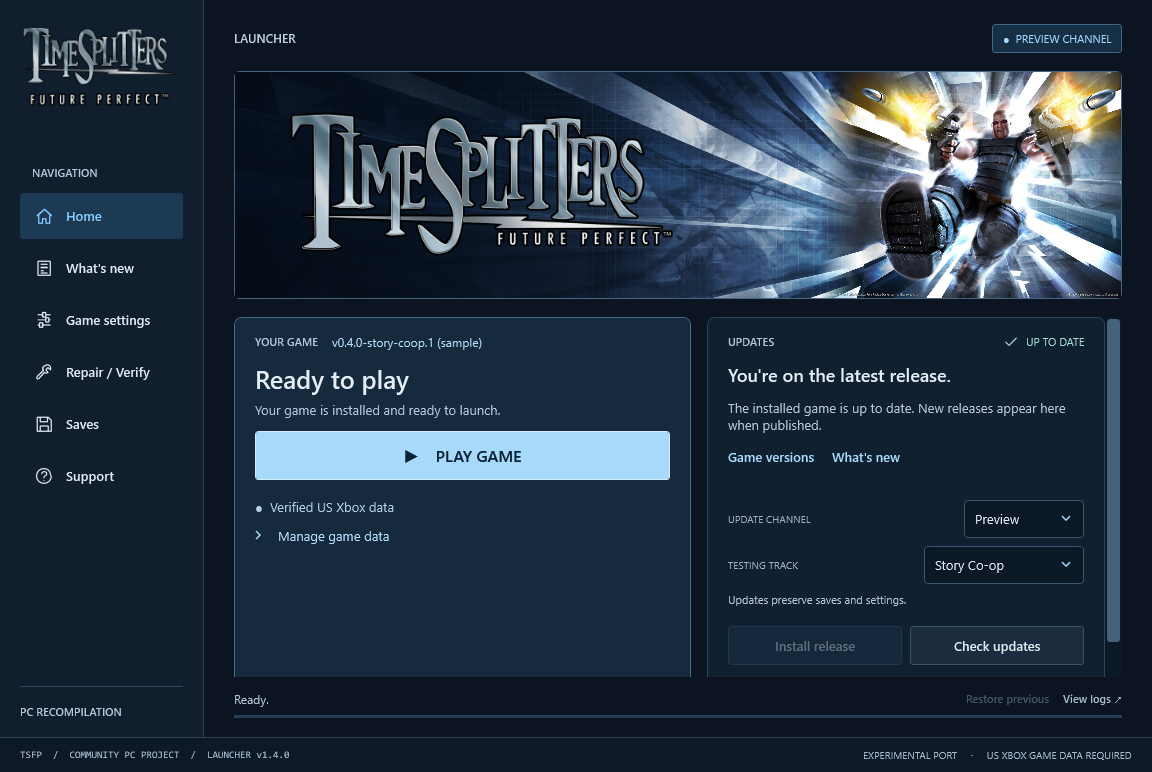
Launcher v1.2.18 interface preview. The game version and channel shown are sample data; Stable is the default game channel; named previews are opt-in with launcher 1.3.0+.
Important
You need your own supported US Xbox ISO or extracted game data. Import it through the launcher. Original game files are not included. Neither version needs an emulator.
Start playing
Use the Windows or Mac download button above to get the latest stable launcher ZIP for your computer. Windows and Mac use the same installation steps below. See the latest launcher release for release notes and checksums.
| Step | Installation |
|---|---|
| 01 | Download the launcher. On the release page, choose Download Windows x64 or Download Mac (Apple Silicon) for your computer. |
| 02 | Extract and open. Extract the whole ZIP to a writable folder. On Windows, open TimeSplitters Launcher.exe, keeping Bin and Support with it. On Mac, open TimeSplitters Launcher.app, keeping its Support folder beside it. |
| 03 | Install the game runtime. Keep Update channel → Stable, then choose Install release. The launcher downloads and verifies the latest available game build for your platform. Choose a preview only when opting into testing. |
| 04 | Import your game once. Choose Locate ISO, or Use extracted files for a folder containing default.xbe, pak and xmv. |
| 05 | Press Play Game. The launcher minimizes while the game runs and returns when you finish. |
Next time: open the launcher and choose Play Game. Installed play remains available offline. Use Check updates → Update release to install a newer game build when available. Launcher and game versions are separate.
System requirements, channels and keeping your saves
- Windows: Windows 10/11 x64 with .NET Framework 4.8.
- Mac: Apple Silicon (M1 or newer). The launcher targets macOS 12+; the current shared Vulkan game renderer requires macOS 26+. See the Mac guide for the legacy OpenGL fallback on older systems.
- Your supported US Xbox game, title ID
45410066; exact executable hash. - Internet access for the initial runtime download; about 5 GB for the game, plus space for update staging, rollback and any optional textures.
- Stable is the default game channel. Choose Preview, then Beta or a named feature under Testing track for opt-in testing. Each track follows its own updates in launcher 1.3.0+. See release channels.
- Keep the whole installation together, especially
Data,Settings,Savesand the launcher's recovery files. Normal updates preserve existing data, settings and saves.
Published builds do not require Python, Git or developer tools. The Mac launcher includes .NET and does not need CrossOver or the .NET SDK.
Windows
If Windows interrupts launcher startup, use Retry, Open launcher folder or View logs. See the Windows security prompt guidance and Windows launcher guide.
Mac (Apple Silicon)
The native Mac launcher downloads and installs Mac game builds using the shared steps above. Intel Macs are not supported. For development checkouts, follow the Mac source-build guide; release installation and self-updates are disabled there to preserve source and local builds.
If the release launcher reports a read-only AppTranslocation path, follow the
Mac launcher folder recovery instructions.
Keep the .app and Support folder together.
The app currently uses ad-hoc signing; Developer ID
signing, notarization and clean-machine installation remain pending.
Mac launcher v1.2.19 has a reported damaged-app rejection and an unsealed app
bundle; see the signing correction and one-time migration
for the fix status and remaining Gatekeeper limitations.
Controls: click inside gameplay to capture the mouse, use WASD to move, and Escape to pause and release it. F2 opens keyboard, mouse and graphics settings; F11 toggles fullscreen. Use Fn with function keys if macOS reserves them. See the full Mac controls and native launcher guide.
Current Mac status: Full campaign completion, save/load and complete rendering/audio fidelity remain unverified. Movie playback and native multiplayer remain unfinished. Track remaining Mac work →
PC features
| Feature | Details |
|---|---|
| Keyboard and mouse | Direct aiming, customizable bindings, mouse-driven menus and input prompts that follow your controls. |
| Widescreen | 1080p, 1440p, 4K and ultrawide support, with adjustable field of view. |
| High frame rate | Original 60 FPS by default; compatible game builds offer opt-in 120/180/240 FPS beta settings. |
| Launcher | Game installation, updates, repair, rollback and settings. |
| Online Multiplayer | Player-hosted Online and LAN matches with Bot support. (Windows only) |
| Extras | Optional Discord Rich Presence, FPS overlays and local crash diagnostics. |
Availability depends on your platform and installed game version. Check the launcher's Release notes, Mac status and measured progress for support and known limits.
Development source also enables continuous water updates with the high-refresh beta presets on the common renderer. 60 FPS (Original) remains the recovery option; full-game and native Mac high-refresh validation remain incomplete.
Controls and settings
Set bindings and graphics before playing in the launcher's Game settings. Use F2 in-game for keyboard and mouse settings, and Settings → Video Options for resolution, aspect ratio, FOV and frame rate.
| Action | Default control |
|---|---|
| Move / look | WASD / mouse |
| Fire / aim | Left / right mouse button |
| Use / confirm | E, Space or Enter |
| Reload / crouch | R / Ctrl or C |
| Change weapon | Mouse wheel or left/right arrows |
| Pause / release mouse | Escape |
| Keyboard and mouse settings | F2 |
| Fullscreen | Alt+Enter (Windows), F11 (Mac) |
The original game has no jump action. For all bindings and platform-specific settings, see Windows controls or Mac controls. On Mac, use Fn with function keys if needed.
Multiplayer
On Windows, choose Online / System Link → Online to host or join a match, or System Link for LAN play. Everyone needs matching game builds and data. Online hosts need port forwarding; guests join using the host's invitation. Follow the multiplayer guide for setup, ports and bots.
Online is experimental; Story co-op and native Mac multiplayer are not supported yet.
Enhanced textures
The partial texture overhaul is an optional launcher download for Windows and Mac. Classic textures remain the default.
When the optional pack is available, use Game settings → Graphics & resolution → Check texture downloads, then Download / update textures. Enable and save Use enhanced textures (Beta) to use it on future launches. See the texture guide for availability, coverage and known issues.
This is an experimental port. Full campaign completion and complete rendering and audio fidelity remain unverified. See measured progress and the Mac backlog for validation and remaining work.
Guides & support
All documentation · Repository layout and naming
Report a bug with your installed versions, platform and steps to reproduce. The launcher's Diagnostics page provides local reports and logs; nothing uploads automatically. Keep personal saves and game data private.
Suggest improvements in Ideas. To contribute, read the contributing guide, project rules and code of conduct. Report security vulnerabilities privately using the security policy.
Support the project
Enjoying the project? Buy me a coffee on Ko-fi to support continued work on TimeSplitters and the discoveries shared along the way. Thank you for being part of the project!
Credits & license
The project statically recompiles the Xbox executable into native code; it does not recover the original C/C++ source. The pinned runtime source is bundled with its credits and licenses, and the independent tooling replacement is in progress. See bundled runtime source for setup verification and remaining dependencies.
Original project code and documentation are licensed under GPL-3.0-only, except where stated otherwise. See LICENSE and NOTICE. When distributing GPL-covered binaries, provide corresponding source and build instructions and preserve the required notices. Upstream and third-party components retain their own licenses and credits.
This license does not cover the original TimeSplitters game or its assets. You must supply your own supported game files. Original game data, generated game code, personal settings and saves are not included in this repository.