JAIL — Recompiled
JAIL — Recompiled is a native recompilation of Tokyo Ghoul: JAIL for macOS and Android.
- Type: PC port
- Game: Tokyo Ghoul: JAIL
- Runs on macOS and Android
- By ch1ppyone
- Latest release v0.1.2, 2026-11-19
- Source: https://github.com/ch1ppyone/jail-recomp
README
Tokyo Ghoul: JAIL — Recompiled
The Japanese PS Vita release, recompiled for macOS Apple Silicon and Android arm64.




Platforms · Screenshots · macOS · Android · How it works · FAQ
JAIL Recompiled is a native recompilation of Tokyo Ghoul: JAIL
(PCSG00615, Japan, version 1.00). The game's ARMv7 code is translated ahead
of time into C and compiled together with a Vita-compatible runtime. It is not
a rewritten game engine or a conventional emulator.
Important
Bring your own game. No game files, firmware, licences or translation assets are included. You need your own legally obtained PKG, matching licence and Vita firmware. Release builds contain only the app: the game data is still yours to provide and is never uploaded.
Platforms
| Platform | Status | Launcher | Graphics | Input |
|---|---|---|---|---|
| macOS Apple Silicon | ✅ Playable start to finish | PyQt6 desktop launcher | SDL3 · Metal | Keyboard, gamepad |
| Android arm64 | ✅ Playable start to finish (verified on a Galaxy S25 Ultra · Android 17) | Built-in PKG installer | SDL3 · Vulkan | Touch controls, gamepad |
| Windows | 🕓 Planned | — | — | — |
| Linux | 🕓 Planned | — | — | — |
Both ports run the same recompiled game code and the same runtime, so saves and game behaviour match. Windows and Linux support is planned for a later stage.
Screenshots
| macOS | Android |
|---|---|
 |  |
| Launcher | |
 |  |
| Main menu | |
 |  |
| In game | |
Screenshots come from the original Japanese release running in local builds.
What you need
| File | What it is |
|---|---|
PCSG00615.pkg | Your Japanese 1.00 game package (original filename is fine) |
work.bin or .rif | The matching 512-byte licence for that package |
PSVUPDAT.PUP | Sony's Vita firmware update; system libraries are rebuilt from it |
The PKG does not contain the firmware, and the firmware does not contain the game: all three are needed.
macOS
Requirements
- Mac with Apple Silicon, macOS 12 or newer;
- Apple Command Line Tools (
xcode-select --install); - Python 3 with
venv; - Homebrew — recommended, used to install missing
cmakeandninja; - about 5 GB of free disk space for the decrypted game and the build.
The launcher installs everything else on first run: a Python environment in
nativ/.venv with PyQt6, PyCryptodome and Capstone, and the pinned native
toolchain (SDL3, SPIRV-Cross, FFmpeg).
Install and play
-
Put your files in
data/:data/ ├── PCSG00615.pkg ├── work.bin └── PSVUPDAT.PUP -
Start the launcher:
- from the repository:
./JAIL-PyQt.command; - from the release: open Tokyo Ghoul JAIL.app.
Both run the same PyQt6 launcher. The packaged app keeps your files, logs and builds in
~/Library/Application Support/TokyoGhoulJAIL/JAIL. - from the repository:
-
Press PREPARE & PLAY. The first run decrypts your copy, recompiles the game and builds it, which takes a while. After that the button becomes PLAY JAIL and the game starts right away.
If your files are elsewhere, use Browse in the launcher: it checks the
files and copies them into the launcher's data folder (data/ in the
repository, or ~/Library/Application Support/TokyoGhoulJAIL/JAIL/data in the
packaged app).
Shader, trophy and input notifications are off by default on macOS and Windows. Turn them back on in Display → On-screen messages, or in the game under F10 → Game → On-screen messages.
Launcher pages
| Page | What it does |
|---|---|
| Home | File check, build status, Prepare & Play / Play JAIL |
| Game Data | PKG, licence and firmware status; Browse and re-check |
| Controls | Keyboard bindings |
| Display | Resolution, frame rate, picture fit, aspect ratio, volume, on-screen messages |
| Settings | Optional system log, local folders, licence notices |
Command-line build
The launcher runs these same steps. With the files in data/:
src/tools/prepare_jail.sh
or step by step:
cd nativ
./vitarecomp firmware   ../data/PSVUPDAT.PUP
./vitarecomp licenses   import ../data/work.bin
./vitarecomp add        ../data/PCSG00615.pkg --license ../data/work.bin --no-build
./vitarecomp analyze    PCSG00615
./vitarecomp recompile  PCSG00615
./vitarecomp build      PCSG00615
./vitarecomp run        PCSG00615
Android
The Android APK is built on a Mac (or Linux) from the same sources. The recompiled game code comes from the macOS build above, so build the game on macOS first.
Hardware status (19 November 2026): the game was installed and played through to the end on a Samsung Galaxy S25 Ultra (SM-S938B, Android 17, arm64): story scenes, menus and the touch/controller input all work, and the game is fully completable. The same build runs on the Android emulator. Two device-specific details came out of that test:
- Android 17's libc aborts on a destroyed mutex inside Samsung's vendor display allocator when the system renderer draws the app window through Vulkan. The manifest therefore disables window hardware acceleration for the app; the game itself still renders through its own SDL Vulkan surface.
- The APK validates the selected PKG before decrypting it: the container magic,
the PFS signatures and the matching
work.binare checked, so a wrong file or licence is reported instead of crashing the runtime.
Requirements
- everything from the macOS section, with a completed game build;
- Android Studio or the command-line
SDK with:
- Android SDK Platform 35, Platform-Tools and Build-Tools;
- NDK
28.2.13676358; - CMake
3.31.6;
- JDK 17 (
brew install openjdk@17); - an arm64 Android 10+ phone, or an emulator, with Vulkan.
The Gradle wrapper is included. SDL3 3.4.10 and FFmpeg 7.1.1 are downloaded and built by the scripts.
Build the APK
cd android
scripts/build_android.sh               # with video playback
scripts/build_android.sh --no-ffmpeg   # faster build, no video
The APK appears in android/app/build/outputs/apk/debug/app-debug.apk.
Release build (signed)
Release APKs are signed with a key kept outside the repository, in
data/keystore/ (ignored by Git). Create it once and keep it safe: every
update must carry the same signature.
cd android
scripts/release_apk.sh v0.1.2
The script builds assembleRelease, verifies the signature, stages
nativ/build/release/v0.1.2/JAIL-v0.1.2-android-arm64.apk and writes its
SHA-256. versionCode and versionName live in android/app/build.gradle.
An APK signed with a different key (for example an older debug build) cannot be updated in place: uninstall it once, then install the release build.
Verification
cd android
tests/run.sh
builds synthetic PKGs and runs the Android decryptor against them: the good
package, a licence from another copy, a truncated download, a corrupted
payload, a file that is not a PKG, a failed reinstall that must keep the
previous app0 and saves, and the free-space message. .github/workflows/verify.yml
runs the same checks plus the Python reference self-tests on every push;
release-checksums.yml regenerates SHA256SUMS from the uploaded release
assets.
A GitHub-hosted runner cannot build the APK itself: the recompiled game C is
private. .github/workflows/android-build.yml is a manual job for a
self-hosted Mac that has the local game build and data/keystore/.
Install
With the phone connected over USB (debugging enabled) or an emulator running:
cd android
scripts/install_android.sh
This installs the APK. For development it also pushes an already prepared
app0 and the runtime inputs over ADB, which skips the on-device installer.
First launch
On the first launch the app asks for three files:
| Choice | File |
|---|---|
| Game package | your retail PCSG00615.pkg (about 1 GB) |
| Vita firmware | PSVUPDAT.PUP |
| Licence | work.bin |
The app decrypts the PKG on the phone itself and writes app0 into its
private storage. The recompiled game image (game.img) and the small Vita
runtime modules (libc.img, libgxm_es4.img, libgpu_es4.img,
libfios2.img, libpvf.img, libult.img, libSceFt2.img) are already
inside the APK and are installed automatically.
The first preparation needs about 3 GB of free space and takes a few minutes.
After it finishes the game starts directly, and the copied PKG is removed.
scripts/install_android.sh remains available for developers who already
have a locally decrypted app0 and prefer the ADB route.
Game data and support
After installation the launcher becomes a small service screen. Long-press the
app icon and choose Game data to open it (or run
adb shell am start -n dev.ch1ppy.jail/.MainActivity --ez install true).
From there you can:
- launch the game;
- reinstall the game data — saves and settings are kept;
- share a diagnostic log with the device model, Android version and the
tail of
runtime.log.
The launcher checks free space before copying and decrypting and reports how much is missing instead of failing halfway through.
Controls
On-screen buttons are visible from launch and hide when a gamepad is used. A Bluetooth or USB gamepad works out of the box.
Tips
-
On the emulator, start it with a hardware GPU for full speed:
$ANDROID_HOME/emulator/emulator -avd <name> -gpu host -
The game was played through to the end on the Galaxy S25 Ultra; battery use has not been measured yet.
How it works
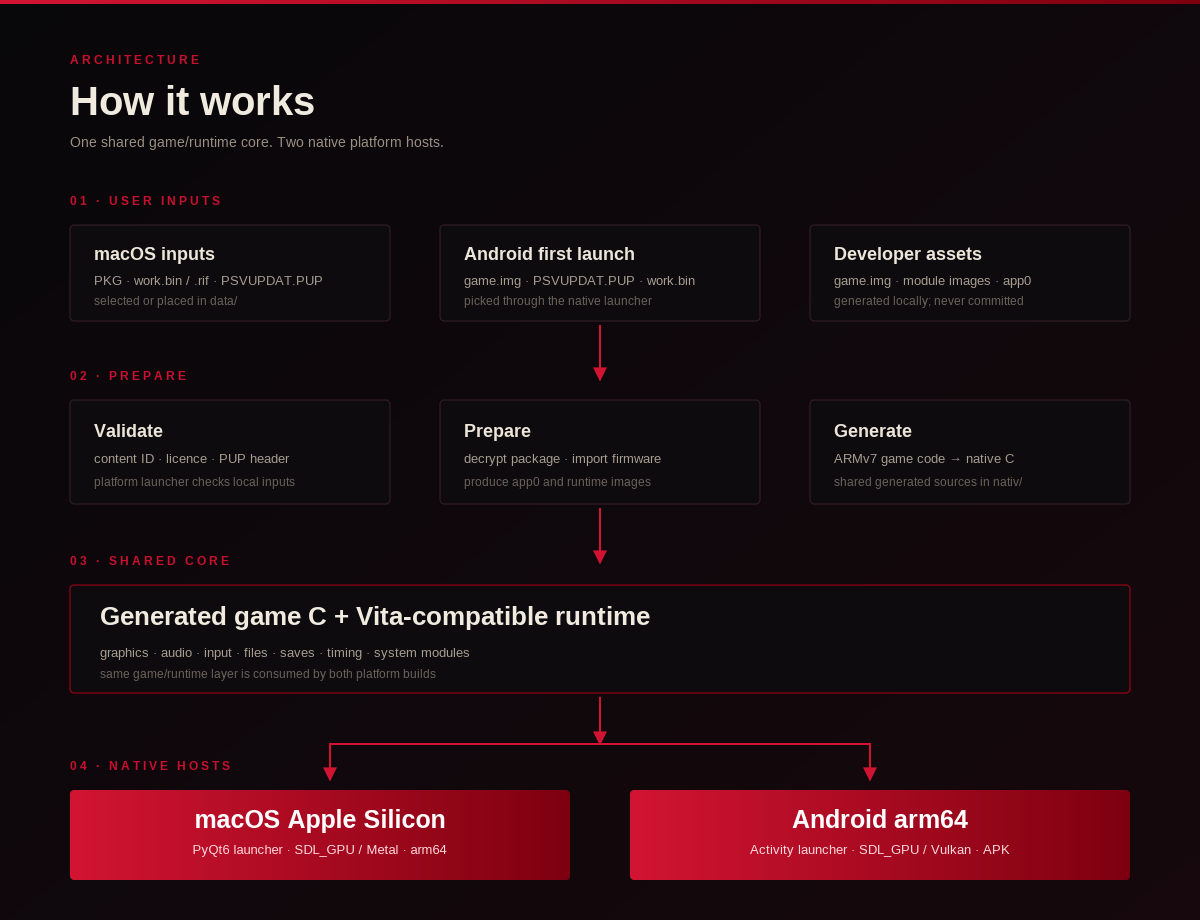
- Your files — the PKG, licence and firmware stay on your machine.
- Prepare — the package is decrypted (by the macOS launcher during setup, or by the Android app on first launch) and the Vita system libraries are rebuilt from your firmware.
- Recompile — the game's ARMv7 code is analysed and translated to C, one function at a time.
- Build — the generated C is compiled together with a Vita-compatible runtime that provides graphics, audio, input, files, saves and timing.
- Play — the result is a native macOS app or Android APK. There is no emulator and no JIT at runtime.
The original game assets are read from your decrypted copy; nothing from the game is stored in this repository.
Troubleshooting
| Problem | Fix |
|---|---|
| Play button disabled | Open Game Data and check the three badges; the files must be the Japanese 1.00 release |
No module named 'Crypto' | Run ./JAIL-PyQt.command again to finish the setup |
| Very slow rendering on macOS | The native toolchain is missing; run the launcher again so it can build it |
Android: libSDL3.so not found | Rebuild with scripts/build_android.sh |
| Android: black screen after start | Run the in-app installer again (or delete the app data and reinstall) |
| Android: not enough free space | Free at least 3 GB for the first preparation, then run the installer again |
Android: work.bin does not match this PKG | Use the licence that belongs to this exact package; a licence from another edition or region is rejected |
Android: the selected file is not a Vita PKG | Select the retail .pkg itself, not a zip, ISO or extracted folder |
| Want a fresh start | Delete nativ/dump/ to decrypt and rebuild from scratch |
To report a problem, enable Settings → Write system log and attach
logs/launcher.log. On Android: adb logcat -s JailAndroid SDL.
FAQ
Does this include the game or firmware? No. You provide your own game, licence and firmware.
Can I download a ready-made app or APK? No. Everything is built locally from your own files. Do not share built APKs or apps: they contain code derived from the game.
Is the game translated? No. The build uses the original Japanese release.
Will another region or update work? No. This targets the Japanese 1.00 release only.
Star history
Repository layout
src/launcher/   macOS launcher
android/        Android app and build scripts
nativ/          recompiler, runtime and build pipeline (shared)
packs/          game-specific configuration
src/tools/      helper tools
docs/images/    screenshots and diagrams
data/           your files — not tracked by Git
Credits
- Luufen/nativ (GPL-2.0-or-later) —
Vita runtime, static recompiler, decryption pipeline and launcher tooling.
Included in
nativ/. - Project Nativ — community project that Luufen/nativ is forked from; original runtime and tooling.
- PersonaDancingRecomp by Ecstatic-Magician — Vita runtime work merged into the nativ lineage.
- Vita3K — Vita hardware and
system-module reference;
SceSelf, PKG, PUP and NID handling innativ/decrypt/. - VitaSDK / vita-headers — NID database used to name imported functions.
- pkg2zip — PKG container format reference.
- psvpfstools and Vita3K psvpfsparser — PFS decryption reference.
- TeamMolecule sceutils — key values and SELF/PUP handling reference.
- SDL3 — window, input, audio and GPU platform layer on macOS and Android.
- Dear ImGui (MIT) — runtime overlay.
- AMD FidelityFX SDK (MIT) — FSR 3.1 upscaler shaders.
- FFmpeg (LGPL-2.1-or-later) — H.264 and AAC decoding.
- SPIRV-Cross (Apache-2.0) — shader translation on macOS.
- Capstone (BSD-3-Clause) — ARM disassembly in the analysis tools.
- PyCryptodome (BSD-2-Clause; parts public domain) — AES and key handling in the local pipeline.
- PyQt6 (GPL-3.0) — launcher interface.
- Kenney Input Prompts (CC0 1.0) — controller button icons.
- Outfit font (SIL OFL 1.1) — bundled UI font.
Project-specific work — JAIL title pack, launchers, macOS and Android ports, build tooling and documentation: ch1ppyone.
Full component terms are in LICENSE, nativ/LICENSE, nativ/THIRD_PARTY.md
and alongside the vendored third-party sources.
Legal
Tokyo Ghoul: JAIL © 石田スイ/集英社・東京喰種製作委員会 ©2015 BANDAI NAMCO Entertainment Inc. All rights to the game, its characters and assets belong to their respective owners.
This independent project is not affiliated with, endorsed by or sponsored by Bandai Namco Entertainment, Sony Interactive Entertainment, Shueisha or any other rights holder.
No game packages, firmware, keys, licences, decrypted executables, generated game builds or modified game archives are included. Use only files you are legally entitled to use. Do not publish private inputs or derived game content.