tokyojungle
Tokyo Jungle Recompiled is a native Windows port of Tokyo Jungle for PlayStation 3, allowing players to run the game on PC with higher resolutions and smoother frame rates.
- Type: PC port
- Game: Tokyo Jungle
- Runs on Windows
- By SilvioDiaz
- Latest release v0.2.0, 2026-11-10
- Source: https://github.com/SilvioDiaz/tokyojungle
README
Tokyo Jungle Recompiled
Tokyo Jungle (PS3, 2012) as a native Windows program. No emulator.

Download BUILD.bat · Quick start · Português · Controls · How it works

Tokyo Jungle was a digital-only PS3 exclusive whose studios are gone, and the PS3 store is closing. This project turns the game's own PS3 code into a Windows program with ps3recomp. No game data is included: you build it from your own copy, and this fork makes that a double-click.
Quick start
You need Windows 10/11 (64-bit), about 10 GB free, and your own copy of Tokyo Jungle
(NA, NPUA80523) with its license file.
-
Make a new folder and put these three things in it:
📁 My Tokyo Jungle ├── BUILD.bat ← from the Releases page ├── 📁 NPUA80523 ← your extracted game (any name) │ ├── PARAM.SFO │ └── 📁 USRDIR (EBOOT.BIN, data\ ...) └── UP9000-NPUA80523_00-TOKYOJUNGLE00001.rap ← your license -
Double-click
BUILD.batand wait. The first build takes 30–60 minutes. -
Open
TokyoJungle.exe, pick the resolution and window mode, and play.
That's it. If something goes wrong, the full log is in build.log in the same folder.
With RecompLauncher: install Tokyo Jungle Recompiled there and pick your
game folder (put the .rap inside it). The launcher runs the same build on its setup screen, shows the
resolution and window settings on the game's page, and Play starts the game directly.
What BUILD.bat does
- Installs anything missing with
winget: Git, Python 3.11, CMake, Ninja, LLVM, Visual Studio 2022 Build Tools (C++) and FFmpeg. The Visual Studio installer may ask for administrator permission. - Downloads ps3recomp at the commit this port was made for and applies the port's patches.
- Decrypts
EBOOT.BINandtj.edatwith your.rapthrough RPCS3. An existing RPCS3 install is used if found; otherwise the portable build is downloaded from the official RPCS3 releases and checked by SHA-256. The decrypted EBOOT must match the tested one byte for byte (hashes). - Recompiles the PS3 code (PPU) and the 18 SPU programs to C, then compiles everything.
- Leaves
TokyoJungle.exe(launcher) andengine\(the game) in your folder.
The .build folder it creates is only needed to rebuild; you can delete it.
Your extracted game folder is left as it was, except USRDIR\data\tj.edat, which is replaced by
its decrypted contents (the original is kept as tj.edat.original).
The launcher
TokyoJungle.exe opens a small window before the game:
| Option | Choices |
|---|---|
| Resolution | 1280×720 (the PS3's, lighter) · 2560×1440 (2K, sharper; on a 1080p screen it acts as supersampling) |
| Display | Window · Full screen (any monitor) |
| Don't ask again | Starts straight away next time. Hold Shift while opening it to see the window again. |
Command line (handy for Steam shortcuts): -play uses the saved choice, -2k forces 2560×1440,
-fullscreen forces full screen.
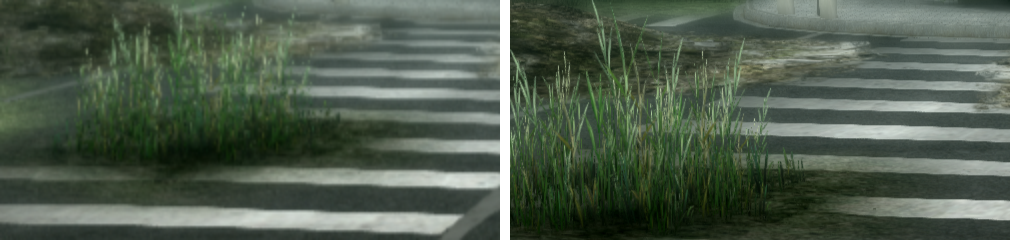
Left: the PS3's 720p. Right: 2K mode.
Status: playable
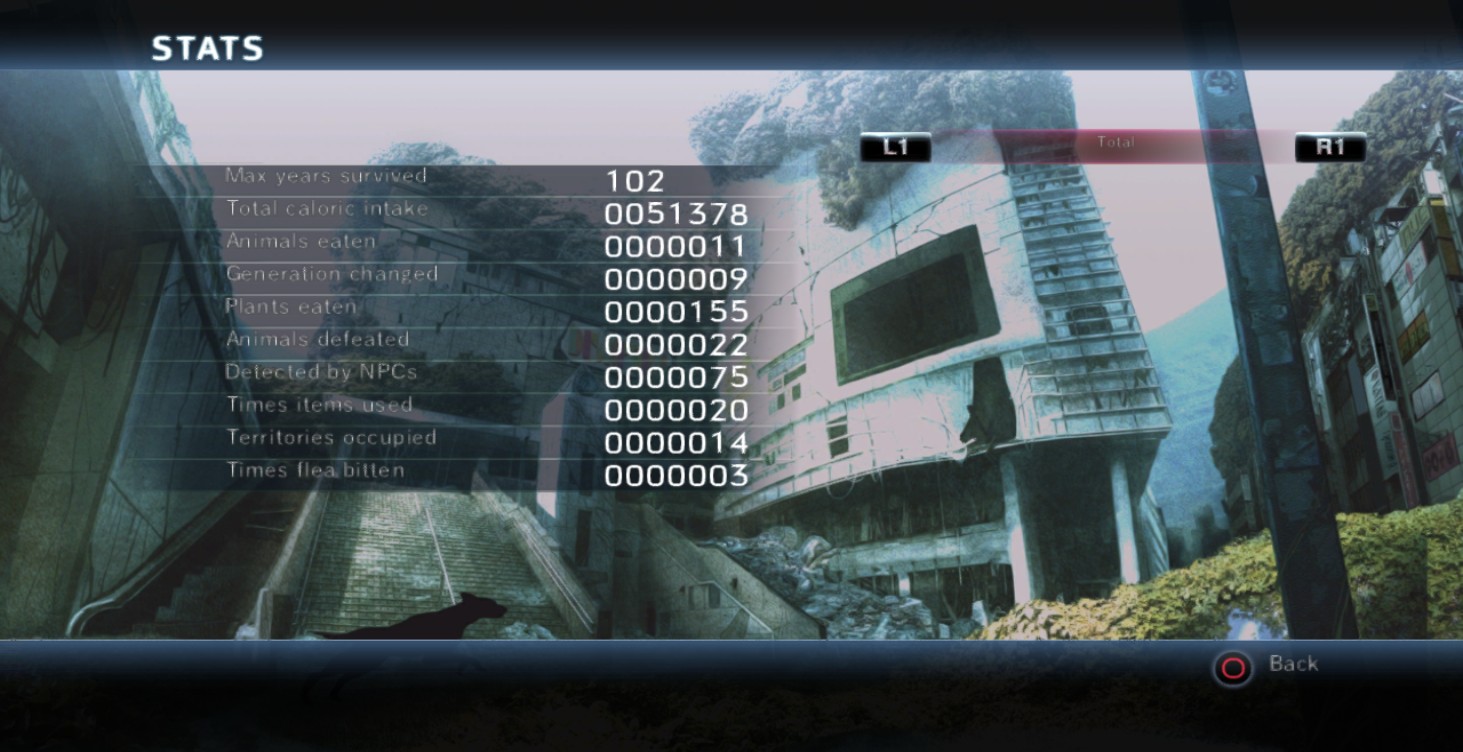
- Survival mode works start to finish. A full 102-year run (about 2 hours) was played with no crash or freeze.
- 60 FPS, including big fights.
- Movies, player and animal models, menus, sound and PC controls work in builds made with
BUILD.bat. - Still to check: Story mode, save and reload across sessions, local 2-player, and Steam Deck / Proton.
Controls
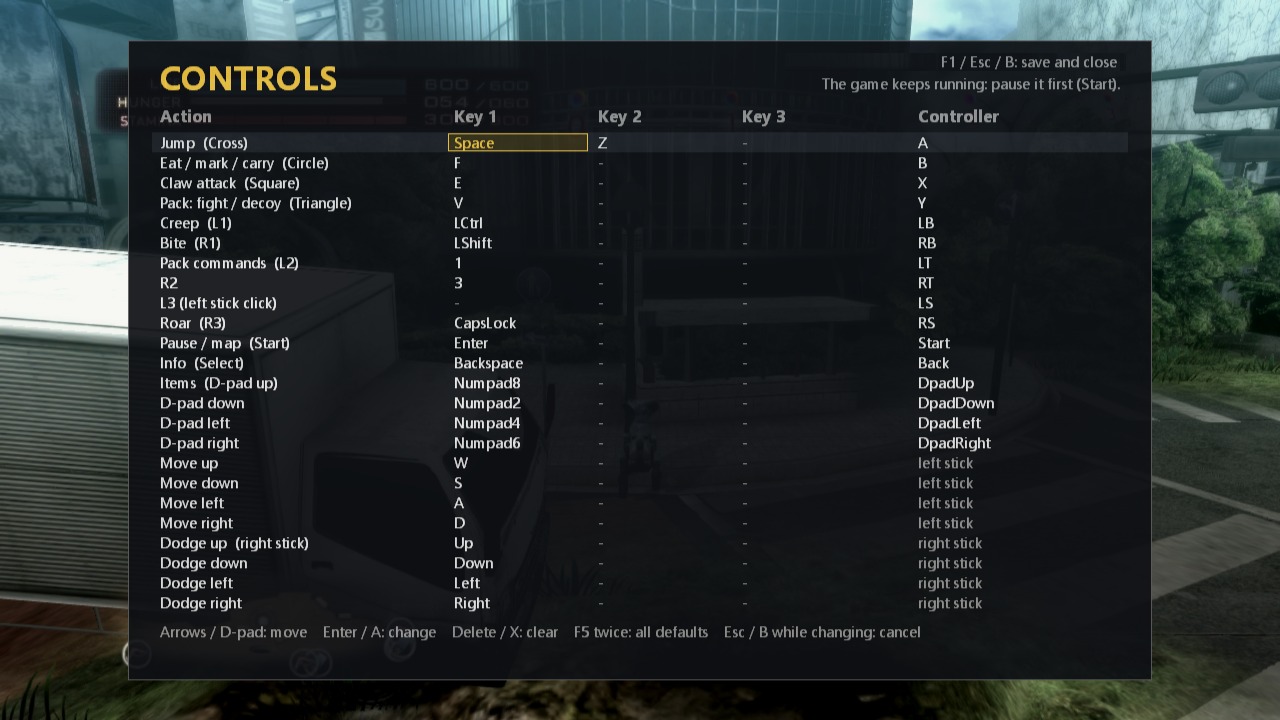
Keyboard, mouse buttons and Xbox-style controllers all work. Press F1 in game (or
Back + Start on a controller) to change any key or button; changes save to
engine\controls.ini and apply right away. Menus show your PC keys instead of PS3 buttons.
| Action | Keyboard | Controller |
|---|---|---|
| Move | W A S D | Left stick |
| Dodge | Arrow keys | Right stick |
| Jump | Space or Z | A |
| Eat / mark / carry | F | B |
| Claw attack | E | X |
| Pack: fight / decoy | V | Y |
| Creep / Bite | Left Ctrl / Left Shift | LB / RB |
| Roar | Caps Lock | Right stick click |
| Pack commands | 1 | LT |
| Pause, map / Info | Enter / Backspace | Start / Back |
| Items, menus | Numpad 8 / 2 / 4 / 6 | D-pad |
The first connected controller is player 1, whatever slot Windows gives it (with Steam open, the real pad often isn't in the first slot). To quit, close the window; a save in progress finishes first.
Troubleshooting
| Problem | What to do |
|---|---|
BUILD.bat stops with an error | Read the last lines of build.log. Run BUILD.bat again after fixing it; finished steps are skipped. |
| "nenhuma pasta com USRDIR\EBOOT.BIN" | The game folder must sit directly in the same folder as BUILD.bat. |
| "o RPCS3 nao descriptografou o EBOOT" | The .rap isn't this game's license (UP9000-NPUA80523_00-TOKYOJUNGLE00001). |
| "EBOOT descriptografado diferente do esperado" | A different game version; only the NA release (NPUA80523, v1.00) is supported. |
| Movies are skipped | engine\ffmpeg.exe is missing; run BUILD.bat again. |
| The controller does nothing | Click the game window once (input only goes to the focused window). |
| Anything else | Logs of the last session are in logs\stdout.log and logs\stderr.log. |
To rebuild from scratch, run BUILD.bat -Rebuild.
Português
Tokyo Jungle do PS3 rodando nativo no Windows, sem emulador. O jogo não vem incluído: você compila a partir da sua própria cópia.
- Numa pasta nova, coloque o
BUILD.bat(da página de Releases), a pasta do jogo extraída (comPARAM.SFOeUSRDIRdentro) e o arquivo de licençaUP9000-NPUA80523_00-TOKYOJUNGLE00001.rap. - Dê dois cliques no
BUILD.bate espere (30 a 60 minutos na primeira vez). Ele instala sozinho o que faltar e grava tudo embuild.log. - Abra o
TokyoJungle.exe, escolha a resolução (1280×720 ou 2560×1440) e janela ou tela cheia, e jogue. Pra mudar a escolha depois, segure Shift ao abrir.
F1 muda os controles. Se der algum problema, veja o build.log (no build) ou a pasta logs
(no jogo).
How it works
EBOOT.BIN ──RPCS3 + your .rap──► EBOOT.ELF
    │
    ├── PPU code ──ppu_lifter──► C++ (≈7,900 functions)  ┐
    └── 18 SPU programs ──spu_lifter──► C                ├─► clang-cl ─► tokyojungle.exe
                       ps3recomp runtime (HLE OS, RSX → D3D12, audio, input) ┘
The game's PowerPC (PPU) and SPU code is translated to C/C++ and compiled into a native x86-64 program; the PS3's operating system, graphics, sound and input are reimplemented by the ps3recomp runtime. More in docs/ABOUT.md.
What this fork adds to the build
Building from the original instructions failed on a clean machine, because the port was made with newer ps3recomp tools and steps than the README listed. This fork scripts all of it:
patches/ps3recomp/tj-build-fixes.patch: ps3recomp fixes from after the pinned commit — the find_functions call-target pass; the SPU lifter'sbi $rNclassification, non-r0 link returns andorbi/xorhi/xorbidecoding (without it the player model renders as a spike);find_spu_functions --raw— plus the first connected XInput pad as player 1, full screen on any monitor, the real-hardware save-data callback error (new saves unlock the first Survival animals) and audio that reopens the Windows output when the device resets or changes and plays on 5.1/7.1 outputs (TJ_AUDIO_CHANNELS=3..8forces a channel count); and a GPU command reader that skips commands at an unmapped address instead of freezing the game (TJ_TEST_GPU_HANG=1forces one ~40 s in, to check).src/tj_font_queue.cpp(hook added byscripts/post_lift.py): the game's text thread could miss a request and leave old words on map labels; it now draws any request still queued.scripts/tj_extract_spu_images.py: the 18 SPU programs are insideEBOOT.ELF; they are cut out by fingerprint (no run-time capture needed).scripts/tj_lift_spu.pylifts them.scripts/tj_split_fixups.py: the parts ofgen_stubs.pythat still matter, for the lifter's split output.scripts/fix_import_slots.py: takes import names the NID database lacks fromsrc/main.cpp(withoutcellSailPlayerInitialize2the movies show a white screen).src/recomp_bridge.h: room for all 554 HLE handlers (the limit was 512).tools/launcher/launcher.c: the launcher;scripts/tj_build_all.ps1: the build.
Manual build (for developers)
The steps BUILD.bat runs, by hand. You need CMake, Ninja, LLVM (clang-cl), Visual Studio 2022
Build Tools and Python 3.10+, plus the decrypted EBOOT.ELF and PARAM.SFO of your copy.
git clone https://github.com/sp00nznet/ps3recomp.git
git clone <this repository> tokyojungle
cd ps3recomp && git checkout d7fff845aca42b5083791801a01d150f5f0ec18c
git apply ../tokyojungle/patches/ps3recomp/ps3recomp-tokyojungle-2026-10-17.patch
git apply ../tokyojungle/patches/ps3recomp/tj-build-fixes.patch
cd ../tokyojungle
pip install -r requirements.txt
cp /path/to/EBOOT.ELF /path/to/PARAM.SFO input/
python scripts/analyze.py
python scripts/fix_import_slots.py
python scripts/tj_split_fixups.py
python scripts/tj_extract_spu_images.py
python scripts/tj_lift_spu.py
python -I scripts/fuse_spu_loops.py --apply
cmake -B build-clang -G Ninja -DCMAKE_BUILD_TYPE=Release -DCMAKE_C_COMPILER=clang-cl -DCMAKE_CXX_COMPILER=clang-cl
cmake --build build-clang
Run it with scripts\launch_tokyojungle.ps1 -Run -Recommended -GameData <game folder>
(add -RenderScale 2 -DisplayVBlank -PresentPhase for 2K). Movies need ffmpeg.exe next to
tokyojungle.exe or on PATH, and the decrypted tj.edat in place of the encrypted one.
Tested game files (SHA-256 and the Redump disc they came from): docs/GAME_INPUT_HASHES.md. More: docs/TESTING.md (play-test log), docs/HISTORY-2026-09.md.
| Region | ID | Format | Supported |
|---|---|---|---|
| NA (Digital) | NPUA80523 | PSN | Yes (tested) |
| JP (Disc) | BCAS20219 | Blu-ray | No |
| EU (Digital) | NPEA00421 | PSN | No |
Credits and legal
- Original port and ps3recomp: sp00nznet.
- Renderer, 60 FPS and 2K, pacing, stability and controls (August–October 2026), play-tested by LasVola.
- Automatic build, launcher and build fixes: Silvio Diaz.
- Movies are decoded with FFmpeg; decryption uses RPCS3. Neither is included in this repository.
The code here is MIT licensed (LICENSE). No game data is included, and none must be
shared: every player builds from their own legally owned copy. Don't upload the built engine
folder, EBOOT.ELF or anything in generated/; they are made from the game.
Tokyo Jungle is a trademark of Sony Interactive Entertainment. This project is not affiliated
with Sony, Japan Studio or Crispy's.
Let's keep Tokyo Jungle alive.