THPS1 64: Recompiled
THPS1 64: Recompiled is a native PC port of Tony Hawk's Pro Skater for macOS and Windows with widescreen and high frame rates.
- Type: PC port
- Game: Tony Hawk's Pro Skater
- Runs on Windows and macOS
- By THPS64Recomp
- Latest release v0.2.0, 2026-10-28
- Source: https://github.com/THPS64Recomp/THPS1-64Recomp
README
THPS1 64: Recompiled
Do you still hum Superman by Goldfinger to yourself? Did you scrape your knees after realizing skateboarding in real life is harder than on the N64? Do you want to re-live that early-aughts nostalgia, but in widescreen / with a high frame rate?? Then look no further than this native PC port of Tony Hawk's Pro Skater for the Nintendo 64, for macOS and Windows. Built with N64Recomp, N64ModernRuntime and RT64.
Download the latest release (v0.2.0)
See also: THPS2 64: Recompiled and THPS3 64: Recompiled, both early previews.
This repository doesn't contain the game. You need your own dump of the N64 cartridge. The app builds the game from it on the first start.
Supported dumps
| Release | SHA-1 (.z64) |
|---|---|
| USA v1.1 | 4900b6c92fb8df1765e91e891dccc525bb102fe1 |
| USA v1.0 | fc1b4dec85e6874fa7321edc24f5a1e78600d9d0 |
| Europe | c321cd05eec58765467878ac8015784535280e3c |
.z64, .n64 and .v64 all work; the file name doesn't matter. Europe runs at 60 Hz.
Features
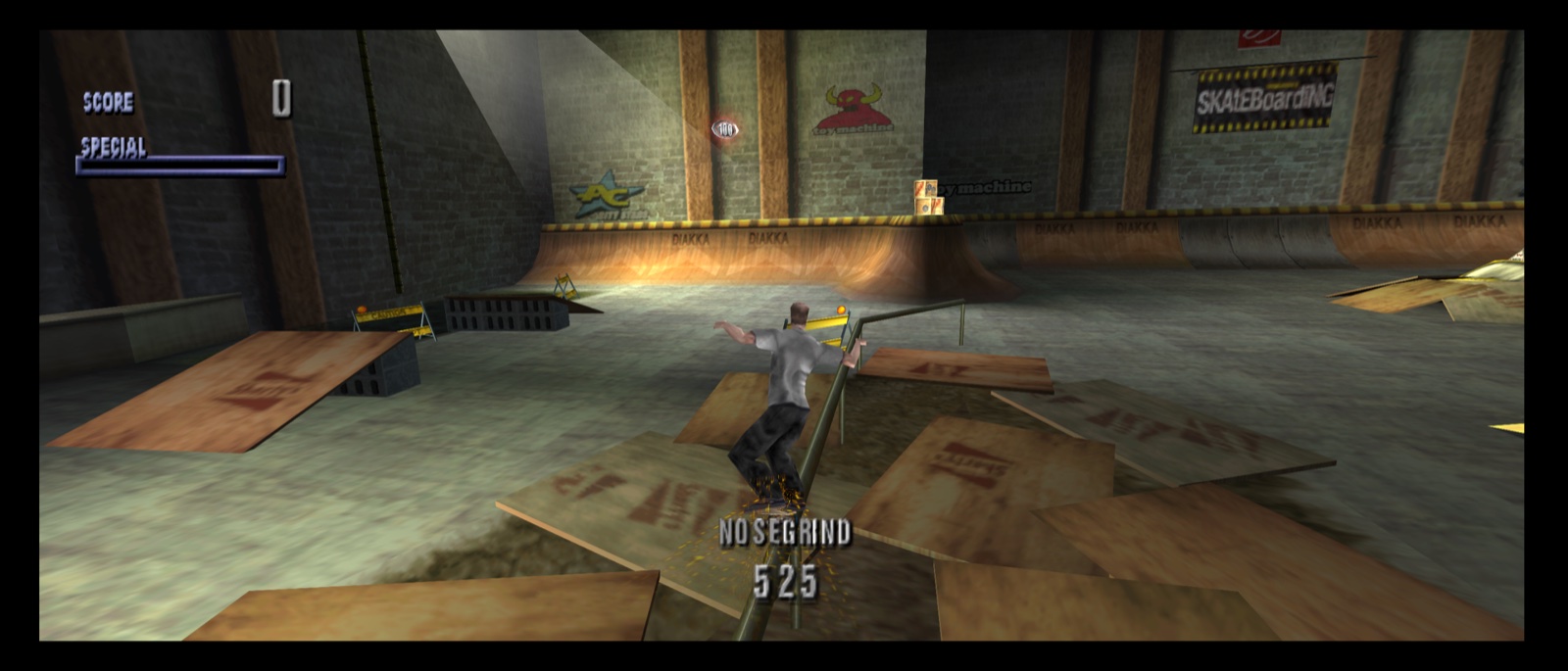
- Widescreen: 16:9, 21:9 or fit to window. The HUD moves to the screen edges.
- High frame rate: the game's 30 fps interpolated to 60 fps.
- Draw distance: see much more of each course (Original, 2x, 4x or Full).
- Picture Border: Fill removes the thin black frame the N64 left around the picture.
- Two-player split screen fills the picture in widescreen.
- Modern rendering: RT64 on Metal (macOS) or Direct3D 12 (Windows), any resolution, MSAA.
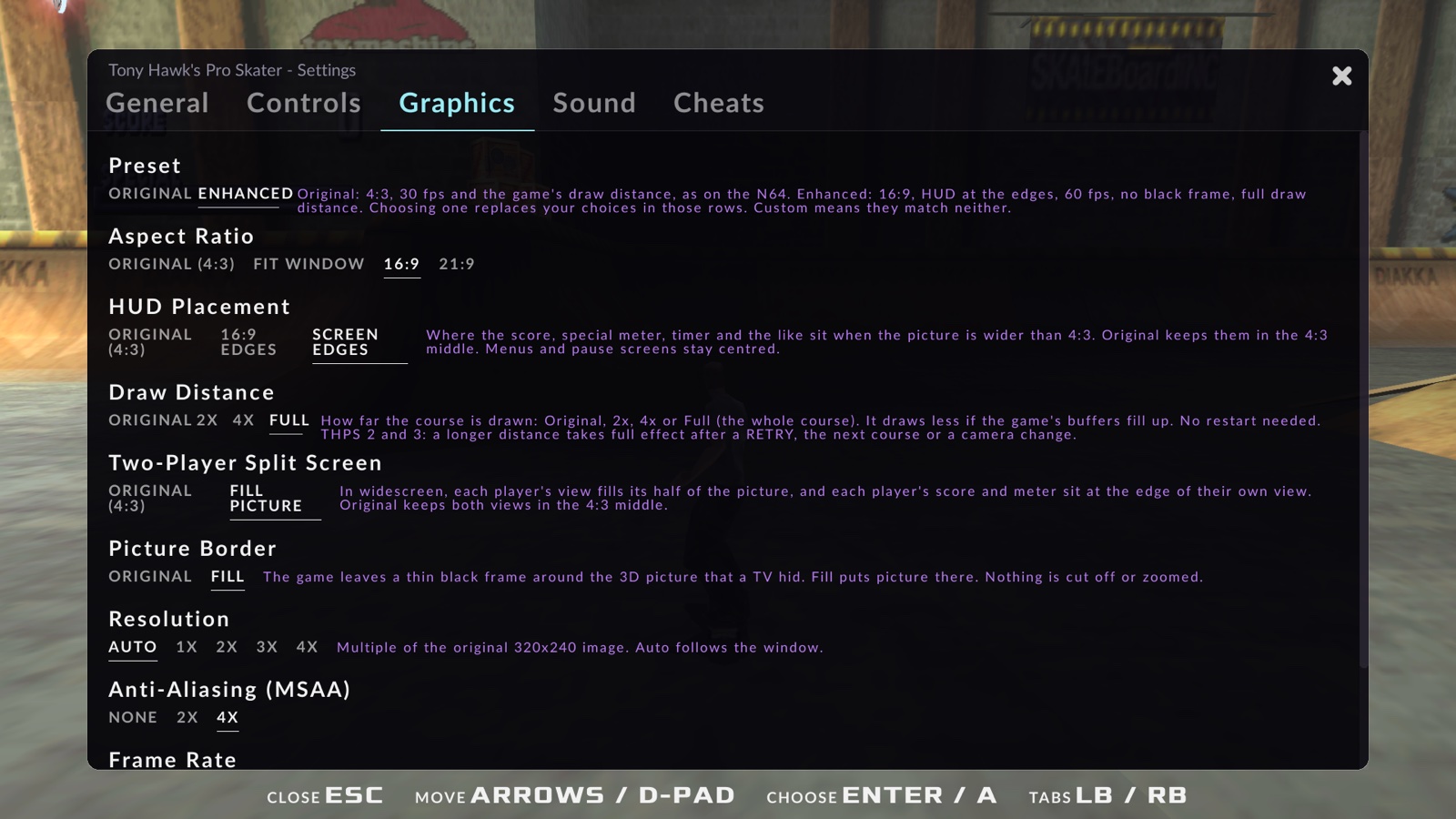
- Recomp settings: press Esc (or Back on a controller) for graphics, controls, sound and cheats. The game's own options are still in its menus.
- Modern controls: any SDL controller, hot-plugging, two players. Xbox-style layout (ollie, flip, grab and grind on the face buttons instead of the N64's C buttons) or the original N64 layout. Rebind any button or key in the settings menu, and pick which controller is player 1 or 2 there.
- Saves: Controller Pak saves in a standard
.mpkfile. - Cheats: Unlock All Levels, Perfect Balance, Slow Motion, Skip to Restart. Off by default.
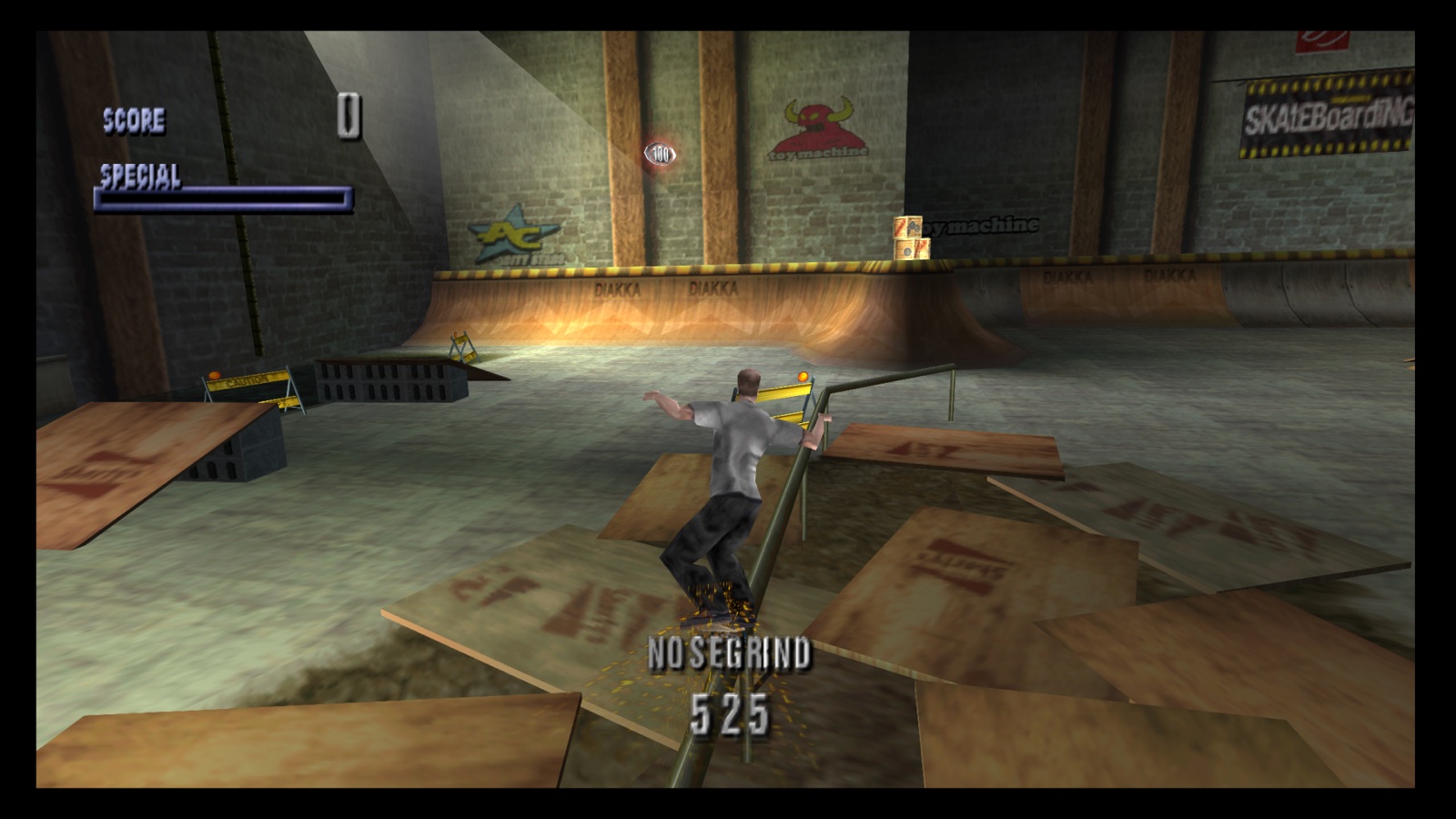
Original or Enhanced
The Preset row at the top of the Graphics tab sets six settings at once. New installs start with Enhanced. If you change a row yourself, the preset shows Custom.
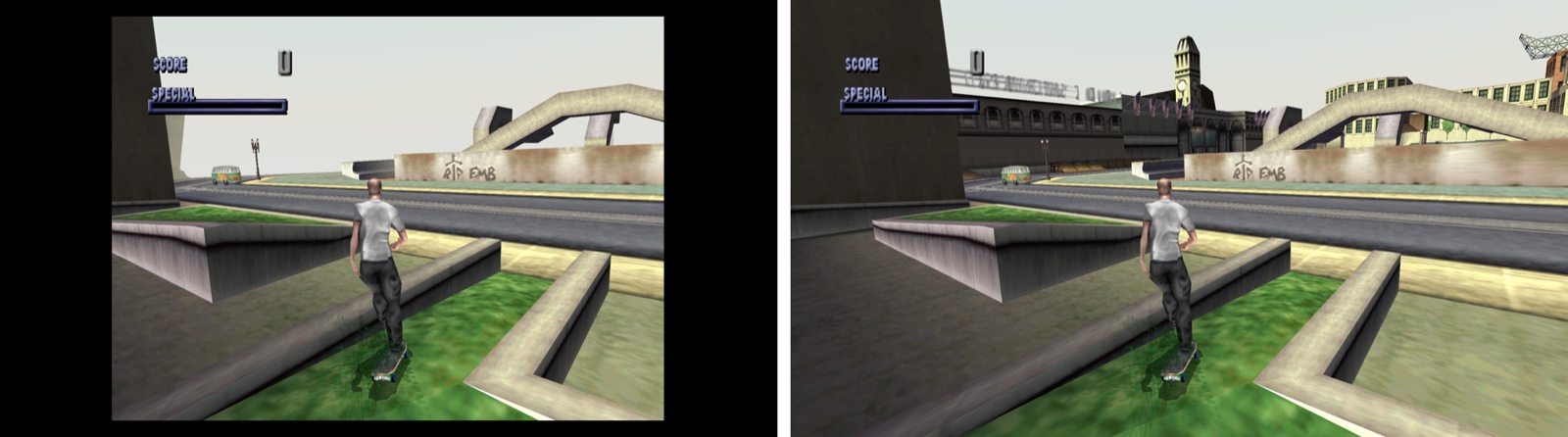
| Setting | Original | Enhanced (default) |
|---|---|---|
| Aspect Ratio | 4:3 | 16:9 |
| HUD Placement | 4:3 middle | Screen edges |
| Frame Rate | 30 fps | 60 fps |
| Draw Distance | As on the N64 | Full (the whole course) |
| Picture Border | Thin black frame | Fill |
| Two-Player Split Screen | 4:3 middle | Fills the picture |
System requirements
- macOS: 13 or later, Apple Silicon or Intel. The first start needs Apple's Command Line Tools (the app offers to install them).
- Windows: 10 or 11, x64, a Direct3D 12 GPU. Everything needed is in the zip.
- Linux: no download yet. The code builds on Linux in CI, but nobody has run the game on a Linux desktop. If you build it from source (BUILDING.md), tell us how it went in Discussions.
Install
macOS
- Download
THPS1-64Recomp-v0.2.0-macOS-universal.zipand unzip it. - Move THPS1 64 Recompiled.app to Applications.
- Open it. macOS blocks the first open because the app isn't notarized:
- macOS 15+: System Settings > Privacy & Security > Open Anyway.
- macOS 13-14: right-click the app > Open > Open.
Windows
- Download
THPS1-64Recomp-v0.2.0-Windows-x64.zipand extract it to a folder you can write to (not Program Files). - Run
THPS1-64Recomp. If SmartScreen appears: More info > Run anyway.
First start: choose your ROM dump (or drop it on the window). The app checks it and builds the game, which takes about 10 seconds. Later starts skip this.
Saves and settings live in ~/Library/Application Support/THPS1-64Recomp/ (macOS) or
%LOCALAPPDATA%\THPS1-64Recomp\ (Windows). Put an empty portable.txt next to the app to keep them beside it.
Updating: replace the app. Saves and settings carry over.
Controls
| Action | Controller (Xbox names) | Keyboard |
|---|---|---|
| Ollie | A (bottom) | Space |
| Flip / grab | X (left) / B (right) | J / L |
| Grind | Y (top) | I |
| Spin | LB / RB (shoulder buttons) | Q / E |
| Pause | Start (Menu) | Return |
| Recomp settings | Back (View) | Esc |
All bindings and the N64 layout: docs/MANUAL.md.
Known issues
- A short freeze (about 0.1 s) when a level loads.
Full list: docs/KNOWN-ISSUES.md.
Bugs and feedback
- Bugs: use the bug report form. Attach
crash.logif the app crashed. - Questions and play-testing notes: Discussions.
- What to try: docs/TESTING.md.
- Never attach your ROM or files built from it.
Building from source
See BUILDING.md. You need your own dump to build a playable game, too. To send a change, see CONTRIBUTING.md.
AI use
AI was used as a tool to assist development of the code, the docs and the testing, with human direction, play-testing and debugging throughout. AI-assisted contributions are welcome if they follow CONTRIBUTING.md. Please report problems here, not to N64Recomp, N64ModernRuntime or RT64. How each release is tested: docs/VERIFICATION.md.
Thanks and credits
This project builds on open-source tools and libraries made by other people, and we learned a lot from them. None of their authors took part in this project or endorse it.
- Recompilation and rendering: N64Recomp and N64ModernRuntime (Wiseguy and contributors), RT64 (Darío and contributors).
- RT64 setup and settings menu: parts adapted from Zelda64Recomp.
- Decompilation tools: splat, spimdisasm and rabbitizer (split and disassemble the game's code), n64sym (finds the N64 library functions), rnc_propack_source (the game's compression format).
- Libraries in the app: SDL (window, input, audio), RmlUi, FreeType and lunasvg (the settings menu).
What came from where, and every licence: NOTICE.md and docs/THIRD_PARTY.md. The code shared by all three games lives in THPS64Host.
License and legal
- License: GPL-3.0-only (LICENSE). It gives no rights in the game.
- No game content: this repository and its releases hold no ROMs, game code or assets. Don't share your dump or the files built from it.
- Unofficial: not affiliated with Activision, Neversoft, Edge of Reality, Tony Hawk, Nintendo, or the N64Recomp, N64ModernRuntime and RT64 projects. Tony Hawk's Pro Skater is a trademark of Activision. Nintendo 64 is a trademark of Nintendo.
- Rights holders: to request a change or removal, write to center.collie.41@icloud.com, or use GitHub's DMCA process.