Ultima V: Warriors of Destiny
Ultima V is a TypeScript engine for the 1988 MS-DOS game Ultima V: Warriors of Destiny, playable in the browser and on desktop and mobile platforms.
- Type: PC port
- Game: Ultima V: Warriors of Destiny
- Runs on Windows, Linux, macOS and Android
- By synthwave-pixel
- Latest release v1.1.149, 2026-10-25
- Source: https://github.com/synthwave-pixel/ultima5
- Website: https://synthwave-pixel.github.io/ultima5/
README
Ultima V: Warriors of Destiny
A new engine for the 1988 MS-DOS game, in TypeScript, for the browser, the desktop, the Steam Deck and Android. Like OpenMW for Morrowind, it ships none of the PC game: it plays your own copy.
Play it: https://synthwave-pixel.github.io/ultima5/
The page itself carries three things of the game's: the Ultima V
Upgrade's music in web/public/music/, the Apple II version's tiles, for
the Apple ][ tile set, and the box's painting, for the key art.
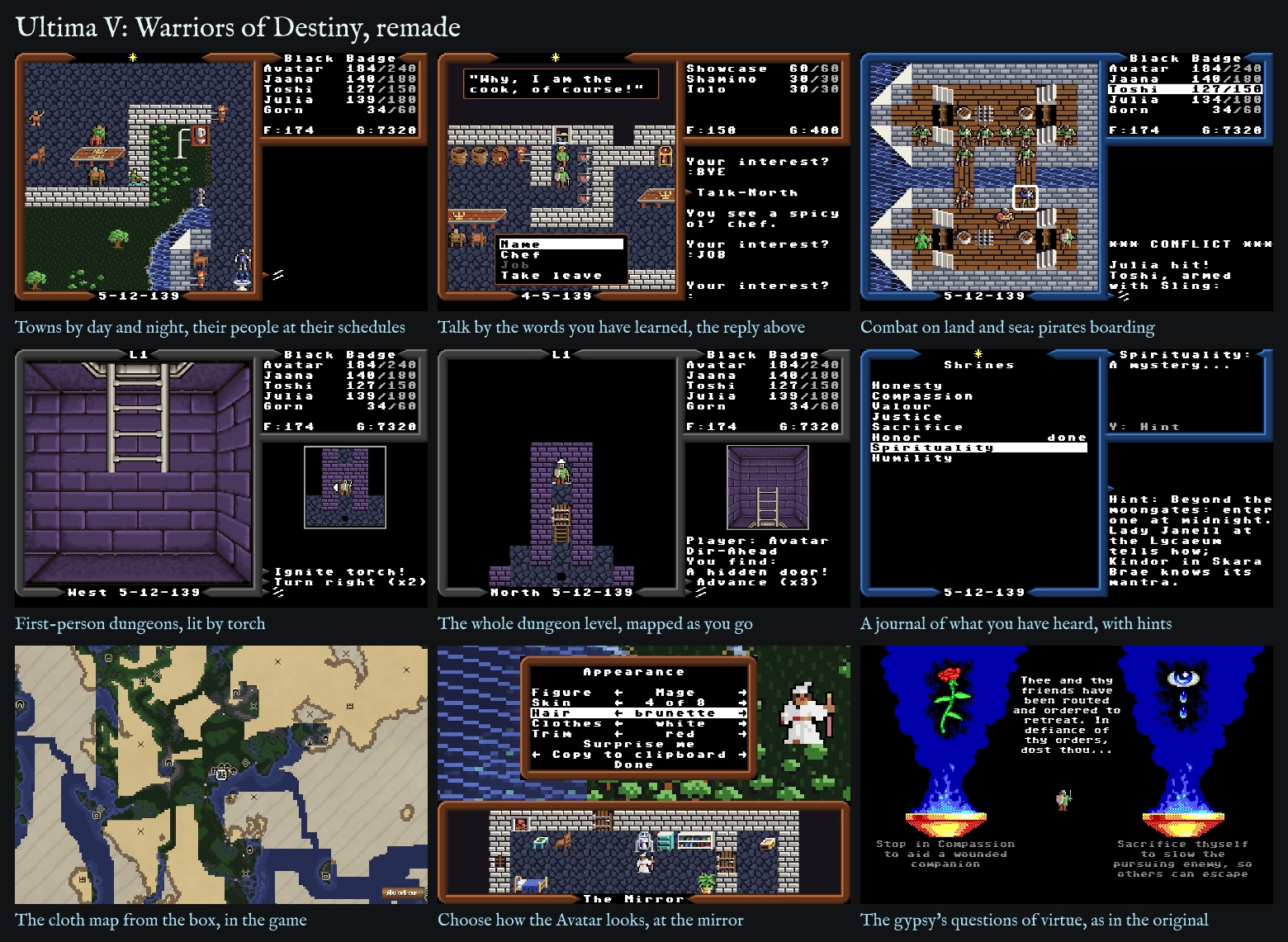
![The two looks and their tile sets - Modern with Modern PC, Apple ][ or PC EGA tiles, PC 1988 with PC EGA or Apple ] - each in the world, a town, combat and a dungeon, and for the Modern look the dungeon's whole-level map
- Installation The browser, the Steam Deck, Windows, macOS, Linux and Android.
- New to Ultima V? Get it running and find your feet.
- Played it in 1988? What is the same and what is new.
- Design notes The thinking behind the changes, for the curious and for game designers.
- Developer notes Building, testing and finding your way round the code.
- Credits Whose work the port is built on.
Installation
Every build asks, the first time, for your own copy of the game: its
folder, its files or a .zip (GOG sells it in
Ultima 4+5+6, and the Internet
Archive has it). The files are checked and kept on your device, and never
leave it. The desktop app's Scan for game files... finds the copy itself:
beside the app, at home, and where GOG and the Linux launchers install
games.
-
Browser: https://synthwave-pixel.github.io/ultima5/. Nothing to install. Chrome, Edge and Android offer to add it as an app, and it works offline after the first visit. On iOS use Share, then Add to Home Screen.
-
Steam Deck: the game installs as a Flatpak from Desktop Mode, in a few minutes, and then lives in your Game Mode library.
- Switch to Desktop Mode: press the Steam button, choose Power, then Switch to Desktop.
- If the Deck has never had a password, give it one: open Konsole and
run
passwd, choosing any password you like. Discover needs it once, when it registers the game's repository, and it is also whatsudoasks for; nothing else changes. - Open this page in a browser there (if the Deck has none yet, Discover, its app store, installs Firefox) and tap install Ultima V. The browser saves a small file; open it from the browser's downloads and Discover shows Ultima V with an Install button, and asks for the password that first time. Install once: later updates arrive in Discover with every other Flatpak's, with no prompt.
- Open Steam, still in Desktop Mode. Click Add a Game at the bottom left, then Add a Non-Steam Game, tick Ultima V in the list, and click Add Selected Programs.
- Return to Game Mode with the icon on the desktop, or restart. The game is in your library under Non-Steam. If the controls do not respond, open the shortcut's controller settings and pick a Gamepad template.
- The first time you play it from Steam, the game gives its library entry its own artwork (cover, banner and logo); Steam shows it the next time Steam starts. Artwork you have set yourself is never replaced.
The same link works on any Linux desktop with Flatpak, and the terminal line below installs per user with no password at all.
-
Windows and macOS: the installers on the Releases page, a Windows installer or portable
.exeand an Apple Silicon.dmg(macOS 13 or later; Intel Macs: use the browser). The Windows installer then keeps itself up to date; the macOS app and the portable.exesay when a newer version is out. They are unsigned, so each system asks once:-
Windows: SmartScreen asks; choose More info, then Run anyway.
-
macOS: the first launch is refused. Open System Settings, choose Privacy & Security, scroll down to Security and click Open Anyway beside Ultima V. Or, in Terminal, once:
xattr -dr com.apple.quarantine "/Applications/Ultima V.app". If macOS later asks to let Ultima V use the microphone (it can when the sound plays through a USB microphone or headset), choose Don't Allow: the game never uses it, and the sound plays on.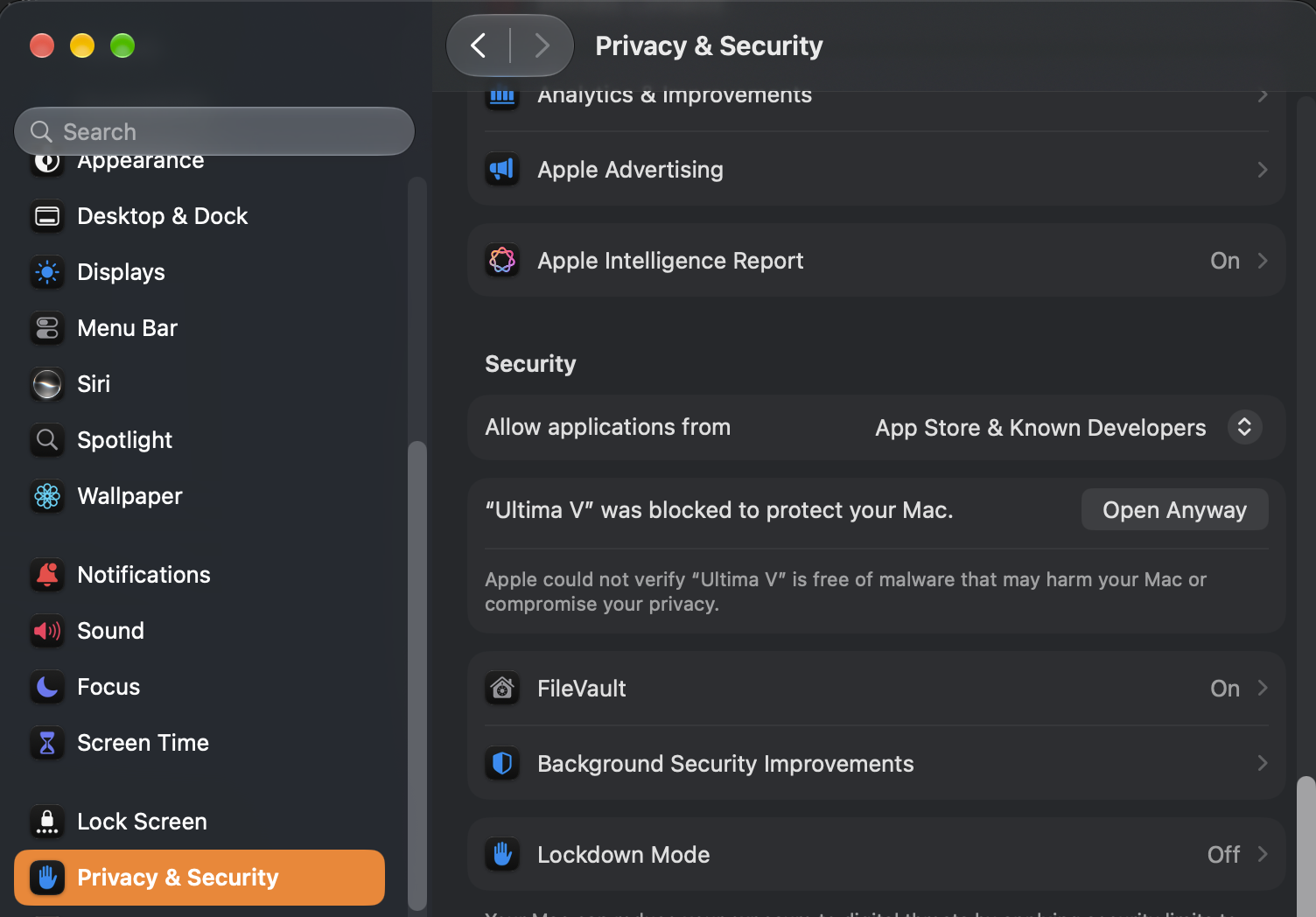
-
-
Android: the APK (
Ultima-V-<version>-android.apk) on the Releases page, for handhelds like the AYN Odin or the Retroid Pocket and for phones and tablets. Copy it to the device and open it; Android asks once to allow installs from that source. Or let Obtainium install it and keep it updated: add Ultima V to Obtainium on the device, or addhttps://github.com/synthwave-pixel/ultima5in Obtainium by hand. iOS has no app on purpose: use the browser. -
Linux without Flatpak: the
AppImageon the Releases page. Make it executable and run it; it keeps itself up to date. On Ubuntu 22.04 or newer (and Mint, Pop!_OS...), if it won't start, install libfuse2 first:sudo apt install libfuse2t64(libfuse2before Ubuntu 24.04).
Installing from a terminal
On a Steam Deck (Konsole, in Desktop Mode) or any Linux with Flatpak, the same as the link above, in one line:
flatpak install --user https://synthwave-pixel.github.io/ultima5/flatpak/ultima5.flatpakref
It registers the game's repository, so flatpak update then updates the
game with everything else. To remove the game and its saved data:
flatpak uninstall --user --delete-data com.synthwavepixel.ultima5
Your saved game
The game saves itself in the browser's storage (the desktop and Android apps each keep their own), and resumes on the next visit. Export saved game and Import saved game (Manage Saves on the title menu, or Settings in play) carry a game between browsers, devices and the apps, as text on the clipboard or in a file. To jump straight to one of the game's sights - Britain, a frigate at sea, the Underworld, Doom - import one of the showcase saves.
Back up your saved game. Browsers can clear a site's storage on their own: Safari and every other iOS browser delete it after seven days without a visit, and any browser may drop it when site data is cleared or at the end of a private window. Export the game now and then. On iOS, add the game to the Home Screen, which keeps its storage; in a browser tab the game warns of this once a day.
More on each build - the desktop app under Steam's Game Mode, Android's full screen, how the installer checks your files, and hosting the web game yourself - is in Installing Ultima V.
Releases
Every release, with the desktop and Android downloads, is on the Releases page. The browser version always runs the newest, and offers to restart when an update has downloaded. The desktop and Android apps say in the game when a newer version is out, and offer it - the restart into it, or its release's page to read and download from.
New to Ultima V?
Ultima V is a role-playing game from 1988. You are the Avatar, called back to Britannia to find its missing king, Lord British, and to break the rule of Blackthorn and the Shadowlords. It is a big, open game: towns to talk your way through, a world and an underworld to cross, dungeons, magic mixed from reagents, and a story told mostly through what people say to you.
What you need is a copy of the game - GOG sells it in Ultima 4+5+6, with Ultima IV and VI, and the Internet Archive has it. This engine reads everything (every word, picture, map and conversation) from those files, so none of the game is in it.
To play, open https://synthwave-pixel.github.io/ultima5/ in a
browser. The first time, it asks for the game's folder, its files or a
.zip (the desktop app can find them itself: Scan for game files...);
they are checked and kept in your browser, and never leave your device.
There are also builds for Windows, macOS, Linux, the Steam Deck and
Android handhelds: see Installation.
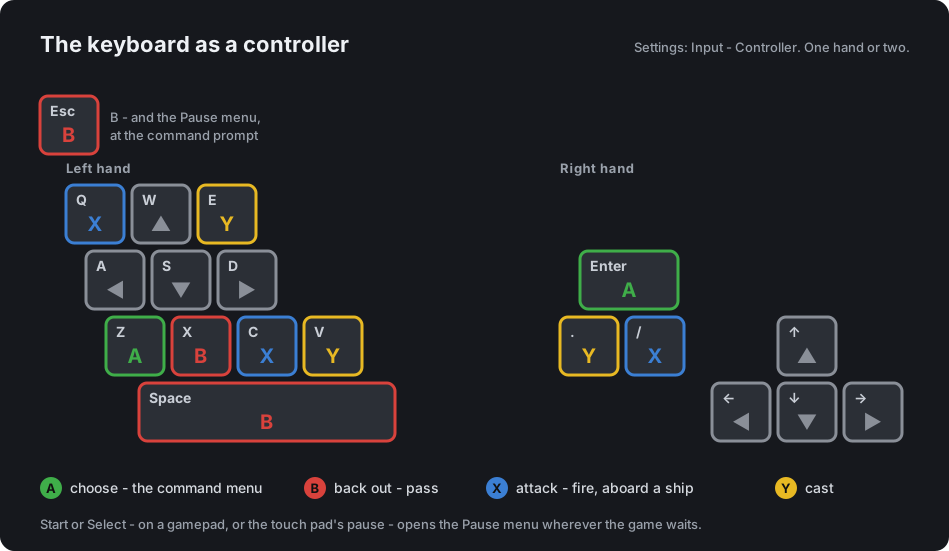
Controls. A controller, the touch pad or the keyboard all work, and the d-pad, A and B are enough to play with: A opens a menu of what you can do where you stand, B backs out, and every question is a box to choose from. A keyboard works as a controller, its keys laid out as an emulator lays them (Z is A, X is B):
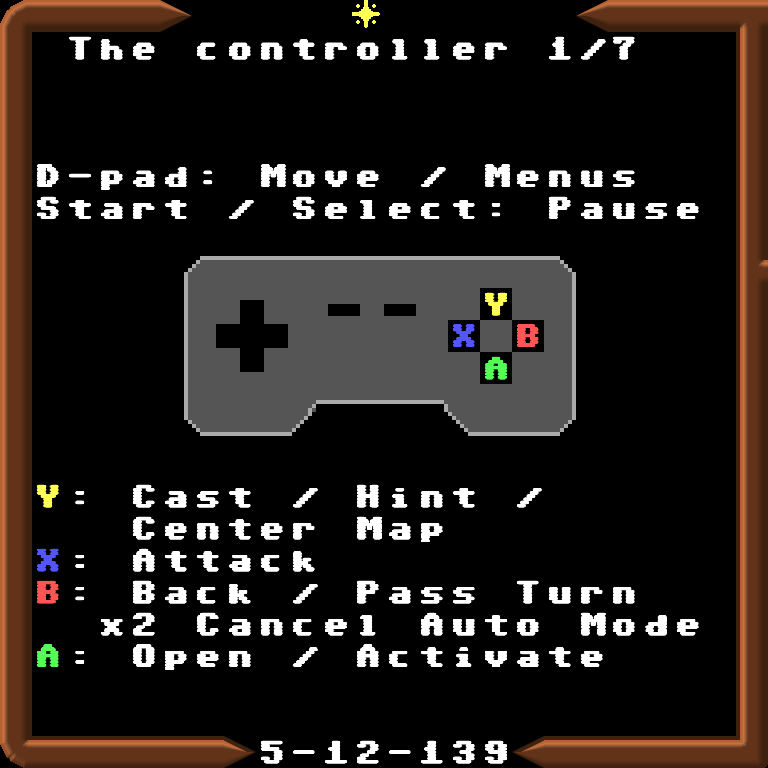
| Controller | Keyboard | What it does |
|---|---|---|
| D-pad, left stick | Arrows, W A S D | Walk; move through a menu (left and right turn a page in a long list) |
| Right stick | In a dungeon, turn left or right where you stand | |
| A | Enter, Z (Tab at the prompt) | Open the menu of what you can do here; choose |
| B | Space, X, B (Escape in a menu) | Back out; at the prompt, pass a turn; leave a won fight |
| X | Q, C, / | Attack: in a fight a snap attack on the foe marked (Fire aboard a ship or beside a cannon) |
| LB, RB | [ and ] | In a fight, the next foe to snap at; at an aim, the next target |
| Y | E, V, Y, . (full stop) | Cast; in the Journal, a hint; on a world map, back to the party |
| Start, Select | Escape at the prompt | Pause menu |
Y for a hint, and home on the map. In the Journal, Y gives a hint for the line the bar is on: where a shrine, dungeon or Flame is and who knows what it wants, never the mantra or the Word itself. On a world map, Y slides the map back to the party, wherever the d-pad has taken it.
At a yes-or-no question Y and N answer too, a number can be typed as well as dialled, and a name is typed. Classic input (Gameplay) makes every command a letter again, as in 1988.
Starting out. Choose Create New Character. You pick a name (or roll one), how you are addressed (Lady or Sir), and how your Avatar looks, in a bedroom before a mirror. Then Thine Adventure asks how hard a game you want - Modern is the recommended one - and a gypsy's questions about virtue shape your character. The game begins at Iolo's hut, with Shamino and Iolo beside you.
When you are stuck, look in the command menu (A, or Enter or Tab):
- Journal: how the quest stands, every place with how many of its clues you have heard, and the clues townsfolk have given. Y on a line gives a hint.
- Map: the cloth map, with what you have seen painted over it.
or open the Pause menu (Escape, Start, or the pause button on the touch pad):
- Tips for a new player: first steps, food, healing, magic, talking, dungeons, virtue, travel and the quest.
- Help: short pages on the controls, fights and dungeons.
- Cheats, if you would rather skip the grinding.
The game saves itself when you enter or leave a town, castle, hut or dungeon, and says "(saved)"; you can also save from the Pause menu. It keeps the seven saves before the last, and when all is lost you can go back to any of them.
More than one character. Create New Character adds a character beside any you have; it never replaces one. With two or more, Journey Onward asks whose journey it is, the one played last first, and that list can also delete a character; so can Delete Character under Manage Saves on the title menu, even the only one. Up to eight characters are kept. Each character has their own saves and their own settings, so people sharing a device each play their own game their own way.
Played it in 1988?
Everything of the 1988 game is here, and the rules follow the reverse-engineered source of the DOS game, u5d, with its modern build's bug fixes. Everything new is optional. What is new, in full has the whole list; the highlights:
- Two looks. Modern (the default) redraws the screen at four times the EGA's size, with three sets of tiles: Modern PC (1988's own art, taken from your files, cleaned up and toned), Apple ][ and PC EGA (1988's tiles exactly). PC (1988) is the 1988 screen as it was, with its own tiles or the Apple ][ set. The PC speaker sounds are there too, beside new chip-tune ones, and the Ultima V Upgrade's music plays where the Upgrade played it, in four soundtracks - Classical, Electronic, Ambient and the Upgrade's own; the soundtrack and the Music and Sound FX levels are set in the Pause menu, under Audio.
- No more guessing at commands. Menus offer what makes sense where you stand, and "Blocked!" is kept for walls and water. Walking into a chest searches and opens it, into a foe attacks, into rocks climbs them, into a door opens it (jimmies it, with a key), into the wall that hides a dungeon room's secret way pushes it. A harpsichord opens a keyboard to play. Classic input makes every command a letter again, as in 1988.
- Conversation by what you have heard. On a controller, instead of typing keywords you pick from the words you have actually learnt, and only the ones the game answers to. Words from a guide can be added in Cheats; Classic input still lets you type anything. What a townsman says appears in a box at the top of the view, page by page, with the words to say framed at its foot, so you can see who you are talking to - a merchant's too, haggling and all; Settings, Dialog: Log keeps it all in the message log, as 1988 did.
- A journal, maps and a dungeon map that fill in as you play, kept with the save. The journal's The Path tells how far you walk the path of the Avatar, in 1988's own words, never a number; under the Modern and Story rules it reads four parts - in word, in deed, in battle and in the quest - and a deed that moved it is tinted in the log.
- Your own Avatar (Modern PC): five figures and your choice of skin, hair and clothes, changed at any mirror. The old "Male or Female?" is now "How art thou addressed?", since that is all it ever decided.
- One setting for the rules: Story, Modern or Classic. Modern (the default) lets poison and hunger wound rather than kill, shares experience, keeps back your last dagger or spear, adds a little to armour, lets the party step over the chests and loot a fight leaves, and eases sleep, charm and what a fight can breed - a daemon that possesses one of the party is cast out again. Story eases it all further; Classic is 1988's game as the Apple II plays it. The rules side by side.
- A fight that tells you more: snap attacks, X striking the foe marked for it without aiming (LB and RB pick another, and each member keeps to the foe they chose), what each bow or thrown weapon has left ("Bow x23:"), a warning before a shot that might hit an ally, Switch Weapon to swap between a member's melee and ranged arms, and Auto combat that knows a charmed friend from a foe - for the whole party, or for everyone but the Avatar while you play the Avatar yourself.
- Some old bugs fixed: armour protects (in the 1988 DOS game it did nothing), a creature's blow is rolled as on the Apple II rather than always its whole attack, the regalia no longer lose their power to a spell or a night's rest, the Glass Sword shatters as it should, and a creature summoned onto a crowded field no longer haunts it as a phantom. Fixing the 1988 game tells how they were found, down to the original Apple II disks.
Design notes
The port's aim is the 1988 game, played the way a modern player expects, without giving up what made it itself. A few principles decide most things:
- Ship none of the PC game. Like OpenMW, the engine reads everything from the player's own files - even the Modern PC art is derived from the original tiles as the game runs: lifted off their ground, toned, and repainted through small per-figure rules, so the Avatar's skin, hair and clothes can be recoloured without redrawing a pixel. The tile-by-tile record is in standard-originals.md. The Apple ][ tile set is the exception: the Apple II version's own tiles, which a player of the PC game would not otherwise have.
- A controller is enough. Every choice can be made with the d-pad, A and B. A prompt is always a menu, never a wait for a button you would have to know about; that one rule reshaped the commands, the shops, the spellbook and above all conversation.
- Never make the player guess, and never spoil. The word menus offer only words the player has heard, and only ones the game answers to; the journal's hints say where and who, never the mantra or the Word.
- Keep 1988 one setting away. Changes to the rules are options, with the original as a choice (Classic input, the Classic rules, the PC (1988) look). Bugs that robbed the player are fixed; quirks that are just flavour are kept.
- Say what a choice does. "Male or Female?" only ever chose the words the Avatar is addressed with, so it now asks exactly that. Every setting explains itself at the foot of the list.
- Measure before changing. The figures' animation pace was worked out from the DOS game's own wait loop: the Modern look moves them at the pace of a 1988 XT, the PC (1988) look at an AT's.
art-brief.md is the brief for an artist taking the Modern look's art further. The modern play and the builds follow the ultima3 port.
Credits
The engine's code is under the MIT licence: see LICENSE. The PC game itself is not included, and remains its owners'; the engine plays the player's own copy.
- The ultima3 port
(synthwave-pixel/ultima3),
the modernized version of LairWare's Ultima III, whose modern play and
builds this port follows, and whose Ultima III art and chip sounds it
borrows (MIT, Copyright (c) 2025 Leon McNeill; see LICENSE): its
Standard border caps (
web/public/graphics/standard-caps.png), its Standard figures and painted grounds (web/art/standard/u3/, from whichnpm run tilesdraws many of the Modern look's tiles instandard-tiles.png; see its note), and its Standard sound effects, for the effects the two games share (web/src/audio/chip3.ts). - The box's painting, by Denis Loubet for Origin Systems (1988): the
key art - Steam's library artwork, the boot screen, the banner above
(
art/,web/art/cover/). It remains its owners'. - The Apple II tiles of the Apple ][ tile set
(
web/public/graphics/apple2-u5-tiles.png): Ultima V's own, drawn by Origin Systems for the Apple II version (1988), read off its P