Virtua Fighter Recomp
Virtua Fighter Recomp is a native PC port of Virtua Fighter that recompiles the arcade's NEC V60 code to native code and reimplements the Model 1 board.
- Type: PC port
- Game: Virtua Fighter
- Runs on Windows, Linux and macOS
- By mr-finster
- Latest release v1.8.0, 2026-11-16
- Source: https://github.com/mr-finster/vf1-recomp
README

Virtua Fighter Recomp
Virtua Fighter (SEGA, arcade, Model 1, 1993) as a native PC game: the arcade's own V60 code, recompiled to native code, with render scales up to 6x, widescreen and smooth motion at any refresh rate.



Play · Download · Trailer · Secret characters · Status · Controls · Report a bug
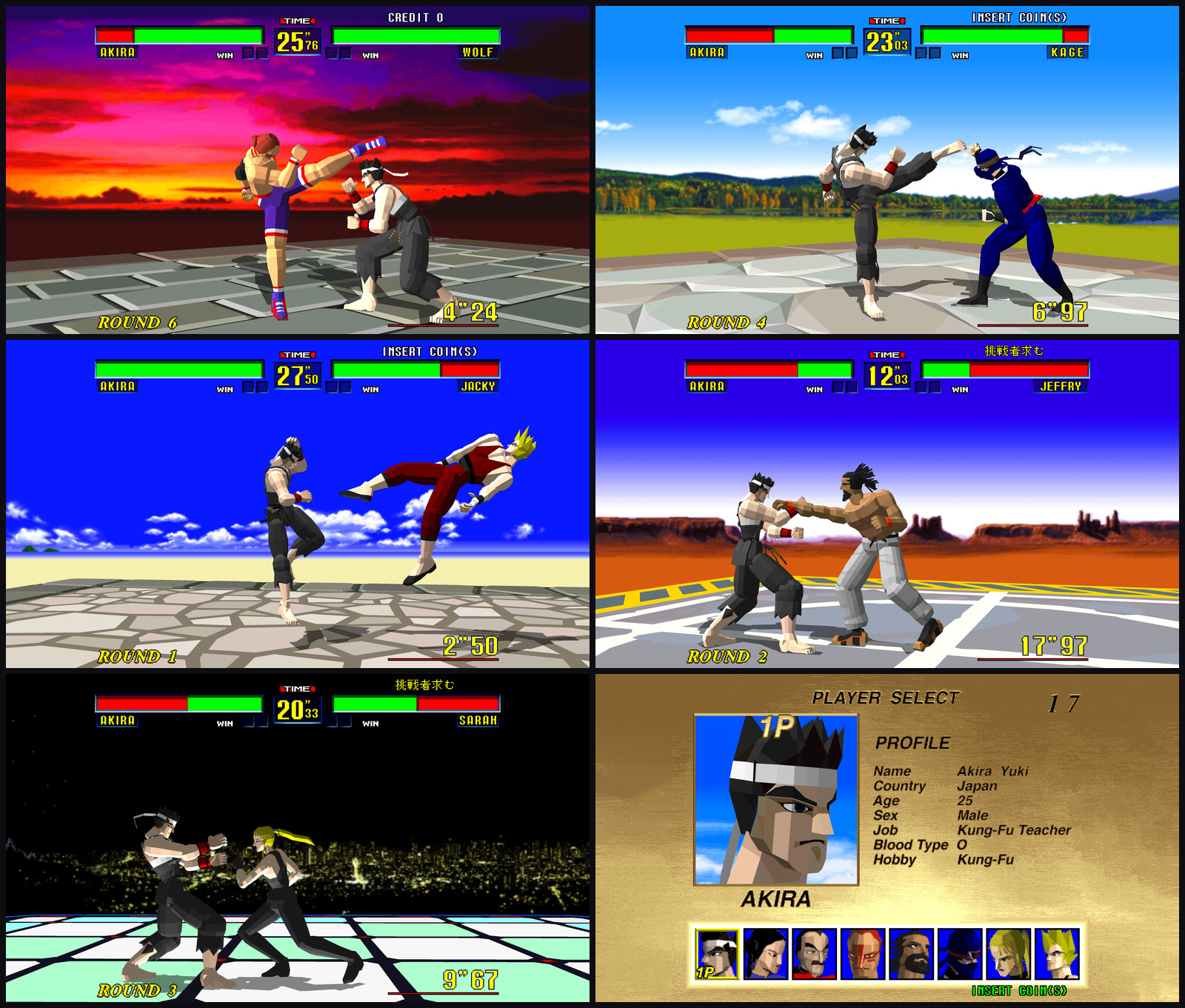
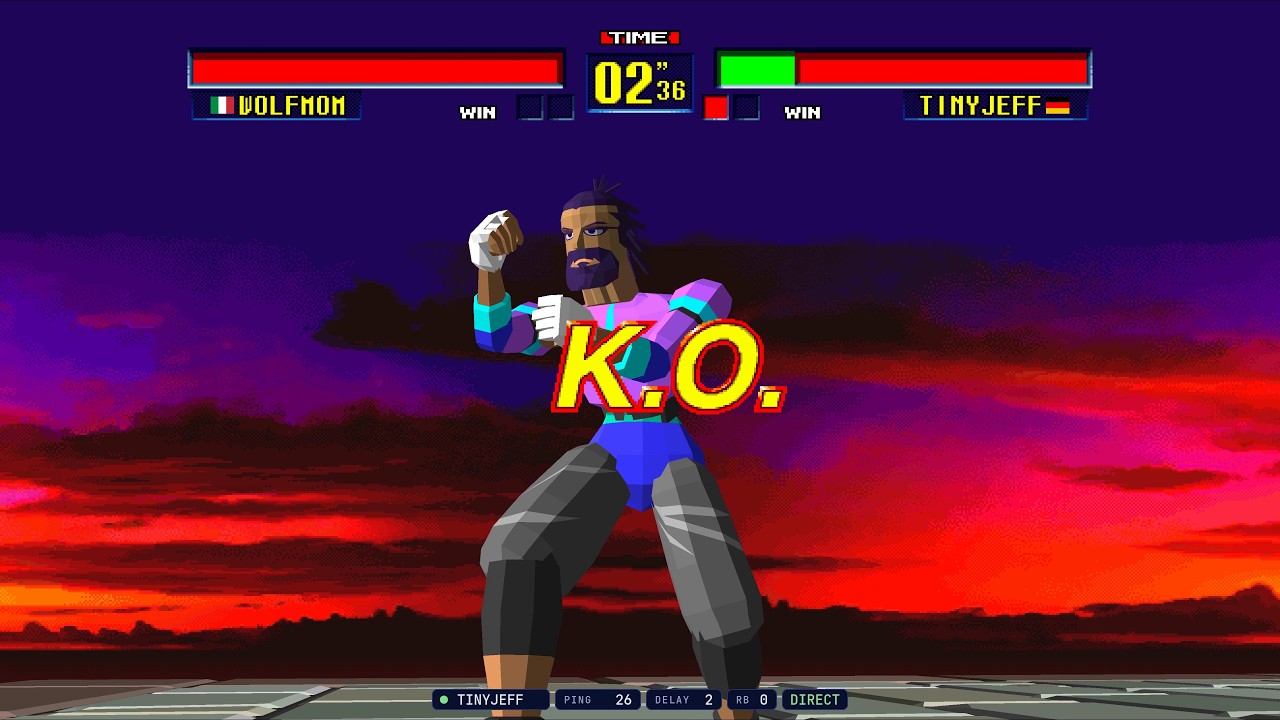
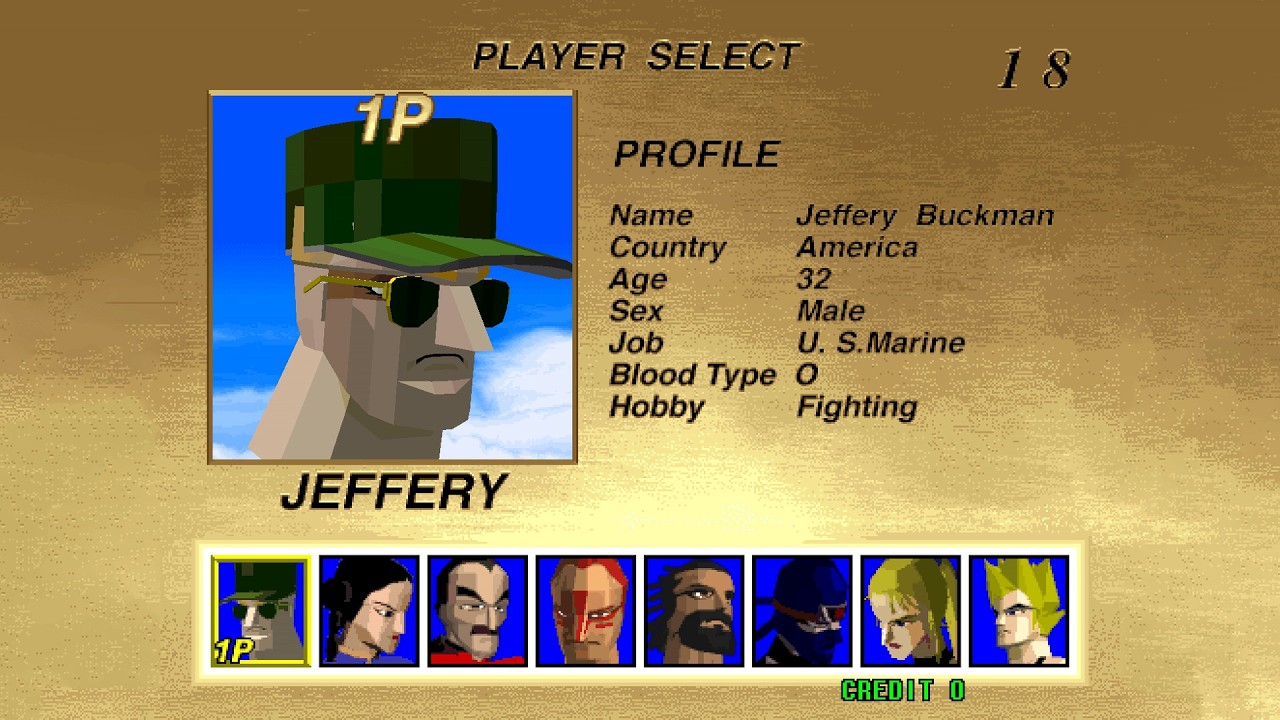
The online trailer · Secret characters (click to watch on YouTube)
Important
No game files are included: no ROMs and nothing made from them. You need your own dump of the game as MAME's
vf set (vf.zip). It is read on your computer, and the game's code is recompiled there when it starts.
An unofficial fan project, not made, approved or supported by SEGA, and not affiliated with it.
About
Virtua Fighter Recomp runs the arcade game's own NEC V60 program, recompiled to native code on your machine from
your vf.zip, and reimplements the rest of the Model 1 board around it: the TGP geometry coprocessor, the polygon
rasterizer, the tile layers, the sound board and the I/O board, from MAME's work on the Model 1. At 1x you get the
arcade's frames pixel for pixel; above it, render scales up to 6x, widescreen and ultrawide, and smooth motion at
your screen's refresh rate.
Status
| Area | State |
|---|---|
| The arcade's V60 program, recompiled to native code | Working |
| TGP, rasterizer, tile layers, sound and I/O boards | Working: reimplemented from MAME's Model 1 code |
| Render scale up to 6x, widescreen and ultrawide, smooth motion | Working; Display > Quality > Smooth motion Off shows the arcade's own frames, the 3D at 30 a second as on the cabinet |
| The 3D drawn on the GPU (Display > Quality > 3D renderer: Auto, GPU or CPU) | Working on macOS (Metal), Windows (Direct3D 12 or Vulkan) and Steam Deck / Linux (Vulkan): the same picture as the CPU's, checked when the game starts; Auto uses the GPU whenever that check passes (not a software GPU such as llvmpipe), and any difference or error falls back to the CPU |
| Sarah's stage lighting (the light from below pulsing with the floor) | Working, as on the cabinet |
| The arcade's shadows at any render scale (Display > Quality > Shadows: Arcade): the checkered mesh, over a fighter lying in it | Working (new); Smooth (blended, kept off the fighters) the default above 1x |
| Portable mode, your own ROM folder | Working |
| Menu, keyboard and gamepads, two players | Working |
| macOS, Windows, Steam Deck / x86-64 Linux | Working |
| Painted widescreen sides for the title and player select | Working in the downloads; not in this repository (4:3 without them) |
| Random fighters, secret characters and cheats (menu > Cheats) | Working: see below |
| The game's language (menu > Arcade settings: English or Japanese) | Working; English from the first start |
| Online play | Experimental: rollback netplay, a random opponent or a friend by room code, no setup, random fighters online (see Online play) |
Random fighters
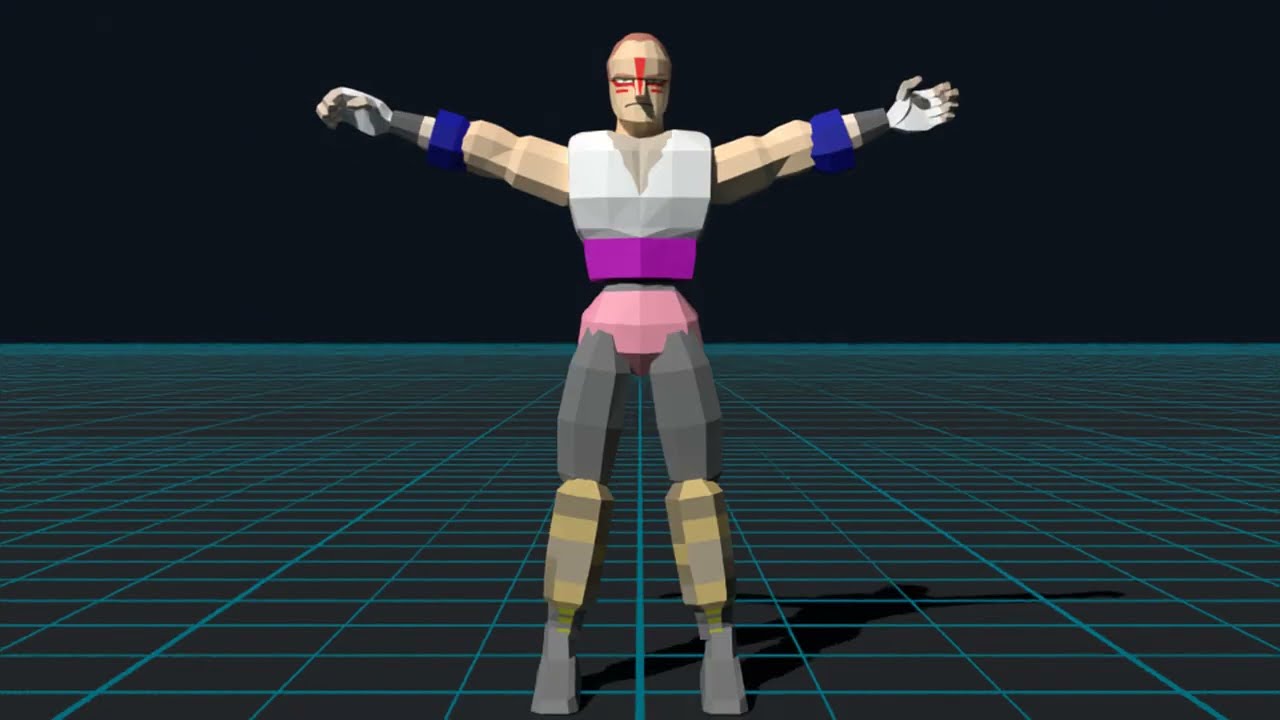
Menu > Cheats > Player 1 fighter (and Player 2 fighter):
- Random: a new fighter every game, its head, body and limbs from three of the cast and its moves dealt from the same three, so it plays like a mix of them, at the real game's timings. Its voice is one of the three's, and it gets a name made of theirs on the energy bar (JACPAIWOLF, WOLFLAURAH).
- Seed: type a fighter's name, as seen on an energy bar, to get that fighter again: the same build and the same moves on any machine. The colours are new every game. Every name, and what it gives: the seed book, docs/SEEDS.md.
- Secret character: one of the fighters cut from the game, below.
Anything but Normal is picked for you at the select. Round 1 builds each random fighter from its polygons as the fight starts. Random opponents makes every computer opponent a random fighter, made afresh for each match.
Secret characters
Menu > Cheats > Player 1 fighter (or Player 2 fighter) > Secret character, then Character: a fighter cut from the arcade ROM, picked for you at the select: Siba (Majido), Jeff, Takeru (the early Akira), the Koskol brothers Rekka, Score and Aeon, or Dural. They were never finished (borrowed moves, no throws), so expect oddities. The other player and the computer keep the real Akira.
Portraits made from the game's own models. Only Siba ever got select art; the rest had none, so the select screen showed Akira's (or nothing). Each one now has a portrait drawn from its real 3D head in the ROM, by the game's own renderer:
- Portraits: the game's select screen draws a live 3D head in a camera of its own per character. The ones without a portrait get one built from their fight head, and each has its own camera, found by rendering every head against the cast's and measuring: the eyes at the same height, the face in the middle, the head the same size, the neck off the bottom. Dural's is also turned to face the way the others do.
| Character | Select screen | Health bar | Notes |
|---|---|---|---|
| Siba (Majido) | Own portrait and profile; named MAJIDO (P1) or SHIIBA (P2) | SIBA | The most complete of them. His pounce is Lau's: his own had no jump in its data and flew him across the ring |
| Jeff | Own portrait and profile; named JEFFERY | JEFF | A handful of Jacky's moves; his hat and shades can be knocked off |
| Takeru | Own portrait and profile (as Akira Ryuzaki, his early name) | TAKERU | The early Akira, in Akira's headband |
| Rekka | Made portrait (no blinking) | REKKA | Rekka and Score share a head |
| Score | Made portrait (no blinking) | SCORE | Looks like Rekka |
| Aeon | Made portrait (no blinking) | AEON | |
| Dural | Made portrait (no blinking) | DURAL |
The rest of Cheats: Kage's mask (a hit can knock his hood back, as on a cabinet played for nine hours), Dural's colour (gold on player 2's side, as the Saturn version's second colour, the default; her chrome, as the arcade; or always gold: drawn only on your screen, so online each player sees their own choice), infinite energy (player 1, 2 or both), one-hit KO, no time limit, and a tiny or huge ring.
Who they were
From The Cutting Room Floor, whose research (and mountainmanjed's MAME cheats) these come from:
- Siba (Majido Ab Dul): seen in pre-release screenshots and on the international cabinet's artwork, as "Shiiba" (on some cabinets mislabelled Akira). Renamed Majido before he was cut, late: he is the only one with his own select icon and voice clips, recorded like the final cast's. His moves are borrowed from Sarah and Lau. He came back as a hidden character, Siba, in Fighters Megamix.
- Jeff (Jeffery Buckman): a soldier in camo, a cap and shades. His name is likely a tribute to VF1 staff member Jeffrey Buchanan, and "Jeffery" later went to Jeffry; finish the game with him and the rankings call him WILLIE, Jeffry's early name. He looks remarkably like Tekken 2's Prototype Jack, from many of the same designers.
- Takeru (Takeru Ryushoji): listed just before Akira in the game's character table and fighting under Akira's name, most likely Akira's early design, but with his own unused bio and nameplate, and TAKERU on the rankings when you finish with him. (Akira himself was once Akira Ryuzaki.)
- The Koskol brothers, Rekka, Score and Aeon: listed just after Akira, with Dural's name and moves. Early design documents name them as the game's three final bosses, perhaps meant to be fought a round each; with the same moves and IDs, they're in effect one character with three outfits.
- Dural: the game's real final boss, never selectable. An early, unused select screen in the code has a portrait for Dural (and one for a Koskol brother), so she may once have been meant to be playable.
Play
From the latest release, or the site:
| System | Download |
|---|---|
| macOS 11+ (Apple silicon and Intel) | VirtuaFighterRecomp-mac.zip |
| Windows 10 or 11 (64-bit) | VirtuaFighterRecomp-windows.zip |
| Steam Deck / x86-64 Linux | VirtuaFighterRecomp-deck.tar.gz |
| Linux on ARM (ARM64: a Raspberry Pi 5; Ubuntu 22.04, Debian 12, Raspberry Pi OS bookworm or newer), unpacked and run as the x86-64 Linux one | VirtuaFighterRecomp-linux-arm64.tar.gz |
Mac and Windows
- Unzip it (Mac: move Virtua Fighter Recomp to Applications; Windows: the VirtuaFighter folder anywhere, not inside Program Files).
- Open it (Windows:
VirtuaFighter.exe). - Choose your
vf.zipwhen it asks. A copy is kept, so you only do this once.
Steam Deck
- Copy the download to the Deck (e.g. Downloads) and unpack it there: in Desktop Mode, right-click it in the file manager > Extract > Extract archive here. (Unpacking on Windows, or copying the folder through a USB stick, can lose the files' permissions, and then nothing launches.)
- Put your
vf.zipin theVirtuaFighter/romsfolder. - Desktop Mode: Steam > Games > Add a Non-Steam Game to My Library > Browse, set the file type filter to "All
files", pick the
vffile in the VirtuaFighter folder, Add Selected Programs. In its Properties, set Start In to the VirtuaFighter folder (e.g./home/deck/Downloads/VirtuaFighter/), and under Compatibility leave "Force the use of a specific Steam Play compatibility tool" off: it's a native Linux game, and Proton stops it launching. - Back in Game Mode, launch it from your Library with the default Gamepad layout.
The Windows download also runs on the Deck under Proton (add VirtuaFighter.exe instead, with Proton forced on),
but the native Linux build above is the one to use.
Portable mode: put a file named portable.txt next to the program (Windows: beside VirtuaFighter.exe; Mac:
beside the app, in the same folder; Steam Deck / Linux: in the VirtuaFighter folder) and the game keeps everything in
that folder: settings, saves, screenshots, log.txt and the copy of your vf.zip (in its roms folder), with
nothing in your user data folder (%APPDATA%, ~/Library/Application Support, ~/.local/share).
Your own ROM folder (e.g. Batocera's /userdata/roms/ports/vf, or any folder an update won't touch): start the
game with --roms <folder> (or --roms=<folder>), set the environment variable VF_ROMS, or add
roms_folder = <folder> to settings.ini; the command line wins, then VF_ROMS, then settings.ini. ~ is your home
folder, and a relative path in settings.ini is from its folder. The game looks there first for vf.zip (and model1io.zip, if you have it) and
only reads it (no copy is kept anywhere else); log.txt names the folder it used. If the zip isn't there, the log
says where it looked and the game carries on as without the option; a zip you then choose with the file picker is
copied into your ROM folder, so the next start finds it there. Examples: Windows VirtuaFighter.exe --roms "D:\ROMs\vf";
Mac open "Virtua Fighter Recomp.app" --args --roms ~/ROMs/vf; Linux / Batocera
./VirtuaFighter.sh --roms /userdata/roms/ports/vf.
Note
The Mac and Windows builds aren't signed. On macOS, open it once, close the message, then System Settings > Privacy & Security > Open Anyway. On Windows, if SmartScreen warns, choose More info > Run anyway.
Controls
Change them in the menu (Esc, or View / Select on a pad).
| Key | Does |
|---|---|
| ↑ ↓ ← → | Player 1: move |
| Z X C | Player 1: guard, punch, kick |
| 1 | Player 1: start |
| I J K L | Player 2: move |
| B N M | Player 2: guard, punch, kick |
| 2 | Player 2: start |
| 5 6 | Coins (Arcade play style) |
| Esc | The menu: display, sound, game, arcade settings, online, controls, cheats, quit (a pad: View, L3 + R3, or the touchpad's click) |
| P / F3 | Pause / reset (neither in an online match) |
| F4 | Free camera (see below) |
| F5 / F6 | Render scale / picture shape |
| F11, F or Alt+Enter | Fullscreen |
| F9 | The frame rate and timings in the title bar |
| F12 | A screenshot of the picture (in the Screenshots folder) |
| Tab (held) | As fast as it goes |
| F2 / 9 | The arcade's test and service buttons (in its test menu, Down and Start do too) |
Gamepad (Xbox layout): d-pad or stick to move, X guard, A punch, B kick, Y guard + punch (throws), RB punch + kick, LB guard + kick, RT all three, Start to start. View (tap), L3 + R3 or the touchpad click opens the menu (Menu can be moved in Controls); View + LB / RB change the render scale / picture shape. In Arcade mode, set Coin in Controls (View works) for a coin button.
Arcade sticks the game doesn't know (DirectInput sticks such as HORI's Virtua Stick High Grade or the Astro City
Mini) get a fighting stick's layout; Controls > Player 1 (or 2) > Set up buttons sets theirs by pressing each in turn. A
gamecontrollerdb.txt (SDL's mappings) in the data folder or beside the program is read too.
Free camera
F4, View + R3 on a pad, or Display > Free camera (taken as the menu closes): a camera you fly round the fight. It starts where the game's camera is and stays where you leave it while the game's moves on; the HUD is hidden, and your controls don't reach the game while it's on. P pauses the fight and the camera still flies. It only changes the picture: the game plays exactly the same. Offline and while watching an online match, never while playing one; always off at the start.
| Keyboard + mouse | Pad | |
|---|---|---|
| Look | Mouse (or the arrow keys) | Right stick |
| Move | W A S D | Left stick |
| Up / down | E or Space / Q or Ctrl | RT / LT |
| Faster (x4) / slower (x0.25) | Shift / Alt | L3 held |
| Speed | Mouse wheel | LB / RB |
| Back to the game's camera | R | Y |
| Leave | F4 | View + R3 |
The arcade board sorts its polygons by depth instead of using a depth buffer, and the game only sends what its own camera sees: from odd angles some polygons overlap wrongly, and parts the game's camera doesn't show can be missing.
Window size
Display > Picture > Window size makes the window a whole multiple of the arcade's 384 lines (1x 512 x 384 for the 4:3 picture, the board's 496 x 384 on its 4:3 tube; 2x 1024 x 768; up to 4x, as many as your screen holds; a wider picture shape makes it as wide as the shape), each arcade line that many of your screen's: Render scale 1x with Window size 1x shows the arcade's 384 lines one to one, Window size 2x with Render scale 1x doubles each of them. It's for playing in a window (fullscreen keeps it for when you're back in one), sized in the window's pixels on a Mac's Retina screen and a scaled Windows screen too, and resizing the window by hand sets it back to Free. The window's size, place, maximised and fullscreen are remembered from one start to the next (handy for capturing it in OBS); a place on a screen that's gone now opens it in the middle of one that's there.
On Windows, fullscreen is a borderless window over the screen (a line taller than it, so no graphics driver takes it
for a game's own fullscreen): switching to fullscreen froze on AMD cards in the driver's exclusive fullscreen
(vf3-recomp #7). Display > Picture > Fullscreen mode (Windows only) switches to Standard, the old way, as does
fullscreen_exclusive = 1 in settings.ini. A Mac (its green button too), Linux and the Steam Deck keep the system's own
fullscreen (fullscreen_window = 1 gives them the borderless window).
Menu
-
Resume and Quit.
-
Display: three pages, each shown on its row with what it's set to, and the free camera's On / Off:
- Picture: picture shape (fit the window, 4:3, 16:10, 16:9, 21:9), window size, fullscreen and (on Windows) fullscreen mode, the HUD, Show FPS.
- Quality: render scale (up to 6x), antialiasing (Low, 2x, 3x), the 3D renderer and (on Windows) the graphics driver, background filter, shadows (smooth, or the arcade's mesh), smooth motion (Off: the arcade's own frames, the 3D 30 a second), V-Sync, frame limit.
- Screen filter and colours: screen filter (scanlines, CRT), CRT colours (an arcade monitor's and others), brightness, gamma.
- Free camera (see Free camera).
Window size makes the window a whole multiple of the arcade's 384 lines (see Window size): Render scale 1x with Window size 1x shows the arcade's lines one to one, Window size 2x doubles each; resizing the window by hand sets it back to Free, and its size and place are remembered either way.
-
Sound: volume, music, effects.
-
Game: the menus' language, play style (PC, or Arcade with its coins), reset, the log file.
-
Arcade settings: the game's language, difficulty, ring size, rounds, continue, demo sound, the service menu.
-
Online: a random opponent, a room, a friend's code, play by address, your name and settings (see below).
-
Controls: each player's pad, keys and buttons (a key for two or three buttons at once: Button c