Xalabaias Adventure
Native Windows/Linux PC port tooling for Xalabaias Adventure (MaxwelHacks SMW hack) via SNES static recompilation.
- Type: PC port
- Game: Xalabaias Adventure
- Runs on Windows
- By MaxwelHacks
- Latest release v0.1.1, 2026-11-01
- Source: https://github.com/rac08241988/XalabaiasAdventure-Recomp
README
Xalabaias Adventure — Native PC Port (Recomp tooling)
Easy install
- Install through Quiver Launcher, or download
XalabaiasAdventure-SNESRecomp-windows-x64-v0.1.2.zipfrom Releases and unzip it.- Make the ROM: open the
patchfolder and drag your clean Super Mario World (USA) ROM ontoPatch My ROM.bat(or double-click it and pick the ROM). It savesXalabaias Adventure.sfcin that folder.- Play: open
XalabaiasAdventureSNESRecomp.exe; in the first-run setup click Browse ROM, pick the newXalabaias Adventure.sfc, then Generate & rebuild...Details and manual patching: Patching the ROM.
How to play (Windows)
- Download
XalabaiasAdventure-SNESRecomp-windows-x64-v0.1.2.zipfrom Releases - Unzip it
- Open
XalabaiasAdventureSNESRecomp.exe - Click Browse ROM and pick your own Xalabaias Adventure ROM (patched SMW — easiest with
patch\Patch My ROM.bat, see Patching the ROM) - Click Generate & rebuild..., wait a few minutes, then play
The first launch downloads a portable compiler (roughly 800 MB once unpacked) into toolchain\
next to the exe, so it needs internet. Everything it writes — the toolchain,
the generated sources, build\, saves, config.ini, XalabaiasAdventure.log —
stays inside the unzipped folder. Later launches go straight to the game's
launcher; press Play.
In game: Esc or F12 (gamepad: Guide) opens/closes the Options panel, Alt+Enter toggles fullscreen.
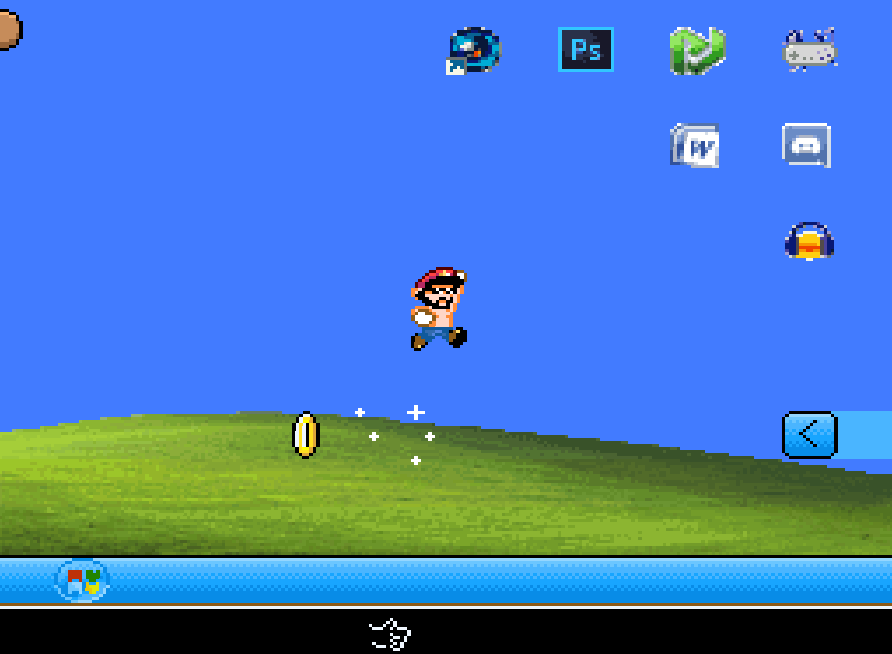
What's new in v0.1.2
- Bundled the official patch file and added patching instructions. The
release zip now has a
patch/folder with MaxwelHacks's officialXalabaias Adventure.bps,Patch My ROM.bat(drag-and-drop patcher that checks your Super Mario World ROM, removes a copier header and verifies the result), Floating IPS (patch/flips/flips.exe) andHOW_TO_PATCH.txt. The.bpsis also attached on its own to the release. The game files are unchanged from v0.1.1.
What's new in v0.1.1 (first public build)
- First port of Xalabaias Adventure (MaxwelHacks), built from the Super
Ryu World 1 port template: one-click launcher, side-panel Options menu
(Esc / F12 / Guide) with live shader preview and Apply, 88
.slang/.glslpshader presets, 120 Hz motion modes, Xbox / PlayStation button hints, Background input (default Off), positional Xbox mapping (SNES B = Xbox A, SNES Y = Xbox X), save import with backup and the uninstall save prompt. - Accepts headered (
.smc, 4,194,816 bytes) and headerless dumps; the 512-byte copier header is stripped before the hash check. - This build runs the game on the byte-exact interpreter tier (the hack's Lunar Magic hijacks are not yet mapped onto native code), so a reasonably modern CPU is recommended.
- Save import only takes saves from an earlier Xalabaias Adventure install
(the uninstaller tags
KEPT_SAVES.txtwith the game's exe name).
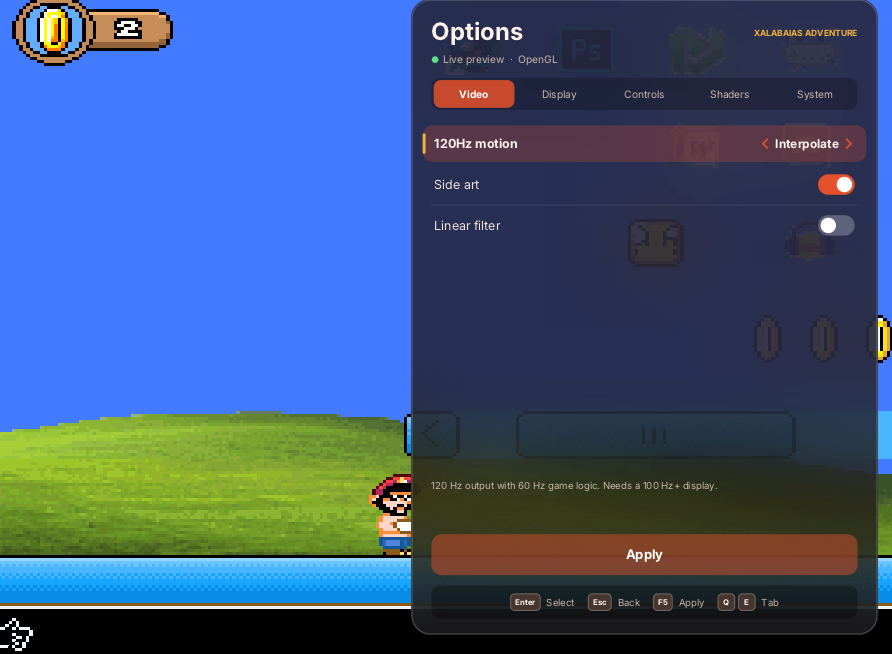
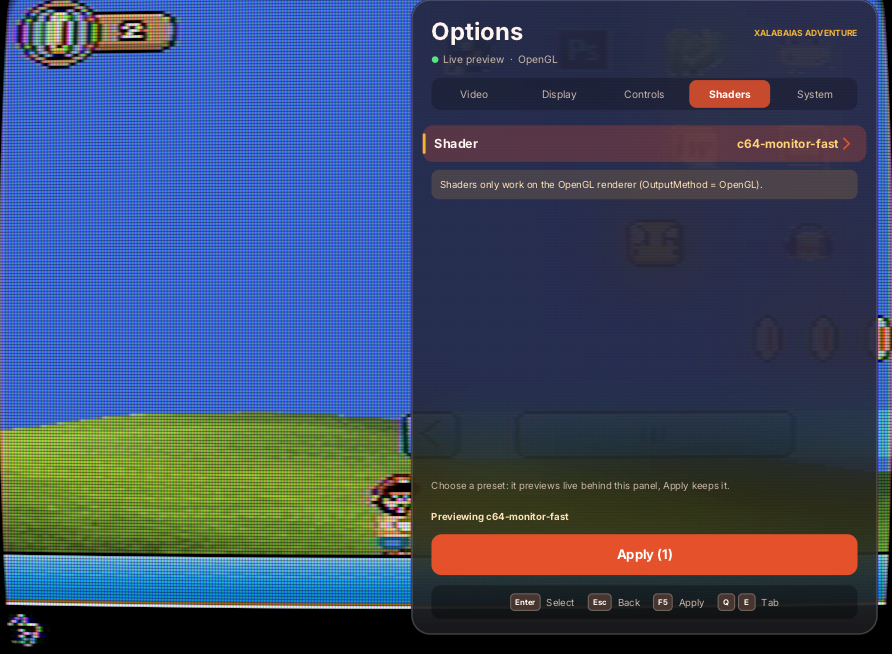
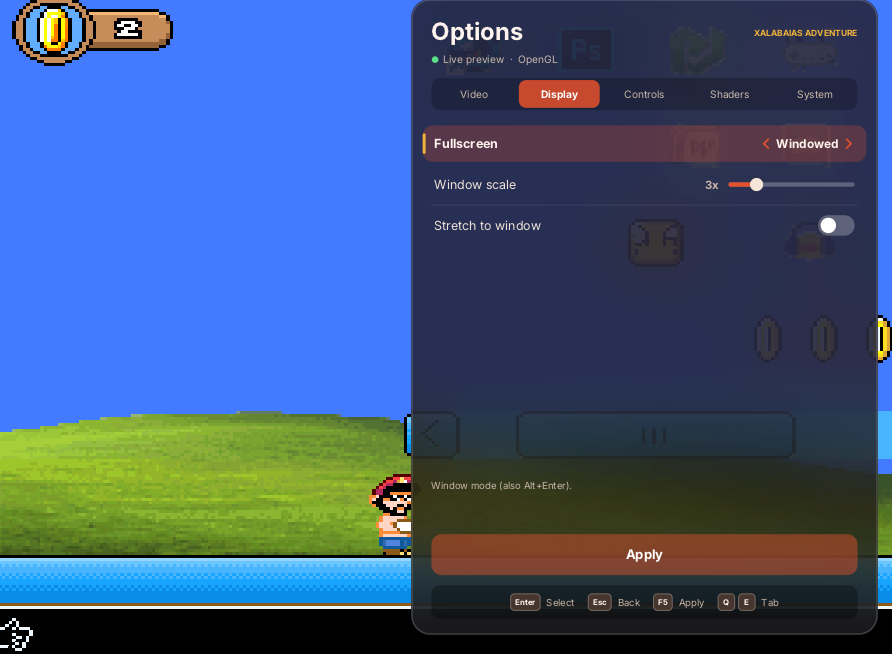
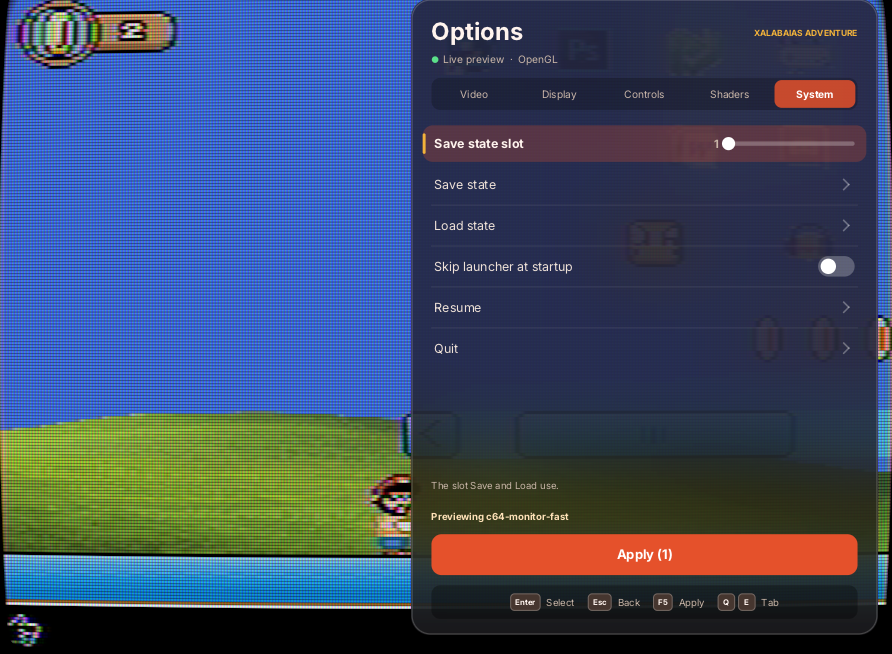
Options panel: Video (120 Hz motion, Side art, Linear filter), Display (Fullscreen, Window scale, Stretch), Controls (Background input), Shaders (live preview, kept only on Apply), System (save-state slot, save/load state, skip launcher, Resume, Quit). Arrows / D-pad move, Enter or A selects, Backspace/Esc or B goes back, Q/E, Tab or LB/RB switch tabs.
 |  |
 |  |
Static-recompilation tooling that turns your own copy of the Xalabaias Adventure
ROM hack into a native Linux / Windows executable. It is a small layer (internally named srw1, inherited from the Super Ryu World 1 port) on top of
SuperMarioWorldRecomp and the
snesrecomp framework.
No ROM or game data is included in this repository or its release. There is no ROM, no patched ROM and no generated C derived from a ROM. The release zip contains the recompiler sources/tooling, a small setup program, a prebuilt analyzer, and in
patch/the hack's official.bpspatch file (the hack author's own work, redistributed for convenience; it contains no Nintendo data) plus Floating IPS. All game-specific C is generated and compiled locally on your machine from your ROM.This project is not affiliated with, endorsed by, or sponsored by Nintendo. Super Mario World is a trademark of Nintendo.
Tested On
- v0.1.2 zip: same game files as v0.1.1 plus
patch/.Patch My ROM.batrejects a wrong ROM (tested with an already-patched Xalabaias ROM); the patch parses and every target-side byte matches the expected ROM (CRC321C4D5C4A). - v0.1.1 zip, fresh folder, Wine on Linux x64 (Windows x64 build): first-run
setup, Browse ROM with the real file picker on the exact file
Xalabaias Adventure.smc(headered, 4,194,816 bytes), Generate & rebuild, launcher → Play, title screen → file select → intro → gameplay (walking, jumping, coins), Options panel via F12 (tabs, Background input Off by default, Esc closes and resumes). - Windows x64 (the user's PC): plays through to gameplay.
- Expected ROM: headerless SHA-256
628198576a47da5a594d82e5691f18ec0b56a71f693e9557f5071b1a5be56f70, CRC321C4D5C4A(a 512-byte copier header is fine; it is stripped first).
Known Issues
- 120 FPS mode: the game lags at times with 120 FPS turned on (tracked as an issue; fix planned).
Where your saves are
Everything lives inside the unzipped folder, under build\:
| File | What it is |
|---|---|
build\saves\save.srm | The in-game (battery) save |
build\saves\*.sav | Save-state slots (Shift+F1…F10 save, F1…F10 load) |
build\config.ini, build\keybinds.ini | Settings and key bindings |
build\srw1_options.ini | Options-panel choices (shader, 120 Hz motion, side art) |
build\save-backups\<date>\ | Backups made before saves were imported |
Save import (on by default): when a new release is unzipped next to an
older install, the first setup run copies that install's build\saves and
settings into the new one. Anything already in the new build\saves is backed
up to build\save-backups\ first, a save is never replaced by an older copy,
and settings are copied only when the new install has none. Put an empty file
named no-save-import beside the exe to turn it off; the log is
build\save-import.log.
Uninstall: run uninstall.bat. It asks Delete save files? (Y/N) —
No removes everything except build\saves, build\save-backups and the
.ini settings, so a later install can import them.
Background input (options menu, default Off, saved as
BackgroundInput in [General] of config.ini): when off, the controller is
ignored while the window is not focused. Button mapping is unchanged.
Credits
- Xalabaias Adventure ("Uma Aventura Xalabaias") is by MaxwelHacks —
SMW Central listing. All
credit for the hack's levels, graphics, music and design goes to the author.
The patch bundled in
patch/is the unmodified official one from that page. - SuperMarioWorldRecomp and
snesrecomp by
Matthew Stanley — the recompiler and runtime this port is built on (PolyForm
Noncommercial 1.0.0). They in turn credit
SMWDisX,
snesrev (MIT), LakeSnes
(MIT) and snes9x — see their READMEs /
THIRD_PARTY_ATTRIBUTION.md. - recomp-ui (MIT) and Asar (LGPL-3.0+) are pulled in as upstream submodules.
- libretro/glsl-shaders — the shader presets offered in the options menu. Not vendored; fetched at setup.
- Floating IPS by Alcaro (GPLv3), for applying the BPS patch; v198 is bundled unmodified as
patch/flips/flips.exe.
What's in this repo
| Path | What |
|---|---|
SuperMarioWorldRecomp/ | git submodule → upstream SuperMarioWorldRecomp, pinned at 324dfc8 (it brings snesrecomp 5ac4b98, recomp-ui, SMWDisX, asar as its own submodules) |
patches/SuperMarioWorldRecomp-srw1.patch | SRW1 build target (SMW_BUILD_SRW1), SRW1 reset/NMI handling, F12 options menu + 120 Hz presentation hooks, runtime shader switching, interpreter-tier execution by default for this target |
patches/snesrecomp-srw1.patch | RetroArch .glslp loader fixes: aliasN, PassPrevN back to the original, bare parameter overrides, #version hoisting, gl_FragColor compat; opt-in debug aids (SNESRECOMP_STATE_DUMP_FRAMES ARAM/DSP state dumps, SNESRECOMP_NATIVE_STATS native-share report) |
overlay/src/srw1_*.c/.h | SRW1 options menu (shader picker, motion mode), 120 Hz render interpolation, HLE stub file |
overlay/recomp/srw1/ | SRW1 recompiler config overlay (bank00.cfg interpreter-tier pins for the AddmusicK SPC handshake) and strip.sed (drops stale stock entry points) |
overlay/tools/regen_srw1.sh, overlay/tools/srw1_generate.py | Generate src/gen-srw1/ from your patched ROM (the Python one is what the Windows setup program calls) |
overlay/tools/srw1_setup_stubs.py | Placeholder bodies so the ROM-free setup program links without any generated code |
patches/recomp-ui-srw1.patch | Small recomp-ui tweaks for the options overlay |
scripts/make_release_zip.sh | Builds the one-click Windows release zip (see below) |
scripts/release/README.txt | README shipped inside the zip |
scripts/setup.sh | Submodules → patches → overlay → shaders → (optional) ROM check + C generation |
scripts/fetch_shaders.sh, scripts/stage_shaders.py | Fetch libretro/glsl-shaders @ cba01a48 and stage the 88 root presets |
patch/ | The hack's official Xalabaias Adventure.bps (by MaxwelHacks), Patch My ROM.bat, HOW_TO_PATCH.txt; the release packager adds Floating IPS v198 into patch/flips/ |
cmake/mingw-w64.cmake | Toolchain file for Windows x64 cross-builds from Linux |
Patching the ROM
The game is a ROM hack, so you make its ROM yourself from your own Super Mario World ROM and the hack's official patch, which comes with this release.
1. What you need
Super Mario World (USA), the original 1990 SNES release, unmodified (your own dump):
| File | unheadered .sfc, 524,288 bytes (512 KB) |
| CRC32 | B19ED489 |
| SHA-1 | 6b47bb75d16514b6a476aa0c73a683a2a4c18765 |
| SHA-256 | 0838e531fe22c077528febe14cb3ff7c492f1f5fa8de354192bdff7137c27f5b |
- A headered
.smc(524,800 bytes: an extra 512-byte copier header) must have the header removed first, or use a patcher that handles it (Patch My ROM.batand Rom Patcher JS both can). - Not the Japanese, European, or Super Mario All-Stars + Super Mario World versions.
2. Where the patch is
- Inside the release zip at
patch/Xalabaias Adventure.bps— so also in your Quiver install folder after installing through Quiver (<install folder>\patch\). - Attached on its own next to the zip on the GitHub release page.
- In this repository at
patch/.
3a. Easiest: Patch My ROM.bat (Windows)
- Open the
patchfolder. - Drag your Super Mario World (USA) ROM onto
Patch My ROM.bat, or double-click it and pick the ROM in the window that opens. - It removes a copier header if there is one, checks the ROM is CRC32
B19ED489(otherwise it says "This isn't a clean Super Mario World (USA) ROM. You need the original USA version, unmodified."), applies the patch with the bundled Floating IPS, checks the result and savesXalabaias Adventure.sfcin thepatchfolder.
3b. Floating IPS (Windows)
- Run
patch\flips\flips.exe(bundled; or get it from the Floating IPS releases). - Click Apply Patch.
- Pick
patch\Xalabaias Adventure.bps. - Pick your clean Super Mario World (USA) ROM.
- Save the result, e.g. as
Xalabaias Adventure.sfc.
Command line: flips --apply "Xalabaias Adventure.bps" smw.sfc "Xalabaias Adventure.sfc".
3c. Online: Rom Patcher JS
- Open https://www.marcrobledo.com/RomPatcher.js/.
- ROM file: your clean Super Mario World (USA) ROM (if it is headered, tick the option to remove the header).
- Patch file:
Xalabaias Adventure.bps. - Click Apply patch; the browser saves the patched ROM. Everything runs locally in your browser.
4. Check the result and use it
- The patched ROM is 4,194,304 bytes (4 MiB), CRC32
1C4D5C4A(SHA-256628198576a47da5a594d82e5691f18ec0b56a71f693e9557f5071b1a5be56f70). - Open
XalabaiasAdventureSNESRecomp.exe; in the first-run setup click Browse ROM, pick the patched ROM (.sfcor.smc, headered or not), then Generate & rebuild... (the first run downloads a portable compiler; later launches only need Play). - If the patcher or the launcher refuses the ROM, your Super Mario World ROM is not the clean USA release, or you have a different release of the hack.
Credits for the patch
Xalabaias Adventure is by MaxwelHacks —
SMW Central page (the English patch; the SMW Central download also has a Portuguese one, which is a different ROM and is not supported).
patch/Xalabaias Adventure.bps is the hack author's own work, the official patch from that page,
redistributed unchanged for convenience. It contains only the hack's changes
and no Nintendo data; you still need your own Super Mario World ROM.
Floating IPS (patch/flips/flips.exe, v198)
is by Alcaro, GPLv3; see patch/flips/SOURCE.txt.
ROMs you need (bring your own)
- Clean Super Mario World (USA), headerless, 512 KiB.
SHA-256
0838e531fe22c077528febe14cb3ff7c492f1f5fa8de354192bdff7137c27f5b. (The upstream build also needs the stock SMW C generated from it.) - Xalabaias Adventure, patched by you: download the official
BPS from the SMW Central page
(also bundled as
patch/Xalabaias Adventure.bps) and apply it to the clean headerless ROM above with Floating IPS (flips --apply XalabaiasAdventure.bps smw.sfc xalabaias.sfc, or the Flips GUI). The result is a 4 MiB LoROM (4,194,304 bytes without a copier header) with SHA-256628198576a47da5a594d82e5691f18ec0b56a71f693e9557f5071b1a5be56f70. If your hash differs (e.g. your SMW ROM had a 512-byte header, or you have a different release of the hack), the tooling will refuse it.
ROMs and generated C are git-ignored; never commit them. The only patch in the
repo is the hack's official patch/Xalabaias Adventure.bps.
Build — Linux
Requirements: git, bash, CMake, Ninja, a C/C++ compiler (GCC or Clang),
Python 3, Rust/Cargo (the native analyzer is built on first regen), OpenGL dev
headers (e.g. libgl-dev) and the usual X11/Wayland dev packages SDL3 needs.
SDL3 3.4.10 is downloaded and built statically by CMake.
git clone https://github.com/rac08241988/XalabaiasAdventure-Recomp.git
cd XalabaiasAdventure-Recomp
scripts/setup.sh --smw /path/to/smw.sfc --srw1 /path/to/srw1.sfc

cd SuperMarioWorldRecomp
cmake -S . -B build-srw1 -G Ninja -DCMAKE_BUILD_TYPE=Release \
      -DSMW_BUILD_SRW1=ON -DSMW_BUNDLE_FALCON_CACHE_HELPER=OFF
cmake --build build-srw1 --target XalabaiasAdventureSNESRecomp

# shaders/ must sit in the working directory you launch from
cp -r ../shaders build-srw1/
cd build-srw1 && ./XalabaiasAdventureSNESRecomp --no-launcher /path/to/srw1.sfc
Build — Windows x64
Cross-compile from Linux (tested path). Install mingw-w64 (posix thread
model, e.g. Debian/Ubuntu g++-mingw-w64-x86-64-posix), then after
scripts/setup.sh as above:
cd SuperMarioWorldRecomp
cmake -S . -B build-srw1-win64 -G Ninja -DCMAKE_BUILD_TYPE=Release \
      -DCMAKE_TOOLCHAIN_FILE=../cmake/mingw-w64.cmake \
      -DSMW_BUILD_SRW1=ON -DSMW_BUNDLE_FALCON_CACHE_HELPER=OFF
cmake --build build-srw1-win64 --target XalabaiasAdventureSNESRecomp
Copy XalabaiasAdventureSNESRecomp.exe and the staged shaders/ folder into one
folder on Windows and run XalabaiasAdventureSNESRecomp.exe --no-launcher srw1.sfc.
Native Windows (untested). Use an MSYS2 MINGW64/UCRT64 shell with
git cmake ninja python rust and the mingw gcc toolchain installed, run
scripts/setup.sh ... there, then the Linux cmake commands without the
toolchain file.
The one-click Windows release (how it works)
scripts/make_release_zip.sh (run after scripts/setup.sh, no ROM needed)
cross-builds a setup host — the SRW1 target configured with
-DSMW_SRW1_PACK=ON -DSNESRECOMP_SETUP_HOST=ON and an empty generated-code
directory, linking placeholder stubs — plus the Rust analyzer for
x86_64-pc-windows-gnu, then stages the tracked SMW / snesrecomp / recomp-ui
sources (minus ROM data, generated code, docs and tests), the shaders and the
configs into a flat zip. It also copies patch/ (the hack's official .bps, Patch My ROM.bat,
HOW_TO_PATCH.txt) and Floating IPS v198 into the zip. Guards fail the build if
any ROM, any other patch file, generated C or funcs.h ends up in it.
On the player's PC the setup exe shows a first-run wizard: it downloads the
portable cmake-clang-v1 toolchain from
retrocomm-toolchains
into toolchain\, verifies the ROM's SHA-256, runs the analyzer +
tools/srw1_generate.py into src\gen-srw1, then configures and builds
build\XalabaiasAdventureSNESRecomp.exe with CMake/Ninja (SDL3 is fetched by
CMake). Afterwards the setup exe hands off to the built game. The game runs
without a console window; output goes to XalabaiasAdventure.log beside it (pass
--console to get a console).
Features
- Native recompiled build of Xalabaias Adventure via snesrecomp, with SDL3 + OpenGL output.
- In-game Options panel — Esc or F12 (gamepad: Guide) opens and closes it;
it never quits the game. Arrows/D-pad navigate, Enter/A accept, Backspace/B
back, Q/E or LB/RB switch tabs, F5 or X/Start apply. The game pauses while
it is open. See What's new in v0.1.1 for every tab.
- Shader: any of the 88 root-level RetroArch
.glslppresets from libretro/glsl-shaders (CRT, scanlines, xBR/ScaleFX, NTSC, handheld, …), multi-pass, previewed live and kept on Apply; Off by default. Shaders only work on the OpenGL renderer (OutputMethod = OpenGL). - Motion (120 Hz+ displays): Off (original 60 Hz path), Interpolate (in-between frames toward the newest tick, ≤1 tick delay), Low-latency (projects forward from the newest tick). Game logic stays at 60 Hz; only presentation is re-rasterized from captured PPU state with interpolated scroll/sprite positions.
- Side Art (default On): fills the widescreen bars with the level rendered beyond the SNES screen edges (softened and darkened), computed live from the game state; no art files are shipped.
- Choices persist in
srw1_options.ini.
- Shader: any of the 88 root-level RetroArch
Status
- The g