YW4 Recomp
YW4 Recomp is a PC port of Yo-kai Watch 4++ that offers higher resolutions, ultrawide support, and improved shadow and anti-aliasing effects.
- Type: PC port
- Game: Yo-kai Watch 4
- Runs on Windows
- By ILFforever
- Latest release deps-mirror, 2026-11-05
- Source: https://github.com/ILFforever/YW4Recomp
- Website: https://ilfforever.github.io/YW4Recomp/
README
YW4 Recomp
Yo-kai Watch 4++, recompiled for PC.
4K · Ultrawide 21:9 / 32:9 · PCSS soft shadows · TAA / SMAA · ×16 texture filtering · Xbox, PlayStation and Joy-Cons
A fan static recompilation of the Nintendo Switch game (update 2.2.0), in the style of N64Recomp: the game's code is translated into a native Windows program.





The title screen, recompiled and running natively on Windows (Vulkan, 30 frames/s).
Important
Built with AI. Claude (Anthropic's model, used through Claude Code) wrote most of this repository: the recompiler, the runtime, the reverse engineering notes and these docs. A human decides what to work on, plays and tests every build, compares it against the real game and reviews the changes. It is a personal fan project that happens to be public. If AI-written code is not something you want to use or read, feel free to pass on it; if you do run it, that is your call.
Note
Platforms:
- Windows - x86-64, Vulkan graphics backend (this is what is built and tested): NVIDIA RTX, and AMD Radeon (decision 0059): a Ryzen 5 7530U laptop's integrated graphics runs it at about 40 frames/s at native resolution, where the Eden emulator gets 25-30
- Linux - x86-64, Vulkan: planned; the runtime is written to be portable but has not been tested yet
Note
Bring your own game. Nothing from the game is in this repository. You need files from your own copy of Yo-kai Watch 4++ with the last update, 2.2.0. Getting those files is up to you and is not covered here.
Status
Tip
1.0.0 releasing soon: the first release, with the launcher. See How to play.
Work in progress: not tested from start to finish yet. What runs so far: from boot through the start of a new game (logos, title menu, name entry in a popup, Yo-kai nicknames included, the opening cutscenes, the Amano house and town, the Yo-kai Pad menus, the diary and autosave), and from late-game saves: towns at night, the bamboo forest, the Yo-kai World, and battles. Most of the game has not been tried.
- Frame rate: the game's 30 frames/s, or 60, 120, 144 or no limit (FRAME RATE in Settings, F1). The game moves by real time, so walking, battles, menus and cutscenes all work at any rate. The game's own 30 holds everywhere tested.
- Graphics: up to 4K and ultrawide, sharper shadows and textures, TAA, and upscaling with NVIDIA DLSS or AMD FSR for high frame rates at 4K (~85-118 frames/s at 4K 21:9 with DLSS or FSR on an RTX 4070 laptop), and frame generation with NVIDIA DLSS or AMD FSR (about twice as many frames on screen). Parts of the game's renderer already run as our own code (shadows, surfaces, the shadow mask, bloom, distance blur, most screen passes).
Expect missing effects and crashes in places nobody has reached yet.
- How it got here, step by step: docs/progress.md
- What is known to be missing or wrong: docs/known-issues.md
How to play
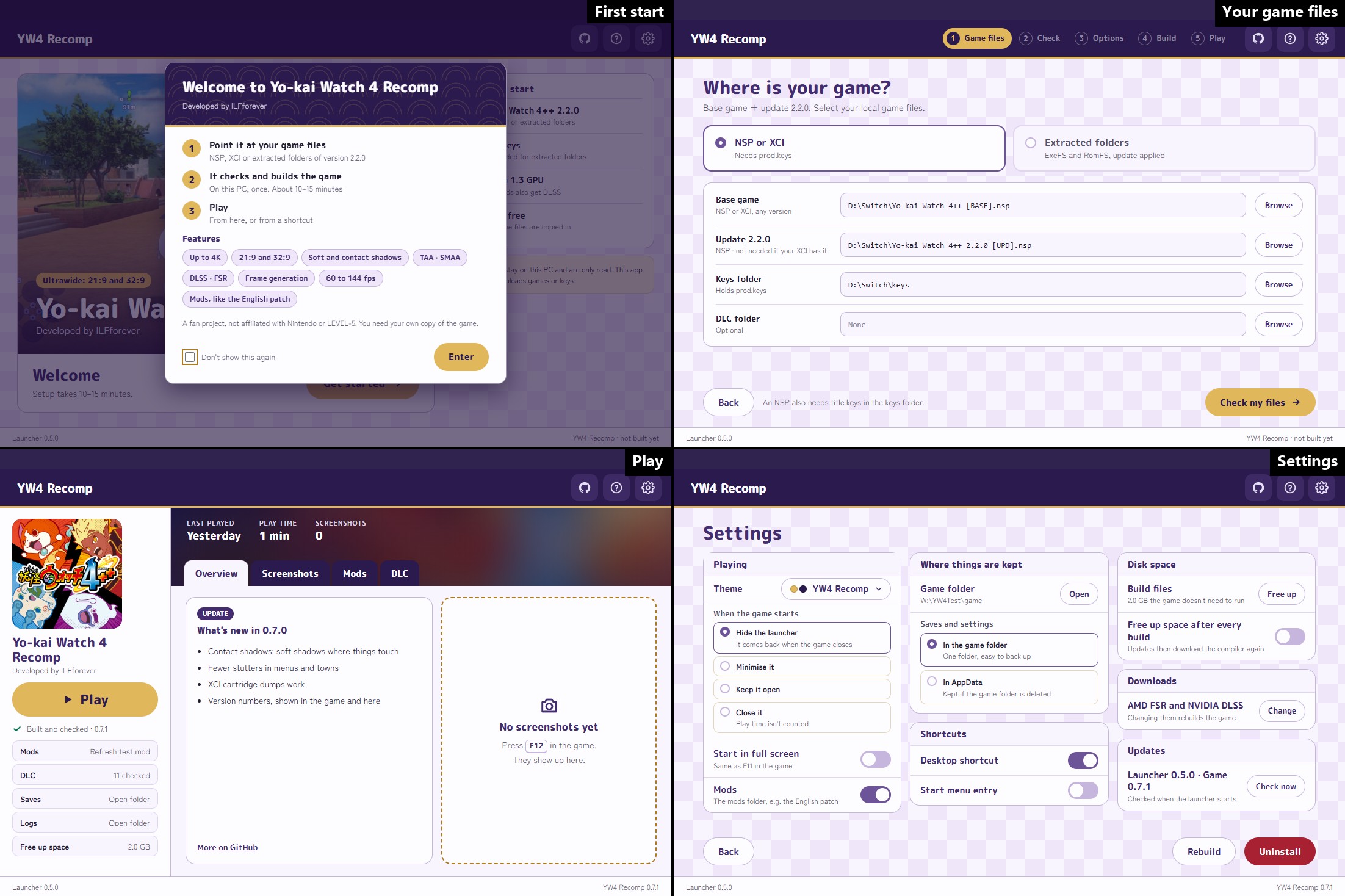
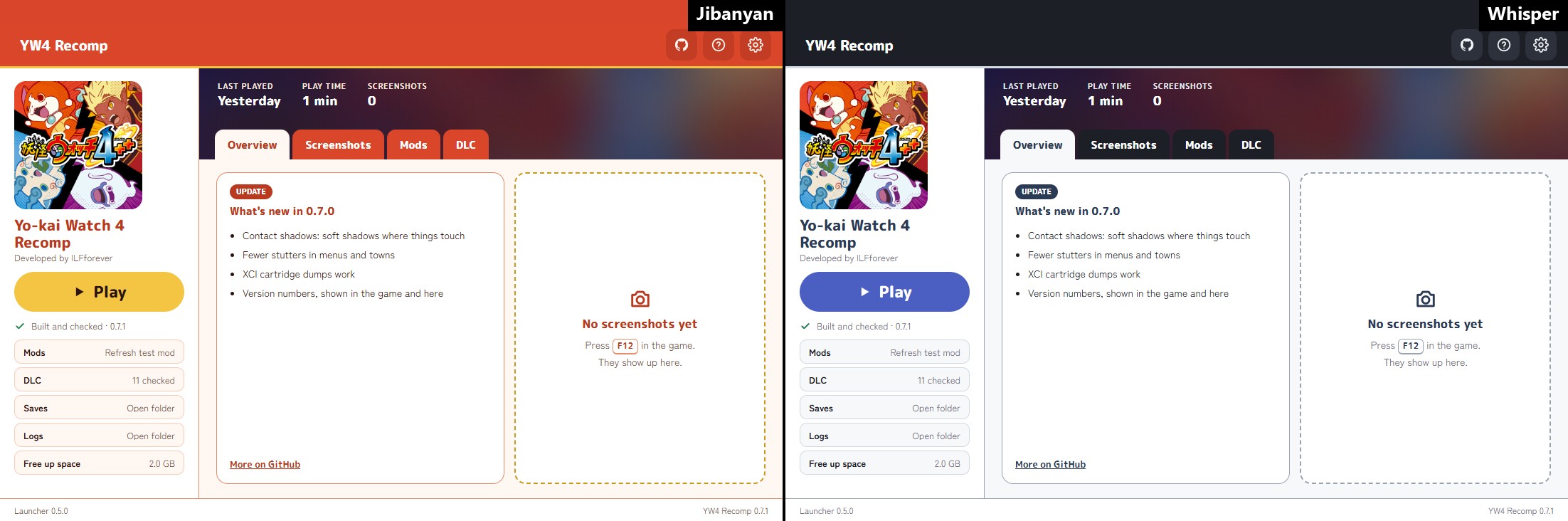
The launcher is coming out soon. It takes your game files (NSP, XCI or extracted folders), checks them, builds the game on your PC once (about 10 to 15 minutes) and starts it. After that it opens on Play, with what's new, your screenshots, mods, DLC, saves and logs. Its theme is synced with the in-game overlay's. Until it is out, you can build from source. Every step and screen is on the launcher's page.
Why not just use an emulator?
Switch emulators already run Yo-kai Watch 4++ at full speed on a good PC. This project aims further: better rendering, better graphics and better performance than the Switch version (see Goals).
An emulator can't do most of this. It imitates the console and plays the game's GPU commands as they are, so the game still decides its shadow quality, its 16:9 UI, its 30 frames/s and its effects. Here the game's renderer is being replaced with our own, so those become ours to change: higher resolution, sharper textures, bigger and soft shadows, anti-aliasing that leaves the UI sharp (TAA included) and ultrawide are already in, as are 60 frames/s and above, upscaling with NVIDIA DLSS or AMD FSR (the world drawn smaller and rebuilt at full size, the menus kept sharp) and frame generation with either (a frame made between each two of the game's).
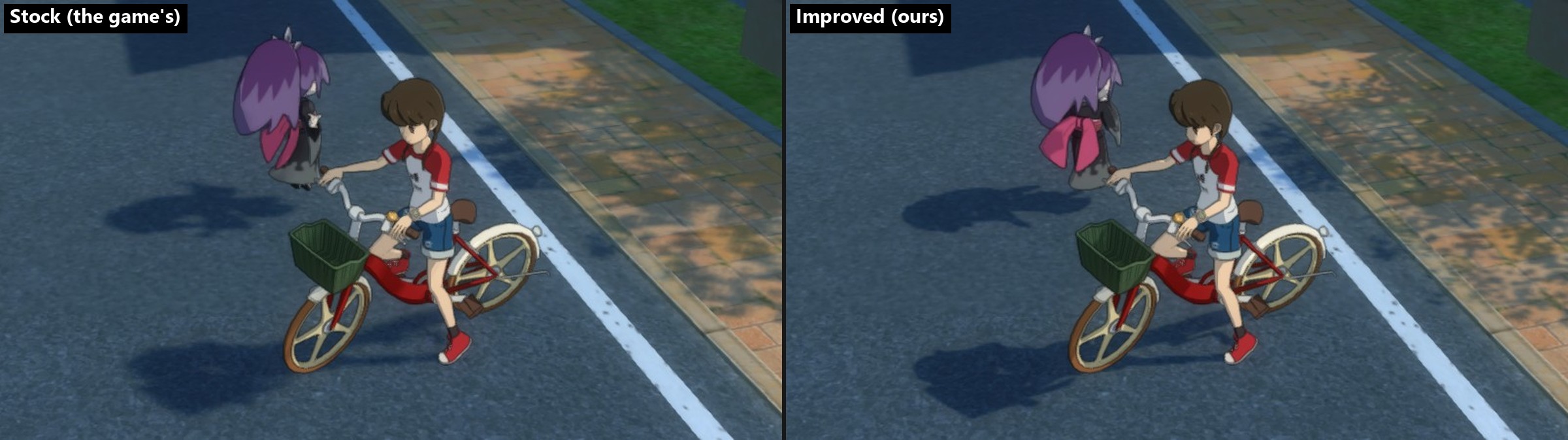
A town street, same spot: the game's shadows (1024 map, no PCSS) against ours (4096 map, PCSS ×2). The characters' shadows keep their shape, and the tree shade on the pavement is soft:
It is also lighter to run. The same busy street on the same laptop (docs/baseline.md, 2026-10-22), both at the game's own settings (1600×900, 30 frames/s, every improvement of this project off), so the two do the same work:
| Emulator (Eden) | This project | |
|---|---|---|
| CPU | 210% of one core | 111% |
| Memory | 15.7 GB | 3.9 GB |
| GPU | 30% | 33% |
Features
What the PC version adds to the Switch game. Open an entry for details, pictures and measurements; more in docs/graphics.md.
Compare them with before/after sliders → (the project's site: ilfforever.github.io/YW4Recomp)
Graphics
Resolution: up to 4K, menus and text at the same size
The 3D world at 1600×900 (the Switch's), 1920×1080, 2560×1440 or 3840×2160; the menus and text are drawn at the same size on top. About 90+ frames/s at 4K on an RTX 4070 laptop with the other features off; with upscaling (under Performance) higher.
Aspect ratio: 16:10, 21:9 and 32:9, the UI kept 16:9 in the middle
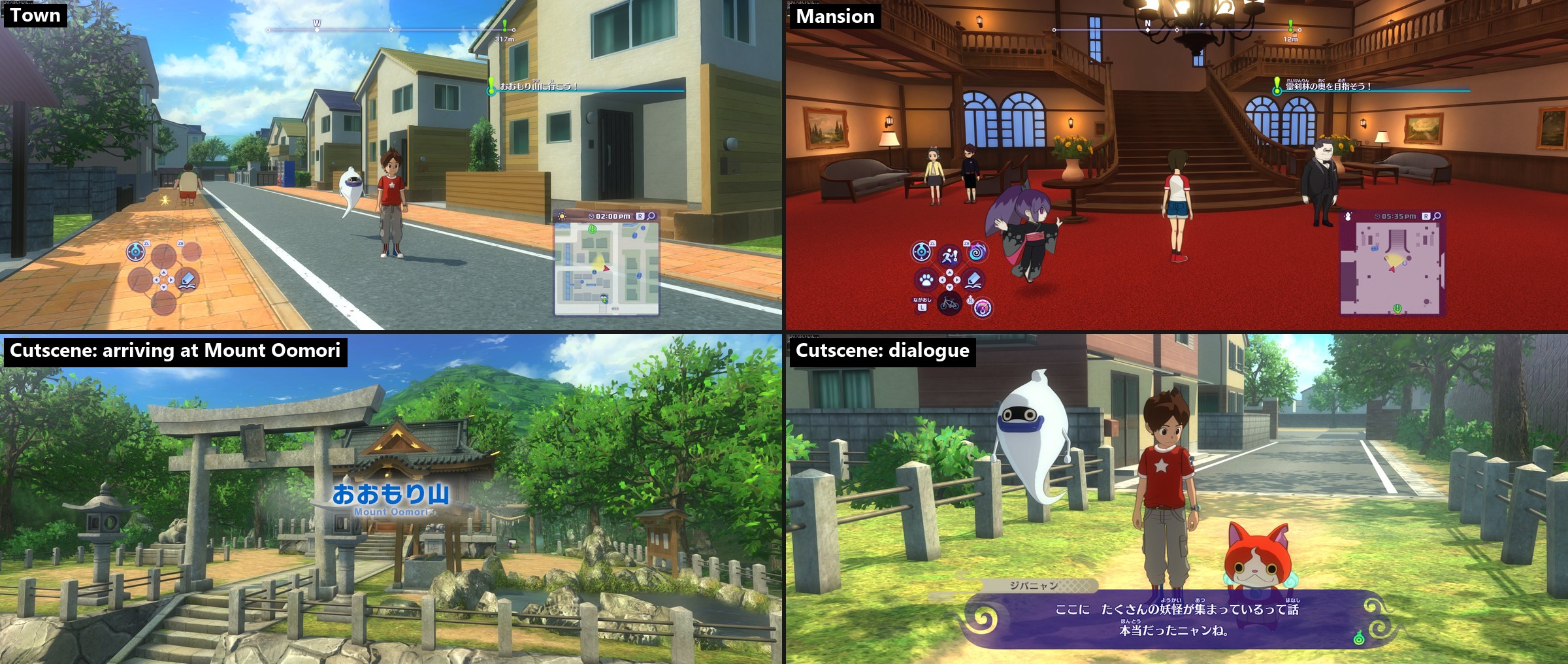
16:9 (the Switch's), 16:10, 21:9 and 32:9. Below, 21:9 in the schoolyard: the world goes on at the sides; the minimap and button hints stay where they are on the Switch.
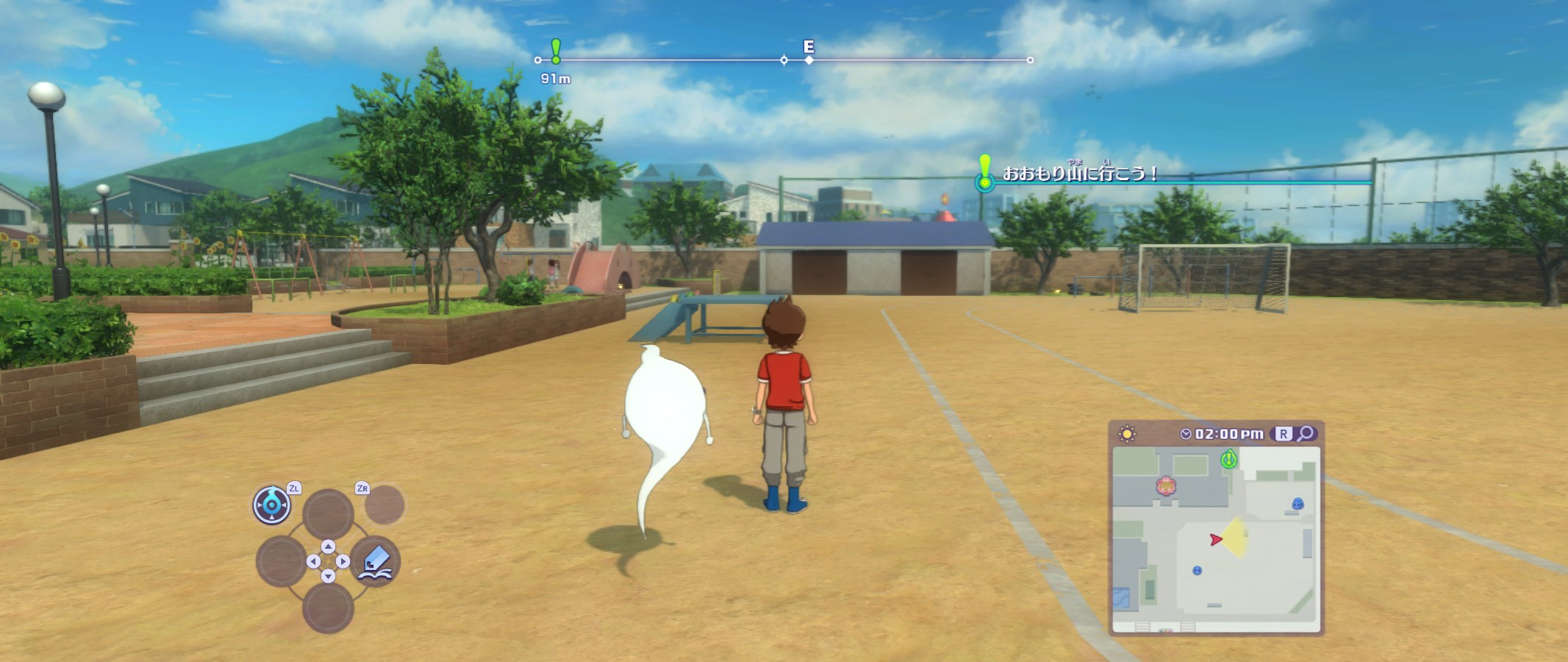
Exploring, cutscenes and battles all work at the wider ratios. 21:9 at 4K height (5120×2160), from play:
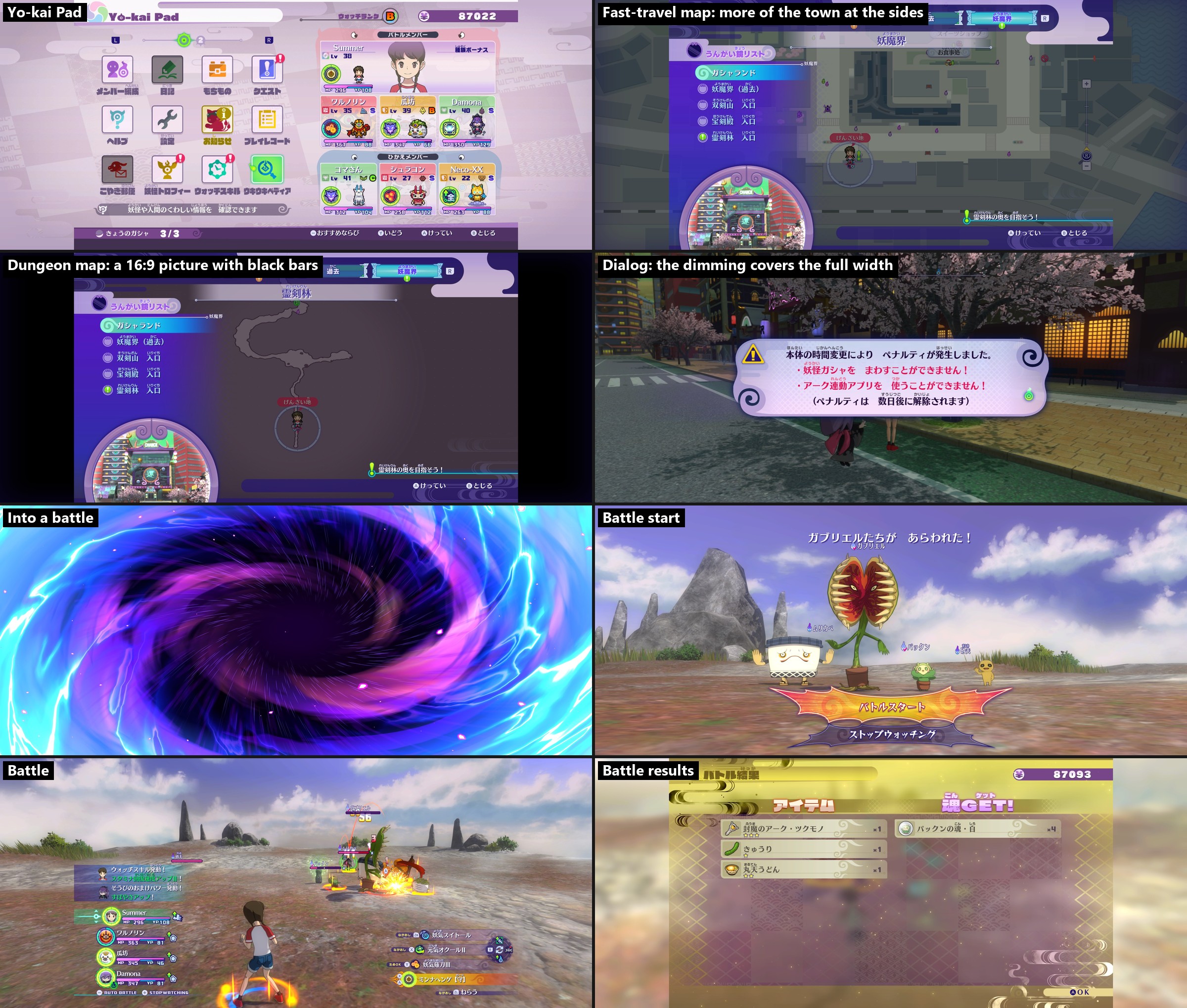
Layers over the whole screen, like the dimming behind a dialog and the loading screen's black, cover the full width; pictures made for 16:9 (the copyright notice, movies, the dungeon map's backdrop) stay 16:9 in the middle with black bars, and the town's fast-travel map shows more of the town at the sides. At 4K ultrawide there are occasional stutters in heavy scenes; more optimization is planned (known issues).
Menus, maps and battles at 21:9 (the dialog at 2133×900, the rest at 5120×2160):
Shadow map size: up to 4096, for sharper shadow edges
A bigger shadow map gives sharper, more detailed shadow edges, most visibly on shadows far from the camera. The bamboo forest, PCSS off:

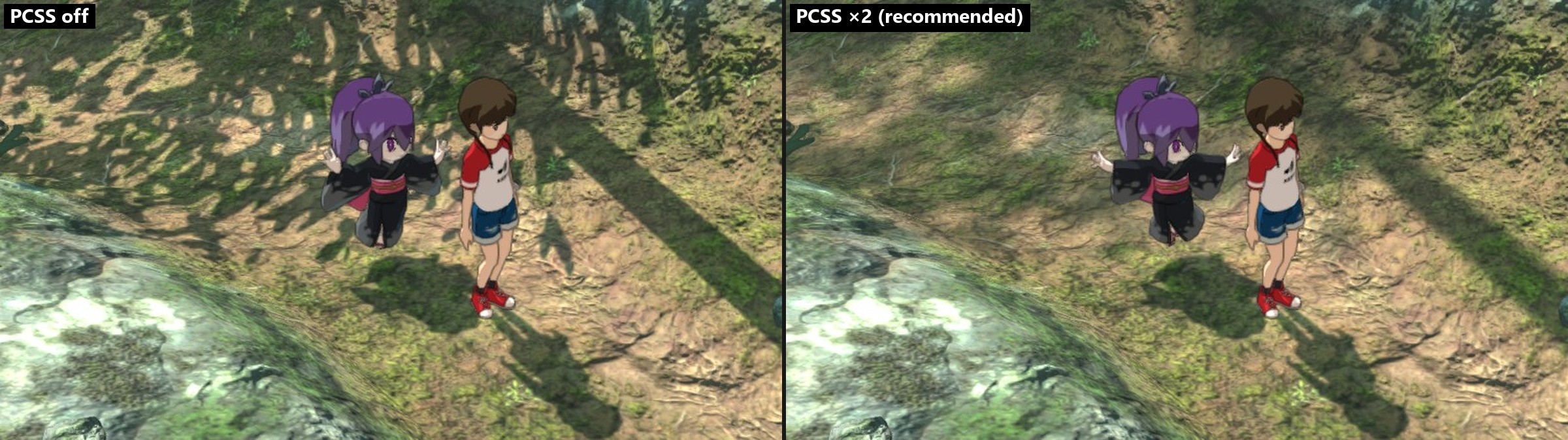
Soft shadows (PCSS): sharp where a shadow touches its caster, softer farther away
PCSS (percentage-closer soft shadows) makes shadows behave more like real ones:
- Close shadows stay sharp: where a shadow touches its caster (feet, poles, the base of a wall).
- Farther shadows get softer: the farther the caster is from the ground, the softer the edge, so tree canopies become soft dappled shade instead of a field of hard dots.
- Less shimmering: hard edges flicker as the camera moves; softer ones spread that out, so distant shadows shimmer much less.
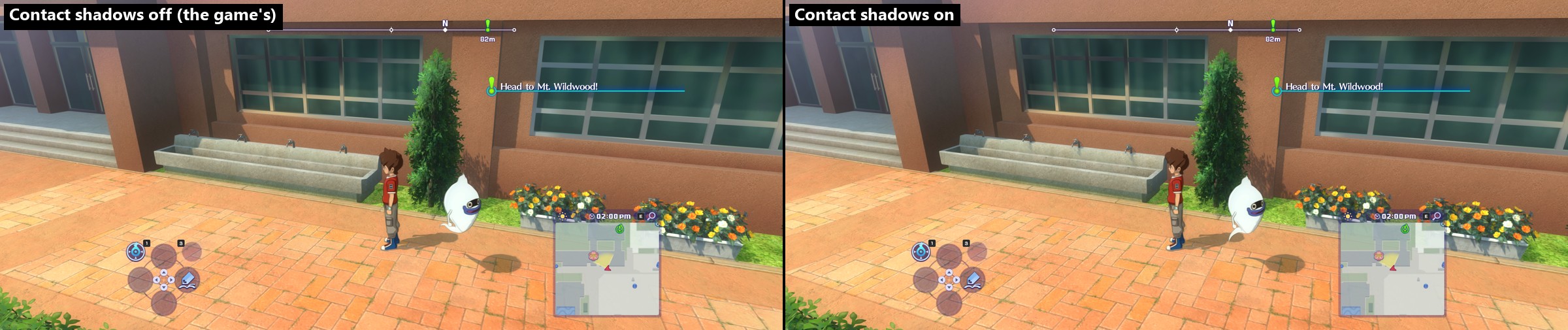
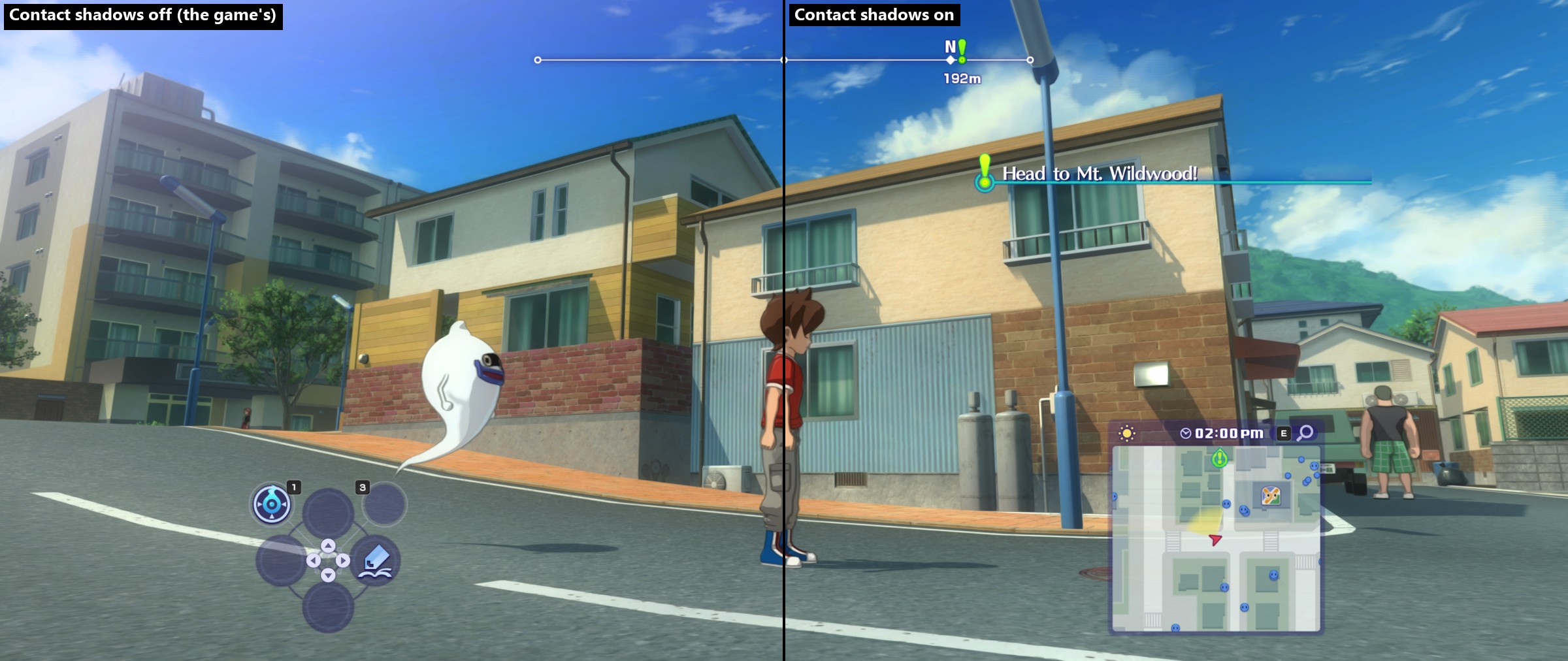
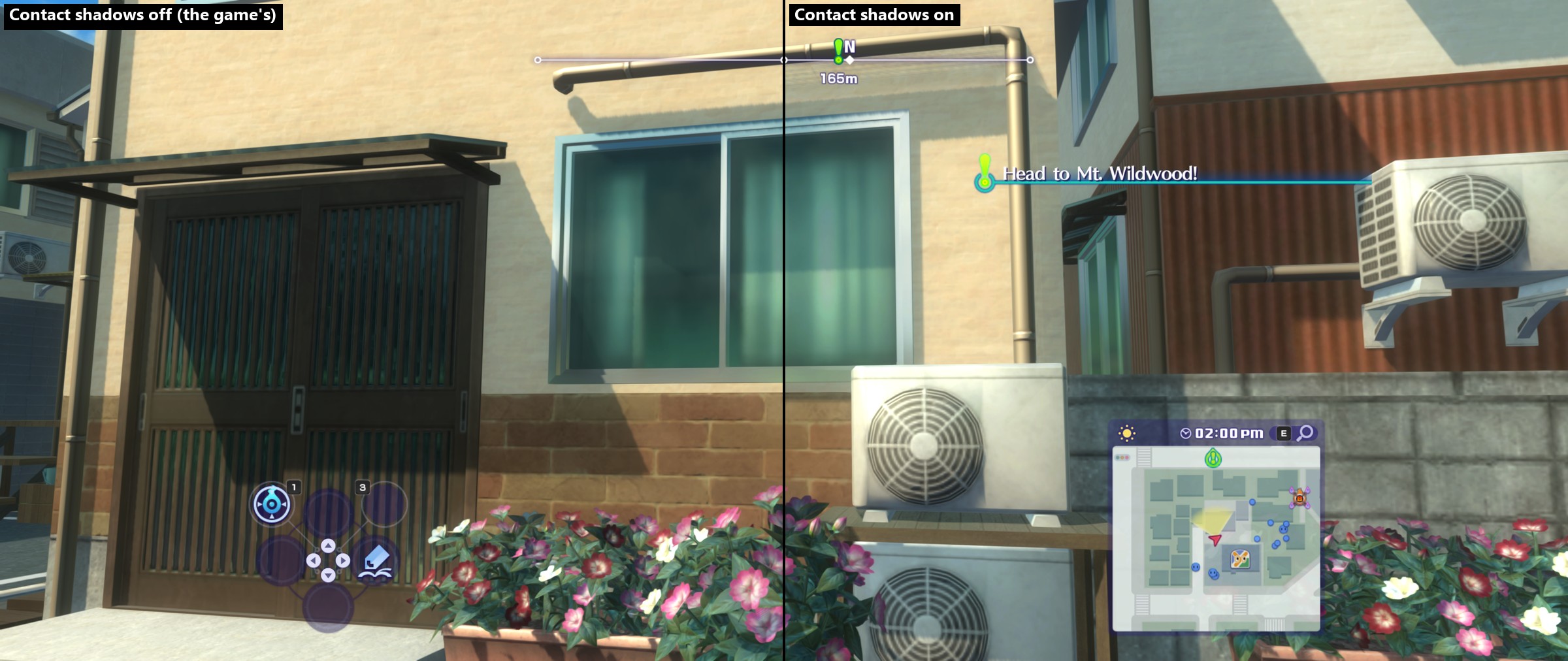
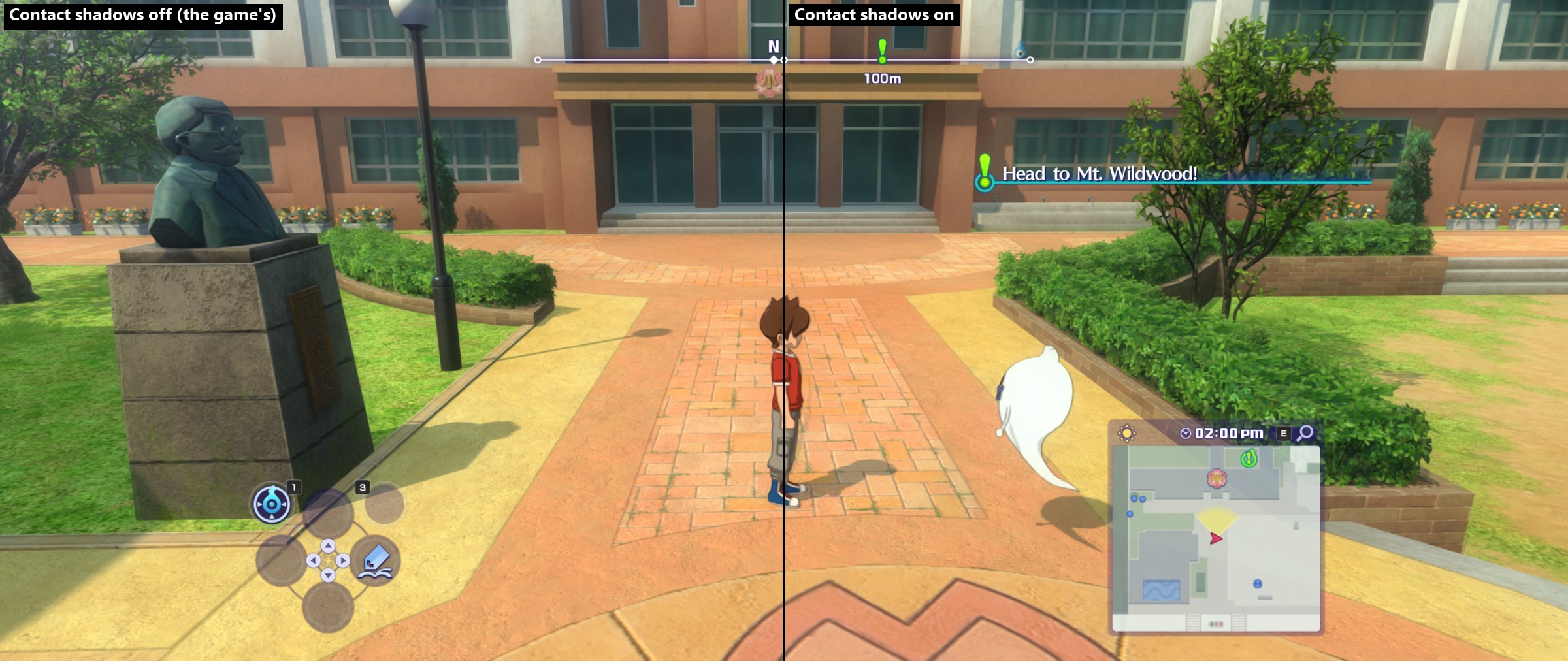
Contact shadows: the small shadows the shadow map is too coarse for
The shadow map can't see small, close detail. Contact shadows fill it in from the picture itself: a short ray from each point toward the sun finds what's in the way.
- Small objects cast their shadow: the taps over the schoolyard sink now shade the sink below them.
- Bushes, trees and flower beds get depth: the leaves shade each other, so they are no longer flat green.
- Under ledges and eaves: a thin dark line where a wall's cap, a roof edge or a planter sticks out.
- Cheap: about 0.25 ms per frame at 4K in a sunny town, less in the shade.
They only come from what's on screen, so something just outside the picture casts none. Darkness under benches and in corners is a different effect (ambient occlusion), not this one. In the panel (F1, SHADOWS, CONTACT SHADOWS) to compare.
Off and on, same spot:
Anti-aliasing: FXAA, SMAA and TAA, with the UI kept sharp
The Switch version has none. Three kinds are in, all applied to the 3D scene before the UI is drawn, so text and menus stay sharp:
- FXAA: fast, smooths jagged edges in one frame.
- SMAA: sharper edge smoothing than FXAA, also one frame at a time.
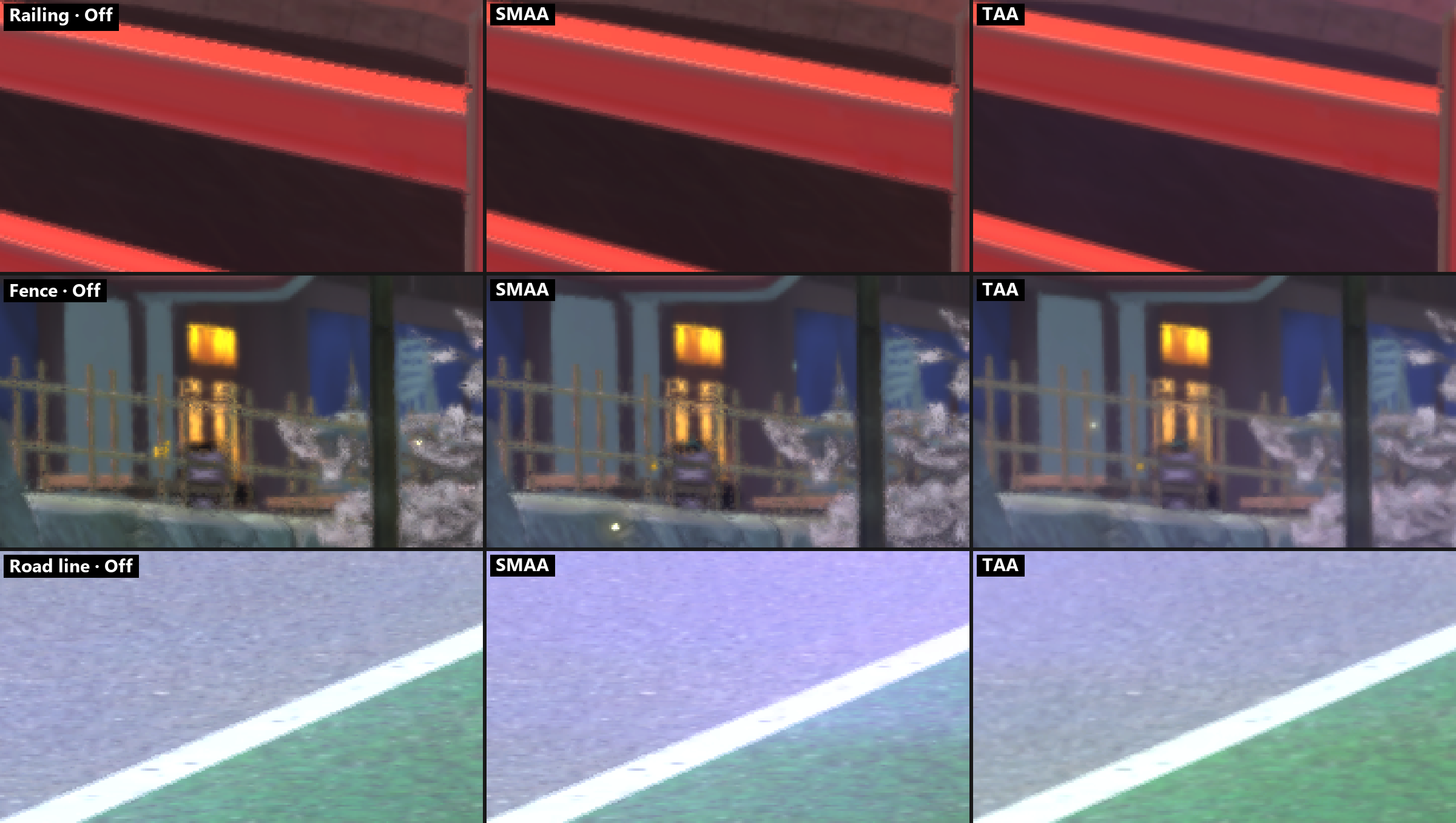
- TAA: also fixes shimmer. Thin things (fences, the goal net, wires, leaves) fall between pixels differently every frame, so they crawl while the camera moves. TAA shifts the 3D scene by a fraction of a pixel each frame and blends the frames together, using the motion the game already writes for every pixel. In the schoolyard the goal net breaks into dots and dashes without AA; with TAA it is a continuous mesh. A light sharpen keeps textures crisp (decision 0032).
Yo-kai World with TAA, 21:9 at 4K height (5120×2160):
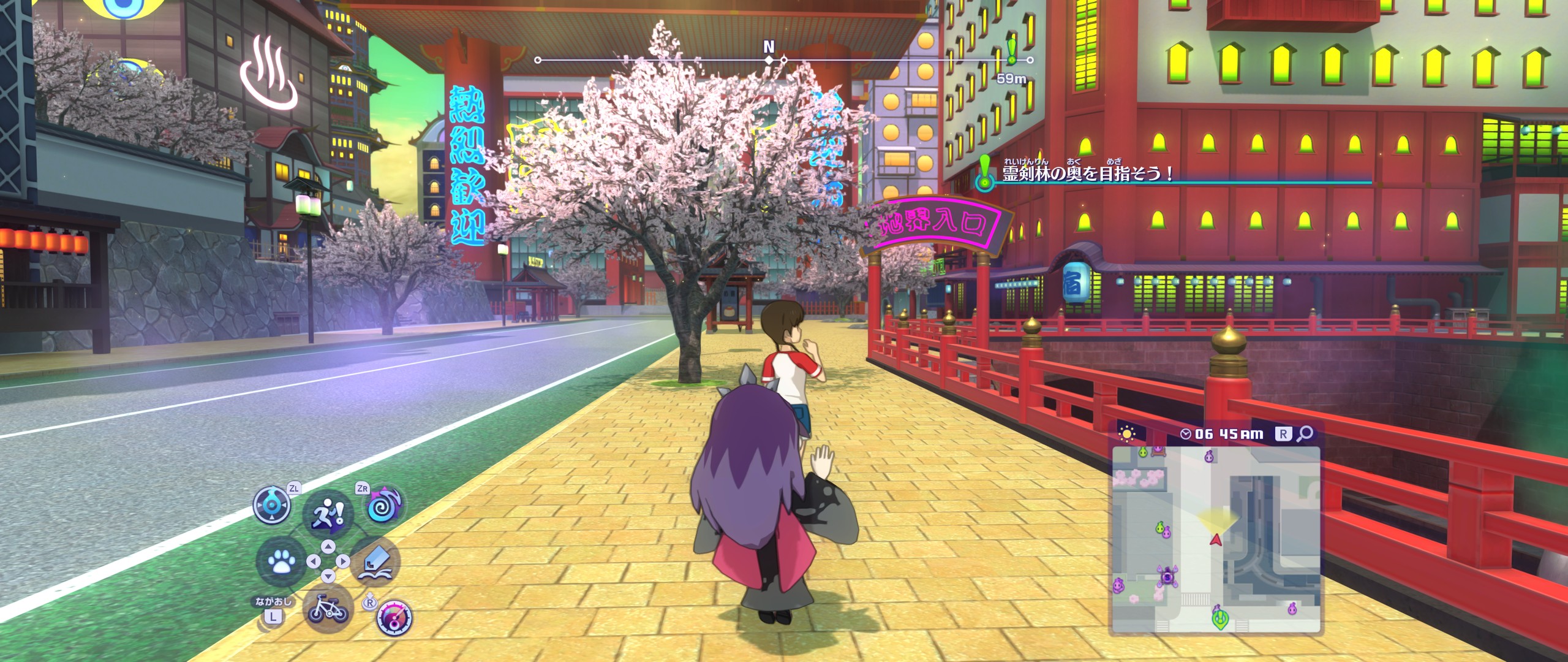
The same frame zoomed in 3×: the red railing, the fence by the lamp post and the road line.
Texture filtering: anisotropic up to ×16, sharp ground into the distance
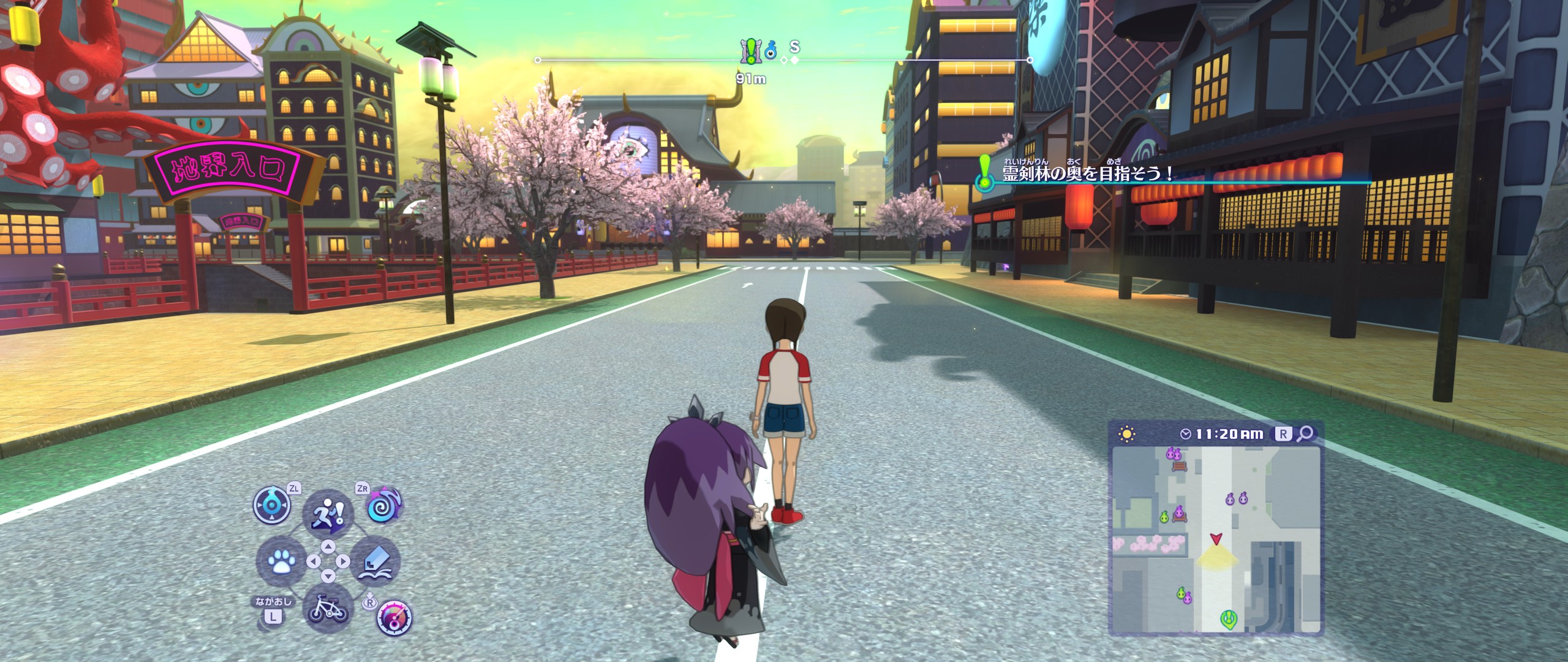
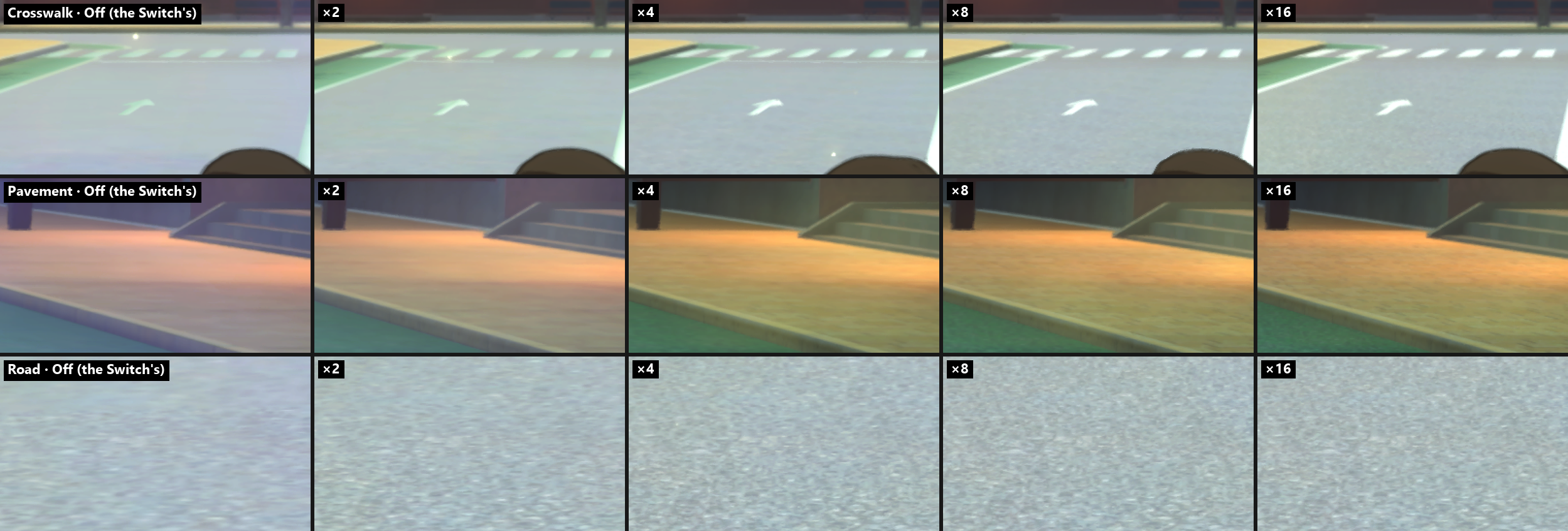
The Switch version uses none, so the ground blurs a short way ahead of the camera. Anisotropic filtering keeps the road, pavement and walls sharp into the distance, even at a low angle. Yo-kai World with ×16:
The same spot zoomed in 2×: the crosswalk far ahead, the pavement on the right and the road surface.
Performance
Frame rate: 30, 60, 120, 144 or no limit, switchable while playing
FRAME RATE in the settings panel: the game's 30 frames/s, or 60, 120, 144 or no limit. The game already moves by the real time between frames, so walking, battles, menus and cutscenes all work at any rate (~140 frames/s at 1600×900). At 4K the GPU is the limit: upscaling lifts it, frame generation doubles what is shown.
Upscaling (NVIDIA DLSS, AMD FSR): the world drawn smaller, rebuilt at full size, menus kept sharp
With ANTI-ALIASING set to DLSS or FSR, the UPSCALING row draws the 3D world smaller than the resolution and the upscaler rebuilds a full-size picture from it and the frames before, using the motion the game writes. The menus and text are drawn afterwards at full size.
Which to use: DLSS for the cleanest picture, FSR for the most frames. On an NVIDIA RTX GPU, DLSS keeps fine patterns (perforated fences, leaves) clean where FSR turns them to grain, and shadow edges still. It uses NVIDIA's newest model, which costs more GPU time than FSR; with it, balanced is the fastest DLSS mode (its performance mode uses a heavier model). FSR runs on any GPU and gives more frames in every mode. DLSS needs NVIDIA RTX; choosing it elsewhere falls back to FSR.
Bamboo forest at 4K 21:9 on an RTX 4070 laptop, frames/s (for comparison, native 5120×2160 with TAA: ~81):
| Mode | World drawn at | DLSS | FSR |
|---|---|---|---|
| native, UPSCALING off (DLSS / FSR as anti-aliasing only) | 5120×2160 | ~61 (DLAA) | ~58 |
| quality | 3413×1440 | ~85 | ~94 |
| balanced | 3013×1271 | ~92 | ~106 |
| performance | 2560×1080 | ~82 | ~118 |
DLSS's own work costs 5.2-5.7 ms of GPU time per frame at this output size (7.4 ms in performance mode), FSR's 3.6-4.3 ms (6.3 at native). Measured 2026-10-31, standing still on the late-game save, FRAME RATE unlimited, frame generation and Reflex off; the other settings at their defaults: EFFECTS RESOLUTION half, SHADOW MAP 4096, SOFT SHADOWS x2, TEXTURE FILTERING x16, DISTANCE BLUR half, and our own renderer's passes on.
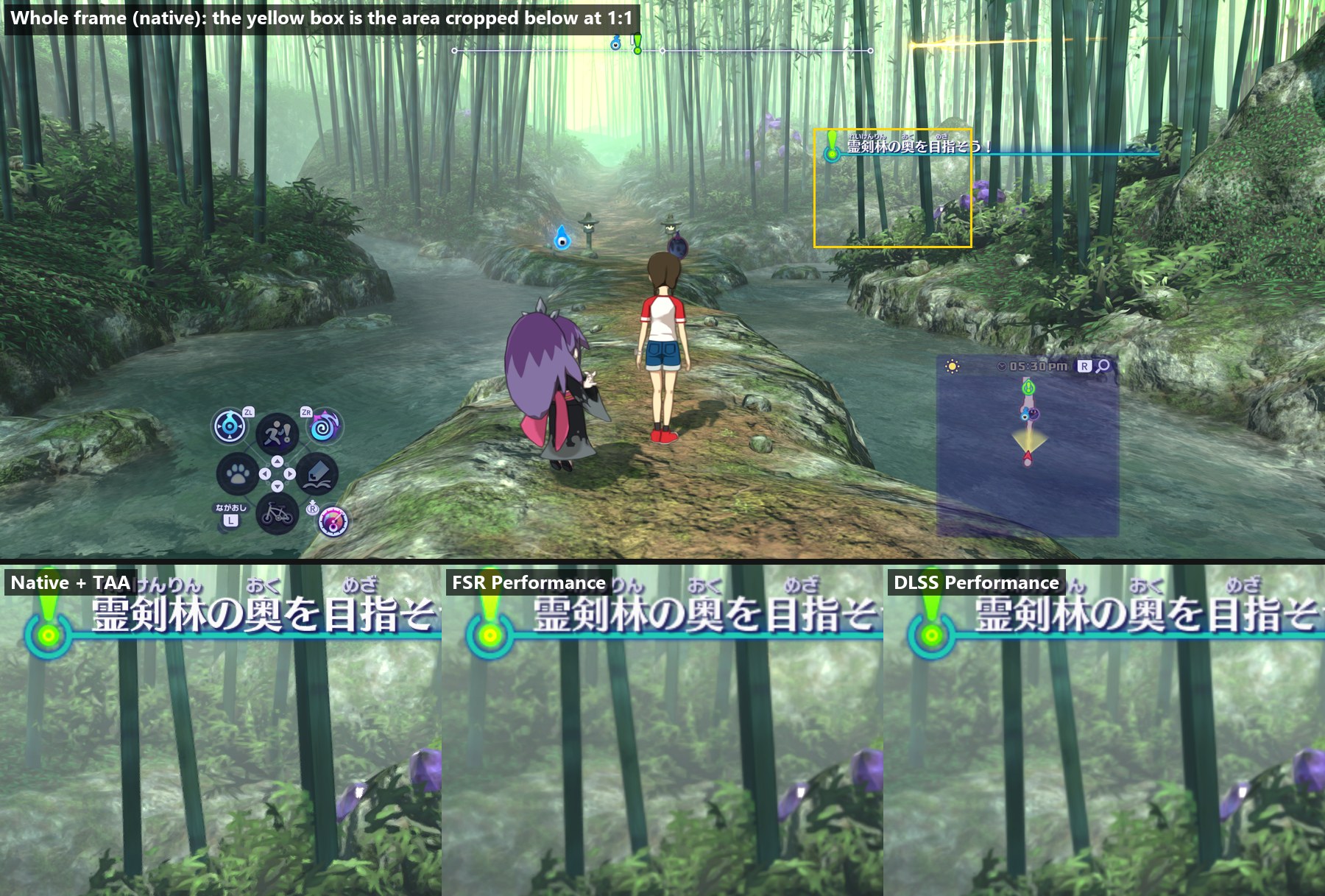
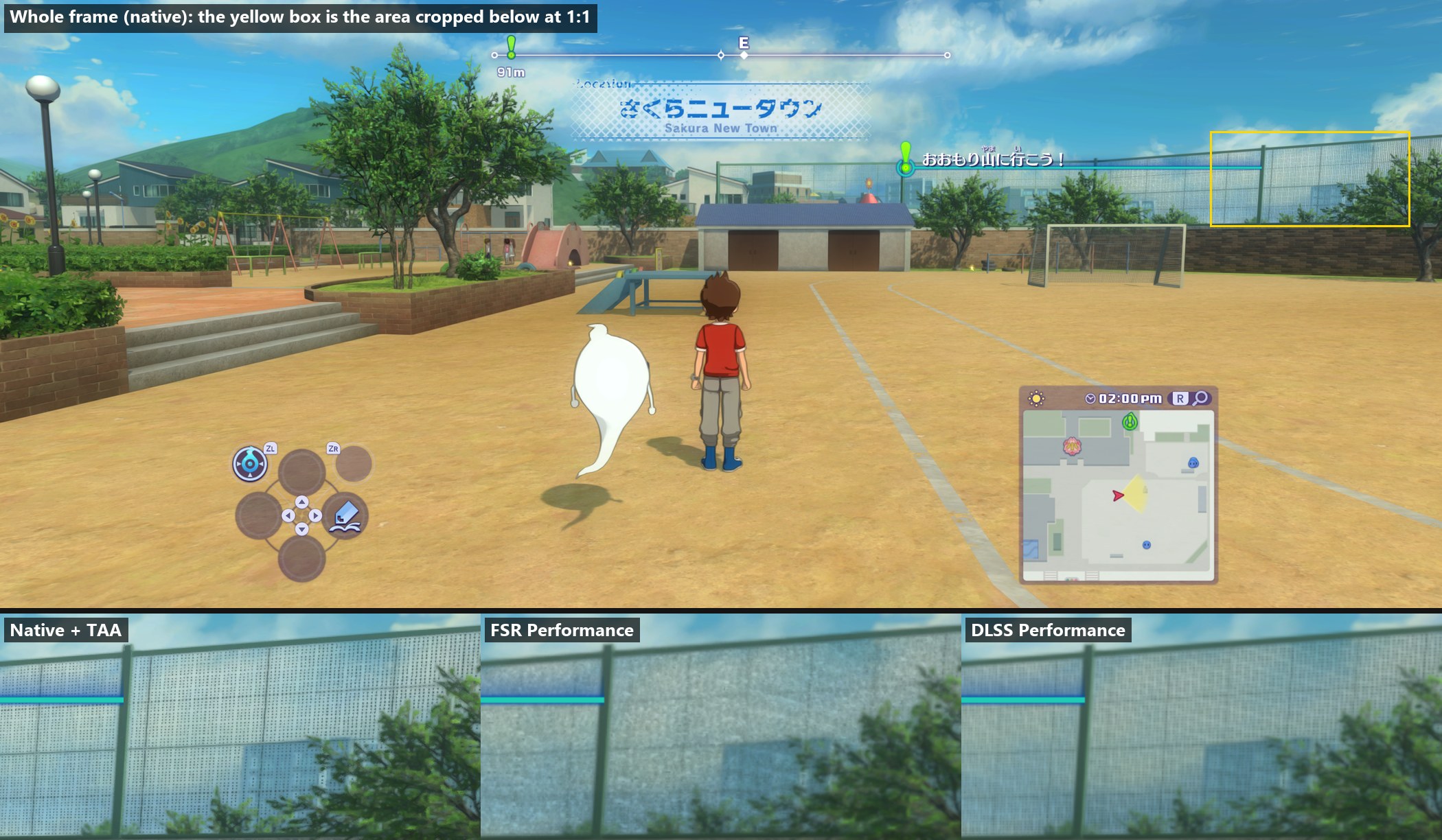
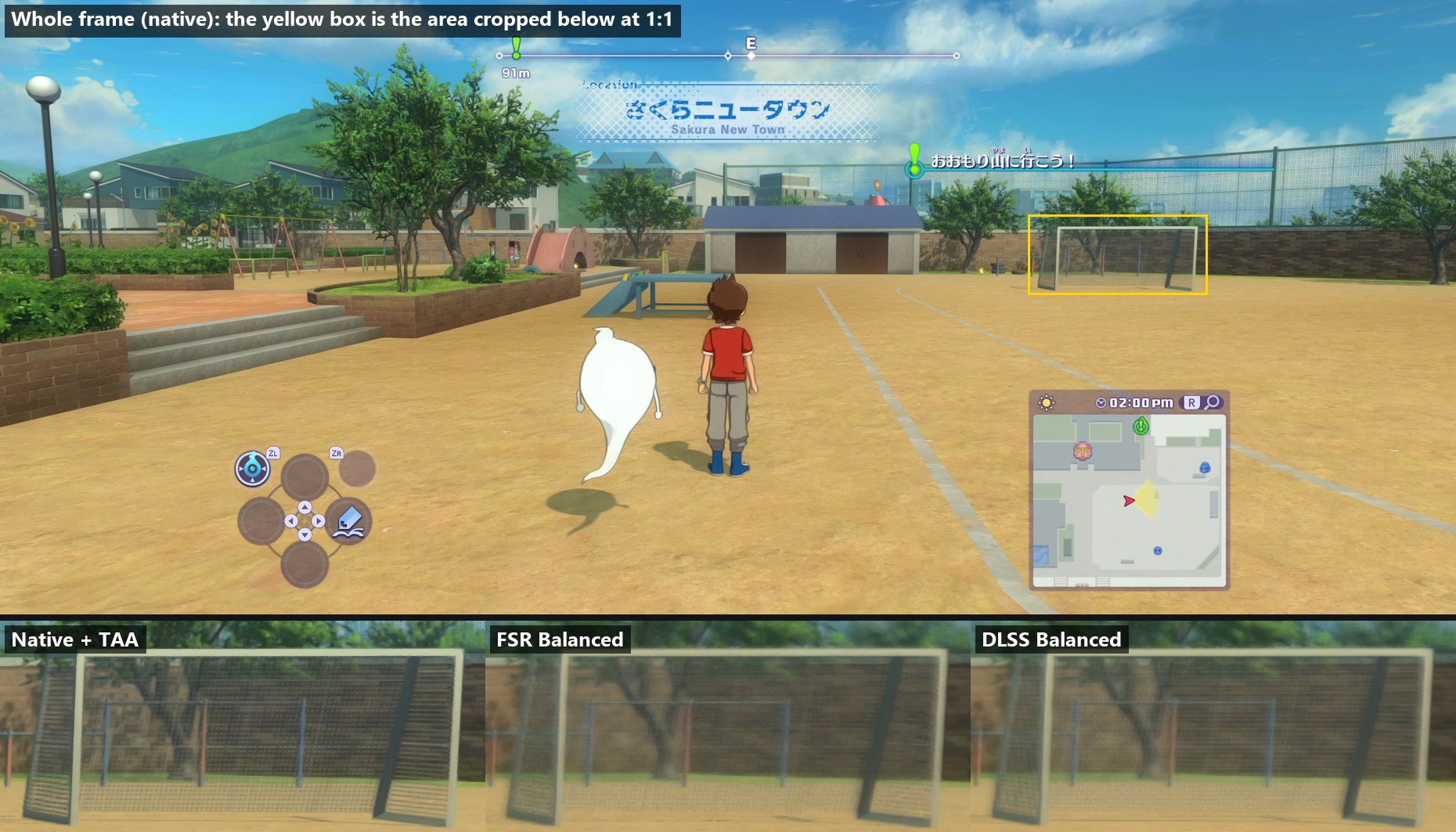
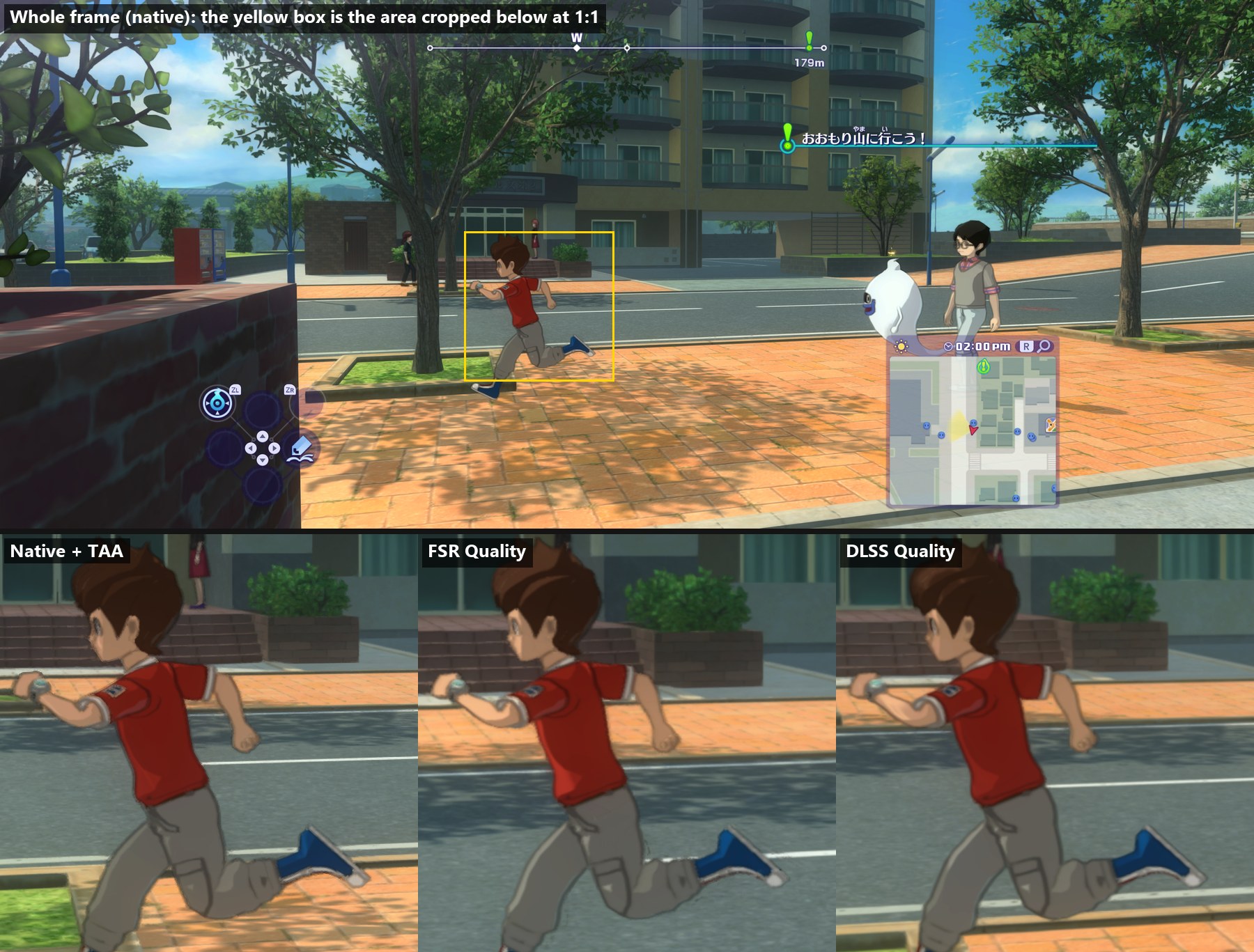
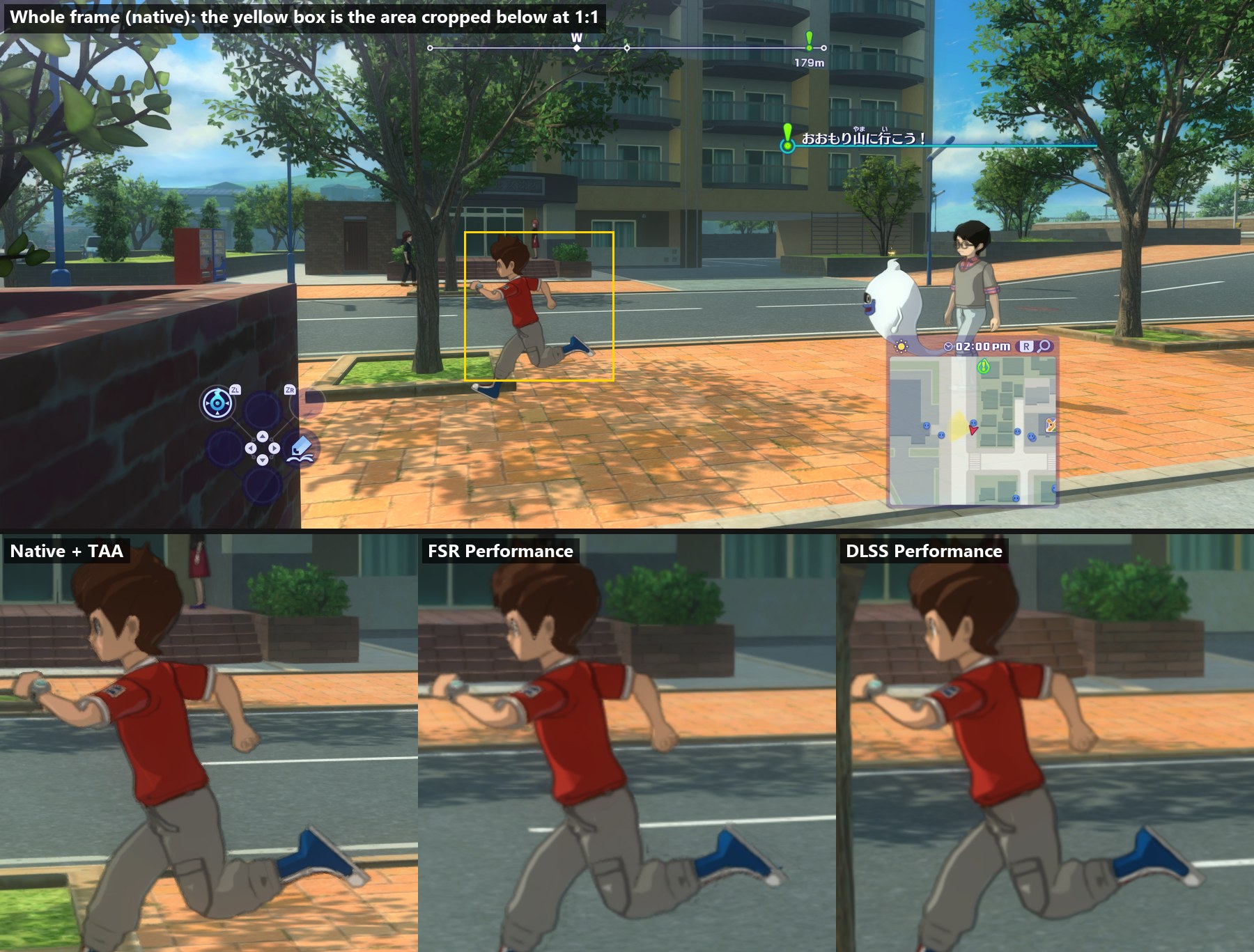
Each image below: on top the whole native frame with the cropped areas in yellow, underneath the 1:1 crops, each labelled with its mode. The DLSS images were taken with its older, faster model, removed since because it made shadow edges flicker; they haven't been retaken with the newest model yet.
Quality (the world drawn at 3413×1440): native, FSR, DLSS. The quest text is as sharp in all three (the UI is drawn at full size); DLSS keeps the bamboo and the lantern closest to native.
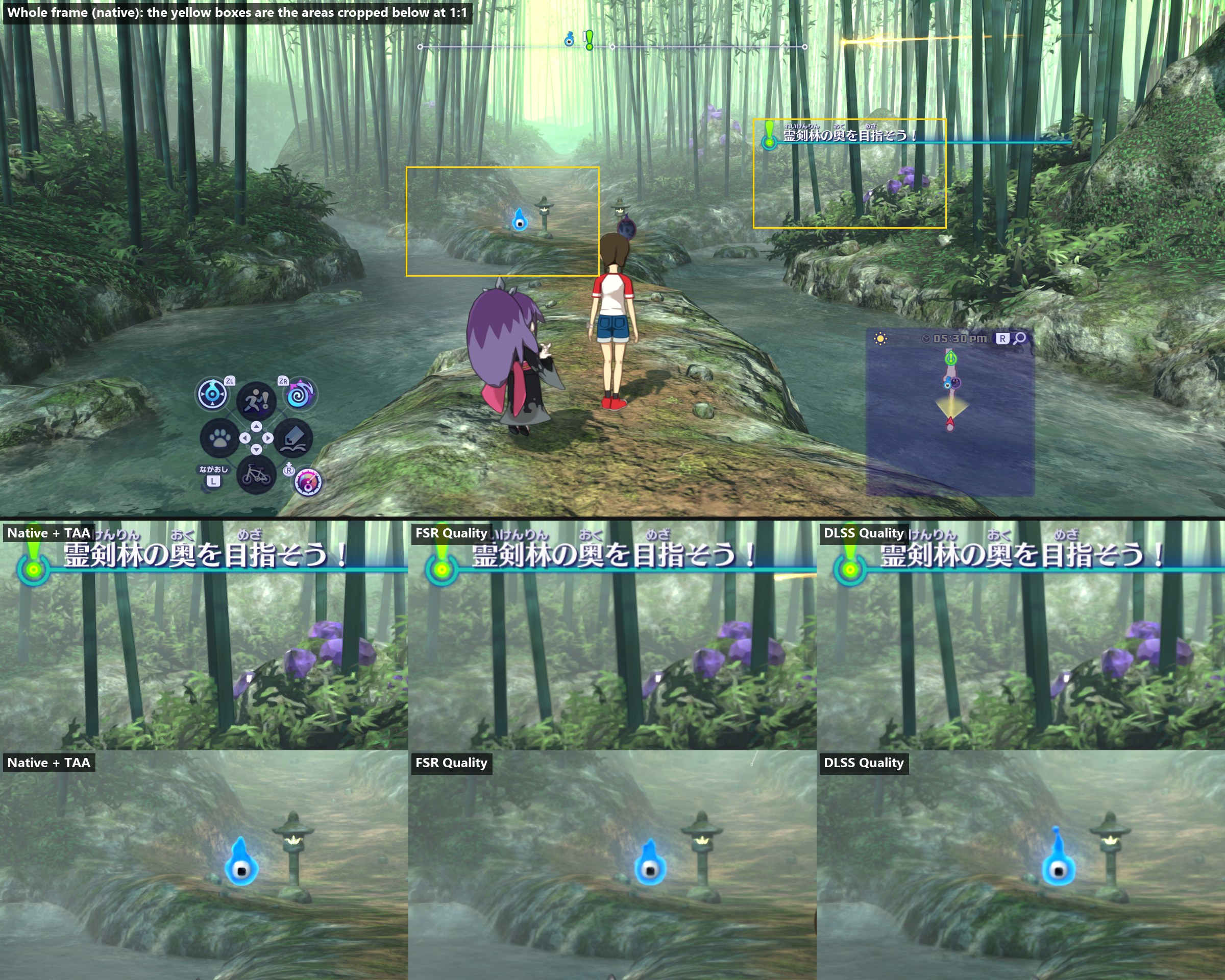
Performance (the world drawn at 2560×1080, a quarter of the pixels): native, FSR, DLSS. DLSS keeps the bamboo and the leaves crisper.
The schoolyard's perforated high fence at performance: native, FSR, DLSS. FSR turns the holes into grain, DLSS keeps a clean pattern.
The schoolyard's far goal net at balanced (the world drawn at 3013×1271): native, FSR, DLSS. Both keep the net at this mode; DLSS's mesh is the more even.
A running character at quality, then at performance: native, FSR, DLSS. No trail behind the moving leg in either.
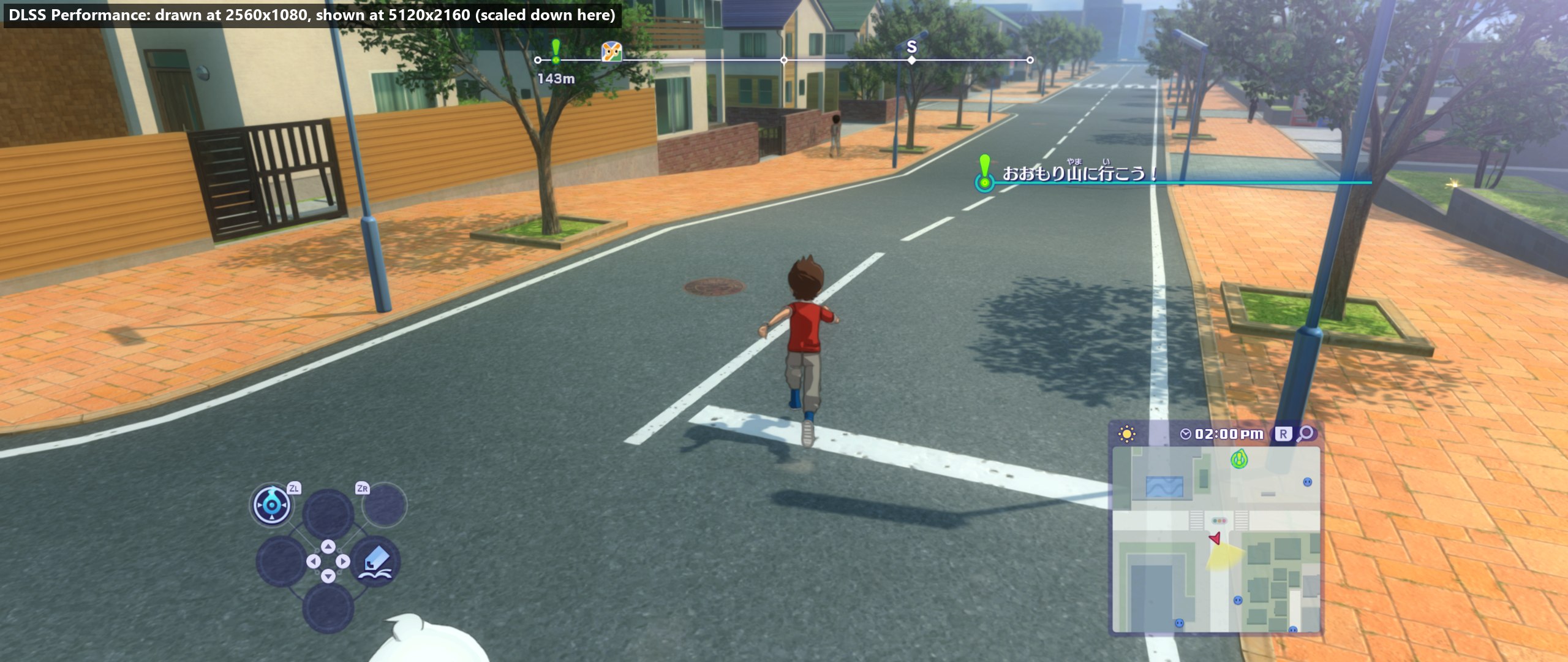
A whole frame in DLSS performance, the world drawn at 2560×1080 and shown at 5120×2160 (scaled down here), ~112 frames/s on the laptop:
How they work and what was measured: decisions 0039 (FSR) and 0040 (DLSS).
NVIDIA DLSS is a technology of NVIDIA Corporation, used under NVIDIA's RTX SDK licence; its files are downloaded by the build and are not part of this repository. AMD FSR is AMD's, under the MIT licence.
Frame generation (NVIDIA DLSS, AMD FSR): a frame made between each two of the game's, the menus kept still
With ANTI-ALIASING set to TAA, FSR or DLSS, the FRAME GENERATION row makes one frame between each two the game draws, from the motion the game writes and the depth, and shows it in between: about twice as many frames on screen. It switches while playing. The menus, our HUD and the settings panel stay still and sharp: frame generation is given the picture from before the menus are drawn, so it can tell them from the world.
Which to use: on an NVIDIA RTX 40 or newer, choose DLSS. It leaves the game more frames of its own and keeps moving characters cleaner. On other GPUs, use FSR (DLSS frame generation needs RTX 40 or newer; the row skips it elsewhere).
Busy late-game town at 4K 21:9 on an RTX 4070 laptop (DLSS performance upscaling, FRAME RATE unlimited). Without frame generation: ~70 frames/s. With it:
| Frame generation | Game frames/s | Frames on screen/s |
|---|---|---|
| off | ~70 | ~70 |
| FSR | ~63 | ~126 |
| DLSS | ~75 | ~150 |
The game draws fewer frames of its own with FSR because its frame generation runs on the same GPU (~7 ms per frame at 5120×2160); DLSS's runs on the RTX's own hardware for it. The HUD (F3) shows both numbers: FPS counts the game's frames, SHOWN the frames on screen.
Things to know:
- It adds about half a frame of input delay, so it feels best where the game already runs at 60 or more.
- FRAME RATE limits the game's own frames; what is shown is about twice that.
- DLSS frame generation pauses while the game window isn't the focused window (NVIDIA's rule).
- With DLSS frame generation, NVIDIA Reflex is on (NVIDIA requires it). The REFLEX row sets it otherwise: it lowers input delay