Z - Rust
Z - Rust is a native PC port of the game Z, recompiled into Rust with SDL3 support and a launcher.
- Type: PC port
- Game: Z
- Runs on Windows and Linux
- By retro gaming tools
- Latest release v0.51-beta, 2026-11-22
- Source: https://github.com/retro-gaming-tools/z-rust
README
Z, recompiled
A native Windows and Linux version of Z, made by translating the game's original programs statically into Rust, on a new runtime built on SDL3. The version is in VERSION, and releases are at https://github.com/retro-gaming-tools/z-rust/releases.
The coding was done by AI (Claude, by Anthropic). The testing was done by a human.
No game data is included. You need Z by the Bitmap Brothers: the Windows 95 release (WINZ.EXE dated 1998-03-02) or the German or English DOS release (the Steam release isn't supported). The program reads the game's files from your copy when it starts, and checks every program file by SHA-256 before it runs.
The launcher
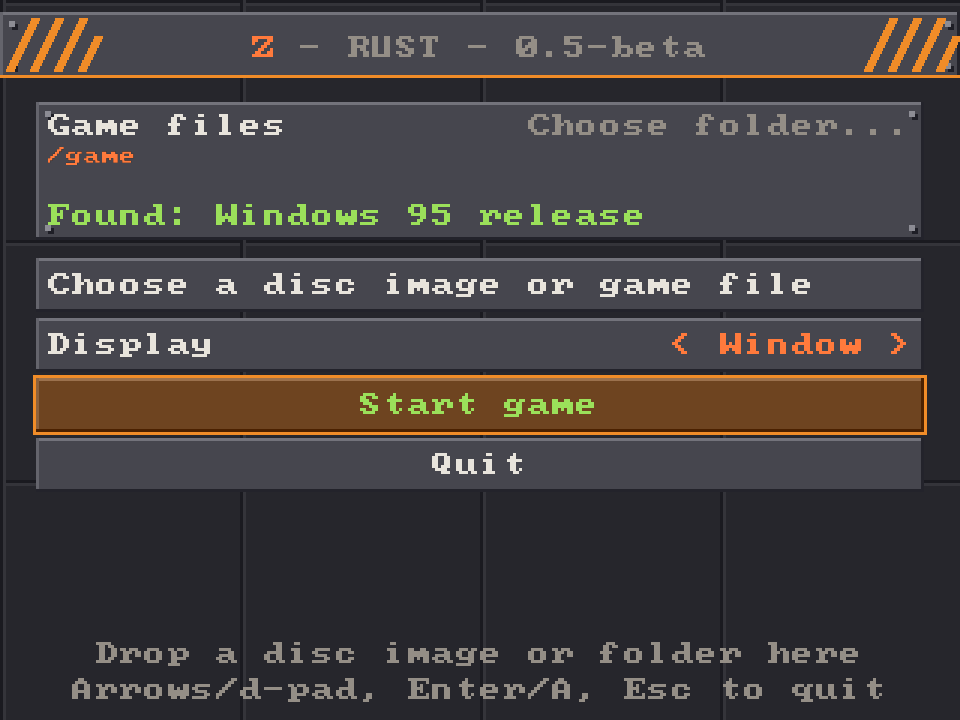
The launcher opens before the game. Your choices are saved in settings.ini beside the program (beside the .AppImage file on Linux), and --play on the command line skips the launcher.
- Game files: where your copy of the game is. Click Choose folder... or press Enter to pick a folder, or drop a folder or disc image onto the window. The line below it says which version was found, or what's missing.
- Choose a disc image or game file: pick a disc image (
.iso,.bin,.img,.mdf,.cue,.ccd) or any file of the game. - Display: Window or Fullscreen.
- Advanced settings... > Files kept (Linux only): Beside program (the default:
settings.ini,recomp.logand unpacked discs beside the.AppImage) or Home (XDG) (~/.config/z-rustfor the settings,~/.local/share/z-rustfor the log and unpacked discs, for AppImage managers that keep all AppImages in one folder).--xdgon the command line does the same. - Start game and Quit.
The launcher works with the mouse, the keyboard (arrow keys to choose and change, Enter to confirm, Escape to quit) and a controller (d-pad to choose and change, A to confirm, Start to start the game, B to quit).
In the game, F11 switches between fullscreen and a window, and F10 shows or hides a frame counter. The port starts in fullscreen unless the launcher's Display row says Window. F10 and F11 belong to the port: the game never sees them, so they can't be used for anything in the game.
Supported versions
Z came as two programs: the Windows 95 release (WINZ.EXE) and the DOS release (ZED.EXE). The port carries both, and each plays as its own program, the way it did on its own system. It checks the one it starts by SHA-256:
| Version | Program | SHA-256 | Where it comes from |
|---|---|---|---|
| Windows 95 release | Z/WINZ.EXE (1998-03-02) | 9d2f3730… | The Windows 95 disc, as a disc image or its files |
| DOS release, German or English (European disc) | ZED.EXE (inside the disc's Z.PAC) | 5d614611… | The German or the European DOS disc, as a disc image (.iso, .bin, .img, .mdf, .cue, .ccd) or its files. Both discs carry the same program; the port starts it in German or English to match the disc |
Only these original DOS and Windows 95 releases are supported. The Steam release doesn't work with this port: its program is a different one. Other releases and languages aren't supported either: their programs differ, and the launcher says which version it found, or that it found none.
Starting
You don't install the game: its installers don't run on modern systems. In the launcher, pick your disc image or any file of the game in a folder, or drop it on the window. An image is unpacked once into a game folder beside the program (game-zed for the DOS release), and every later start finds it by itself. A real CD or DVD in a drive works the same way: pick the mounted disc's folder or any file on it. The DOS release gets its CD drive and language switch (/CD:E /ger or /CD:E /eng) from the port, and needs no sound, video or mouse driver set-up: the port picks the best settings, with SVGA on.
What works
- Both releases: the intro and logo videos, the menus, cutscenes, missions, saving and loading, sound effects and MIDI music.
- Windows: the game's menu bar and dialogs, drawn by the port in the Windows 95 style, and videos filling the screen.
- DOS: SVGA (640x400) and VGA missions, edge scrolling on every side, and scrolling by dragging with the right button.
- The game runs at its own speed: the Windows release's missions run at 18 frames a second, as the original did.
- Saves made with the original.
Known limits
- Music plays on the built-in GeneralUser GS bank, so it sounds like General MIDI, not a Roland MT-32.
- No multiplayer.
- The game is shown at its original resolution (640x480, or 640x400 and 320x200 in DOS), scaled to the window. Larger views of the battlefield are planned.
- In the Windows release, Alt (or the controller's Back button) opens a menu with Quit, for fullscreen, where there's no window to close.
If something doesn't work, please open an issue and attach recomp.log, which is beside the program (beside the .AppImage file on Linux). After starting again, it's recomp-previous.log.
Why the source is here
So you don't have to trust a download. Everything that makes the release is in this repository:
programs/: the game's code, translated to Rust by the recompiler, a folder for each program, andsrc/, which starts them. Don't edit them by hand: they're regenerated.mods/: hand-written Rust that replaces some of the game's functions (see below).runtime/: the hand-written runtime: the CPU state, the Windows and DOS functions the game calls, video, sound and input on SDL3, and the launcher.recompiler/: the static recompiler that wroteprograms/andsrc/.build/,build.sh,regenerate.sh: the Docker build for the release, and the check that the code matches your game..github/workflows/build.yml: GitHub builds the release from a tagged commit, with build provenance.CHANGELOG.md: what changed in each version, andchanges.sh, which shows the full diff between two versions.
Building
You need Docker, and nothing else.
./build.sh
This builds an image with pinned tools (Rust, MinGW, SDL3, appimagetool), then the Windows zip and the Linux AppImage, into dist/.
Checking the code against your game
./regenerate.sh /path/to/your/game
This builds the recompiler, runs it on your copy of the game with the settings in recomp.json, and compares the result with src/ and the rest of this repository. No difference means the published code is exactly what the recompiler makes from the game.
Checking a release
Release files built by GitHub carry a provenance attestation. With the GitHub CLI:
gh attestation verify <file> --repo retro-gaming-tools/z-rust
It tells you which workflow run and which commit built the file.
Comparing versions
Each version has a tag v<version>, such as v0.5-beta.
./changes.sh 0.5-beta 0.6-beta > changes.diff
This lists the changelog entries, the commits and the files that changed, then the diff of everything written by hand: the runtime, the mods, the recompiler and the build. The translated code in src/code/ is only summarised, because a regeneration rewrites much of it. Add --code for its full diff.
Mods
Each .rs file in mods/ is hand-written Rust, and a pub fn f_XXXXXXXX(cpu: &mut Cpu) in one replaces the game's function at that address everywhere. The translated original stays callable as o_XXXXXXXX. Start a mod file with use crate::code::*; and use recomp_runtime::Cpu;. A line //! launcher: LABEL gives the mod an On/Off row in the launcher (launcher-off: for one that starts off, launcher-advanced: for one on the advanced page), and its functions then begin with if !host::mod_enabled(cpu, "FILE") { return o_XXXXXXXX(cpu); }.
Licence
The recompiler, the runtime, the mods and the build scripts are under the MIT licence in LICENSE.
MIDI music is played by rustysynth (MIT) with the GeneralUser GS sound bank v2.0.3 by S. Christian Collins (https://www.schristiancollins.com), which is built into the program. Its licence is in runtime/assets/GeneralUser-GS-LICENSE.txt.
The code in programs/ is translated from the program files of the original game, including the C runtimes they come with. That code belongs to its rights holders, so no licence is granted for it here. This project isn't affiliated with or endorsed by them. Please buy the game.
Generated for z by the recompiler in recompiler/.