ZeroRacersVirtualBoyRecomp
ZeroRacersVirtualBoyRecomp is a Windows recompilation of Zero Racers for Virtual Boy with customizable controls and optional F-Zero-inspired colors.
- Type: PC port
- Game: Zero Racers
- Runs on Windows
- By mstan
- Latest release v0.0.3, 2026-09-11
- Source: https://github.com/mstan/ZeroRacersVirtualBoyRecomp
README
Zero Racers Recompiled
A recompilation of Zero Racers for Virtual Boy, playable on Windows. Built with vbrecomp and recomp-ui.
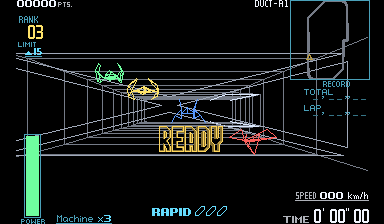
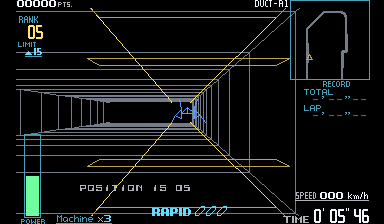
Screenshots show the optional color mod. Original red graphics are the default.
- Play with a keyboard or controller, with customizable controls.
- Adjust fullscreen, window size, filtering and audio through recomp-ui.
- Keep your progress with persistent saves and settings.
- Enable F-Zero-inspired colors: silver tunnels, distinct machines, colored menus and HUDs, and yellow repair areas, preserving the original wireframes.
Play
- Download the Windows ZIP from Releases.
- Extract the entire ZIP and run ZeroRacersVirtualBoyRecomp.exe.
- Choose Browse For ROM, select your extracted
.vbfile, and press Play.
You need your own supported ROM; none is included.
For color, open Mods, choose Install .vbmod, select the included
zero-racers-full-color-0.2.1.vbmod, and enable Wireframe color. Turn it off
to return to the original red graphics. The mod does not patch your ROM.
Controls and settings
Controller: Select your connected controller in the launcher. The D-pad or left stick steers; the right stick handles the Virtual Boy's right D-pad. Face buttons, shoulders and Start/Select have ready-to-use defaults.
Keyboard: Arrow keys and WASD control the two D-pads. X/Z are A/B, Q/E are L/R, Enter is Start, and Right Shift is Select. Hold Tab for turbo.
Use Configure to remap controls and Settings for display and audio. Press Escape to open settings during play. Close the game normally to save.
When updating, close the game and extract the new ZIP into its folder. Keep
vbrecomp.cfg, keybinds.ini, saves/ and mods/ to retain your setup and progress.
Supported ROM
Extract the ROM from its ZIP before selecting it. The launcher checks that it matches this revision:
| Cartridge | Value |
|---|---|
| Revision | Zero Racers (Japan, USA) (En) (Switch Online) |
| Size | 1,048,576 bytes |
| CRC32 | 71553796 |
| SHA-256 | 47421cd82dfd414d042d2f7f9db51e657d414d4ddfa46887efb544029fa11ce7 |
For developers
You need Windows 10/11 x64, Git, Python 3.11+ on PATH, MSYS2, and the supported ROM. Install the build tools in an MSYS2 terminal:
pacman -S --needed mingw-w64-x86_64-gcc mingw-w64-x86_64-cmake mingw-w64-x86_64-ninja mingw-w64-x86_64-make mingw-w64-x86_64-SDL2
Then clone and build from PowerShell:
git clone --recurse-submodules https://github.com/mstan/ZeroRacersVirtualBoyRecomp.git
Set-Location ZeroRacersVirtualBoyRecomp
.\tools\build.ps1 -Rom 'C:\Games\zero_racers.vb'
.\build\vbrecomp\runtime\ZeroRacersVirtualBoyRecomp.exe --launcher --rom 'C:\Games\zero_racers.vb'
For an existing clone, run git submodule update --init --recursive first.
The build script handles code generation and compilation. It expects MSYS2 at
C:\msys64; use -Toolchain or -Python for custom installation paths.
Add -Build build-release -Production to build the player version. To try the
color mod after a regular build, run python tools/play-color.py.
License
See LICENSE.md for project licensing. Dependencies retain their own licenses. Zero Racers and its artwork belong to Nintendo; see artwork attribution.
R.A.I.D. - Retro AI Development
A Discord for AI-assisted retro reverse engineering, decompilation and recompilation.